1. Εισαγωγή
This manual provides comprehensive instructions for the safe and efficient operation of your CLABEL 220B Thermal Bluetooth Label Printer. This portable, inkless label maker is designed for various applications in small businesses, offices, and homes, supporting label widths from 20mm to 50mm.
2. Περιεχόμενα συσκευασίας
Βεβαιωθείτε ότι όλα τα είδη που αναφέρονται παρακάτω περιλαμβάνονται στη συσκευασία σας:
- CLABEL 220B Thermal Bluetooth Label Printer
- 1 Roll of Thermal Labels
- Καλώδιο φόρτισης USB
- Εγχειρίδιο χρήστη (αυτό το έγγραφο)
3. Το προϊόν τελείωσεview
Familiarize yourself with the components of your CLABEL 220B printer.
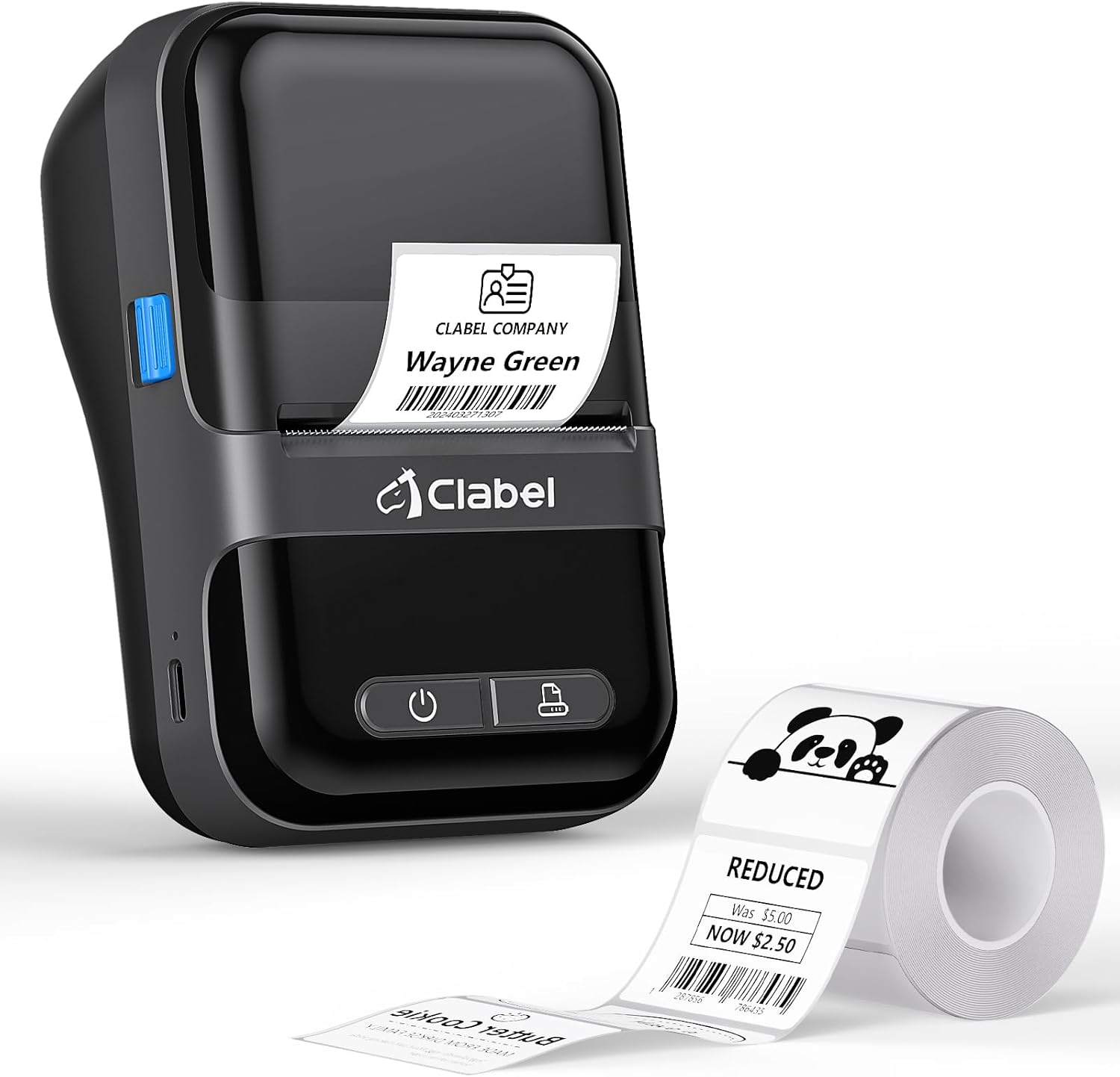
Image: The CLABEL 220B printer, showcasing its compact design, a printed label emerging from the output slot, and a roll of blank labels.
The printer features a power button, a feed button, and a label compartment. The charging port is typically located on the side or back.
4. Ρύθμιση
4.1. Φόρτιση του εκτυπωτή
Before initial use, fully charge the printer. Connect the provided USB cable to the printer's charging port and to a 5V-2A power adapter (not included) or a computer's USB port. The charging indicator light will show the charging status.
4.2. Φόρτωση ετικετών
Follow these steps to correctly load the thermal labels:

Image: Step-by-step guide for label installation, showing opening the cover, setting jam protection, inserting labels, and closing the cover.
- Ανοίξτε το κάλυμμα του εκτυπωτή.
- Set the jam protection to "OPEN" if applicable.
- Insert the label roll into the compartment, ensuring the printable side faces up and the labels are aligned on the left.
- Pull out a small length of labels and close the cover securely.
5. Σύνδεση
5.1. Mobile Phone Connection (Bluetooth)
The CLABEL 220B supports connection with iOS and Android devices via Bluetooth.

Image: Mobile phone connection steps, illustrating downloading the 'Clabel trade' app, enabling Bluetooth, and connecting to the printer within the app.
- Download the "CLABEL trade" app from your device's app store (iOS App Store or Android Google Play Store).
- Βεβαιωθείτε ότι το Bluetooth είναι ενεργοποιημένο στο κινητό σας τηλέφωνο.
- Open the "CLABEL trade" app and connect to your printer from the device list.
5.2. Σύνδεση με υπολογιστή (USB)
For Windows PCs, connect the printer using the provided USB cable.

Image: Computer connection steps, detailing turning on the printer, connecting via USB, downloading the driver/app, and printing.
- Ενεργοποιήστε τον εκτυπωτή.
- Συνδέστε τον εκτυπωτή στον υπολογιστή σας μέσω του καλωδίου USB.
- Download the necessary driver or application from the official CLABEL brand webτοποθεσία.
- Open the application, create or select a label, and initiate printing.
6. Οδηγίες λειτουργίας
6.1. Using the CLABEL Trade App
The "CLABEL trade" app offers extensive features for label creation and management:
- Access over 30 business label templates.
- Utilize more than 450 common symbols for various applications.
- Create and customize your own label templates.
- Edit and typeset labels with text, barcodes, QR codes, images, and more.
6.2. Batch Printing
The printer supports batch printing, allowing you to import data from Excel tables to print multiple labels efficiently. This feature helps improve printing efficiency by setting the printing quantity without repetitive operations.
6.3. Recommended Label Sizes and Uses
The CLABEL 220B printer supports labels with a width of 20-50mm and a length of 15-100mm, accommodating various styles and applications.

Image: Recommended label sizes for business applications, including price tags, barcodes, logos, and product information (e.g., 40x40mm, 50x50mm).

Image: Recommended label sizes for food applications, such as bakery items, ingredient lists, and price & date labels (e.g., 40x30mm, 50x40mm).

Image: Recommended label sizes for office organization, including labels for letters, addresses, folders, and cables (e.g., 25x78mm, 50x30mm).
7. Συντήρηση
To ensure optimal performance and longevity of your CLABEL 220B printer, follow these maintenance guidelines:
- Καθαρισμός της κεφαλής εκτύπωσης: Regularly clean the thermal print head with an alcohol swab to remove dust or adhesive residue. Ensure the printer is off and cooled down before cleaning.
- Εξωτερικός καθαρισμός: Wipe the exterior of the printer with a soft, dry cloth. Avoid using harsh chemicals or abrasive materials.
- Αποθήκευση: Αποθηκεύστε τον εκτυπωτή σε δροσερό και ξηρό μέρος, μακριά από το άμεσο ηλιακό φως και ακραίες θερμοκρασίες.
- Φροντίδα μπαταρίας: For long-term storage, charge the battery to about 50% every three months to prevent deep discharge.
8. Αντιμετώπιση Προβλημάτων
If you encounter issues with your CLABEL 220B printer, refer to the following common problems and solutions:
| Πρόβλημα | Πιθανή αιτία | Διάλυμα |
|---|---|---|
| Ο εκτυπωτής δεν ενεργοποιείται | Πρόβλημα χαμηλής μπαταρίας ή ρεύματος | Charge the printer fully. Ensure the power button is pressed correctly. |
| Poor print quality (light or spotty) | Dirty print head, incorrect label type, or low battery | Clean the print head. Ensure you are using thermal labels. Charge the printer. Adjust print density in the app if available. |
| Labels are misaligned or jammed | Labels not loaded correctly | Open the cover, re-align the label roll, and ensure it's properly seated. Refer to Section 4.2. |
| Δεν είναι δυνατή η σύνδεση μέσω Bluetooth | Bluetooth off, app issue, or printer not discoverable | Ensure Bluetooth is enabled on your phone and the printer is on. Restart the app and printer. Try re-pairing the device. |
| PC connection issues | Driver not installed, incorrect cable, or software issue | Install the correct driver from the CLABEL website. Ensure the USB cable is functional. Restart PC and printer. |
If the problem persists, please contact CLABEL customer support for further assistance.
9. Προδιαγραφές
Key technical specifications for the CLABEL 220B Thermal Bluetooth Label Printer:
- Μοντέλο: 220Β
- Τεχνολογία εκτύπωσης: Θερμικός
- Συνδεσιμότητα: Bluetooth, USB
- Έξοδος εκτυπωτή: Μονόχρωμος
- Μέγιστη ανάλυση εκτύπωσης: 203 DPI
- Μέγιστο μέγεθος μέσου: 25-50mm (width)
- Συμβατές συσκευές: Smartphones (iOS, Android), Windows XP or above
- Χωρητικότητα μπαταρίας: 2200 mAh
- Κατανάλωση ρεύματος: 2.2 Watt (λειτουργία σε λειτουργία)
- Διαστάσεις προϊόντος: 4.65" Β x 4.6" Π x 2.88" Υ
- Βάρος αντικειμένου: 14.1 ουγγιές (400 γραμμάρια)
10. Εγγύηση και υποστήριξη
The CLABEL 220B Thermal Bluetooth Label Printer comes with a limited warranty. For specific warranty terms and conditions, please refer to the documentation included with your purchase or visit the official CLABEL webτοποθεσία.
For additional support, including detailed user guides and installation manuals, please refer to the following resources:
- Official CLABEL Webτοποθεσία: CLABEL Store
- Οδηγός χρήστη (PDF): Κατεβάστε τον Οδηγό χρήσης
- Εγχειρίδιο εγκατάστασης (PDF): Λήψη Εγχειριδίου Εγκατάστασης
For technical assistance or customer service inquiries, please contact CLABEL support through their official channels.


