1. Εισαγωγή
This manual provides detailed instructions for the installation, configuration, and operation of your Hikvision DS-7104HGHI-K1 4-Channel Digital Video Recorder (DVR). Please read this manual thoroughly before using the product to ensure correct and safe operation. Keep this manual for future reference.
2. Το προϊόν τελείωσεview και Χαρακτηριστικά
The Hikvision DS-7104HGHI-K1 is a 4-channel 1080p Lite DVR designed for reliable surveillance recording. It supports various camera types and features advanced video compression technology.

Εικόνα 2.1: Κορυφή view of the Hikvision DS-7104HGHI-K1 DVR, showing its compact design and branding.
Βασικά Χαρακτηριστικά:
- 4-Channel Video Input: Supports up to 4 analog cameras.
- 1080p Lite Recording: Provides high-definition recording at 1080p Lite resolution.
- Συμπίεση H.265+: Advanced video compression technology for efficient storage and reduced bandwidth usage.
- Multi-format Input: Compatible with HDTVI, AHD, CVI, CVBS, and up to 5 IP camera inputs (up to 2MP).
- Έξοδος HDMI/VGA: For local monitoring.
- Απομακρυσμένη πρόσβαση: Υποστηρίζει τηλεχειριστήριο viewing via Hik-Connect app.

Εικόνα 2.2: Εμπρός και πίσω views of the Hikvision DVR, highlighting various ports and connectivity options, along with icons representing H.265 Pro, Mobile access, 5-in-1 compatibility, and IP/Analog XVR capabilities.
H.265+ Compression Benefits:
H.265+ compression significantly reduces the required storage space and bandwidth compared to older compression standards like H.264, without compromising video quality.

Εικόνα 2.3: A bar graph illustrating the reduction in 24-hour recording file size (GB) when using H.265+ compression compared to H.264 and H.265, showing up to an 83% gap in storage requirements.
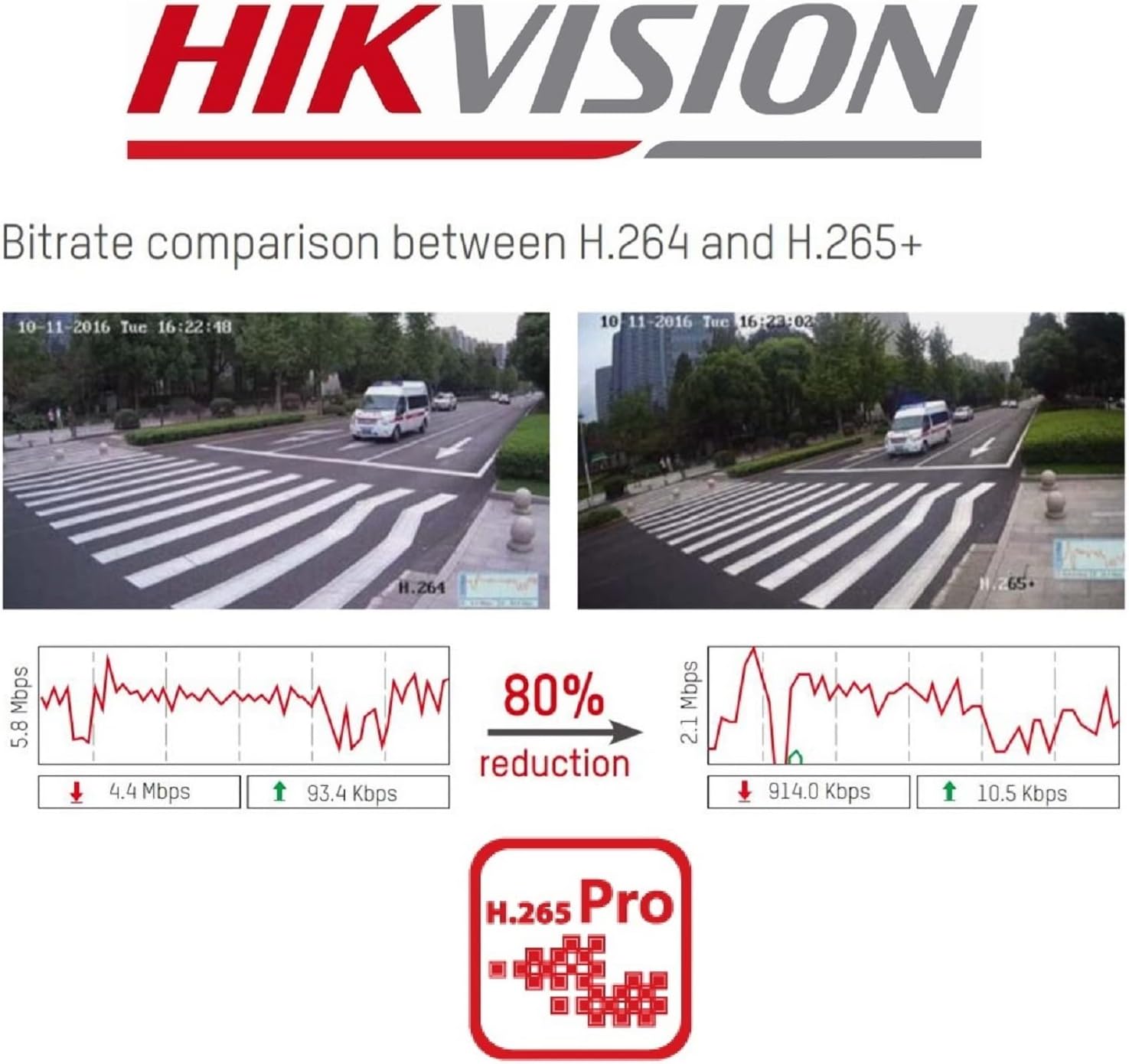
Εικόνα 2.4: A visual comparison of bitrate usage between H.264 and H.265+ compression, demonstrating an 80% reduction in bitrate with H.265+ while maintaining similar video quality in sample surveillance footage.
3. Περιεχόμενα συσκευασίας
Βεβαιωθείτε ότι όλα τα αντικείμενα υπάρχουν στη συσκευασία σας:
- Hikvision DS-7104HGHI-K1 DVR Unit
- Μετασχηματιστής ρεύματος
- USB Ποντίκι
- Καλώδια SATA (για σύνδεση σκληρού δίσκου)
- Οδηγός γρήγορης εκκίνησης
- Note: Hard drive is not included and must be purchased separately.
4. Πληροφορίες Ασφάλειας
- Ensure the power supply matches the DVR's requirements.
- Μην εκθέτετε το DVR σε νερό ή υγρασία.
- Αποφύγετε την τοποθέτηση του DVR σε άμεσο ηλιακό φως ή κοντά σε πηγές θερμότητας.
- Εξασφαλίστε τον κατάλληλο αερισμό για να αποφύγετε την υπερθέρμανση.
- Χρησιμοποιείτε μόνο εξαρτήματα που καθορίζονται από τον κατασκευαστή.
5. Ρύθμιση
5.1 Εγκατάσταση υλικού
- Hard Drive Installation (HDD not included):
- Ξεβιδώστε και αφαιρέστε το πάνω κάλυμμα του DVR.
- Connect the SATA power and data cables from the DVR to the hard drive.
- Secure the hard drive inside the DVR using the provided screws.
- Επανατοποθετήστε το επάνω κάλυμμα και ασφαλίστε το με βίδες.
- Σύνδεση καμερών: Connect your analog cameras to the BNC video input ports on the rear panel of the DVR.
- Σύνδεση οθόνης: Συνδέστε μια οθόνη στη θύρα εξόδου HDMI ή VGA.
- Σύνδεση δικτύου: Connect an Ethernet cable from the DVR's LAN port to your router or network switch.
- Σύνδεση ποντικιού USB: Συνδέστε το ποντίκι USB σε μια θύρα USB του DVR.
- Ενεργοποίηση: Connect the power adapter to the DVR and then to a power outlet. The DVR will power on automatically.
5.2 Αρχική διαμόρφωση
- First-Time Startup: Upon first boot, the DVR will guide you through a setup wizard.
- Ορίστε κωδικό: Δημιουργήστε έναν ισχυρό κωδικό πρόσβασης για τον χρήστη διαχειριστή. Αυτός είναι κρίσιμος για την ασφάλεια.
- Ρυθμίσεις δικτύου: Configure network settings (DHCP is usually sufficient for most home networks).
- Αρχικοποίηση σκληρού δίσκου: The DVR will prompt you to initialize the newly installed hard drive. This step is necessary for recording.
- Ημερομηνία και ώρα: Ορίστε τη σωστή ημερομηνία και ώρα.
6. Λειτουργία
6.1 Ζωντανά View
Μετά την αρχική ρύθμιση, το DVR θα εμφανίσει ζωντανά view from connected cameras on the monitor. You can switch between single-camera view και πλέγμα πολλαπλών καμερών view χρησιμοποιώντας τα χειριστήρια στην οθόνη ή το ποντίκι.
6.2 Εγγραφή
The DVR is typically configured to record continuously by default once the HDD is initialized. You can customize recording schedules, motion detection recording, and alarm recording settings through the DVR's menu:
- Μεταβείτε στο Μενού > Εγγραφή > Χρονοδιάγραμμα to adjust recording times.
- Μεταβείτε στο Menu > Alarm > Motion Detection to configure motion-triggered recording.
6.3 Αναπαραγωγή
Να view ηχογραφημένο footage:
- Μεταβείτε στο Menu > Playback.
- Select the camera(s) and the date/time range you wish to review.
- Χρησιμοποιήστε τα χειριστήρια αναπαραγωγής (αναπαραγωγή, παύση, γρήγορη προώθηση, επαναφορά) για να πλοηγηθείτε στο φαγητό.tage.
6.4 Απομακρυσμένη Πρόσβαση (Hik-Connect)
The Hik-Connect app allows you to view ζήσε ρεtage, play back recordings, and receive alerts on your smartphone or tablet from anywhere with an internet connection.

Εικόνα 6.1: The Hik-Connect application icon alongside a smartphone displaying a multi-camera live view, illustrating the remote monitoring capabilities of the DVR system.
- Download the Hik-Connect app from your device's app store.
- Create a Hik-Connect account.
- Προσθέστε το DVR σας στην εφαρμογή σαρώνοντας τον κωδικό QR στο DVR ή εισάγοντας χειροκίνητα τον σειριακό του αριθμό.
- Ensure your DVR is connected to the internet and Hik-Connect service is enabled in the DVR's network settings.
7. Συντήρηση
- Τακτικός καθαρισμός: Keep the DVR free from dust. Use a soft, dry cloth for cleaning.
- Ενημερώσεις υλικολογισμικού: Ελέγχετε περιοδικά την επίσημη ιστοσελίδα της Hikvision webιστότοπος για ενημερώσεις υλικολογισμικού για να διασφαλιστεί η βέλτιστη απόδοση και ασφάλεια.
- Δημιουργία αντιγράφων ασφαλείας δεδομένων: Δημιουργείτε τακτικά αντίγραφα ασφαλείας των σημαντικών ηχογραφήσεων σε μια εξωτερική συσκευή αποθήκευσης.
- Ασφάλεια κωδικού πρόσβασης: Change your DVR password periodically to enhance security.
8. Αντιμετώπιση Προβλημάτων
- Χωρίς έξοδο βίντεο:
- Ελέγξτε τις συνδέσεις των καλωδίων HDMI/VGA.
- Ensure the monitor is powered on and set to the correct input.
- Χωρίς εγγραφή:
- Verify that a hard drive is installed and initialized.
- Check recording schedules and ensure they are active.
- Ensure cameras are properly connected and functioning.
- Δεν είναι δυνατή η απομακρυσμένη πρόσβαση:
- Βεβαιωθείτε ότι το DVR είναι συνδεδεμένο στο διαδίκτυο.
- Check network settings and Hik-Connect status on the DVR.
- Verify your Hik-Connect account and device binding in the app.
- DVR Unresponsive:
- Restart the DVR by disconnecting and reconnecting the power.
- If issues persist, consider a factory reset (note: this will erase configurations).
9. Προδιαγραφές
| Χαρακτηριστικό | Λεπτομέρεια |
|---|---|
| Αριθμός μοντέλου | DS-7104HGHI-K1 |
| Είσοδος βίντεο | 4-channel BNC (HDTVI/AHD/CVI/CVBS) + up to 5 IP channels (up to 2MP) |
| Συμπίεση βίντεο | H.265 Pro+/H.265+/H.265/H.264+/H.264 |
| Ανάλυση κωδικοποίησης | 1080p Lite @ 25/30 fps |
| Έξοδος βίντεο | 1 HDMI, 1 VGA (simultaneous output) |
| Είσοδος ήχου | RCA 1 καναλιού |
| Έξοδος ήχου | RCA 1 καναλιού |
| Υποστήριξη σκληρού δίσκου | 1 SATA interface, up to 4 TB capacity |
| Διασύνδεση δικτύου | 1 RJ45 10M/100M self-adaptive Ethernet interface |
| Διασύνδεση USB | 2 διεπαφές USB 2.0 |
| Διαστάσεις (Μ x Π x Υ) | 20 x 20 x 4.5 εκ |
| Βάρος | 1.01 kg (χωρίς σκληρό δίσκο) |
10. Εγγύηση και υποστήριξη
Για πληροφορίες εγγύησης και τεχνική υποστήριξη, ανατρέξτε στην επίσημη ιστοσελίδα της Hikvision. website or contact your authorized Hikvision dealer. Keep your purchase receipt as proof of purchase.


