1. Εισαγωγή
Welcome to the Staniot H501-WiFi Home Alarm System. This comprehensive security kit is designed to provide reliable and intelligent protection for your home or office. Featuring an intuitive touch screen panel, seamless app control, and compatibility with smart home assistants, this system offers enhanced security and peace of mind. This manual will guide you through the setup, operation, and maintenance of your new security system.

Figure 1: Staniot H501-WiFi Home Alarm System components including the main panel, door/window sensors, SOS button, motion detector, and remote controls.
2. Σημαντικές πληροφορίες για την ασφάλεια
Please read all safety instructions carefully before installing and operating the system. Failure to follow these instructions may result in damage to the device or personal injury.
- Ensure the system is installed in a dry environment, away from water and excessive humidity.
- Μην επιχειρήσετε να αποσυναρμολογήσετε ή να επισκευάσετε τη συσκευή μόνοι σας. Αναθέστε όλες τις εργασίες σέρβις σε εξειδικευμένο προσωπικό.
- Use only the provided power adapter for the main panel.
- Keep small components and batteries out of reach of children.
- Verify that all sensors are securely mounted to prevent accidental detachment.
- Only connect to a 2.4 GHz WiFi network. 5 GHz networks are not supported.
3. Περιεχόμενα συσκευασίας
Κατά την αποσυσκευασία, βεβαιωθείτε ότι όλα τα είδη που αναφέρονται παρακάτω περιλαμβάνονται στη συσκευασία σας:
- 1 x Security Panel (Main Control Unit)
- 4 x Entry Sensors (Door/Window Sensors)
- 1 x Κουμπί SOS
- 2 x Τηλεχειριστήρια
- 1 x Ενσύρματη σειρήνα
- 1 x Ανιχνευτής κίνησης PIR
- 1 x Power Adapter for Main Panel
- Εξαρτήματα στερέωσης (βίδες, αυτοκόλλητα μαξιλαράκια)
- Εγχειρίδιο χρήστη (αυτό το έγγραφο)

Figure 2: Visual representation of the 10-piece alarm kit contents.
4. Οδηγός εγκατάστασης
4.1. Εγκατάσταση κύριου πίνακα
- Ενεργοποίηση: Connect the provided power adapter to the main security panel and plug it into a wall outlet. The panel will power on and display the Staniot Home UI 2.0 interface.
- Σύνδεση δικτύου:
- On the panel, navigate to the Wi-Fi settings.
- Επιλέξτε το δίκτυο Wi-Fi 2.4 GHz και εισαγάγετε τον κωδικό πρόσβασης.
- Ensure the panel is connected to the internet for app control and updates.
- Λήψη εφαρμογής: Download the "Smart Life" app from your smartphone's app store (iOS App Store or Google Play Store). Register an account if you don't have one.
- Σύζευξη με την εφαρμογή:
- Open the Smart Life app and follow the on-screen instructions to add a new device.
- Επιλέξτε "Ασφάλεια & Βιντεοεπιτήρηση" -> "Συναγερμός (Wi-Fi)".
- Follow the app's guide to connect the panel. This usually involves putting the panel into pairing mode.

Figure 3: The sleek design of the Staniot security panel, highlighting its ultra-thin profile και θύρες συνδεσιμότητας.
4.2. Sensor and Accessory Installation
The system supports up to 200 accessories. Each accessory comes with adhesive pads or screws for easy installation.
- Entry Sensors (Door/Window):
- Mount the two parts of the entry sensor on a door or window frame, ensuring they are aligned and within 1 cm of each other when the door/window is closed.
- Use the provided adhesive or screws for secure mounting.
- Test by opening and closing the door/window; the sensor's indicator light should flash.

Figure 4: Proper placement and activation of an entry sensor.
- Ανιχνευτής κίνησης PIR:
- Install the motion detector in a corner or on a wall where it can cover the desired area without obstructions. Avoid direct sunlight or heat sources.
- Mount at a height of approximately 2.2-2.4 meters (7-8 feet) for optimal detection range.
- Test by walking through the detection area; the indicator light should activate.

Figure 5: The motion detector's 110-degree detection range.
- Κουμπί SOS: Place the SOS button in an easily accessible location, such as a bedside table or near an exit.
- Τηλεχειριστήρια: No installation needed. Keep them handy for quick arming/disarming.
- Ενσύρματη σειρήνα: Connect the wired siren to the designated siren port on the main panel. Mount it in a visible location for maximum deterrent effect.
4.3. Adding Accessories to the System
After physical installation, you need to add each accessory to the main panel and the Smart Life app.
- On the main panel, navigate to "Menu" -> "Accessories" -> "Add Accessory".
- Trigger the accessory (e.g., open an entry sensor, wave in front of the motion detector, press the SOS button). The panel will detect and add the accessory.
- You can customize the name of each accessory in the Smart Life app for easier identification (e.g., "Front Door Sensor", "Living Room Motion").
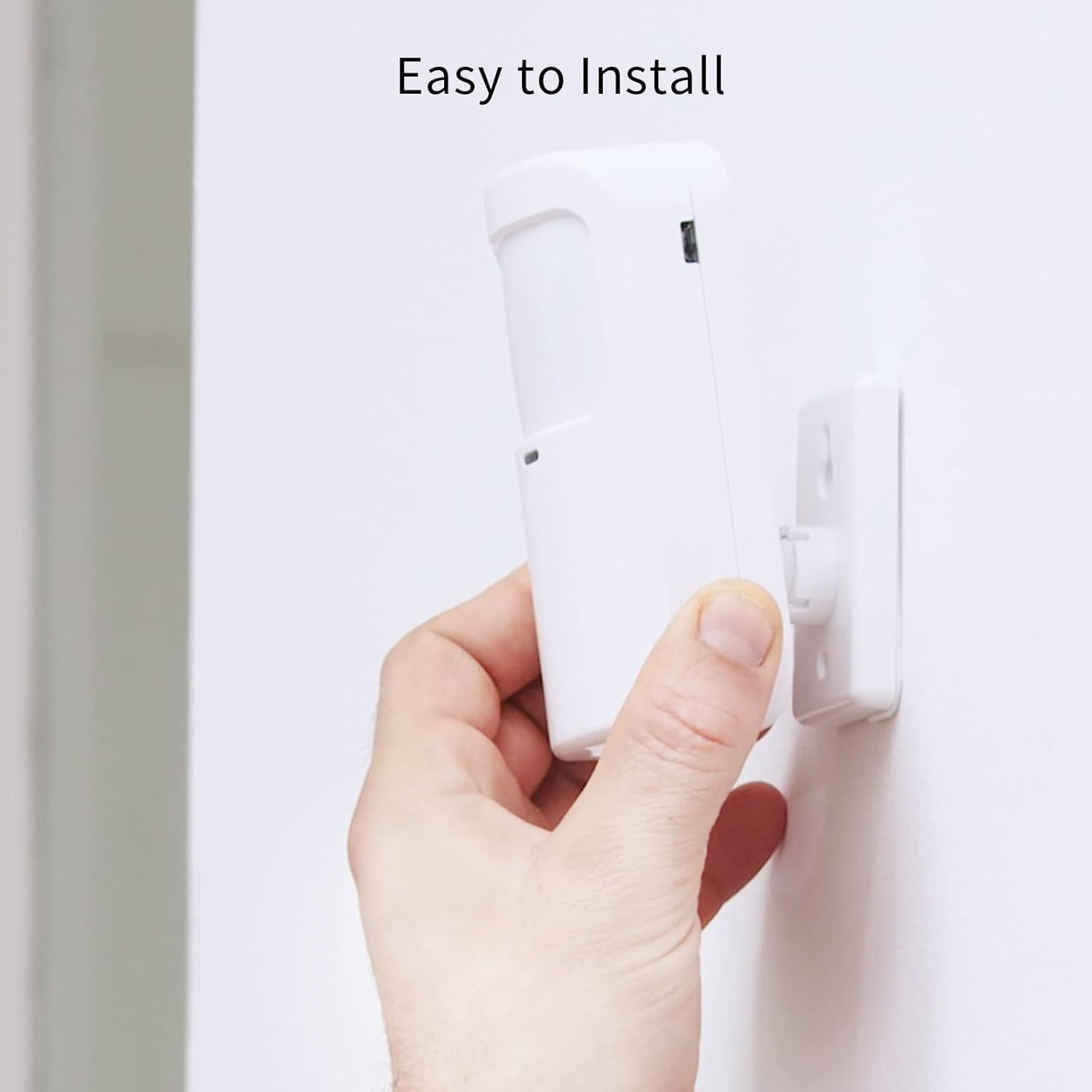
Figure 6: Simple installation process for the motion sensor.
5. Λειτουργία του συστήματός σας
5.1. Όπλιση και αφόπλιση
The Staniot system offers multiple ways to arm and disarm your security system:
- Κύριος πίνακας: Use the touch screen to select "Away Arm" (full protection), "Stay Arm" (perimeter protection, internal sensors off), or "Disarm".
- Τηλεχειριστήριο: Press the respective buttons on the remote control for quick arming/disarming.
- Εφαρμογή Smart Life: Control the system remotely from your smartphone. You can set alarm modes and monitor accessory status.
- Φωνητικός έλεγχος (Alexa/Βοηθός Google): Ενσωματώστε το με το Amazon Alexa ή το Google Assistant για φωνητικές εντολές.
- Enable the "Smart Life" skill in your Alexa or Google Home app.
- Συνδέστε τον λογαριασμό σας Smart Life.
- Use commands like "Alexa, arm the security system" or "Hey Google, disarm the alarm."

Σχήμα 7: Ενσωμάτωση φωνητικού ελέγχου με την Alexa και τον Βοηθό Google.
5.2. Instant App Notifications
When an alarm is triggered, you will receive instant notifications on your smartphone via the Smart Life app. This allows you to monitor your home's security status in real-time, even when you are away.

Figure 8: Real-time alarm notifications on your mobile device.
5.3. Λειτουργία SOS
In case of an emergency, pressing the SOS button will immediately trigger the alarm and send alerts to pre-set emergency contacts via the app.

Figure 9: The SOS button provides immediate assistance in emergencies.
6. Συντήρηση
- Αντικατάσταση μπαταρίας: Replace batteries in sensors and remote controls as needed. The Smart Life app may notify you of low battery levels.
- Καθάρισμα: Wipe the main panel and sensors with a soft, dry cloth. Avoid using abrasive cleaners or solvents.
- Ενημερώσεις υλικολογισμικού (OTA): The system supports Over-The-Air (OTA) online upgrades. Regularly check for and install updates via the Smart Life app to ensure optimal performance and access to new features.

Figure 10: Seamless online firmware updates for continuous system improvement.
- Έλεγχοι συστήματος: Periodically test all sensors and the siren to ensure they are functioning correctly.
7. Αντιμετώπιση Προβλημάτων
| Πρόβλημα | Πιθανή αιτία | Διάλυμα |
|---|---|---|
| Panel not connecting to Wi-Fi. | Incorrect Wi-Fi password; 5 GHz network selected; weak signal. | Double-check password. Ensure you are connecting to a 2.4 GHz network. Move panel closer to router. |
| Οι αισθητήρες δεν ενεργοποιούν τον συναγερμό. | Sensor battery low; sensor not paired; improper installation. | Replace sensor battery. Re-pair sensor with panel. Ensure proper alignment and proximity for entry sensors. |
| Δεν υπάρχουν ειδοποιήσεις εφαρμογής. | App permissions not granted; phone's notification settings disabled; panel not connected to internet. | Check app permissions in phone settings. Enable notifications for Smart Life app. Verify panel's internet connection. |
| Ο φωνητικός έλεγχος δεν λειτουργεί. | Smart Life skill not enabled/linked; incorrect voice commands. | Ensure Smart Life skill is enabled and linked in Alexa/Google Home app. Use precise commands. |
| Siren not sounding. | Siren not connected; siren volume set too low. | Check siren connection to the main panel. Adjust siren volume settings on the panel. |
Εάν αντιμετωπίσετε προβλήματα που δεν αναφέρονται εδώ, ανατρέξτε στην ενότητα υποστήριξης ή επικοινωνήστε με την εξυπηρέτηση πελατών.
8. Προδιαγραφές
| Χαρακτηριστικό | Λεπτομέρεια |
|---|---|
| Αριθμός μοντέλου | H501-WiFi |
| Μάρκα | Στάνιοτ |
| Διαστάσεις (Πάνελ) | 21.59 x 16.51 x 7.37 cm (8.5 x 6.5 x 2.9 ίντσες) |
| Βάρος | 912 γραμμάρια (2.01 λίβρες) |
| Πηγή ισχύος | Τροφοδοτείται από μπαταρία (περιλαμβάνεται 1 μπαταρία ιόντων λιθίου) |
| Τομtage | 5 Volt |
| Τεχνολογία Συνδεσιμότητας | Ασύρματη σύνδεση (μόνο Wi-Fi 2.4 GHz) |
| Μέθοδος Ελέγχου | Application, Touch Screen, Remote Control, Voice Control |
| Συμβατές Συσκευές | Smartphone (Smart Life App), Amazon Alexa, Google Assistant |
| Max Accessories Supported | Έως 200 |
| Υλικό | ABS |
| Πιστοποιήσεις | CE, UKCA, FCC |
9. Εγγύηση και υποστήριξη
9.1. Πληροφορίες εγγύησης
Staniot products come with a standard manufacturer's warranty. Please refer to the warranty card included in your package or visit the official Staniot webιστότοπος για λεπτομερείς όρους και προϋποθέσεις εγγύησης. Φυλάξτε την απόδειξη αγοράς σας ως απόδειξη αγοράς για τυχόν αξιώσεις εγγύησης.
9.2. Υποστήριξη πελατών
For technical assistance, troubleshooting, or any questions regarding your Staniot Home Alarm System, please contact our customer support team. We are committed to providing prompt and helpful service.
- Διαδικτυακή υποστήριξη: Visit the Staniot official webιστότοπος για συχνές ερωτήσεις, άρθρα υποστήριξης και φόρμες επικοινωνίας.
- Υποστήριξη ηλεκτρονικού ταχυδρομείου: Ανατρέξτε στη συσκευασία του προϊόντος σας ή στην επίσημη webιστότοπος για τη διεύθυνση ηλεκτρονικού ταχυδρομείου υποστήριξης πελατών.
- Τηλεφωνική υποστήριξη: Ελέγξτε την επίσημη webιστότοπος για διαθέσιμους αριθμούς τηλεφωνικής υποστήριξης και ώρες λειτουργίας.
Your satisfaction is our primary goal. If you encounter any problems, please contact us first, and we will resolve the issue for you as soon as possible.


