1. Το προϊόν τελείωσεview
The ASUS TUF Gaming LC 240 ARGB is an all-in-one liquid CPU cooler designed for mid-sized gaming builds. It provides efficient CPU cooling and features Addressable RGB (ARGB) lighting for aesthetic customization. This cooler is compatible with various Intel (LGA 1700, 1200, 1150, 1151, 1152, 1155, 1156, 1366) and AMD (AM4) CPU sockets.

Image 1.1: The ASUS TUF Gaming LC 240 ARGB Liquid CPU Cooler, showcasing its dual ARGB fans and illuminated pump head.
Βασικά Χαρακτηριστικά:
- TUF Gaming ARGB Radiator Fans: Equipped with a fan blade groove design for optimized airflow and reduced noise levels.
- NCVM-Coated Pump Cover: Features a durable, non-conductive vacuum metallization coating that enhances the cooler's rugged and modern aesthetic.
- Συμβατότητα Aura Sync: Allows for synchronized lighting effects with other Aura Sync-enabled components.
- Reinforced, Sleeved Tubing: Provides increased durability and protection against wear and tear.
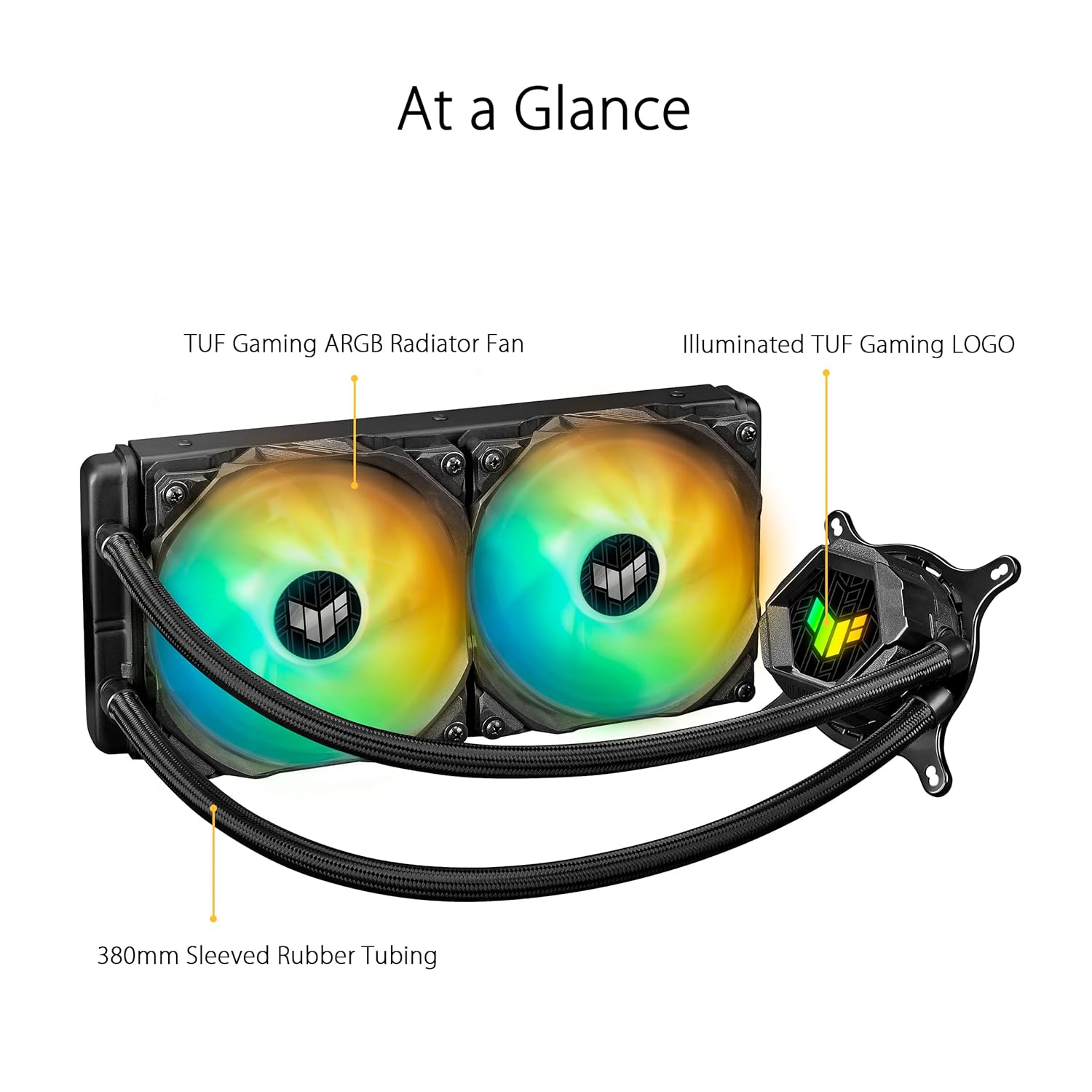
Image 1.2: An 'At a Glance' view of the cooler, highlighting the TUF Gaming ARGB Radiator Fans, Illuminated TUF Gaming LOGO on the pump, and 380mm Sleeved Rubber Tubing.
2. Περιεχόμενα συσκευασίας
Verify that all components are present in the package before beginning installation. If any items are missing or damaged, contact your retailer or ASUS support.
%202%20x%20120mm%20TUF%20Gaming%20ARGB%20Radiator%20Fans%20Fan%20Cable%20for%20Fan%20Connection%20ARGB%20Cable%20for%20Lighting%20Control%20Accessory%20Pack%20of%20Screws%20and%20Brackets%20Quick%20Start%20Guide%20TUF%20Gaming%20Sticker.jpg)
Image 2.1: All components included in the ASUS TUF Gaming LC 240 ARGB package. This includes the liquid cooler unit with pre-applied thermal compound, two 120mm ARGB radiator fans, fan cables, ARGB lighting control cables, an accessory pack of screws and mounting brackets for various CPU sockets, a quick start guide, and a TUF Gaming sticker.
Συμπεριλαμβανόμενα είδη:
- ASUS TUF Gaming LC 240 ARGB Liquid Cooler (with pre-applied thermal compound)
- 2 x 120mm TUF Gaming ARGB Radiator Fans
- Καλώδιο ανεμιστήρα για σύνδεση ανεμιστήρα
- ARGB Cable for Lighting Control
- Accessory Pack of Screws and Brackets (for Intel and AMD sockets)
- Οδηγός γρήγορης εκκίνησης
- Αυτοκόλλητο TUF Gaming
3. Ρύθμιση και εγκατάσταση
Proper installation is crucial for optimal cooling performance. Refer to the detailed Quick Start Guide included in your package for specific, step-by-step instructions for your CPU socket type. The following provides a general overview.
Γενικά Βήματα Εγκατάστασης:
- Προετοιμασία μητρικής πλακέτας: Install the appropriate mounting backplate (if required) for your CPU socket (Intel or AMD) onto the motherboard.
- Mount Radiator Fans: Attach the two 120mm ARGB fans to the radiator using the provided screws. Ensure the fan airflow direction is correct for your case's cooling configuration (intake or exhaust).
- Εγκατάσταση καλοριφέρ: Secure the radiator assembly to an available fan mount in your PC case (e.g., top, front, or rear).
- Βάση αντλίας/ψυχρής πλάκας: Carefully align the pump/cold plate assembly over your CPU. The thermal compound is pre-applied; avoid touching it. Secure the pump to the CPU socket using the correct mounting brackets and screws. Apply even pressure when tightening.
- Σύνδεση καλωδίων:
- Connect the pump power cable to the designated CPU_FAN or AIO_PUMP header on your motherboard.
- Connect the fan cables to available fan headers on your motherboard or a fan controller.
- Connect the ARGB lighting cables from the fans and pump to an Addressable RGB header (5V-D-G) on your motherboard or a compatible ARGB controller.
- Διαχείριση καλωδίων: Route all cables neatly to ensure proper airflow within your PC case.

Image 3.1: The ASUS TUF Gaming LC 240 ARGB cooler installed within a PC system, showing the radiator, fans, and illuminated pump head on the CPU.
4. Οδηγίες λειτουργίας
Once installed, the ASUS TUF Gaming LC 240 ARGB operates automatically to cool your CPU. The pump circulates coolant through the system, and the fans dissipate heat from the radiator.
Παρακολούθηση και Έλεγχος:
- Θερμοκρασία CPU: Monitor your CPU temperatures using motherboard monitoring software or third-party utilities to ensure optimal performance.
- Έλεγχος ταχύτητας ανεμιστήρα: Fan speeds can typically be controlled via your motherboard's BIOS/UEFI settings or through motherboard-specific software (e.g., ASUS Fan Xpert). Adjust fan curves to balance cooling performance and noise levels.
- Έλεγχος φωτισμού ARGB: The Addressable RGB lighting on the fans and pump head can be customized using ASUS Aura Sync software. This allows you to synchronize lighting effects with other compatible components in your system.

Image 4.1: A close-up of the illuminated TUF Gaming logo on the pump head, demonstrating the ARGB lighting capabilities.
5. Συντήρηση
Η τακτική συντήρηση βοηθά στη διασφάλιση της μακροζωίας και της βέλτιστης απόδοσης της υγρής ψύκτρας CPU σας.
- Αφαίρεση σκόνης: Periodically clean dust from the radiator fins and fan blades using compressed air. Excessive dust buildup can impede airflow and reduce cooling efficiency.
- Επιθεώρηση σωληνώσεων: Check the reinforced, sleeved tubing for any signs of kinks, leaks, or damage. While designed for durability, regular inspection is recommended.
- Επιθεώρηση ανεμιστήρα: Ensure fan blades are free from obstructions and rotate smoothly. Clean any debris that may have accumulated.
- Θερμική πάστα: The cooler comes with pre-applied thermal compound. If you ever need to remount the cooler (e.g., for CPU upgrade), clean off the old thermal paste from both the CPU and cold plate, and apply a fresh layer of high-quality thermal paste.
6. Αντιμετώπιση Προβλημάτων
If you encounter issues with your ASUS TUF Gaming LC 240 ARGB cooler, refer to the following common troubleshooting steps.
Κοινά ζητήματα και λύσεις:
- Υψηλές θερμοκρασίες CPU:
- Ensure the pump is running and connected to the correct motherboard header.
- Verify fans are spinning and properly oriented for airflow.
- Check for dust buildup on the radiator and clean if necessary.
- Confirm the cold plate is making proper contact with the CPU and that thermal paste is adequately applied.
- Οι ανεμιστήρες δεν περιστρέφονται/Το ARGB δεν ανάβει:
- Check all power and ARGB cable connections to the motherboard or controller.
- Ensure ARGB headers are enabled in motherboard BIOS/UEFI.
- Verify that ASUS Aura Sync software is installed and configured correctly.
- Ασυνήθιστοι θόρυβοι:
- A slight gurgling sound upon initial startup is normal as air settles. If persistent, ensure the radiator is mounted higher than the pump if possible, to allow air to collect in the radiator.
- Check for any cables or obstructions hitting fan blades.
- If the pump makes loud grinding noises, contact ASUS support.
7. Προδιαγραφές
Detailed technical specifications for the ASUS TUF Gaming LC 240 ARGB Liquid CPU Cooler.
| Χαρακτηριστικό | Προσδιορισμός |
|---|---|
| Μάρκα | ASUS |
| Αριθμός μοντέλου | TUF GAMING LC 240 ARGB |
| Μέθοδος Ψύξης | Ανεμιστήρας, Νερό |
| Συμβατές Συσκευές | Επιτραπέζιος υπολογιστής |
| Υποστήριξη υποδοχής CPU | Intel LGA 1700, 1200, 1150, 1151, 1152, 1155, 1156, 1366; AMD AM4 |
| Μέγεθος καλοριφέρ | 240mm (Dual 120mm fans) |
| Μέγεθος ανεμιστήρα | 120 mm |
| Μέγιστη Ταχύτητα Περιστροφής | 2000 σ.α.λ |
| Επίπεδο θορύβου | 29 ντεσιμπέλ |
| Τύπος συνδέσμου τροφοδοσίας | 3-Pin (Pump), 4-Pin PWM (Fans) |
| Τομtage | 20 Kilovolts (Pump, typical operating voltagΤο e είναι 12V) |
| Wattage | 1 watt (αντλία) |
| Υλικό | Aluminum, Metal, Plastic, Rubber |
| Διαστάσεις προϊόντος | 11.81 x 7.87 x 4.72 ίντσες |
| Βάρος αντικειμένου | 2.2 λίρες |
| UPC | 195553233149 |
8. Εγγύηση και υποστήριξη
ASUS products are manufactured to high quality standards. For specific warranty information, please refer to the warranty card included with your product or visit the official ASUS webτοποθεσία.
Υποστήριξη πελατών:
If you require technical assistance or have questions regarding your ASUS TUF Gaming LC 240 ARGB Liquid CPU Cooler, please contact ASUS customer support through their official channels.
- Επίσημο ASUS Webτοποθεσία: For drivers, FAQs, and support resources, visit www.asus.com.
- Σελίδα υποστήριξης προϊόντος: Look for the specific product support page for the TUF Gaming LC 240 ARGB on the ASUS webτοποθεσία.


