1. Εισαγωγή
This manual provides detailed instructions for the setup, operation, and maintenance of your CHERRY DW 9100 Slim Wireless Keyboard and Mouse Set. This rechargeable desktop set offers both 2.4 GHz wireless and Bluetooth connectivity, featuring a slim design and silent keystroke SX Scissor Mechanism for comfortable and efficient use in various environments.

Image 1.1: The CHERRY DW 9100 Slim Wireless Keyboard and Mouse Set, including the USB nano receiver.
2. Περιεχόμενα συσκευασίας
Παρακαλούμε ελέγξτε τα περιεχόμενα της συσκευασίας κατά το άνοιγμα της συσκευασίας για να βεβαιωθείτε ότι υπάρχουν όλα τα εξαρτήματα:
- CHERRY DW 9100 Slim Wireless Keyboard
- CHERRY DW 9100 Slim Wireless Mouse
- Nano δέκτης USB
- Καλώδιο φόρτισης USB-C
- Εγχειρίδιο χρήστη (αυτό το έγγραφο)
3. Ρύθμιση
3.1 Φόρτιση των συσκευών
Both the keyboard and mouse are equipped with rechargeable lithium batteries.
- Συνδέστε το παρεχόμενο καλώδιο φόρτισης USB-C στη θύρα USB-C του πληκτρολογίου και του ποντικιού.
- Connect the other end of the cable to a powered USB port (e.g., computer, USB wall adapter).
- The status LED on each device will indicate the charging status. A full charge is indicated when the LED changes color or turns off (refer to Section 4.3 for LED indicators).
3.2 Σύνδεση μέσω ασύρματης σύνδεσης 2.4 GHz
For a stable and fast wireless connection, use the included USB nano receiver.
- Locate the USB nano receiver.
- Συνδέστε τον νανο-δέκτη USB σε μια διαθέσιμη θύρα USB στον υπολογιστή σας.
- On both the keyboard and mouse, locate the connectivity switch. Set the switch to the 2.4 GHz position (often indicated by a receiver icon or "RF").
- Οι συσκευές θα πρέπει να συνδέονται αυτόματα στον υπολογιστή σας.
3.3 Σύνδεση μέσω Bluetooth
The set supports Bluetooth connectivity for devices that have Bluetooth capabilities.
- On both the keyboard and mouse, locate the connectivity switch. Set the switch to the Bluetooth position (often indicated by a Bluetooth icon).
- On your computer or device, open the Bluetooth settings.
- Initiate the pairing process on your device. The keyboard and mouse should appear in the list of discoverable devices (e.g., "CHERRY DW 9100 Keyboard", "CHERRY DW 9100 Mouse").
- Select each device to pair them. Follow any on-screen prompts, such as entering a pairing code for the keyboard.
Σημείωμα: The keyboard and mouse can be paired with multiple Bluetooth devices. Use the connectivity switch to toggle between paired devices or 2.4 GHz mode.
4. Οδηγίες λειτουργίας
4.1 Λειτουργίες πληκτρολογίου
The CHERRY DW 9100 Slim Keyboard features a full-size layout with an SX Scissor Mechanism for silent and precise keystrokes.
- Τυπικά κλειδιά: Όλα τα τυπικά αλφαριθμητικά και συμβολικά πλήκτρα λειτουργούν όπως αναμένεται.
- Πλήκτρα λειτουργιών (F1-F12): These keys may have secondary functions (e.g., media control, volume, brightness) accessible by pressing the Fn key simultaneously. Refer to your operating system's settings for specific function key behavior.
- Αριθμητικό πληκτρολόγιο: Provides dedicated number entry.

Εικόνα 4.1: Πλαϊνός επαγγελματίαςfile of the CHERRY DW 9100 Slim Keyboard, highlighting its thin design.

Image 4.2: Visual representation of the CHERRY SX Scissor Mechanism, responsible for silent and precise keystrokes.
4.2 Λειτουργίες ποντικιού
The CHERRY DW 9100 Slim Mouse features 6 buttons and a scroll wheel for versatile navigation.
- Αριστερό/Δεξί κλικ: Τυπικά κουμπιά ποντικιού.
- Τροχός κύλισης: Για κάθετη κύλιση και ως κουμπί μεσαίου κλικ.
- Πλαϊνά κουμπιά: Συνήθως χρησιμοποιείται για πλοήγηση προς τα εμπρός/πίσω σε web browsers.
- Διακόπτης DPI: A button, usually near the scroll wheel, allows adjustment of the mouse's sensitivity (DPI - Dots Per Inch). Pressing this button cycles through different DPI settings, indicated by the mouse's status LED.

Εικόνα 4.3: Κορυφή view of the CHERRY DW 9100 Slim Mouse, showing the left/right click buttons, scroll wheel, and DPI switch.
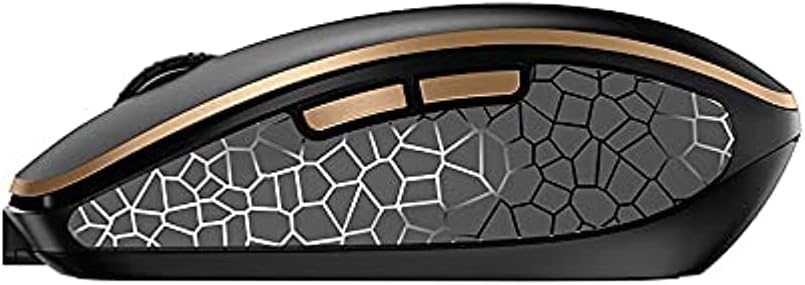
Εικόνα 4.4: Πλάγια όψη view of the CHERRY DW 9100 Slim Mouse, illustrating the ergonomic design and side buttons.
4.3 LED κατάστασης
Both the keyboard and mouse feature status LEDs to provide information on battery level, charging status, and mouse resolution.
- Χαμηλή μπαταρία: The LED will flash or illuminate in a specific color (e.g., red) when the battery level is low, indicating that charging is required.
- Φόρτιση: The LED will illuminate while charging and typically change color or turn off when fully charged.
- Mouse Resolution (DPI): When adjusting the DPI, the mouse LED may briefly flash to indicate the current setting.
5. Συντήρηση
5.1 Καθαρισμός
Για να διατηρήσετε την απόδοση και την εμφάνιση των συσκευών σας:
- Αποσυνδέστε τις συσκευές από τον υπολογιστή σας πριν από τον καθαρισμό.
- Χρησιμοποιήστε ένα μαλακό πανί που δεν αφήνει χνούδι ελαφρώς dampμε νερό ή ήπιο διάλυμα καθαρισμού.
- Avoid using harsh chemicals, abrasive cleaners, or solvents, as these can damage the surfaces.
- Για το πληκτρολόγιο, χρησιμοποιήστε πεπιεσμένο αέρα για να αφαιρέσετε τη σκόνη και τα υπολείμματα ανάμεσα στα πλήκτρα.
5.2 Φροντίδα μπαταρίας
The integrated lithium batteries are designed for long-term use.
- Επαναφορτίστε τις συσκευές όταν εμφανιστεί η ένδειξη χαμηλής μπαταρίας.
- Αποφύγετε την πλήρη αποφόρτιση των μπαταριών συχνά για να παρατείνετε τη διάρκεια ζωής τους.
- If storing the devices for an extended period, charge them to approximately 50% before storage.
6. Αντιμετώπιση Προβλημάτων
If you encounter issues with your CHERRY DW 9100 Slim set, refer to the following common solutions:
6.1 Προβλήματα συνδεσιμότητας
- No Connection (2.4 GHz):
- Ensure the USB nano receiver is securely plugged into a working USB port.
- Verify the keyboard and mouse connectivity switches are set to the 2.4 GHz θέση.
- Δοκιμάστε να συνδέσετε τον δέκτη σε διαφορετική θύρα USB.
- Ensure the devices are sufficiently charged.
- Δεν υπάρχει σύνδεση (Bluetooth):
- Ensure the keyboard and mouse connectivity switches are set to the Bluetooth θέση.
- Confirm Bluetooth is enabled on your computer/device.
- Remove previous pairings from your device's Bluetooth settings and attempt to re-pair.
- Ensure the devices are sufficiently charged.
6.2 Προβλήματα τροφοδοσίας και φόρτισης
- Συσκευές που δεν φορτίζονται:
- Check that the USB-C charging cable is properly connected to both the device and the power source.
- Try a different USB-C cable or a different USB power source.
- Βεβαιωθείτε ότι η πηγή τροφοδοσίας είναι ενεργή.
- Μικρή διάρκεια ζωής μπαταρίας:
- Βεβαιωθείτε ότι οι συσκευές είναι πλήρως φορτισμένες πριν από τη χρήση.
- Battery life can vary based on usage patterns.
6.3 Προβλήματα παρακολούθησης ποντικιού
- Inaccurate or No Tracking:
- Βεβαιωθείτε ότι ο αισθητήρας του ποντικιού είναι καθαρός και απαλλαγμένος από υπολείμματα.
- Use the mouse on a suitable surface (e.g., mouse pad). Highly reflective or transparent surfaces may cause issues.
- Adjust the DPI setting using the DPI switch on the mouse.
7. Προδιαγραφές
| Χαρακτηριστικό | Λεπτομέρεια |
|---|---|
| Αριθμός μοντέλου | JD-9100US-2 |
| Διαστάσεις προϊόντος | 17.32 x 5.12 x 0.59 ίντσες |
| Βάρος αντικειμένου | 2.35 λίρες |
| Μπαταρίες | Rechargeable Lithium (USB-C) |
| Τεχνολογία Συνδεσιμότητας | Bluetooth, 2.4 GHz Radio Frequency (USB) |
| Ειδικό χαρακτηριστικό | Rechargeable, Silent Keystroke (SX Scissor Mechanism) |
| Συμβατές Συσκευές | Προσωπικός υπολογιστής |
| Κατασκευαστής | ΚΕΡΑΣΙ |
Note on Batteries: The product description indicates USB-C rechargeable lithium batteries. The specification "1 AA batteries required. (included)" in the source data appears to be a discrepancy. Please rely on the USB-C rechargeable feature for this model.
8. Εγγύηση και υποστήριξη
CHERRY products are manufactured to high-quality standards. For detailed warranty information, including terms and conditions, please refer to the official CHERRY webστον ιστότοπο ή στην κάρτα εγγύησης που συνοδεύει το προϊόν σας.
For technical support, troubleshooting assistance beyond this manual, or to inquire about replacement parts, please visit the official CHERRY support portal or contact their customer service directly.
- Official CHERRY Webτοποθεσία: www.cherry.de/en/ (or regional equivalent)
- Υποστήριξη πελατών: Ανατρέξτε στο webιστοσελίδα για στοιχεία επικοινωνίας.


