1. Σημαντικές πληροφορίες για την ασφάλεια
Before operating the Matrix Fitness TF50 Treadmill, please read and understand all safety instructions. Failure to follow these instructions may result in injury or damage to the equipment.
- Συμβουλευτείτε έναν γιατρό: Πάντα να συμβουλεύεστε έναν επαγγελματία υγείας πριν ξεκινήσετε οποιοδήποτε νέο πρόγραμμα άσκησης.
- Εποπτεία: Αυτή η συσκευή δεν προορίζεται για χρήση από άτομα με μειωμένες σωματικές, αισθητηριακές ή διανοητικές ικανότητες ή έλλειψη εμπειρίας και γνώσης, εκτός εάν έχουν λάβει επίβλεψη ή οδηγίες σχετικά με τη χρήση της συσκευής από άτομο υπεύθυνο για την ασφάλειά τους. Τα παιδιά θα πρέπει να επιβλέπονται ώστε να διασφαλίζεται ότι δεν παίζουν με τη συσκευή.
- Στάση έκτακτης ανάγκης: Familiarize yourself with the safety key and its function. Always attach the safety key clip to your clothing during operation. In case of an emergency, pulling the safety key will immediately stop the treadmill.
- Σωστή τοποθέτηση: Place the treadmill on a level, stable surface with adequate clearance around it (at least 6 feet behind and 2 feet on each side). Do not place on thick carpet as it may interfere with ventilation.
- Καλώδιο ρεύματος: Ensure the power cord is not pinched or damaged. Do not use extension cords. Plug directly into a grounded outlet.
- Συντήρηση: Εκτελέστε τακτική συντήρηση όπως περιγράφεται σε αυτό το εγχειρίδιο για να διασφαλίσετε την ασφαλή λειτουργία.
WARNING: To reduce the risk of electric shock, fire, and serious injury, read all instructions before using this equipment.
2. Το προϊόν τελείωσεview
The Matrix Fitness TF50 Treadmill with XUR 22" Touchscreen Console is designed to provide a club-quality workout experience in a home environment. It features a robust frame, a spacious running deck, and an interactive console for diverse training options.
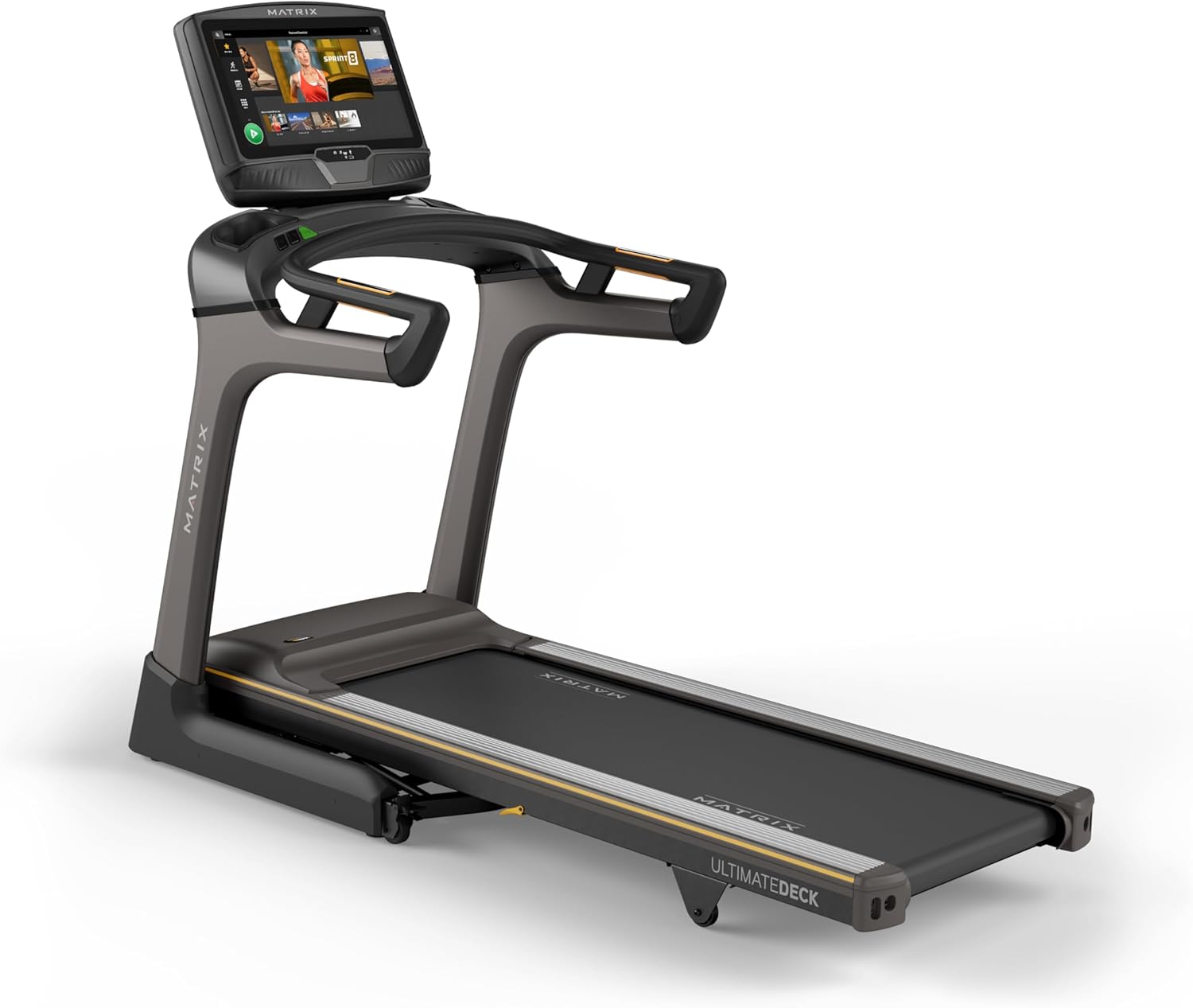
Εικόνα: Μπροστά view of the Matrix Fitness TF50 Treadmill, showcasing the 22-inch touchscreen console and the running deck.
Βασικά Χαρακτηριστικά
- XUR 22" Touchscreen Console: Offers streaming apps, iFIT integration, virtual active programs, and performance tracking.
- Σύστημα μετάδοσης κίνησης Johnson: A quiet, durable, and responsive motor for consistent performance.
- Ultimate Deck System: Provides industrial-grade cushioning for a comfortable running experience.
- Αναδιπλούμενο σχέδιο: Near 90-degree folding for space-saving storage.
- Expanded Running Surface: 20" x 60" deck accommodates various stride lengths.
- Speed and Incline: 0.5-12.5 mph speed range and 0-15% incline for versatile workouts.

Image: Diagram highlighting key features of the TF50 Treadmill, including its folding design, 20"x60" Ultimate Deck System, quiet DC motor, 0-15% incline range, 0.5-12.5 mph speed range, and industrial-grade cushioning.
3. Ρύθμιση και συναρμολόγηση
The Matrix Fitness TF50 Treadmill requires assembly. It is recommended to have two people for assembly due to the size and weight of the components. Ensure all parts listed in the hardware kit are present before beginning.
3.1 Αποσυσκευασία και τοποθέτηση
- Carefully remove all components from the packaging. Keep packaging materials until assembly is complete.
- Place the treadmill in a location that meets the recommended clearance requirements: at least 6 feet (1.8 meters) behind the treadmill and 2 feet (0.6 meters) on each side.
- Ensure the surface is level and stable. Avoid placing on thick carpet that could obstruct ventilation.
3.2 Βήματα συναρμολόγησης
Refer to the included assembly guide for detailed, step-by-step instructions and diagrams. General steps include:
- Attach the upright masts to the treadmill frame.
- Secure the console base and handlebars to the masts.
- Connect all necessary cables between the console and the frame.
- Τοποθετήστε τυχόν υπόλοιπα καλύμματα ή αξεσουάρ.
3.3 Σύνδεση ρεύματος
- Ensure the treadmill is turned off before plugging it in.
- Plug the power cord directly into a dedicated, grounded electrical outlet. Do not use extension cords or adapters.
- Turn on the main power switch, usually located near the front of the treadmill base.
4. Οδηγίες λειτουργίας
This section details how to operate your Matrix Fitness TF50 Treadmill and utilize its features.
4.1 Κονσόλα Πάνωview (XUR 22" Touchscreen)
The XUR console provides access to various workout programs, entertainment apps, and performance data.

Image: Close-up of the XUR 22-inch touchscreen console, highlighting its extra-large HD display, streaming app capabilities (Netflix, YouTube, Spotify), Virtual Active Sprint 8 and iFIT integration, Bluetooth FTMS, integrated HDMI, 13 metric-driven programs, and Bluetooth HR strap connectivity.
- Ενεργοποίηση: Once plugged in and the main power switch is on, the console will power up.
- Αρχική εγκατάσταση: Follow the on-screen prompts to connect to Wi-Fi, set up user profiles, and activate any included subscriptions like iFIT.
- Πλοήγηση: Use the touchscreen to navigate through menus, select workouts, and access applications.

Image: The main workout screen of the XUR console, displaying various workout options and a 'Sprint 8' program tile.

Image: The entertainment apps screen on the XUR console, showing icons for Netflix, YouTube, Spotify, Facebook, Twitter, InstagRAM και άλλες εφαρμογές.
4.2 Έναρξη Προπόνησης
- Συνδέστε το κλειδί ασφαλείας: Κουμπώστε το κλειδί ασφαλείας στα ρούχα σας. Ο διάδρομος δεν θα λειτουργήσει χωρίς το κλειδί ασφαλείας στη θέση του.
- Select Program/Mode: From the console, choose a quick start, a pre-programmed workout, an iFIT workout, or a virtual active route.
- Αρχή: Πατήστε το κουμπί START στην κονσόλα. Ο ιμάντας θα αρχίσει να κινείται με χαμηλή ταχύτητα.
- Adjust Speed and Incline: Use the speed and incline buttons on the console or handlebars to adjust your workout intensity.

Image: Close-up of the treadmill handlebars, showing integrated speed and incline control buttons for easy adjustments during a workout.
4.3 Διακοπή μιας προπόνησης
- Κανονική στάση: Press the STOP button on the console. The belt will gradually slow down and stop.
- Στάση έκτακτης ανάγκης: Pull the safety key from the console. The treadmill will stop immediately.
4.4 Αναδίπλωση και Αποθήκευση
The TF50 Treadmill features an easy-folding design for convenient storage.
- Βεβαιωθείτε ότι ο διάδρομος είναι σταματημένος και απενεργοποιημένος.
- Carefully lift the running deck until it locks into the upright position.
- To unfold, gently push the deck release lever and slowly lower the deck to the floor.

Image: The Matrix TF50 Treadmill shown in its folded, upright position, demonstrating its space-saving design.

Image: A woman demonstrating the folding mechanism of the treadmill, lifting the running deck into its upright storage position.
5. Συντήρηση
Η τακτική συντήρηση διασφαλίζει τη μακροζωία και τη βέλτιστη απόδοση του διαδρόμου σας.
5.1 Καθαρισμός
- Καθημερινά: Wipe down the console and handlebars with a soft, damp cloth after each use. Avoid abrasive cleaners or excessive moisture.
- Εβδομαδιαίος: Vacuum around and under the treadmill to prevent dust and debris buildup.
5.2 Συντήρηση Ταπέτου Κίνησης
- Λάδωμα: The Ultimate Deck System is designed for low maintenance. Refer to the full product manual for specific lubrication schedules, if any. Over-lubrication can cause damage.
- Tension and Alignment: Periodically check the running belt for proper tension and alignment. If the belt slips or drifts to one side, consult the full manual for adjustment procedures or contact customer support.

Image: A cutaway diagram illustrating the multi-layered cushioning of the Ultimate Deck System, designed for impact absorption.
5.3 Motor Compartment
- Ετήσιος έλεγχος: Annually, or as needed, unplug the treadmill and carefully remove the motor cover. Vacuum any dust or debris from the motor area. Do not touch any electrical components. Replace the cover securely.

Εικόνα: Ένα κομμάτι view of the Johnson Drive System motor, showing its internal components and design for quiet and responsive operation.
6. Αντιμετώπιση Προβλημάτων
This section provides solutions to common issues you might encounter with your TF50 Treadmill. For more complex problems, contact Matrix Fitness customer support.
| Πρόβλημα | Πιθανή αιτία | Διάλυμα |
|---|---|---|
| Ο διάδρομος δεν ενεργοποιείται. | Το καλώδιο τροφοδοσίας δεν είναι συνδεδεμένο. Ο κύριος διακόπτης ρεύματος είναι απενεργοποιημένος. Ο ασφαλειοδιακόπτης έχει ενεργοποιηθεί. | Βεβαιωθείτε ότι το καλώδιο τροφοδοσίας είναι καλά συνδεδεμένο. Ενεργοποιήστε τον κύριο διακόπτη τροφοδοσίας. Ελέγξτε τον ασφαλειοδιακόπτη του σπιτιού. |
| Running belt does not move. | Safety key not in place; Emergency stop activated; Motor issue. | Ensure safety key is fully inserted. Check if emergency stop button is pressed. If problem persists, contact support. |
| Console is unresponsive or frozen. | Software glitch; Temporary electrical issue. | Turn off the main power switch, wait 30 seconds, then turn it back on. If issue continues, contact support. |
| Ο ιμάντας τρεξίματος γλιστράει ή διστάζει. | Belt tension too loose; Belt lubrication needed. | Refer to the full manual for belt tension adjustment. Check lubrication schedule. |
If you encounter an issue not listed here or if the suggested solutions do not resolve the problem, please contact Matrix Fitness customer support.
7. Προδιαγραφές
Detailed technical specifications for the Matrix Fitness TF50 Treadmill with XUR Console.

Image: Diagram showing the dimensions of the Matrix TF50 Treadmill: 81 inches (D) x 35 inches (W) x 62 inches (H).
| Χαρακτηριστικό | Προσδιορισμός |
|---|---|
| Μάρκα | Μήτρα |
| Όνομα μοντέλου | Matrix Fitness TF50 Treadmill |
| Κονσόλα | XUR 22" Touchscreen |
| Διαστάσεις προϊόντος (ΜxΠxΥ) | 81" x 35" x 62" |
| Διπλωμένο μέγεθος | 42" x 35" x 76" |
| Βάρος αντικειμένου | 310 λίρες |
| Μέγιστο βάρος χρήστη | 400 λίρες |
| Running Surface (Deck Length x Width) | 60" x 20" |
| Μέγιστη Ταχύτητα | 12.5 μίλια την ώρα |
| Ελάχιστη Ταχύτητα | 0.5 μίλια την ώρα |
| Μέγιστο ποσοστό κλίσηςtage | 15% |
| Ιπποδύναμη | 3.25 ίππους |
| Υλικό | Κραματοποιημένος χάλυβας |
| Πηγή ισχύος | Ενσύρματο Ηλεκτρικό |
| Τεχνολογία Συνδεσιμότητας | HDMI, USB, WiFi, Bluetooth |
| Μετρήσεις που μετρήθηκαν | Distance, Speed, Incline, Calories, Time |
| Απαιτείται συναρμολόγηση | Ναί |
| UPC | 763165008938 |
8. Εγγύηση και υποστήριξη
Matrix Fitness provides comprehensive warranty coverage for the TF50 Treadmill.
8.1 Πληροφορίες εγγύησης
- Πλαίσιο: Ισόβια εγγύηση
- Motor and Cushioning: Ισόβια εγγύηση
- Parts (Console): 5 χρόνια
- Labor (Console): 1 έτος
- Parts (Frame): 7 χρόνια
- Labor (Frame): 2 χρόνια
Please retain your proof of purchase for warranty claims. Warranty terms may vary by region. For full details, refer to the warranty card included with your product or visit the official Matrix Fitness webτοποθεσία.
8.2 Υποστήριξη πελατών
For technical assistance, parts, or service inquiries, please contact Matrix Fitness customer support. Have your model number (TF50 Treadmill with XUR) and serial number ready when contacting support.
Επισκεφθείτε το Κατάστημα Matrix Fitness στο Amazon για περισσότερες πληροφορίες ή για να βρείτε στοιχεία επικοινωνίας.


