Εισαγωγή
Welcome to the user manual for your Creative Sound Blaster X4. This external USB Digital-to-Analog Converter (DAC) and amplifier is designed to elevate your audio experience across various platforms, including PC, Mac, and gaming consoles. It features advanced surround sound technologies, intelligent communication tools, and versatile connectivity to deliver high-fidelity audio for all your entertainment and communication needs.
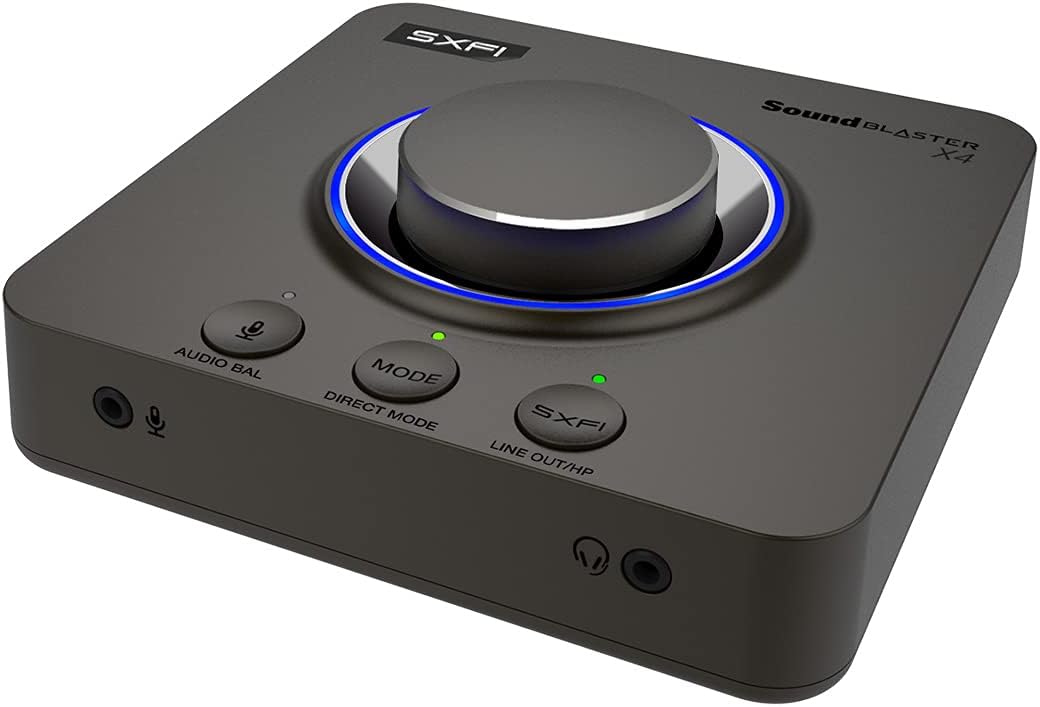
The Creative Sound Blaster X4, a versatile external audio device.
Περιεχόμενα συσκευασίας
Ensure all the following items are included in your Sound Blaster X4 package:
- Sound Blaster X4 Unit
- Καλώδιο USB-C σε USB-A
- Οπτικό καλώδιο
- Quick Start Guide (User Guide available online)

Contents typically found in the Sound Blaster X4 package.
Ρύθμιση
Σύνδεση στη Συσκευή σας
The Sound Blaster X4 offers versatile connectivity options:
- Σύνδεση USB-C: Connect the Sound Blaster X4 to your PC, Mac, PS4, PS5, or Nintendo Switch using the provided USB-C to USB-A cable. This connection provides both power and audio data.
- Optical-in Connection: For devices supporting optical output, connect an optical cable from your device's optical out port to the Sound Blaster X4's optical-in port.

Connecting the Sound Blaster X4 to a laptop via USB-C.

Rear ports of the Sound Blaster X4, including optical and USB.
Εγκατάσταση προγράμματος οδήγησης και λογισμικού
For full functionality and customization, download and install the Δημιουργική εφαρμογή from the official Creative website. The app provides access to all audio settings, EQ modes, and communication features.
Operating the Sound Blaster X4
Οι έλεγχοι τελείωσανview
The Sound Blaster X4 features intuitive controls for easy access to key functions:
- Κουμπί ελέγχου έντασης ήχου: Large, central knob for precise volume adjustments.
- Direct Mic Mute Button: Mutes/unmutes your microphone instantly.
- Κουμπί λειτουργίας: Cycles through three customizable EQ modes.
- Κουμπί SXFI: Toggles Super X-Fi and SXFI BATTLE Mode on/off.
- Audio Balance Feature: Adjusts volume levels between two audio sources (SPDIF / Optical / USB) via the volume knob.
- Direct Mode Button: Activates Direct Mode for pure, unprocessed audio.
- Speaker (Line-out) and Headphones Switch Button: Seamlessly switch audio output between speakers and headphones without unplugging.
Front panel controls of the Sound Blaster X4.
Audio Balance Feature
The Audio Balance feature allows you to quickly adjust the volume mix between two different audio sources. This is particularly useful for balancing game audio with voice chat during online communication.
Demonstration of the Sound Blaster X4's audio balance feature.
Βασικά Χαρακτηριστικά
Τεχνολογίες Surround Sound
Experience immersive audio with multiple surround sound options:
- 7.1 Discrete Surround: Supports up to 7.1 discrete channels for multi-channel speaker systems.
- Super X-Fi: Headphone holography technology that recreates the soundstage of a multi-speaker system in your headphones.
- Ακουστική μηχανή: Sound Blaster's renowned surround virtualization for both speakers and headphones.
- Dolby Digital Live: Real-time encoding of any audio source into Dolby Digital for single-cable connection to your home theater system.

Sound Blaster X4's multiple surround sound technologies.
SmartComms Kit
The SmartComms Kit simplifies your online communication experience on Windows 10:
- Ανίχνευση φωνής: Automatically mutes and unmutes your microphone as you speak, eliminating the need for manual control.
- Καθαρισμός θορύβου: Two-way noise cancellation that removes static background noise from both your environment and the other parties' audio.

SmartComms Kit and CrystalVoice for enhanced communication.
Ακουστικό Ampπιο ζωντανή
The Sound Blaster X4 functions as a powerful headphone amplifier, capable of driving studio-grade headphones with impedance up to 600Ω, ensuring high-quality audio output.

High-resolution audio support and powerful headphone ampζωοποίηση
Χαρακτηριστικά παιχνιδιού
Gain a competitive edge with specialized gaming modes:
- SXFI BATTLE Mode: Designed for FPS games, this mode provides accurate audio cues and depth, allowing you to pinpoint enemy locations.
- Λειτουργία ανίχνευσης: Enhances important in-game audio cues like footsteps and weapon reloads, helping you hear beyond what you see.
Συνδεσιμότητα
The Sound Blaster X4 offers a comprehensive set of I/O connectors:
- Θύρα USB-C: For power and data connection to PC, Mac, and consoles.
- Optical-in: For digital audio input from various devices.
- Optical-out: For digital audio output to external speakers or receivers.
- Line-in / Line-out: Analog connections for various audio sources and outputs.
- Headset-in: Dedicated port for connecting headsets.
- Microphone-out: Για σύνδεση εξωτερικού μικροφώνου.

Λεπτομερής view of the Sound Blaster X4's seven I/O connectors.
Δημιουργική εφαρμογή
The Creative App provides full audio customization on Windows PC via USB, and quick EQ and audio tweaks on Android and iOS via Bluetooth. It allows you to:
- Select between various Sound Modes (Gaming, Music, Movies, etc.).
- Access and configure Super X-Fi, Acoustic Engine, SmartComms Kit, CrystalVoice, Scout Mode, Encoder, and Mixer settings.
- Customize and save your own EQ modes.

The Creative App interface for comprehensive audio control.
Ελάχιστες Απαιτήσεις Συστήματος
| Κατηγορία | λειτουργικό σύστημα Windows | macOS |
|---|---|---|
| Επεξεργαστής | Intel® Core™ i3 or AMD® equivalent | Intel, AMD, or 100% compatible motherboard |
| Λειτουργικό σύστημα | Microsoft Windows 11, Windows 10 version 1703, 32 / 64-bit or later | macOS έκδοση 10.15 ή μεταγενέστερη |
| ΕΜΒΟΛΟ | 4 GB RAM | 4 GB RAM |
| Χώρος στον σκληρό δίσκο | 4 GB ελεύθερου χώρου στον σκληρό δίσκο | 4 GB ελεύθερου χώρου στον σκληρό δίσκο |
| Θύρα USB | Θύρα USB 2.0 / USB 3.0 | Θύρα USB 2.0 / USB 3.0 |
Note: SmartComms Kit, Scout Mode, CrystalVoice, and Sound Blaster Acoustic Engine's features are only accessible via the Creative App, downloadable on PC and Mac.
Αρμονία
| Χαρακτηριστικό | Υπολογιστής με Windows | macOS | PS5 | PS4 | Nintendo Switch |
|---|---|---|---|---|---|
| Super X-Fi and SXFI BATTLE Mode | ✓ | ✓ | ✓ | ✓ | ✓ |
| Discrete 7.1 / 5.1 Virtual 7.1 / 5.1 | ✓ | ✓ | |||
| Dolby Digital Live Encoding | via Optical-out cable | ||||
| Ισορροπία ήχου | ✓ | ✓ | via HDMI to optical converter | via Optical cable | |
| Programmable EQ Modes | ✓ | ✓ | ✓ | ✓ | ✓ |
| Άμεση λειτουργία | ✓ | ✓ | ✓ | ✓ | ✓ |
| Κουμπί σίγασης μικροφώνου | ✓ | ✓ | ✓ | ✓ | ✓ |
| SmartComms Kit | Windows 10 Ver 1703 or later | ||||
| CrystalVoice | Windows 10 Ver 1703 or later | Ver 10.14 (Intel-based Mac) | |||
| Scout Mode | Windows 10 Ver 1703 or later | Ver 10.14 (Intel-based Mac) | |||
| Ακουστική Μηχανή | ✓ | ✓ | |||
| Δημιουργική εφαρμογή | Windows 10 Ver 1703 or later | Ver 10.14 (Intel-based Mac) | via Bluetooth from mobile devices |
Αντιμετώπιση προβλημάτων
If you encounter any issues with your Sound Blaster X4, please refer to the following common solutions:
- Χωρίς έξοδο ήχου:
- Ensure the USB-C cable is securely connected to both the Sound Blaster X4 and your device.
- Verify that the correct audio output device (Sound Blaster X4) is selected in your operating system's sound settings.
- Check the volume levels on the Sound Blaster X4, your operating system, and your connected headphones/speakers.
- If using optical connection, ensure the optical cable is correctly inserted and the source device is outputting audio via optical.
- Ζητήματα μικροφώνου:
- Confirm the microphone is properly plugged into the Sound Blaster X4's microphone input.
- Check that the microphone is not muted on the device or in your operating system's sound settings.
- Adjust microphone gain settings within the Creative App.
- Παραμορφωμένος ήχος:
- Βεβαιωθείτε ότι όλα τα καλώδια είναι συνδεδεμένα με ασφάλεια και δεν έχουν υποστεί ζημιά.
- Try reducing the volume level on both the Sound Blaster X4 and your source device.
- Update the Sound Blaster X4 firmware and drivers via the Creative App.
- If using Direct Mode, ensure no other audio effects are enabled that might cause distortion.
- Μη Αναγνωρισμένη συσκευή:
- Try connecting the Sound Blaster X4 to a different USB port on your computer.
- Restart your computer and the Sound Blaster X4.
- Reinstall the Creative App and drivers.
Συντήρηση
To ensure the longevity and optimal performance of your Sound Blaster X4, follow these maintenance guidelines:
- Καθάρισμα: Χρησιμοποιήστε ένα μαλακό, στεγνό πανί για να σκουπίσετε τη συσκευή. Αποφύγετε τη χρήση υγρών καθαριστικών ή λειαντικών υλικών.
- Αποθήκευση: Αποθηκεύστε τη συσκευή σε δροσερό και ξηρό μέρος, μακριά από το άμεσο ηλιακό φως και ακραίες θερμοκρασίες όταν δεν τη χρησιμοποιείτε.
- Χειριζόμενος: Αποφύγετε την πτώση της συσκευής ή την έκθεσή της σε ισχυρά χτυπήματα. Μην επιχειρήσετε να αποσυναρμολογήσετε τη μονάδα, καθώς αυτό θα ακυρώσει την εγγύηση.
- Φροντίδα καλωδίων: Handle cables gently. Avoid bending or crimping them excessively, which can damage internal wires.
Τεχνικές Προδιαγραφές
- Διαστάσεις προϊόντος: 5.16 x 5.16 x 1.61 ίντσες
- Βάρος αντικειμένου: 1.37 λίρες
- Κατασκευαστής: Creative Labs
- ASIN: B0953LL5R6
- Χώρα προέλευσης: Κίνα
- Αριθμός μοντέλου προϊόντος: X4
- Ημερομηνία πρώτης διαθεσιμότητας: 17 Μαΐου 2021
- Συμβατές συσκευές: Personal Computer, Laptop, Gaming Console, Speaker, Headphone, Ampπιο ζωντανή
- Μάρκα: Δημιουργικός
- Διεπαφή υλικού: USB
- Λειτουργία εξόδου ήχου: Surround, Dolby Digital
- Πλατφόρμα: Όχι Ειδικά για Μηχανή
Εγγύηση και υποστήριξη
For detailed warranty information and technical support, please refer to the official Creative Labs webιστότοπο ή τον οδηγό χρήσης σε PDF.
Οδηγός χρήστη (PDF): Κατεβάστε τον Οδηγό χρήσης
Creative Support: Επισκεφθείτε το Creative Support Page για συχνές ερωτήσεις, προγράμματα οδήγησης και επιλογές επικοινωνίας.


