Εισαγωγή
This manual provides detailed instructions for the installation, operation, and maintenance of your DeLOCK USB Type-C to 2.5 Gigabit LAN Adapter (Model 66645). Please read this manual thoroughly before using the device to ensure proper functionality and to prevent damage.
Προϊόν Πάνωview
The DeLOCK USB Type-C to 2.5 Gigabit LAN Adapter expands your PC or notebook with a network interface via a USB Type-C port. It is also compatible with Thunderbolt 3 interfaces. This adapter supports NBASE-T technology, allowing data transfer speeds of 1 Gbps and 2.5 Gbps over standard network cables, automatically negotiating the best possible transfer rate.

Image: DeLOCK 2.5 Gigabit LAN Adapter in its retail packaging.
The adapter features a SuperSpeed USB (USB 3.2 Gen 1) Type-C male connector for connecting to your host device and a 2.5 Gigabit LAN RJ45 female port for network cable connection. The compact design ensures portability and ease of use.
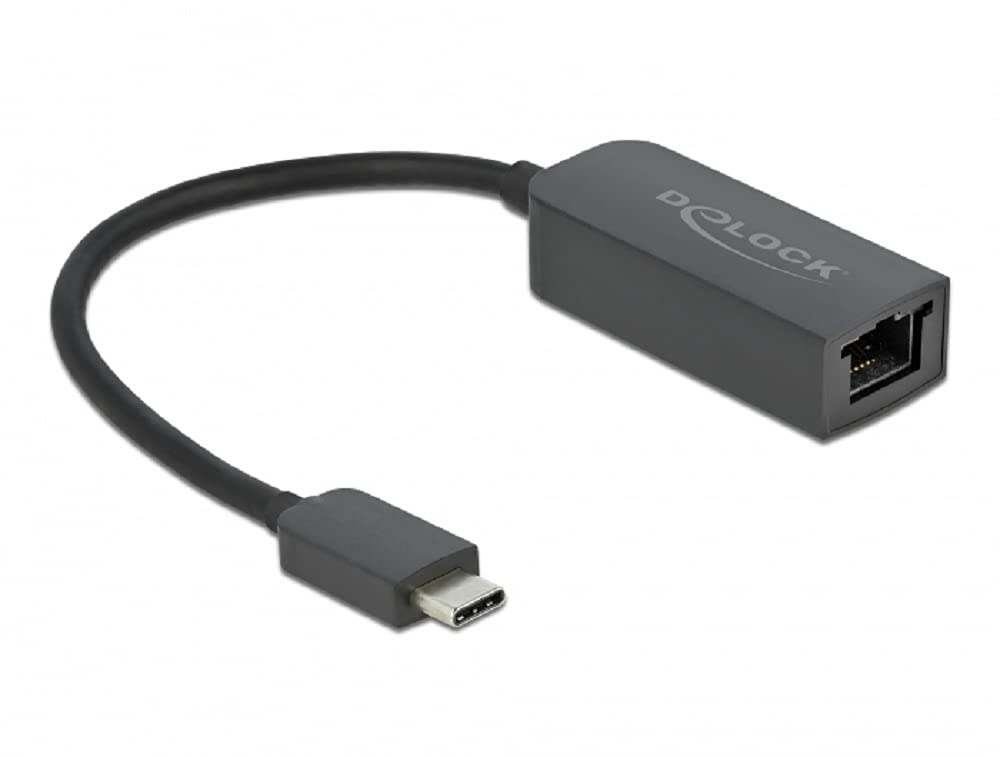
Image: Diagram illustrating the USB Type-C male connector, the 16 cm cable, and the 2.5 Gigabit LAN RJ45 female jack of the DeLOCK adapter.
Οδηγίες εγκατάστασης
- Σύνδεση με τη συσκευή υποδοχής: Plug the USB Type-C male connector of the DeLOCK adapter into an available USB Type-C port on your PC or notebook. Ensure the port supports USB 3.2 Gen 1 or Thunderbolt 3 for optimal performance.
- Σύνδεση στο Δίκτυο: Connect a standard RJ45 Ethernet network cable from your router, modem, or network switch to the 2.5 Gigabit LAN RJ45 female port on the DeLOCK adapter.
- Εγκατάσταση προγράμματος οδήγησης: In most modern operating systems (Windows 10/11, macOS, Linux), the adapter is plug-and-play and drivers will install automatically. If prompted, allow the system to install necessary drivers. If automatic installation fails, visit the official Delock website for driver downloads specific to model 66645.
- Επαλήθευση σύνδεσης: Once connected, check your operating system's network settings to confirm that the new network adapter is recognized and has established a connection.
Λειτουργία του προσαρμογέα
After successful setup, the DeLOCK adapter functions as a standard wired network interface. Your operating system will automatically detect and utilize it for internet and local network access. The NBASE-T technology will automatically negotiate the highest possible speed (up to 2.5 Gbps) supported by your network infrastructure and cable quality.
- Ensure your network cable is securely connected to both the adapter and your network device.
- For optimal performance, use Cat5e or higher-rated Ethernet cables.
- Monitor your system's network activity indicators to confirm data transmission.
Συντήρηση
The DeLOCK USB Type-C to 2.5 Gigabit LAN Adapter requires minimal maintenance.
- Καθάρισμα: Χρησιμοποιήστε ένα μαλακό, στεγνό πανί για να καθαρίσετε το εξωτερικό του προσαρμογέα. Αποφύγετε τη χρήση υγρών καθαριστικών ή διαλυτών.
- Αποθήκευση: Όταν δεν χρησιμοποιείται, αποθηκεύστε τον προσαρμογέα σε δροσερό, ξηρό μέρος μακριά από το άμεσο ηλιακό φως και ακραίες θερμοκρασίες.
- Χειριζόμενος: Avoid bending or twisting the cable excessively, and do not apply undue force when connecting or disconnecting the adapter.
Αντιμετώπιση προβλημάτων
- Δεν υπάρχει σύνδεση δικτύου:
- Ensure the adapter is firmly plugged into the USB Type-C port.
- Verify the Ethernet cable is securely connected to both the adapter and the network device.
- Επανεκκινήστε τον υπολογιστή και τον εξοπλισμό δικτύου σας (δρομολογητή/μόντεμ).
- Check your operating system's network settings to ensure the adapter is enabled.
- Try a different USB Type-C port on your device.
- Δοκιμάστε με διαφορετικό καλώδιο Ethernet.
- Αργή ταχύτητα σύνδεσης:
- Ensure your network infrastructure (router, switch, cables) supports 2.5 Gigabit Ethernet.
- Use Cat5e or Cat6 Ethernet cables for optimal performance.
- Update the adapter's drivers from the official Delock webιστότοπος εάν είναι διαθέσιμος.
- Check for other network activity or bandwidth-intensive applications running on your device.
- Ο προσαρμογέας δεν αναγνωρίζεται:
- Ensure your USB Type-C port is functional.
- Try connecting the adapter to another computer to rule out a device-specific issue.
- Manually install drivers from the Delock website if automatic installation failed.
- Check your device manager (Windows) or system information (macOS/Linux) for any unrecognized devices or driver conflicts.
Προδιαγραφές
| Αριθμός μοντέλου: | 66645 |
| Συνδέσεις: | 1 x SuperSpeed USB (USB 3.2 Gen 1) USB Type-C male 1 x 2.5 Gigabit LAN RJ45 female |
| Chipset: | Realtek RTL8156 |
| Τιμές μεταφοράς δεδομένων: | Ethernet up to 10 Mbps (half/full duplex) Fast Ethernet up to 100 Mbps (half/full duplex) Gigabit Ethernet up to 1000 Mbps (half/full duplex) NBASE-T up to 2.5 Gbps (half/full duplex) |
| Προδιαγραφές USB: | SuperSpeed USB - 5Gbps |
| Χαρακτηριστικά: | Υποστηρίζει Auto MDI-X (αυτόματη ανίχνευση τυπικού ή crossover καλωδίου δικτύου) NBASE-T technology for 1Gbps and 2.5Gbps speeds |
| Διεπαφή υλικού: | Ethernet, Thunderbolt, USB, USB Type C |
| Συμβατές συσκευές: | Επιτραπέζιος υπολογιστής, φορητός υπολογιστής |
| Χρώμα: | Μαύρος |
| Διαστάσεις προϊόντος: | 5.51 x 4.72 x 1.18 ίντσες |
| Βάρος αντικειμένου: | 1.76 ουγγιές (50 γραμμάρια) |
Εγγύηση και υποστήριξη
For warranty information and technical support, please refer to the documentation included with your purchase or visit the official Delock webιστότοπο. Συνήθως, εκεί μπορείτε να βρείτε πόρους υποστήριξης, συχνές ερωτήσεις και στοιχεία επικοινωνίας για την εξυπηρέτηση πελατών.


