1. Εισαγωγή
Welcome to the user manual for your new Alienware m15 R4 Gaming Laptop. This powerful machine is designed to deliver an immersive gaming experience with its high-performance components. Featuring an Intel Core i7-10870H processor, NVIDIA GeForce RTX 3070 graphics, a 15.6-inch Full HD 300Hz display, and a 1TB PCIe SSD, this laptop is built for speed and responsiveness. This manual provides essential information on setting up, operating, maintaining, and troubleshooting your device to ensure optimal performance and longevity.
2. Τι υπάρχει στο κουτί
Upon unboxing your Alienware m15 R4, please verify that all the following items are included:
- Alienware m15 R4 Notebook
- Καλώδιο ρεύματος
- Μετασχηματιστής ρεύματος
- Εγχειρίδιο χρήστη (αυτό το έγγραφο)
3. Το προϊόν τελείωσεview
Familiarize yourself with the key features and components of your Alienware m15 R4 gaming laptop.
3.1 Μπροστά View
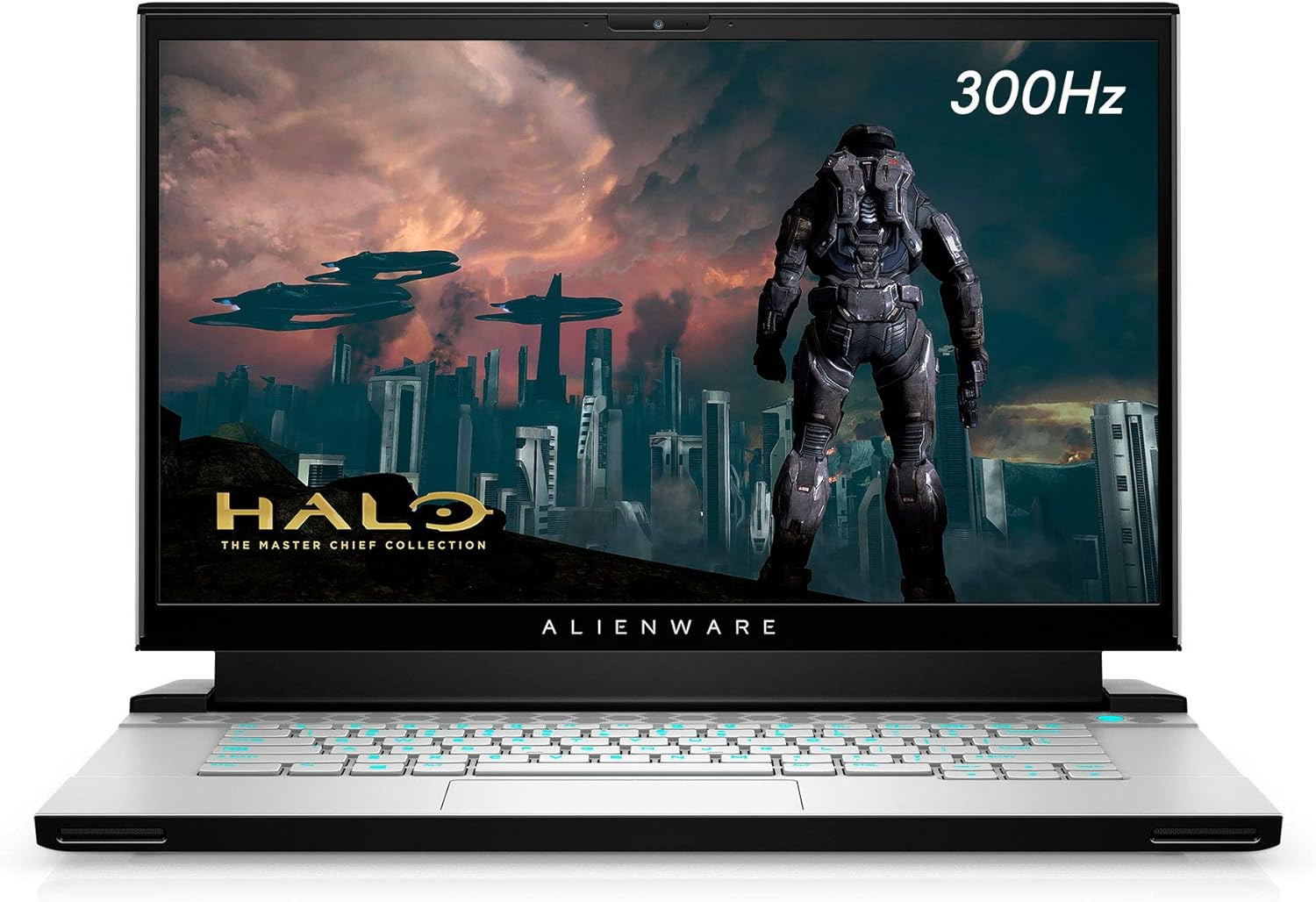
Εικόνα 3.1: Εμπρός view of the Alienware m15 R4 laptop, showcasing the 15.6-inch Full HD display with a 300Hz refresh rate, ideal for immersive gaming. The Alienware logo is visible below the screen.
3.2 Θύρες Αριστερής Πλευράς

Εικόνα 3.2: Left side of the laptop, featuring a USB 3.0 Type-A port, an Ethernet port for wired network connectivity, and a 3.5mm audio jack for headphones or headsets.
3.3 Θύρες δεξιάς πλευράς

Εικόνα 3.3: Right side of the laptop, equipped with two USB 3.0 Type-A ports and an SD card reader for convenient data transfer from memory cards.
3.4 Rear Ports and Cooling

Εικόνα 3.4: Οπισθεν view of the laptop, highlighting the robust cooling vents and essential ports including HDMI, Mini-DisplayPort, Thunderbolt 3 (USB-C), and the power adapter input. This design optimizes airflow and connectivity.
3.5 Πληκτρολόγιο και Touchpad

Εικόνα 3.5: Από πάνω προς τα κάτω view of the Alienware m15 R4's keyboard and touchpad. The keyboard features per-key RGB lighting and a comfortable layout for gaming and typing. The precision touchpad offers smooth navigation.
3.6 Laptop Back and Alienware Logo

Εικόνα 3.6: The back of the Alienware m15 R4 laptop, featuring the iconic illuminated Alienware head logo. The sleek design and Lunar Light finish are prominent.
3.7 Βασικά χαρακτηριστικά
- Επίδειξη: 15.6-inch FHD (1920 x 1080) 300Hz 3ms 300-nits 100% sRGB color gamut for fluid visuals.
- Επεξεργαστής: 10th Generation Intel Core i7-10870H (8-Core, 16MB Cache, up to 5.0GHz Max Turbo Frequency).
- Μνήμη: 16GB 2933MHz DDR4 RAM (Note: RAM is soldered and not user-upgradeable on some configurations).
- Αποθήκευση: 1TB PCIe SSD for fast boot times and game loading.
- Γραφικά: NVIDIA GeForce RTX 3070 8GB GDDR6 for high-fidelity gaming.
- Συνδεσιμότητα: Killer Wi-Fi 6 AX1650i 802.11ax 2x2 Wireless LAN + Bluetooth 5.1.
- Λειτουργικό σύστημα: Windows 10 Home (upgradeable to Windows 11).
4. Οδηγός εγκατάστασης
Follow these steps to set up your Alienware m15 R4 for the first time.
- Σύνδεση τροφοδοσίας: Plug the power adapter into the laptop's power input port (located at the rear) and then into a wall outlet.
- Αρχική εκκίνηση: Open the laptop lid and press the power button (located on the top right of the keyboard deck). The Alienware logo will illuminate, and the system will begin its initial boot sequence.
- Εγκατάσταση των Windows: Follow the on-screen instructions to complete the Windows 10 Home setup. This includes selecting your region, language, creating a user account, and connecting to a Wi-Fi network.
- Ενημερώσεις προγραμμάτων οδήγησης: After Windows setup, it is recommended to connect to the internet and allow Windows Update to download and install the latest drivers and security patches. You can also visit the official Alienware support website for the latest specific drivers for your model.
- Κέντρο εντολών Alienware: Explore the pre-installed Alienware Command Center software to customize lighting, power profiles, and monitor system performance.
5. Οδηγίες λειτουργίας
This section covers basic operation and usage tips for your Alienware m15 R4.
5.1 Διαχείριση ενέργειας
- Ενεργοποίηση/Απενεργοποίηση: Press the power button to turn on the laptop. To turn off, go to Start > Power > Shut down in Windows.
- Κατάσταση ύπνου: Close the lid or select Sleep from the Start > Power menu to put the laptop into a low-power state.
- Επανεκκίνηση: Select Restart from the Start > Power menu to reboot the system.
5.2 Πληκτρολόγιο και Touchpad
- Οπίσθιος φωτισμός πληκτρολογίου: Customize the per-key RGB lighting effects using the Alienware Command Center.
- Πλήκτρα λειτουργιών: Χρησιμοποιήστε το Fn key in combination with the F1-F12 keys for quick access to features like volume control, screen brightness, and external display switching.
- Χειρονομίες επιφάνειας αφής: The precision touchpad supports multi-touch gestures for scrolling, zooming, and switching applications. Refer to Windows settings for customization.
5.3 Απόδοση Παιχνιδιού
- Λειτουργία παιχνιδιού: Windows 10 includes a Game Mode feature that optimizes system resources for gaming. Enable it via Windows Settings > Gaming > Game Mode.
- Κέντρο εντολών Alienware: Utilize the Command Center to create custom performance profiles for your games, manage fan speeds, and monitor temperatures.
- Εξωτερική οθόνη: For an enhanced gaming experience, connect to an external high-refresh-rate monitor using the HDMI or Mini-DisplayPort.
6. Συντήρηση
Η τακτική συντήρηση συμβάλλει στη διασφάλιση της μακροζωίας και της βέλτιστης απόδοσης του φορητού υπολογιστή σας.
- Καθάρισμα:
- Χρησιμοποιήστε ένα μαλακό πανί που δεν αφήνει χνούδι για να καθαρίσετε την οθόνη και το εξωτερικό μέρος. Αποφύγετε τα σκληρά χημικά.
- Use compressed air to clear dust from cooling vents periodically to maintain airflow.
- Ενημερώσεις λογισμικού:
- Regularly check for Windows Updates to ensure your operating system is secure and up-to-date.
- Update graphics drivers (NVIDIA GeForce Experience) and other system drivers (Alienware Update or Dell SupportAssist) for best performance.
- Φροντίδα μπαταρίας:
- Αποφύγετε την συχνή πλήρη αποφόρτιση της μπαταρίας.
- Εάν αποθηκεύετε τον φορητό υπολογιστή για μεγάλο χρονικό διάστημα, βεβαιωθείτε ότι η μπαταρία είναι φορτισμένη περίπου στο 50-80%.
- Διαχείριση αποθήκευσης: Καθαρίζετε περιοδικά τα περιττά files and uninstall unused programs to free up disk space and maintain system speed.
7. Αντιμετώπιση Προβλημάτων
This section addresses common issues you might encounter with your Alienware m15 R4.
7.1 Performance Issues (Lag, Slowdowns)
- Check Background Processes: Open Task Manager (Ctrl+Shift+Esc) to identify and close resource-intensive applications.
- Ενημέρωση προγραμμάτων οδήγησης: Ensure your graphics drivers and chipset drivers are up-to-date.
- Ψύξη: Ensure cooling vents are not obstructed. Excessive heat can lead to performance throttling. Consider using Alienware Command Center to adjust fan profiles.
- Λειτουργία τροφοδοσίας: Ensure the laptop is set to a "High Performance" or "Balanced" power plan, especially when gaming.
7.2 Υπερθέρμανση
- Αερισμός: Ensure the laptop is on a hard, flat surface to allow proper airflow. Avoid using it on soft surfaces like beds or couches.
- Καθαρίστε τους αεραγωγούς: Use compressed air to clear dust from the intake and exhaust vents.
- Ταχύτητα ανεμιστήρα: Adjust fan curves in Alienware Command Center to increase cooling during intense workloads.
7.3 Προβλήματα οθόνης (Δεν υπάρχει εικόνα, τρεμοπαίζει)
- Εξωτερική οθόνη: Συνδέστε μια εξωτερική οθόνη για να ελέγξετε αν το πρόβλημα οφείλεται στην οθόνη του φορητού υπολογιστή ή στην κάρτα γραφικών.
- Επανεγκατάσταση προγράμματος οδήγησης: Reinstall graphics drivers.
- Λάμψη: Ensure display brightness is not set to minimum.
7.4 Keyboard/Touchpad Unresponsive
- Επανεκκίνηση: A simple restart can often resolve temporary unresponsiveness.
- Έλεγχος οδηγού: Ensure keyboard and touchpad drivers are correctly installed and up-to-date in Device Manager.
- Εξωτερικές συσκευές: Disconnect any external keyboards or mice to rule out conflicts.
8. Προδιαγραφές
Detailed technical specifications for the Alienware m15 R4 (Model: AWM15R4-7689WHT-PUS).
| Χαρακτηριστικό | Προσδιορισμός |
|---|---|
| Μάρκα | Alienware |
| Όνομα μοντέλου | Alienware m15 R4 |
| Αριθμός μοντέλου είδους | AWM15R4-7689WHT-PUS |
| Μέγεθος οθόνης | 15.6 ίντσες |
| Ανάλυση οθόνης | 1920 x 1080 pixel (FHD) |
| Ρυθμός ανανέωσης οθόνης | 300Hz |
| Επεξεργαστής | Intel Core i7-10870H (8-Core, up to 5.0GHz) |
| ΕΜΒΟΛΟ | 16 GB DDR4 (2933 MHz) |
| Σκληρός Δίσκος | 1 TB PCIe SSD |
| Συνεπεξεργαστής γραφικών | NVIDIA GeForce RTX 3070 |
| Μέγεθος μνήμης RAM κάρτας γραφικών | 8 GB GDDR6 |
| Λειτουργικό σύστημα | Windows 10 Home |
| Ασύρματος τύπος | Killer Wi-Fi 6 AX1650i 802.11ax, Bluetooth 5.1 |
| Θύρες USB 3.0 | 3 |
| Βάρος αντικειμένου | 5.5 λίρες |
| Διαστάσεις προϊόντος (ΜxΠxΥ) | 14.19 x 10.86 x 0.78 ίντσες |
| Χρώμα | Lunar Light (White) |
| Μπαταρίες | 1 μπαταρία ιόντων λιθίου (περιλαμβάνεται) |
9. Εγγύηση και υποστήριξη
Your Alienware m15 R4 laptop comes with a standard manufacturer's warranty. For detailed information regarding warranty coverage, terms, and conditions, please refer to the warranty documentation included with your purchase or visit the official Dell/Alienware support webτοποθεσία.
Τεχνική Υποστήριξη:
- For technical assistance, driver downloads, and troubleshooting guides, please visit the Υποστήριξη Dell webτοποθεσία.
- You can also contact Alienware customer support directly through their webιστότοπος για εξατομικευμένη βοήθεια.
Please have your service tag or express service code ready when contacting support, as this will help expedite the process.


