1. Το προϊόν τελείωσεview
The Forte TEZAUR Computer Desk is designed to provide a functional workspace with integrated features. It includes an elevated monitor shelf, a metal headphone holder, a cup holder, and cable management openings. The desk features integrated LED lighting with adjustable colors, powered via USB. An additional storage unit with open compartments can be positioned on either the left or right side of the main desk.

Εικόνα 1.1: Πάνωview of the Forte TEZAUR Computer Desk with its integrated features.
2. Προειδοποιήσεις για την ασφάλεια
Attention: This desk requires assembly. Please follow all instructions carefully and use appropriate tools. Ensure the desk is fully assembled and stable before placing any items on it or using it. Failure to do so may result in injury or damage to the product.
- Να συναρμολογείτε πάντα το γραφείο σε μια μαλακή, καθαρή επιφάνεια για να αποφύγετε γρατσουνιές.
- It is recommended that two adults assemble this product.
- Μην σφίγγετε υπερβολικά τις βίδες, καθώς αυτό μπορεί να προκαλέσει ζημιά στο υλικό.
- Κρατήστε τα μικρά μέρη και τα υλικά συσκευασίας μακριά από παιδιά.
- Βεβαιωθείτε ότι όλα τα εξαρτήματα υπάρχουν πριν ξεκινήσετε τη συναρμολόγηση.
3. Οδηγίες εγκατάστασης και συναρμολόγησης
Παρακαλώ ρεview all steps before beginning assembly. Ensure you have sufficient space and the necessary tools (e.g., screwdriver, hammer).
3.1 Αναγνώριση εξαρτημάτων
Unpack all components and identify them against the parts list provided in your packaging. Familiarize yourself with the different panels and hardware.
3.2 Main Desk Assembly
- Begin by assembling the main desk frame according to the provided diagrams. Attach the side panels to the main desktop using the designated hardware.
- Secure the back panel to enhance stability.
- Install the elevated monitor shelf onto the main desktop. Ensure it is securely fastened.
3.3 Storage Unit Assembly and Placement
The additional storage unit can be mounted on either the left or right side of the main desk, offering flexibility to suit your space and preference.
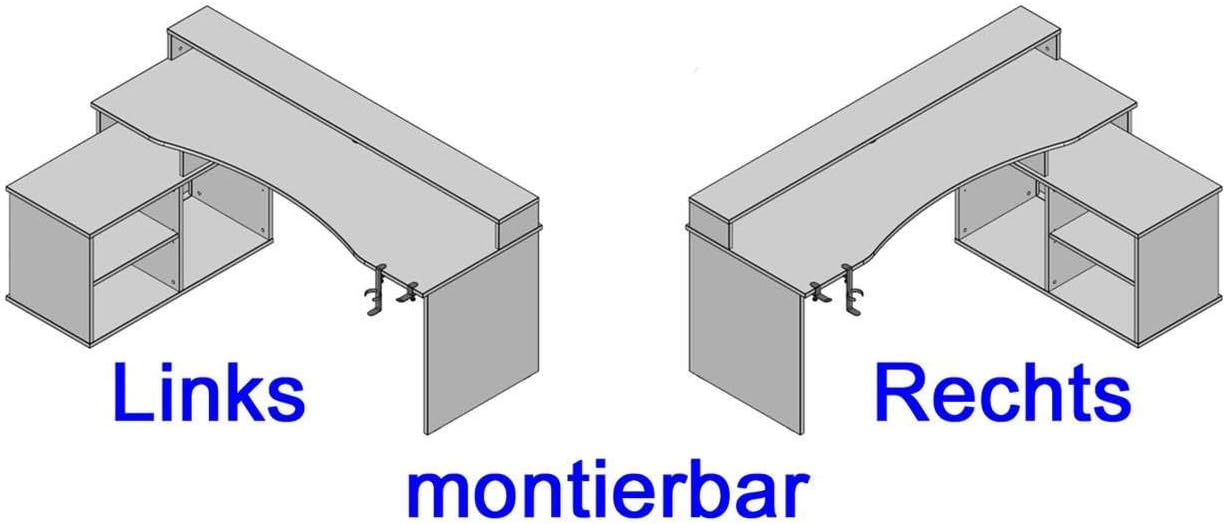
Image 3.1: The storage unit can be configured on either the left or right side of the desk.
- Assemble the storage unit's frame and internal shelves.
- Attach the assembled storage unit to the main desk structure on your preferred side (left or right) using the provided connectors.
3.4 Τοποθέτηση εξαρτημάτων
- Attach the metal headphone holder and cup holder to the underside of the desk. These are typically clamp-on designs.

Image 3.2: Detail of the headphone holder attachment.

Image 3.3: Headphone and cup holder in position.
3.5 LED Lighting Installation
- Carefully place the LED strip into the designated channel on the elevated monitor shelf.
- Connect the LED strip's USB cable to a compatible USB power source (e.g., computer, USB wall adapter).
3.6 Διαχείριση καλωδίων
Utilize the cable grommets and openings on the desk surface and back panel to route and organize your cables, maintaining a tidy workspace.

Image 3.4: Cable grommet for organized cable routing.
4. Οδηγίες λειτουργίας
4.1 LED Φωτισμός
The integrated LED lighting is powered via a USB connection. Once connected, use the provided remote control to turn the lights on/off and change colors. Refer to the remote control's specific instructions for detailed functionality.
4.2 Headphone and Cup Holder
The detachable headphone and cup holders can be positioned as desired along the desk edge. Ensure they are securely clamped before use to prevent items from falling.
5. Συντήρηση
5.1 Καθαρισμός
To clean the desk surfaces, use a soft, damp cloth. Avoid abrasive cleaners, harsh chemicals, or solvents, as these can damage the finish. Wipe spills immediately.
5.2 Έλεγχος Σταθερότητας
Ελέγχετε περιοδικά όλες τις βίδες και τα στοιχεία στερέωσης για να βεβαιωθείτε ότι παραμένουν σφιχτά. Σφίξτε ξανά εάν είναι απαραίτητο για να διατηρήσετε τη σταθερότητα του γραφείου.
6. Αντιμετώπιση Προβλημάτων
6.1 Τα φώτα LED δεν λειτουργούν
- Ensure the USB cable is securely connected to a functioning USB power source.
- Ελέγξτε την μπαταρία του τηλεχειριστηρίου και αντικαταστήστε την εάν είναι απαραίτητο.
- Verify the LED strip is correctly seated in its channel.
6.2 Desk Instability
- Ελέγξτε όλες τις βίδες συναρμολόγησης και σφίξτε όσες είναι χαλαρές.
- Βεβαιωθείτε ότι το γραφείο είναι τοποθετημένο σε επίπεδη επιφάνεια.
- Verify that all components are correctly assembled according to the instructions.
7. Προδιαγραφές προϊόντος
| Χαρακτηριστικό | Λεπτομέρεια |
|---|---|
| Μάρκα | Φόρτε |
| Αριθμός μοντέλου | TZRB214B3-Z113 |
| Χρώμα | Μαύρο Ματ |
| Διαστάσεις (Μ x Π x Υ) | 200 cm x 125.4 cm x 91.1 cm (78.7 in x 49.4 in x 35.9 ίντσες) |
| Υλικό | Engineered Wood, Metal, Melamine |
| Βάρος αντικειμένου | 86.2 κιλά (190 λίβρες) |
| Ειδικά Χαρακτηριστικά | Elevated Monitor Shelf, Ergonomic Design, Cup Holder, Headphone Holder, LED Lighting (USB, color changeable) |
| Max Load - Tabletop | 40 κιλά (88 λίβρες) |
| Max Load - Monitor Shelf | 10 κιλά (22 λίβρες) |
| Max Load - Storage Compartment | 5 κιλά (11 λίβρες) |

Image 7.1: Detailed dimensions and maximum load capacities of the desk.
8. Εγγύηση και υποστήριξη
This product is covered by a manufacturer's warranty. Please refer to your purchase documentation for specific warranty terms and conditions. Spare parts availability is typically 2 years from the date of purchase.
For technical assistance, missing parts, or warranty claims, please contact your retailer or the Forte customer support directly. Keep your proof of purchase handy when contacting support.


