1. Εισαγωγή
The Canon EOS C70 Cinema Camera is a compact, versatile camera designed for professional video production. It features a 4K Super 35mm Dual Gain Output (DGO) sensor, Dual Pixel CMOS AF technology, and the DIG!C DV7 image processor, delivering exceptional image quality and dynamic range. This manual provides essential information for setting up, operating, and maintaining your EOS C70 camera.

Εικόνα 1.1: Εμπρός view of the Canon EOS C70 Cinema Camera body.
2. Ρύθμιση
2.1 Περιλαμβανόμενα Στοιχεία
- Canon EOS C70 Cinema Camera Body
- Handle Unit and Shoulder Strap
- Compact Power Adapter and AC Power Cable
- Canon BP-A30 Battery Pack
- CG-A20 Battery Charger
- Microphone Holder Unit
- Show Adapter Base/Knob/Screw
- Measure Hook
- Καπάκι σώματος
2.2 Τοποθέτηση μπαταρίας
Insert the provided BP-A30 battery pack into the battery slot on the rear of the camera. Ensure it clicks securely into place. For extended recording, consider using the optional BP-A60 battery pack.
2.3 Τοποθέτηση κάρτας μνήμης
The EOS C70 features dual SD card slots. Open the memory card door on the side of the camera and insert compatible SD/SDHC/SDXC cards (UHS-I or higher, V60 or higher recommended) until they click. Close the door securely.
2.4 Σύνδεση φακού
The camera is equipped with an RF lens mount. Align the red dot on the lens with the red dot on the camera's mount and twist clockwise until it locks. For EF lenses, use a compatible EF-EOS R mount adapter (e.g., Canon Mount Adapter EF-EOS R 0.71x for Super 35mm sensor compatibility and an additional stop of light).

Figure 2.1: RF Mount compatibility with various adapters for EF lenses.
3. Οδηγίες λειτουργίας
3.1 Ενεργοποίηση/Απενεργοποίηση
To power on the camera, locate the power switch and slide it to the 'ON' position. To power off, slide it to 'OFF'.
3.2 Εγγραφή
Press the red 'REC' button to start and stop recording. The EOS C70 supports 4K 120p high-frame rate recording and offers 16+ stops of dynamic range with Canon Log 2. It utilizes the DIG!C DV7 image processor for superior image quality. Recording formats include 4K/HD and XF-AVC/MP4, with dual SD card slots allowing simultaneous recording.

Figure 3.1: The Super 35mm Dual Gain Output (DGO) sensor for high dynamic range.

Figure 3.2: The powerful DIG!C DV7 Image Processor.
3.3 Autofocus (AF)
Utilize Canon's Dual Pixel CMOS Autofocus technology for precise and reliable focusing. The EOS iTR AF X system provides advanced face and eye detection, enhancing tracking capabilities.

Figure 3.3: Dual Pixel CMOS AF for accurate focusing.
3.4 Built-in ND Filters
The EOS C70 features built-in ND filters with 2, 4, 6, 8, and 10 stops, allowing for quick adjustment to various lighting conditions without changing external filters.

Figure 3.4: ND Filter buttons for quick light control.
3.5 Είσοδοι ήχου
Two built-in mini-XLR input terminals allow for professional-quality audio recording with up to four channels of audio control.

Figure 3.5: Mini-XLR inputs for professional audio.
3.6 Vertical Shooting
The compact design and built-in tripod hole on the grip allow for comfortable handheld vertical or horizontal shooting, ideal for content creation for smart devices and digital signage.
3.7 Direct Touch Control
The fully rotatable LCD screen offers direct touch control for quick access to settings like start/stop recording, file format, resolution, ISO/Gain, color temperature, and iris.

Figure 3.6: Direct touch control on the rotatable LCD screen.
3.8 Time Code Terminal
The camera includes a Time Code Terminal for precise synchronization in multi-camera setups.
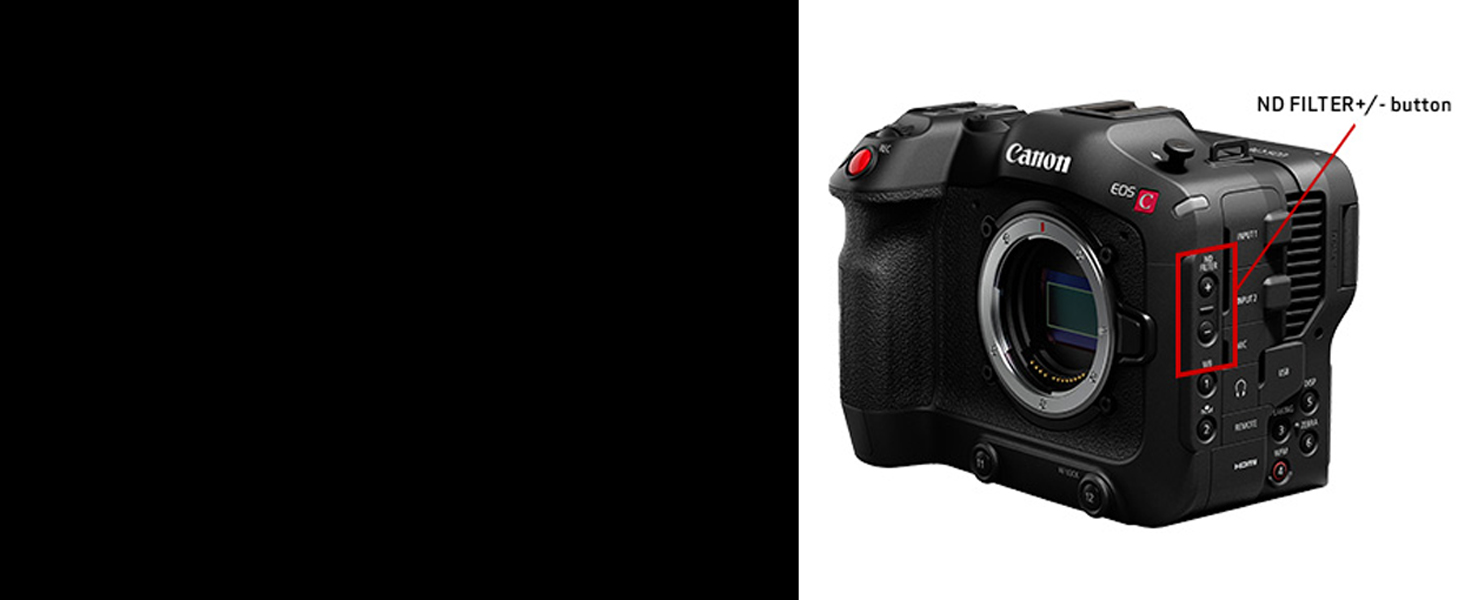
Figure 3.7: Time Code Terminal for synchronization.
3.9 Σταθεροποίηση εικόνας
Coordinated control with RF lenses and electronic image stabilization optimizes hand-shake correction for stable footage.

Figure 3.8: Image stabilization for smooth video.
3.10 Τηλεχειριστήριο
The camera supports remote control for flexible operation in various shooting scenarios.

Figure 3.9: Remote control setup for the EOS C70.
3.11 Video Comparison (EOS C70 vs. EOS R5 C)
For a detailed comparison of the Canon EOS C70 and EOS R5 C, including their respective strengths and ideal use cases, please watch the official Canon video below. This can help users understand the C70's position and capabilities within Canon's cinema camera lineup.
Video 3.1: Canon EOS R5 C and the EOS C70: Which is best for you? This video provides a comparative overview of the Canon EOS C70 and EOS R5 C, highlighting their features and helping users choose the right camera for their needs.
4. Συντήρηση
To ensure the longevity and optimal performance of your Canon EOS C70, follow these maintenance guidelines:
- Καθάρισμα: Regularly clean the camera body with a soft, dry cloth. Use a blower brush to remove dust from the lens and sensor. For stubborn smudges on the lens, use a specialized lens cleaning solution and cloth.
- Αποθήκευση: Store the camera in a cool, dry place away from direct sunlight and extreme temperatures. Use a dehumidifier in humid environments to prevent mold growth.
- Φροντίδα μπαταρίας: Αποθηκεύστε τις μπαταρίες σε δροσερό και ξηρό μέρος. Μην αφήνετε τις μπαταρίες πλήρως αποφορτισμένες για μεγάλα χρονικά διαστήματα.
- Ενημερώσεις υλικολογισμικού: Periodically check the Canon website for firmware updates to ensure your camera has the latest features and performance enhancements.
5. Αντιμετώπιση Προβλημάτων
Ακολουθούν ορισμένα συνηθισμένα προβλήματα και πιθανές λύσεις:
- Υπερθέρμανση κάμερας: While the EOS C70 is designed for extended recording, continuous high-resolution recording in hot environments can lead to overheating. Ensure adequate ventilation around the camera. Reduce recording resolution or frame rate if overheating persists.
- Ζητήματα αυτόματης εστίασης: If autofocus is not performing as expected, ensure your lens is clean and free of obstructions. Check the autofocus settings in the camera menu to ensure the correct mode (e.g., Face/Eye Detection) is selected for your shooting scenario.
- Μικρή διάρκεια ζωής μπαταρίας: Ensure batteries are fully charged before use. Consider carrying spare BP-A30 or BP-A60 batteries, or utilize the compact power adapter for continuous power.
- Προβλήματα ποιότητας εικόνας: Verify that the correct recording format (e.g., 4K/HD, XF-AVC/MP4) and bit depth (e.g., 10-bit) are selected for your desired output. Ensure lenses are clean and properly attached.
6. Προδιαγραφές
| Χαρακτηριστικό | Λεπτομέρεια |
|---|---|
| Μάρκα | Κανόνας |
| Όνομα μοντέλου | EOS C70 |
| Αριθμός μοντέλου | 4507C002 |
| Συμβατές βάσεις | Canon RF |
| Τεχνολογία αισθητήρα φωτογραφίας | CMOS |
| Μέγεθος αισθητήρα φωτογραφίας | Super 35mm |
| Δυναμικές στάσεις | 16 Στάσεις |
| Ανάλυση βίντεο | 2160p, 3840p |
| Σταθεροποίηση εικόνας | Οπτικός |
| Τύπος οθόνης | οθόνη υγρού κρυστάλλου |
| Μέγεθος οθόνης | 3.5 ίντσες |
| Τύπος οθόνης αφής | Χωρητικός |
| Τύπος μνήμης Flash | Dual Slot: SD/SDHC/SDXC |
| Ικανότητα εγγραφής | 270 Λεπτά |
| Τεχνολογία Συνδεσιμότητας | Ethernet, HDMI, USB-C |
| Ασύρματη τεχνολογία | Bluetooth, WiFi |
| Βάρος αντικειμένου | 7.04 λίρες |
7. Εγγύηση και υποστήριξη
The Canon EOS C70 Cinema Camera comes with a 1ετής εγγύηση κατασκευαστή. For detailed warranty information, product support, and service inquiries, please visit the official Canon webιστότοπο ή επικοινωνήστε με την εξυπηρέτηση πελατών της Canon.
Μπορείτε επίσης να επισκεφθείτε το Canon Store στο Amazon για πρόσθετες πληροφορίες προϊόντος και αξεσουάρ.


