1. Εισαγωγή
This manual provides comprehensive instructions for the installation, operation, and maintenance of the SINOTIMER TM919B 30A Programmable Electronic Timer Switch. This device is designed to automatically control the ON/OFF switching of various electrical appliances based on user-defined daily or weekly programs. Please read this manual carefully before installation and use to ensure proper function and safety.
2. Πληροφορίες Ασφάλειας
WARNING: Risk of electric shock. Installation should only be performed by a qualified electrician or trained personnel.
- Always disconnect power at the circuit breaker before installing or servicing the timer switch.
- Βεβαιωθείτε ότι όλες οι συνδέσεις καλωδίωσης είναι ασφαλείς και συμμορφώνονται με τους τοπικούς ηλεκτρικούς κώδικες.
- Μην υπερβαίνετε τη μέγιστη ονομαστική τιμή φορτίου των 30A.
- This device is intended for indoor use only. Avoid exposure to moisture or extreme temperatures.
- Μην επιχειρήσετε να αποσυναρμολογήσετε ή να επισκευάσετε τη μονάδα μόνοι σας. Επικοινωνήστε με εξειδικευμένο προσωπικό σέρβις.
3. Το προϊόν τελείωσεview
The SINOTIMER TM919B is a digital timer switch featuring a large LCD display, multiple programming options, and a manual override function. It is designed for DIN rail mounting.
3.1. Στοιχεία και χειριστήρια
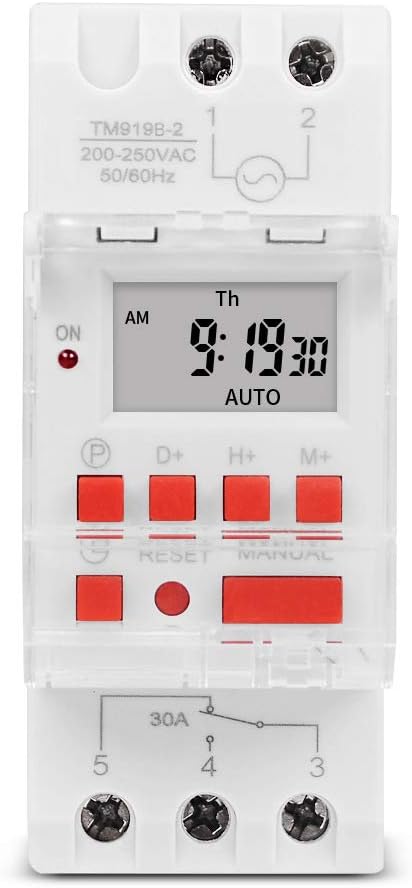
Εικόνα 1: Εμπρός view of the TM919B timer switch, showing the LCD display, control buttons, and terminal connections.

Εικόνα 2: Γωνία view of the TM919B with the transparent protective cover open, revealing the programming buttons (P, D+, H+, M+, RESET, MANUAL).
- Οθόνη LCD: Εμφανίζει την τρέχουσα ώρα, ημέρα και την κατάσταση του προγράμματος.
- Κουμπί P (Πρόγραμμα): Είσοδος/έξοδος από τη λειτουργία ρύθμισης προγράμματος.
- D+ (Day) Button: Adjusts day of the week in setting modes.
- H+ (Hour) Button: Adjusts hour in setting modes.
- M+ (Minute) Button: Adjusts minute in setting modes.
- Κουμπί επαναφοράς: Clears all settings and resets the timer to factory defaults.
- MANUAL Button: Εναλλάσσει μεταξύ των λειτουργιών ON, AUTO και OFF.
- Συνδέσεις τερματικού: For power input and load output.
4. Προδιαγραφές
| Χαρακτηριστικό | Προσδιορισμός |
|---|---|
| Μοντέλο | TM919B |
| Τομtage | 220V (AC200-250V) |
| Συχνότητα | 50/60Hz |
| Μέγιστο φορτίο | 30A (αντιστατικό φορτίο) |
| Προγράμματα | 16 ON/OFF programs per day/week |
| Ελάχιστο διάστημα | 1 λεπτό |
| Εφεδρική μπαταρία | Built-in rechargeable battery (for memory retention) |
| Βάση | Ράγα DIN 35mm |
| Διαστάσεις | Ανατρέξτε στην Εικόνα 3 |

Εικόνα 3: Detailed dimensions of the TM919B timer switch, showing height, width, and depth measurements.
5. Ρύθμιση και εγκατάσταση
Follow these steps for safe and correct installation of your timer switch.
5.1. Τοποθέτηση
- Βεβαιωθείτε ότι η παροχή ρεύματος είναι αποσυνδεδεμένη από τον κύριο διακόπτη κυκλώματος.
- Mount the TM919B onto a standard 35mm DIN rail. The device features a clip mechanism on the back for secure attachment.
- Press the orange clip at the bottom of the unit to release it from the DIN rail if removal is necessary.

Εικόνα 4: Πλευρά view of the TM919B, highlighting the orange DIN rail mounting clip.

Εικόνα 5: Πίσω view of the TM919B, illustrating the DIN rail mounting mechanism.
5.2. Διάγραμμα καλωδίωσης
Refer to the diagram below for correct wiring connections. Ensure all connections are tight and insulated.

Εικόνα 6: Πλευρά view of the TM919B showing the wiring diagram printed on the casing. Terminals 1 and 2 are for power input (L and N). Terminals 3, 4, and 5 are for load output (Common, Normally Open, Normally Closed).
- Τερματικοί σταθμοί 1 και 2: Power Input (L - Live, N - Neutral). Connect your 220V AC supply here.
- Τερματικό 3: Common (COM) for the output relay.
- Τερματικό 4: Normally Open (NO) output. The load will be powered when the timer is ON.
- Τερματικό 5: Normally Closed (NC) output. The load will be powered when the timer is OFF.
For typical applications where the load is switched ON by the timer, connect the load between Terminal 3 (COM) and Terminal 4 (NO).
6. Οδηγίες λειτουργίας
6.1. Αρχική ρύθμιση και επαναφορά
- After connecting power, the display may be blank or show random characters. Press the ΕΠΑΝΑΦΟΡΑ button with a pointed object (e.g., a pen tip) to clear all memory and reset the timer. The display will show "0:00" and "MO".
- Allow the internal battery to charge for at least 30 minutes before programming for optimal performance and memory retention during power outages.
6.2. Ρύθμιση τρέχουσας ώρας και ημέρας
- Πατήστε και κρατήστε πατημένο το D+ button to set the current day of the week (MO, TU, WE, TH, FR, SA, SU).
- Πατήστε και κρατήστε πατημένο το H+ button to set the current hour (0-23).
- Πατήστε και κρατήστε πατημένο το M+ button to set the current minute (0-59).
- Release the buttons when the correct time and day are displayed. The timer will automatically save the settings.
6.3. Προγραμματισμός κύκλων ON/OFF
The TM919B supports up to 16 ON/OFF programs. Each program consists of an ON time and an OFF time.
- Πατήστε το P Πατήστε το κουμπί μία φορά. Η οθόνη θα εμφανίσει την ένδειξη "1 ON". Αυτό ισχύει για το πρώτο πρόγραμμα ON.
- Χρήση D+ για να επιλέξετε την ημέρα/τις ημέρες για αυτό το πρόγραμμα. Οι επιλογές περιλαμβάνουν:
- ΔΕΥ ΤΡΙ ΤΕΤ ΠΕΜ ΠΑΡ ΣΑΒ ΚΥΡ (Κάθε μέρα)
- MO (Μόνο Δευτέρα)
- Τρίτη (μόνο Τρίτη)
- ...
- ΔΕΥ ΤΡΙ ΤΕΤ ΠΕΜ ΠΑΡ (Καθημερινές)
- ΣΑ ΚΥ (Σαββατοκύριακα)
- MO TU WE (Mon-Wed)
- TH FR SA (Thu-Sat)
- ΔΕΥ ΤΕΤ ΠΑΡ (Δευτ., Τετ., Παρ.)
- ΤΡΙ ΠΕΜ ΣΑ (Τρί, Πέμ, Σάβ)
- ΔΕΥ ΤΡΙ ΤΕΤ ΠΕΜ ΠΑΡ ΣΑΒ (Δευ-Σάβ)
- Χρήση H+ και M+ to set the desired ON hour and minute.
- Πατήστε το P button again. The display will show "1 OFF". This is for the first OFF program.
- Χρήση D+, H+, και M+ to set the desired OFF day, hour, and minute. Ensure the OFF time is after the ON time for the same program.
- Repeat steps 1-5 for additional ON/OFF programs (up to 16). If you don't need all 16 programs, simply press P to cycle through unused programs until you return to the current time display.
- To exit programming mode and save settings, press the clock button (usually labeled with a clock icon, or simply wait for 30 seconds without input).
6.4. Χειροκίνητη παράκαμψη
Πατήστε το ΕΓΧΕΙΡΙΔΙΟ κουμπί για εναλλαγή μεταξύ των τρόπων λειτουργίας:
- ΕΠΙ: Η έξοδος του χρονοδιακόπτη είναι συνεχώς ενεργοποιημένη, αγνοώντας όλα τα προγράμματα.
- ΑΥΤΟ: Ο χρονοδιακόπτης λειτουργεί σύμφωνα με τους προγραμματισμένους κύκλους ON/OFF. Αυτή είναι η τυπική λειτουργία.
- OFF: Η έξοδος του χρονοδιακόπτη είναι συνεχώς απενεργοποιημένη, αγνοώντας όλα τα προγράμματα.
Βεβαιωθείτε ότι ο χρονοδιακόπτης έχει ρυθμιστεί σε ΑΥΤΟ για προγραμματισμένη λειτουργία.
7. Συντήρηση
- The TM919B is designed for maintenance-free operation.
- Καθαρίστε το εξωτερικό με ένα μαλακό, στεγνό πανί. Μην χρησιμοποιείτε λειαντικά καθαριστικά ή διαλύτες.
- Ensure the internal battery is charged by keeping the unit powered for at least 24 hours initially, and periodically thereafter, to maintain time and program memory during power outages.
8. Αντιμετώπιση Προβλημάτων
| Πρόβλημα | Πιθανή αιτία | Διάλυμα |
|---|---|---|
| Η οθόνη είναι κενή. | Δεν υπάρχει τροφοδοσία ρεύματος· η εσωτερική μπαταρία είναι αποφορτισμένη. | Check power connections. Allow unit to charge for 30 minutes. |
| Timer not switching load. | Incorrect wiring; timer in MANUAL ON/OFF mode; incorrect program settings. | Verify wiring (refer to Figure 6). Ensure timer is in AUTO mode. Check program times and days. |
| Τα προγράμματα χάνονται μετά την διακοπή ρεύματοςtage. | Η εσωτερική μπαταρία δεν είναι πλήρως φορτισμένη ή είναι ελαττωματική. | Ensure unit is powered for at least 24 hours to fully charge the battery. If problem persists, contact support. |
| Τα κουμπιά δεν ανταποκρίνονται. | Unit frozen; temporary glitch. | Πατήστε το ΕΠΑΝΑΦΟΡΑ κουμπί. |
9. Εγγύηση και υποστήριξη
Τα προϊόντα SINOTIMER κατασκευάζονται σύμφωνα με υψηλά πρότυπα ποιότητας. Για πληροφορίες εγγύησης ή τεχνική υποστήριξη, ανατρέξτε στην τεκμηρίωση που παρέχεται με την αγορά σας ή επισκεφθείτε την επίσημη ιστοσελίδα της SINOTIMER. webιστότοπο. Κρατήστε την απόδειξη αγοράς σας ως απόδειξη αγοράς.
For further assistance, you may contact SINOTIMER customer service through their official channels.


