Εισαγωγή
This manual provides comprehensive instructions for the safe and efficient use of your Sutinna DAC-03 PRO Decoder with Headphone Amplifier. Please read this manual thoroughly before operating the device and retain it for future reference.

Figure 1: Sutinna DAC-03 PRO Decoder (Front View)
Περιεχόμενα συσκευασίας
Παρακαλούμε ελέγξτε το περιεχόμενο της συσκευασίας κατά το άνοιγμα της συσκευασίας. Εάν λείπουν ή έχουν υποστεί ζημιά κάποια είδη, επικοινωνήστε με την υποστήριξη πελατών.
- Sutinna DAC-03 PRO Decoder x 1
- Καλώδιο φόρτισης x 1
- Optical Fiber Cable x 1
- Data Cable (PC-USB) x 1
- Εγχειρίδιο οδηγιών x 1

Σχήμα 2: Συμπεριλαμβανόμενα αξεσουάρ
Προϊόν Πάνωview
The Sutinna DAC-03 PRO is a versatile digital-to-analog converter and headphone amplifier designed to enhance your audio experience. It features multiple input options and sound adjustment controls.
Χειριστήρια και συνδέσεις μπροστινού πίνακα

Σχήμα 3: Μπροστινό και πίσω πάνελ πάνωview
- Διακόπτης επιλογέα εισόδου: Toggle between USB, Optical (OPT), and Coaxial (COA) inputs.
- Έξοδος ακουστικών 3.5 mm: Συνδέστε τα ακουστικά σας εδώ.
- Κουμπί ελέγχου μπάσων: Ρυθμίστε το επίπεδο των μπάσων.
- Κουμπί ελέγχου πρίμων: Ρυθμίστε το επίπεδο των πρίμων.
- Volume Control Knob / Power Switch: Rotate to adjust volume. Press to power the device on or off.
Συνδέσεις πίσω πίνακα
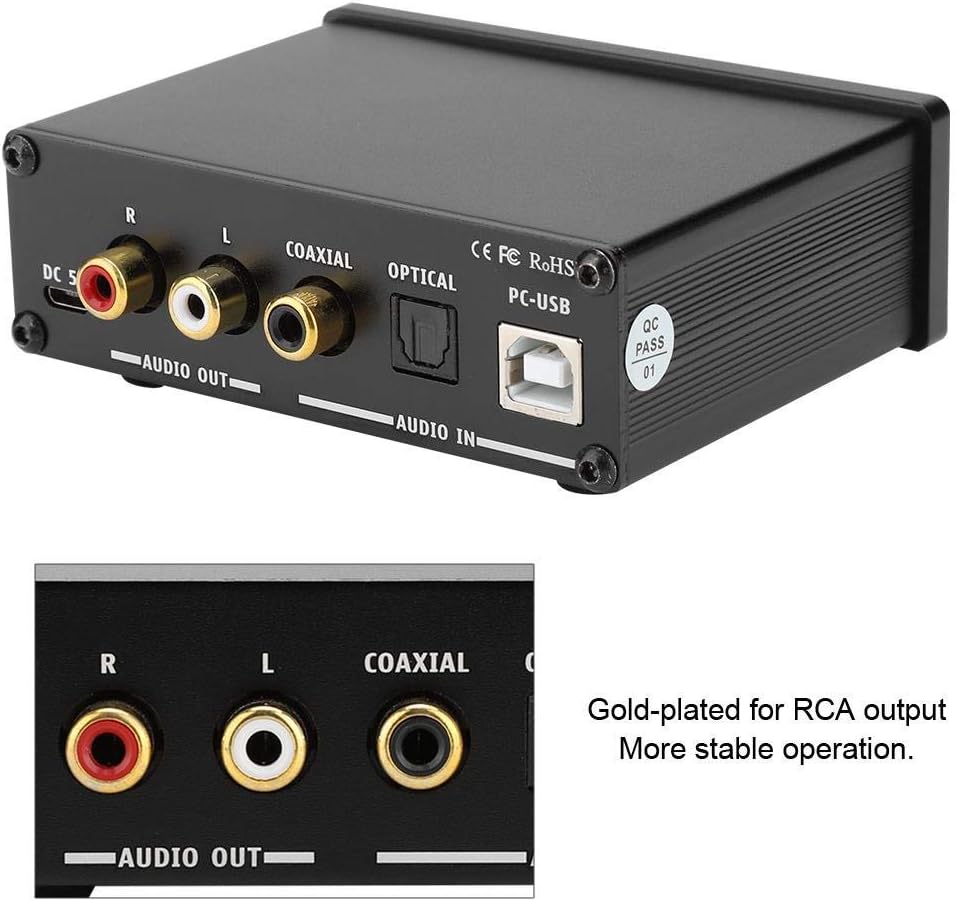
Σχήμα 4: Συνδέσεις πίσω πάνελ
- Είσοδος DC 5V: Connect the provided charging cable here for power.
- RCA Audio Output (L/R): Σύνδεση σε ένα ampLifier ή ενεργά ηχεία.
- Ομοαξονική είσοδος: Connect a coaxial digital audio source.
- Οπτική είσοδος: Connect an optical digital audio source.
- Είσοδος PC-USB: Connect to a computer for USB audio input.
Ρύθμιση
Follow these steps to set up your Sutinna DAC-03 PRO:
- Σύνδεση ρεύματος: Connect the provided charging cable to the DC 5V input on the rear panel of the DAC-03 PRO, then plug the other end into a suitable 5V power adapter (not included) or a USB port.
- Σύνδεση πηγής εισόδου:
- Οπτική είσοδος: Connect an optical fiber cable from your audio source (e.g., TV, game console) to the OPTICAL input on the DAC-03 PRO.
- Ομοαξονική είσοδος: Connect a coaxial cable from your audio source to the COAXIAL input on the DAC-03 PRO.
- Είσοδος PC-USB: Connect the provided data cable from your computer's USB port to the PC-USB input on the DAC-03 PRO. Your computer should automatically recognize the device.
- Σύνδεση εξόδου:
- Έξοδος RCA: Connect RCA cables from the AUDIO OUT (L/R) ports on the DAC-03 PRO to your ampLifier ή ενεργά ηχεία.
- Έξοδος ακουστικών: Plug your 3.5mm headphones into the headphone jack on the front panel.
- Ενεργοποίηση: Press the Volume Control Knob on the front panel to power on the device.
Οδηγίες Λειτουργίας
Once the device is set up, follow these steps for operation:
- Επιλέξτε Εισαγωγή: Use the Input Selector Switch on the front panel to choose your desired audio source (USB, OPT, or COA).
- Προσαρμογή έντασης ήχου: Rotate the Volume Control Knob clockwise to increase volume and counter-clockwise to decrease it. Start with a low volume level to prevent sudden loud sounds.
- Adjust Tone: Use the Bass Control Knob and Treble Control Knob to fine-tune the audio output to your preference. Rotate clockwise to increase and counter-clockwise to decrease.
- Χρήση ακουστικών: When headphones are connected to the 3.5mm jack, the audio will be routed to the headphones. Adjust the volume using the main Volume Control Knob.
- Απενεργοποιώ: Press the Volume Control Knob again to power off the device when not in use.
Συντήρηση
Proper maintenance ensures the longevity of your device:
- Καθάρισμα: Χρησιμοποιήστε ένα μαλακό, στεγνό πανί για να καθαρίσετε το εξωτερικό της συσκευής. Μην χρησιμοποιείτε υγρά καθαριστικά ή λειαντικά υλικά.
- Αποθήκευση: Αποθηκεύστε τη συσκευή σε δροσερό, ξηρό μέρος, μακριά από το άμεσο ηλιακό φως και ακραίες θερμοκρασίες.
- Χειριζόμενος: Αποφύγετε την πτώση ή την έκθεση της συσκευής σε ισχυρές κρούσεις.
Αντιμετώπιση προβλημάτων
If you encounter issues, refer to the following troubleshooting guide:
- Χωρίς έξοδο ήχου:
- Βεβαιωθείτε ότι η συσκευή είναι ενεργοποιημένη.
- Verify that the correct input source is selected (USB, OPT, COA).
- Check all audio cables (RCA, optical, coaxial, USB) for secure connections.
- Confirm that the volume is not set to minimum on the DAC-03 PRO or your connected ampσωτηρι/ηχεία.
- If using PC-USB, ensure the DAC-03 PRO is selected as the default audio output device in your computer's sound settings.
- Παραμορφωμένος ήχος:
- Reduce the volume level on the DAC-03 PRO and your connected audio equipment.
- Check for damaged or loose cables.
- Ensure the audio source is not overdriving the input.
- Device Not Recognized by PC (USB Input):
- Δοκιμάστε να συνδεθείτε σε διαφορετική θύρα USB στον υπολογιστή σας.
- Βεβαιωθείτε ότι το καλώδιο USB είναι καλά συνδεδεμένο.
- Κάντε επανεκκίνηση του υπολογιστή σας.
- No external drivers are typically required; the system should recognize it automatically.
- Power Indicator Not On:
- Verify the power cable is securely connected to the DC 5V input and the power source.
- Βεβαιωθείτε ότι η πηγή τροφοδοσίας είναι ενεργή.
- Press the Volume Control Knob to ensure the device is powered on.
Προδιαγραφές
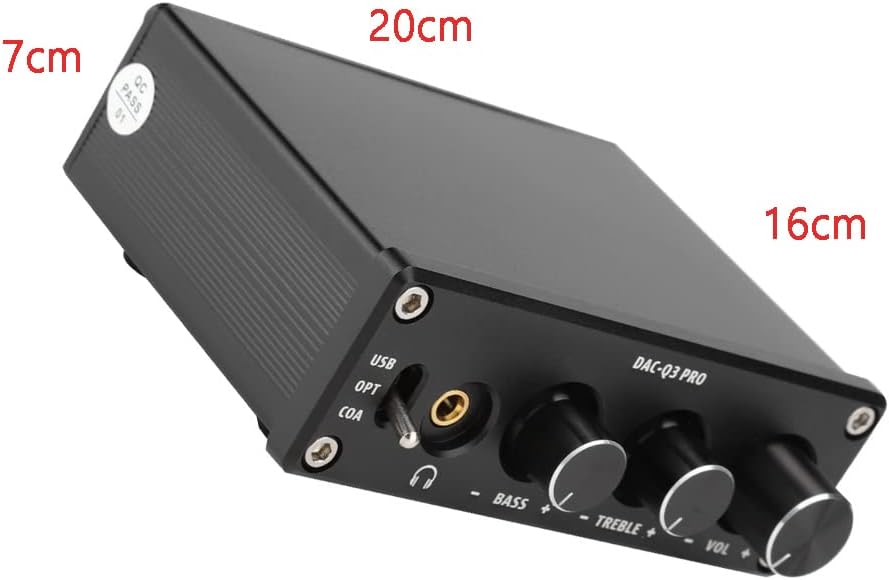
Σχήμα 5: Διαστάσεις προϊόντος
| Χαρακτηριστικό | Προσδιορισμός |
|---|---|
| Μοντέλο | DAC-03 PRO |
| Chipset | MS8412 + SA9023 + NE5532 + 97220 |
| Max Headphone Output Power | 90 mW / 32 ohm |
| Τροφοδοτικό | DC 5V 1A |
| Εύρος απόκρισης συχνότητας | 20Hz - 20kHz (± 3dB) |
| Αναλογία σήματος προς θόρυβο (SNR) | 105dB |
| Εύρος προσαρμογής πρίμων | ± 6dB |
| Εύρος ρύθμισης μπάσων | ± 6dB |
| Sampling Frequency (USB) | 24 bit / 96 kHz |
| Sampling Frequency (Coaxial/Optical) | 24 bit / 192 kHz |
| Λειτουργία ελέγχου | Touch switch + Potentiometer knob |
| Διεπαφή εισόδου | Fiber (Optical), Coaxial, PC-USB |
| Διεπαφή εξόδου | Gold-plated RCA, 3.5mm Headphone |
| Διαστάσεις (Μ x Π x Υ) | 9.7 x 9 x 3 εκ |
| Βάρος | 405 γρ |
Υποστήριξη
For further assistance or inquiries, please contact Sutinna customer support. Refer to your purchase documentation for specific contact details.


