1. Το προϊόν τελείωσεview
The TP-Link Archer TX50E is a high-performance AX3000 Wi-Fi 6 Bluetooth 5.3 PCIe Adapter designed for desktop PCs. It leverages the latest Wi-Fi 6 standard to deliver extreme speeds, ultra-low latency, and uninterrupted connectivity, making it suitable for demanding applications like immersive gaming and VR. The adapter features a customized heat sink and gold-plated contactors for enhanced stability and longevity.
Βασικά Χαρακτηριστικά:
- Wi-Fi 6 Performance: Delivers speeds up to 2.4 Gbps (2402 Mbps on 5 GHz + 574 Mbps on 2.4 GHz) with 1024-QAM and 160 MHz bandwidth.
- Εξαιρετικά χαμηλή καθυστέρηση: Revolutionary OFDMA and MU-MIMO technologies reduce lag for responsive gaming and VR experiences.
- Bluetooth 5.3: Achieves 2× faster speeds and 4× broader coverage than Bluetooth 4.2, enabling seamless connection with various peripherals.
- Ευρεία κάλυψη: Equipped with two high-gain antennas to extend Wi-Fi range.
- Premium Build: Features a customized heat sink for efficient thermal dissipation and gold-plated contactors for improved stability and oxidation resistance.
- Προηγμένη ασφάλεια: Υποστηρίζει WPA3, το πιο πρόσφατο πρότυπο ασφάλειας δικτύου, για βελτιωμένη προστασία δικτύου.
2. Περιεχόμενα συσκευασίας
Βεβαιωθείτε ότι όλα τα αντικείμενα υπάρχουν στη συσκευασία σας:

Image: TP-Link Archer TX50E retail box showing the adapter and included accessories.
- TP-Link Archer TX50E Wi-Fi 6 Bluetooth 5.3 PCIe Adapter
- Δύο κεραίες υψηλού κέρδους
- Καλώδιο USB Bluetooth
- CD πόρων
- Οδηγός γρήγορης εγκατάστασης
- Low-Profile Υποστήριγμα
3. Εγκατάσταση υλικού
Πριν ξεκινήσετε:
- Βεβαιωθείτε ότι ο υπολογιστής σας είναι απενεργοποιημένος και αποσυνδεδεμένος από την πηγή τροφοδοσίας.
- Ground yourself to discharge any static electricity before handling components.
- Refer to your computer's manual for specific instructions on opening the case.
Βήμα-βήμα εγκατάσταση:
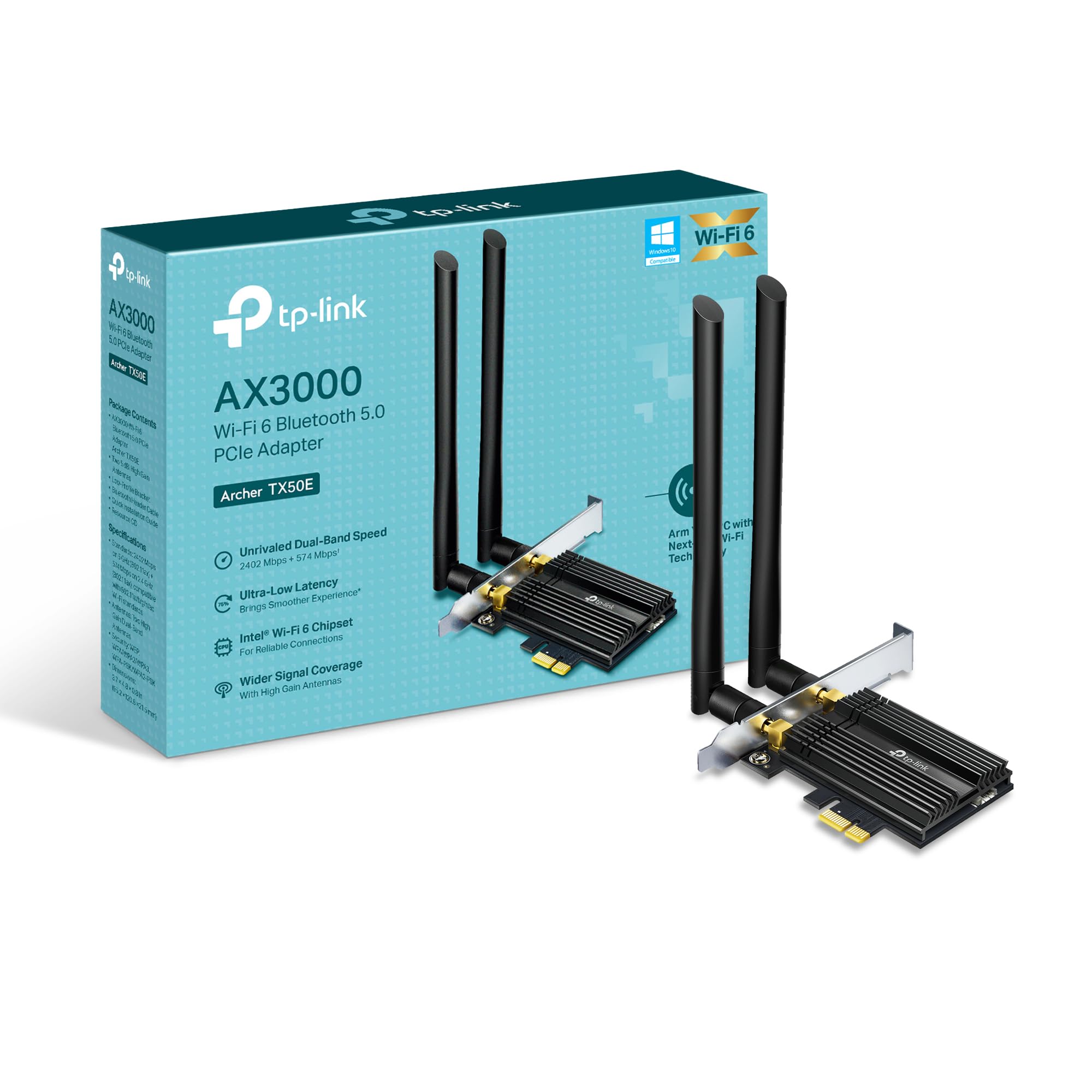
Εικόνα: Μπροστά view of the TP-Link Archer TX50E adapter with antennas.
- Απενεργοποίηση και αποσύνδεση: Απενεργοποιήστε τον υπολογιστή σας και αποσυνδέστε το καλώδιο τροφοδοσίας από την πρίζα.
- Ανοιχτή θήκη υπολογιστή: Αφαιρέστε το πλαϊνό πάνελ του περιβλήματος του υπολογιστή σας για να αποκτήσετε πρόσβαση στη μητρική πλακέτα.
- Συνδέστε το καλώδιο USB Bluetooth: Connect the provided Bluetooth USB cable to the adapter's Bluetooth header.
- Εντοπίστε θέσεις υποδοχής: Identify an available PCI Express X1 slot on your motherboard and an F_USB connector (usually labeled USB910 or similar).
- Εισαγωγή προσαρμογέα: Carefully insert the Archer TX50E adapter into the chosen PCIe X1 slot. Ensure it is seated firmly.
- Συνδέστε το καλώδιο USB: Connect the other end of the Bluetooth USB cable to the F_USB connector on your motherboard. This connection is essential for Bluetooth functionality.
- Secure Adapter and Antennas: Secure the adapter with a screw to the computer case. Then, connect the two high-gain antennas to the adapter's connectors. Adjust their position for optimal signal reception.
- Κλείσιμο θήκης υπολογιστή: Αντικαταστήστε το πλαϊνό πάνελ του περιβλήματος του υπολογιστή σας.
- Ενεργοποίηση: Plug the power cable back into the wall outlet and turn on your computer.
Οπτικός οδηγός εγκατάστασης:
Video: A step-by-step guide demonstrating the physical installation of the TP-Link Archer TX50E PCIe adapter into a desktop computer.
4. Εγκατάσταση προγράμματος οδήγησης
After hardware installation, you need to install the Wi-Fi and Bluetooth drivers for the adapter to function correctly. Σημείωμα: ΜΗΝ εκτελείτε τα προγράμματα εγκατάστασης προγραμμάτων οδήγησης Bluetooth και Wi-Fi ταυτόχρονα.
Step-by-Step Driver Installation:
- Insert CD or Download Drivers: Insert the provided resource CD into your computer's CD/DVD drive. If your computer does not have a CD/DVD drive, download the latest drivers from the official TP-Link website (search for Archer TX50E).
- Run Autorun: Once the CD is inserted, an Autorun window should appear. Click to run `Autorun.exe`. If it doesn't appear, navigate to 'This PC' or 'My Computer', open your CD/DVD drive, and manually run `Autorun.exe`.
- Install Wi-Fi Drivers: In the TP-Link driver installation utility, select the option to install the Wi-Fi drivers. Follow the on-screen instructions to complete the installation. You may need to restart your computer after this step.
- Install Bluetooth Drivers: After the Wi-Fi drivers are installed and your computer has restarted (if prompted), run the `Autorun.exe` again or manually launch the Bluetooth driver installer. Follow the on-screen instructions to complete the Bluetooth driver installation. Another restart may be required.
For a visual guide on driver installation, please refer to the setup video provided in the Hardware Installation section.
5. Οδηγίες λειτουργίας
Σύνδεση σε Wi-Fi:
- After successful driver installation, click the Wi-Fi icon in your system tray (usually in the bottom-right corner of your screen).
- Θα εμφανιστεί μια λίστα με τα διαθέσιμα ασύρματα δίκτυα. Επιλέξτε το δίκτυο που επιθυμείτε.
- Κάντε κλικ στην επιλογή «Σύνδεση» και εισαγάγετε το κλειδί ασφαλείας δικτύου (κωδικό πρόσβασης), εάν σας ζητηθεί.
- Ο υπολογιστής σας θα πρέπει τώρα να είναι συνδεδεμένος στο δίκτυο Wi-Fi.
Σύζευξη συσκευών Bluetooth:
- Ensure your Bluetooth device is in pairing mode (refer to your device's manual).
- On your computer, go to 'Settings' > 'Devices' > 'Bluetooth & other devices'.
- Turn on Bluetooth if it's not already enabled.
- Κάντε κλικ στην επιλογή «Προσθήκη Bluetooth ή άλλης συσκευής» και επιλέξτε «Bluetooth».
- Επιλέξτε τη συσκευή σας από τη λίστα και ακολουθήστε τυχόν οδηγίες στην οθόνη για να ολοκληρώσετε τη διαδικασία σύζευξης.
6. Αντιμετώπιση Προβλημάτων
If you encounter issues with your Archer TX50E adapter, try the following common troubleshooting steps:
- Δεν υπάρχει σύνδεση Wi-Fi:
- Βεβαιωθείτε ότι ο προσαρμογέας έχει τοποθετηθεί σωστά στην υποδοχή PCIe.
- Verify that the antennas are securely connected.
- Check Device Manager to ensure Wi-Fi drivers are installed and the device is recognized without errors.
- Try updating or reinstalling the Wi-Fi drivers.
- Επανεκκινήστε τον υπολογιστή σας και τον ασύρματο δρομολογητή σας.
- Το Bluetooth δεν λειτουργεί:
- Confirm the Bluetooth USB cable is properly connected to both the adapter and the motherboard's F_USB header.
- Check Device Manager to ensure Bluetooth drivers are installed and the device is recognized without errors.
- Verify that Bluetooth is enabled in your computer's settings.
- Try updating or reinstalling the Bluetooth drivers.
- Χαμηλές ταχύτητες ή διακοπτόμενη σύνδεση:
- Ensure your router supports Wi-Fi 6 (802.11ax) for optimal performance.
- Adjust the position of the antennas for better signal reception.
- Move your computer closer to the router or reduce obstacles between them.
- Ελέγξτε για παρεμβολές από άλλες ηλεκτρονικές συσκευές.
- Ενημερώστε το υλικολογισμικό του δρομολογητή σας.
If these steps do not resolve your issue, please contact TP-Link Technical Support.
7. Τεχνικές Προδιαγραφές
| Χαρακτηριστικό | Προσδιορισμός |
|---|---|
| Μοντέλο | Τοξότης TX50E |
| πρότυπο ασύρματης | Wi-Fi 6 (802.11ax/ac/b/g/n) |
| Έκδοση Bluetooth | Bluetooth 5.3 |
| Διασύνδεση | PCI Express |
| Ρυθμός μεταφοράς δεδομένων | Up to 2402 Mbps (5 GHz), 574 Mbps (2.4 GHz) |
| Υποστήριξη Λειτουργικού Συστήματος | Windows 11, 10 (64-bit) |
| Ασφάλεια | WPA3 |
| Διαστάσεις (Μ x Π x Υ) | 9.53 x 12.09 x 2.16 εκ |
| Βάρος αντικειμένου | 90.72 γρ. (0.2 λίβρες) |
| Διασύνδεση υλικού | Bluetooth |
| Συμβατές Συσκευές | Επιτραπέζιος υπολογιστής, φορητός υπολογιστής |
8. Εγγύηση και τεχνική υποστήριξη
Η TP-Link προσφέρει ένα 2 χρόνια εγγύηση for this product. Additionally, free 24/7 τεχνική υποστήριξη είναι διαθέσιμο να σας βοηθήσει με οποιεσδήποτε ερωτήσεις ή προβλήματα που μπορεί να αντιμετωπίσετε.
For further assistance, please visit the official TP-Link support webιστότοπο ή επικοινωνήστε απευθείας με την εξυπηρέτηση πελατών τους.


