1. Εισαγωγή
This manual provides instructions for the proper setup, operation, and maintenance of your IPD IPH-160 Monaural Wired Headset. The IPH-160 is designed for clear communication in various environments, featuring a noise-cancelling microphone and a 3.5mm jack for broad compatibility.
2. Περιεχόμενα συσκευασίας
Βεβαιωθείτε ότι όλα τα είδη υπάρχουν στη συσκευασία σας:
- IPD IPH-160 Monaural Headset
- Quick Disconnect (QD) to 3.5mm Jack Cable (4-pole)
- Μαξιλάρια αυτιών (προεγκατεστημένα ή εφεδρικά)
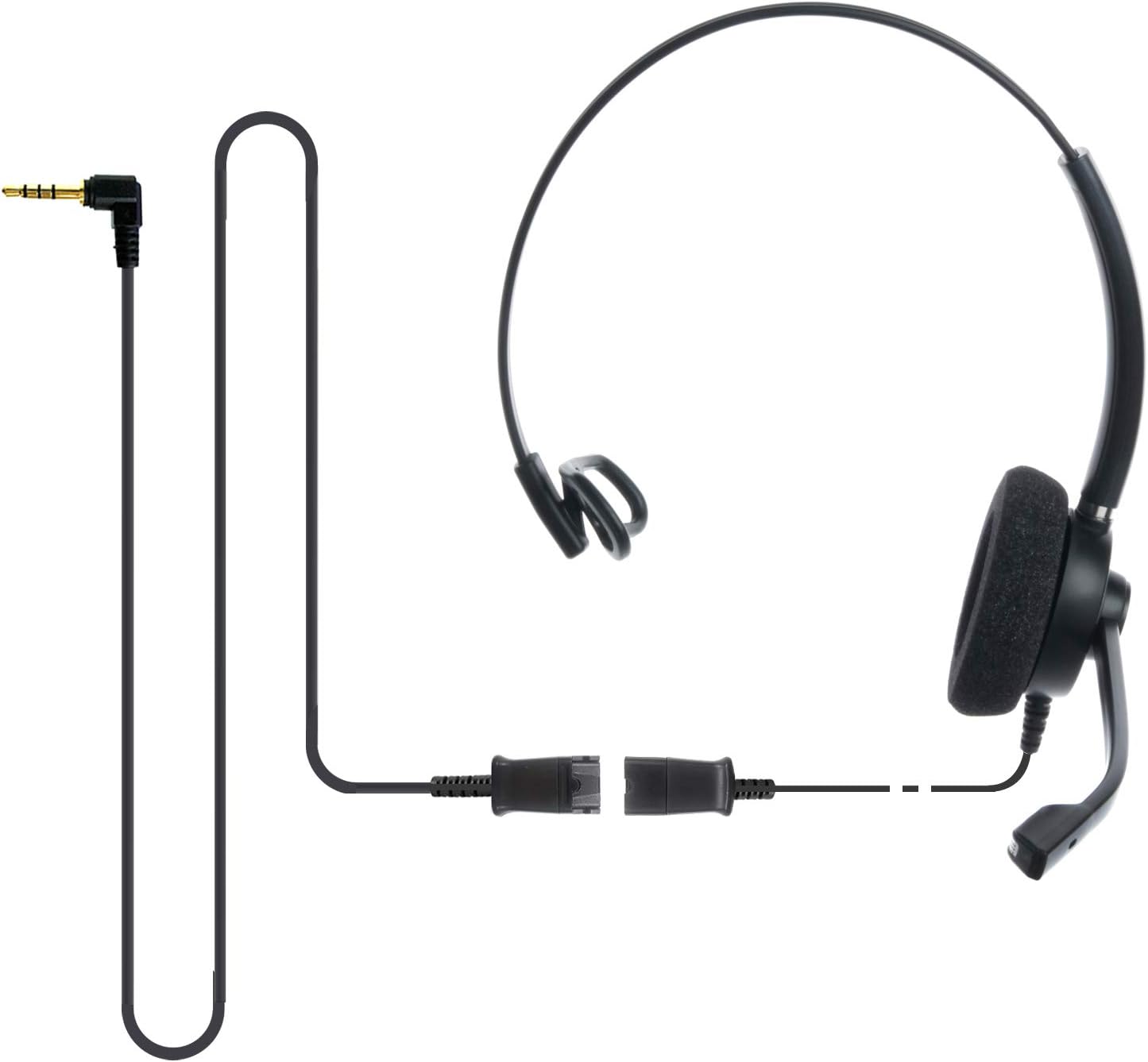
Image: The IPD IPH-160 headset with its detachable Quick Disconnect cable and 3.5mm jack connector.
3. Ρύθμιση
3.1 Σύνδεση των ακουστικών
- Connect the Quick Disconnect (QD) cable to the headset. Ensure a secure connection.
- Insert the 3.5mm jack of the cable into the corresponding port on your device (Android cell phone, laptop, tablet, Apple MacBook, or other smart device).

Εικόνα: Κοντινό πλάνο view of the 3.5mm jack connector, illustrating its connection to a mobile device and laptop.
3.2 Συμβατότητα συσκευής
The 3.5mm jack (4 poles) is compatible with a wide range of devices including:
- Android cell phones (e.g., Samsung, Huawei, HTC, ZTE)
- Φορητοί υπολογιστές
- Ταμπλέτες
- Apple MacBooks with a single 3.5mm headset port
Σημείωμα:
- iPhone 7/7S and later models may require an additional Lightning to 3.5mm adapter (not included).
- If your specific phone model is not listed or you encounter compatibility issues, please contact IPD support for assistance.

Image: The IPD headset shown with various connection options for desk phones, PCs/softphones, and mobile phones, highlighting the versatility of Quick Disconnect cables.
4. Λειτουργία των ακουστικών
4.1 Φθορά και Ρύθμιση
The IPH-160 headset is designed for all-day comfort. Adjust the headband for a secure yet comfortable fit. The microphone boom is flexible; position it approximately 1-2 inches from your mouth for optimal voice pickup.
4.2 Μικρόφωνο ακύρωσης θορύβου
The headset features a passive noise-cancelling microphone to reduce background noise, ensuring clearer conversations. Proper microphone positioning is crucial for effective noise cancellation.

Image: A user wearing the headset, demonstrating the microphone's position and illustrating the effect of noise cancellation on audio waveforms.
4.3 Acoustic Shock Protection (ASP)
The headset incorporates an Acoustic Shock Protection (ASP) circuit on the speaker. This feature protects your hearing from sudden, unwanted loud noises by cutting sounds over 105dB and maintaining levels below 105dB.
4.4 Wideband Audio
The HD Wideband speaker delivers clear sound, enhancing the quality of your calls and audio monitoring.

Image: A close-up of the headset's ear cushion, visually representing the distinction between acoustic noise and clear sound for high-quality voice communication.
5. Συντήρηση
5.1 Καθαρισμός
To maintain hygiene and performance, regularly clean the ear cushions and other surfaces of the headset with a soft, dry cloth. Avoid using harsh chemicals or abrasive materials.
5.2 Αποθήκευση
When not in use, store the headset in a clean, dry place away from direct sunlight and extreme temperatures. Avoid tangling the cable to prevent damage.
6. Αντιμετώπιση Προβλημάτων
6.1 Δεν υπάρχει ήχος ή η ένταση είναι χαμηλή
- Βεβαιωθείτε ότι η υποδοχή 3.5 mm είναι πλήρως τοποθετημένη στη συσκευή σας.
- Ελέγξτε τις ρυθμίσεις έντασης ήχου της συσκευής σας.
- Verify that the headset is selected as the audio output device in your computer's sound settings.
- Confirm the Quick Disconnect (QD) cable is securely connected to the headset.
6.2 Το μικρόφωνο δεν λειτουργεί
- Βεβαιωθείτε ότι το βραχίονα του μικροφώνου είναι τοποθετημένο σωστά κοντά στο στόμα σας.
- Check your device's microphone input settings and ensure the headset is selected as the input device.
- Test the headset with another compatible device to rule out a device-specific issue.
6.3 Ζητήματα συμβατότητας
If you experience compatibility problems with your device, especially if it's not explicitly listed as compatible, please contact IPD customer support for guidance.
7. Προδιαγραφές
| Χαρακτηριστικό | Προσδιορισμός |
|---|---|
| Όνομα μοντέλου | IPH-160-35 |
| Τεχνολογία Συνδεσιμότητας | Ενσύρματο |
| Jack ακουστικών | 3.5 mm Jack (4-pole) |
| Έλεγχος θορύβου | Παθητική ακύρωση θορύβου |
| Απόκριση συχνότητας | 10 KHz |
| Ευαισθησία | 58 dB |
| Αντίσταση | 150 Ωμ |
| Βάρος αντικειμένου | 198 γραμμάρια (7 ουγκιές) |
| Υλικό | Πλαστική ύλη |
| Τοποθέτηση αυτιού | Πάνω από το αυτί |
| Ειδικό χαρακτηριστικό | Ακύρωση θορύβου |
| Συμπεριλαμβανόμενα εξαρτήματα | Μαξιλάρια αυτιών |
8. Πληροφορίες εγγύησης
The IPD IPH-160 Headset comes with a 3 χρόνια εγγύηση από την ημερομηνία αγοράς. Η παρούσα εγγύηση καλύπτει κατασκευαστικά ελαττώματα υπό κανονική χρήση. Παρακαλούμε φυλάξτε την απόδειξη αγοράς για τυχόν αξιώσεις εγγύησης.
9. Υποστήριξη
For technical assistance, warranty claims, or any questions regarding your IPD IPH-160 Headset, please contact IPD customer support. You can find contact information on the official IPD webστον ιστότοπο ή μέσω του λιανοπωλητή σας.
Επισκεφθείτε το IPD Store για περισσότερες πληροφορίες και προϊόντα.


