Εισαγωγή
This manual provides essential instructions for the proper use, setup, and maintenance of your BYTECH Lightning Cable (Model: CLMFCBLASST). This cable is designed for charging and data transfer with compatible Apple iOS devices, including iPhones, iPads, and iPods, as well as connecting to laptops and personal computers.
Προϊόν Πάνωview
The BYTECH Lightning Cable is a durable accessory for your Apple devices. It features a Lightning connector on one end and a USB-A connector on the other, facilitating both power delivery for charging and data exchange. The cable supports fast charging capabilities for compatible devices.
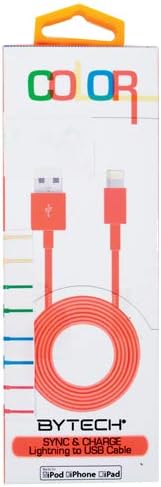
This image displays the retail packaging for the BYTECH Lightning to USB Cable. The packaging is white with 'COLOR' printed at the top in multi-colored letters. An orange Lightning to USB cable is visible through a clear window, coiled neatly. The bottom of the package indicates 'BYTECH SYNC & CHARGE Lightning to USB Cable' and compatibility with iPod, iPhone, and iPad.
Συστατικά:
- Συνδετήρας Lightning: Connects to your Apple iOS device (iPhone, iPad, iPod).
- Υποδοχή USB-A: Connects to a USB power adapter, computer USB port, or other USB charging source.
- Καλώδιο: The flexible cord connecting the two connectors, designed for durability and efficient power/data transfer.
Ρύθμιση
To begin using your BYTECH Lightning Cable, follow these steps:
- Προσδιορισμός συνδέσμων: Locate the Lightning connector (smaller, 8-pin) and the USB-A connector (larger, rectangular).
- Σύνδεση σε πηγή τροφοδοσίας ή υπολογιστή:
- For charging, insert the USB-A connector into a compatible USB wall adapter or car charger.
- For charging and data transfer, insert the USB-A connector into an available USB port on your laptop or personal computer.
- Σύνδεση σε συσκευή iOS: Insert the Lightning connector into the charging port of your iPhone, iPad, or iPod. Ensure it is fully seated.
- Επαλήθευση σύνδεσης: Your device should indicate that it is charging or connected to a computer.
Οδηγίες Λειτουργίας
Φόρτιση της συσκευής σας:
Once connected as described in the "Setup" section, your iOS device will begin charging automatically. The cable supports fast charging when paired with a compatible power adapter and device.
Μεταφορά δεδομένων:
When connected to a computer, the cable enables data transfer between your iOS device and the computer. This allows for syncing media, documents, and other files using iTunes or Finder (macOS Catalina and later).
- Connect your iOS device to your computer using the BYTECH Lightning Cable.
- Unlock your iOS device and respond to any "Trust This Computer?" prompts by tapping "Trust" and entering your passcode if required.
- Open iTunes (Windows/older macOS) or Finder (macOS Catalina and later) on your computer.
- Select your device within the application to manage and transfer data.
Συντήρηση
Η σωστή φροντίδα παρατείνει τη διάρκεια ζωής του καλωδίου σας:
- Αποθήκευση: Όταν δεν το χρησιμοποιείτε, τυλίξτε χαλαρά το καλώδιο. Αποφύγετε το σφιχτό τύλιγμα ή τις αιχμηρές στροφές, ειδικά κοντά στους συνδετήρες, καθώς αυτό μπορεί να προκαλέσει ζημιά στα εσωτερικά καλώδια.
- Καθάρισμα: Use a soft, dry cloth to gently wipe the cable and connectors. Do not use liquid cleaners or abrasive materials.
- Χειριζόμενος: Always grasp the connector head when plugging or unplugging the cable. Avoid pulling directly on the cable itself.
- Περιβάλλο: Κρατήστε το καλώδιο μακριά από ακραίες θερμοκρασίες, άμεσο ηλιακό φως και υγρασία.
Αντιμετώπιση προβλημάτων
If you encounter issues with your BYTECH Lightning Cable, consider the following:
- Η συσκευή δεν φορτίζεται:
- Βεβαιωθείτε ότι και τα δύο άκρα του καλωδίου είναι καλά συνδεδεμένα.
- Δοκιμάστε διαφορετικό τροφοδοτικό USB ή θύρα USB υπολογιστή.
- Check the charging port on your iOS device for debris or lint.
- Test the cable with a different compatible iOS device, if available.
- Ζητήματα μεταφοράς δεδομένων:
- Ensure your iOS device is unlocked and you have tapped "Trust This Computer" when prompted.
- Restart both your iOS device and your computer.
- Update iTunes or Finder to the latest version.
- Δοκιμάστε μια διαφορετική θύρα USB στον υπολογιστή σας.
- Ζημιά καλωδίου: Inspect the cable for any visible signs of damage, such as fraying, cuts, or bent connectors. Discontinue use if damage is found.
Προδιαγραφές
| Ιδιότης | Λεπτομέρεια |
|---|---|
| Μάρκα | Bytech |
| Αριθμός μοντέλου | CLMFCBLASST |
| UPC | 805112016938 |
| Τύπος σύνδεσης | Lightning (Male) to USB-A (Male) |
| Τύπος καλωδίου | Αστραπή |
| Συμβατές Συσκευές | iPhone, iPad, iPod, Laptop, Personal Computer |
| Ειδικό χαρακτηριστικό | Γρήγορη Φόρτιση |
| Προτεινόμενες χρήσεις | Charging, data transfer for iOS devices |
| Αριθμός καρφιτσών | 8 (Lightning) |
| Βάρος αντικειμένου | 1.76 ουγγιές |
| Διαστάσεις προϊόντος | 1 x 1 x 1 ίντσες (Συσκευασία) |
Εγγύηση και υποστήριξη
For warranty information or technical support regarding your BYTECH Lightning Cable, please refer to the official Bytech webστον ιστότοπο ή επικοινωνήστε απευθείας με την εξυπηρέτηση πελατών. Κρατήστε την απόδειξη αγοράς σας για αξιώσεις εγγύησης.
Για γενικές ερωτήσεις, μπορείτε να επισκεφθείτε την Bytech brand page on Amazon.