Εισαγωγή
The Hyperkin Armor3 NuWave Controller is designed to provide accurate and fluid motion control for your Nintendo Wii U and Wii consoles. Featuring built-in Nu+ technology, this controller enhances your gaming experience by offering a wider range of motion in compatible titles. This manual provides essential information on setting up, operating, maintaining, and troubleshooting your NuWave Controller.
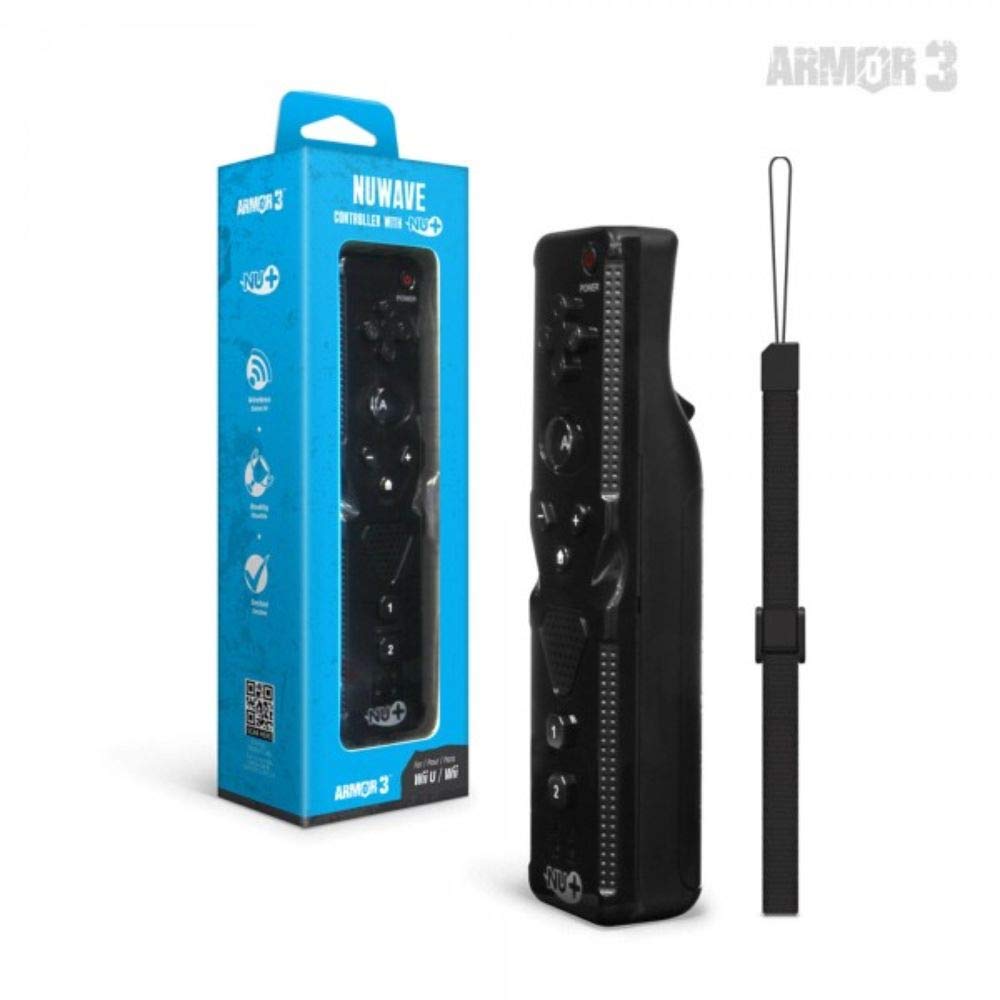
Εικόνα 1: Hyperkin Armor3 NuWave Controller and its packaging. The controller is black with a wrist strap, and the packaging highlights its Nu+ technology and compatibility with Wii U and Wii.
Προϊόν Πάνωview
The Armor3 NuWave Controller is a motion-sensing controller compatible with both Wii U and Wii systems. It integrates advanced Nu+ technology for enhanced motion detection and precision in supported games.
Βασικά Χαρακτηριστικά:
- Αρμονία: Fully compatible with Nintendo Wii U and Nintendo Wii consoles.
- Nu+ Technology: Built-in technology for a wider range of motion and improved accuracy in compatible titles.
- Εργονομικός σχεδιασμός: Designed for comfortable grip and extended gameplay sessions.
- Πηγή ενέργειας: Απαιτούνται μπαταρίες 2 AA (δεν περιλαμβάνονται).
Ρύθμιση
1. Τοποθέτηση μπαταρίας
- Εντοπίστε τη θήκη της μπαταρίας στο πίσω μέρος του χειριστηρίου.
- Σύρετε το κάλυμμα της μπαταρίας προς τα κάτω για να το ανοίξετε.
- Τοποθετήστε δύο (2) μπαταρίες AA, φροντίζοντας για τη σωστή πολικότητα (+/-) όπως υποδεικνύεται στο εσωτερικό της θήκης.
- Replace the battery cover by sliding it upwards until it clicks into place.
2. Connecting to Your Console
To connect the NuWave Controller to your Wii U or Wii console, follow these steps:
- Βεβαιωθείτε ότι η κονσόλα σας είναι ενεργοποιημένη.
- On your Wii U or Wii console, press the SYNC button (usually located near the SD card slot or battery compartment).
- On the NuWave Controller, open the battery cover and locate the small red SYNC button inside the battery compartment.
- Press and release the SYNC button on the controller.
- The player indicator lights on the bottom of the controller will flash. Once a single light remains lit, the controller is successfully connected.
- If connection fails, repeat steps 2-5. Ensure the controller is within range of the console.
Οδηγίες Λειτουργίας
Βασικοί έλεγχοι:
- Κατευθυντικό pad (D-Pad): Used for menu navigation and character movement.
- Ενα κουμπί: Primary action button, often used for selection or interaction.
- B Button (Trigger): Located on the underside, typically used for grabbing or firing.
- 1 & 2 Buttons: Auxiliary action buttons, functions vary by game.
- Κουμπί αφετηρίας: Returns to the console's Home Menu.
- Plus (+) & Minus (-) Buttons: Often used for zooming, adjusting settings, or specific in-game actions.
- Κουμπί λειτουργίας: Ενεργοποιεί/απενεργοποιεί το χειριστήριο.
Motion Sensing with Nu+ Technology:
The built-in Nu+ technology provides enhanced motion tracking. For games that support it, you will experience more precise and responsive movements. Hold the controller firmly and ensure clear line of sight to the sensor bar for optimal performance.
- Διαμέτρηση: Some games may require initial calibration. Follow on-screen prompts.
- Λουράκι καρπού: Always use the included wrist strap to prevent accidental drops during active gameplay.
Συντήρηση
Καθάρισμα:
- Σκουπίστε το χειριστήριο με ένα μαλακό, στεγνό πανί.
- Για επίμονη βρωμιά, ελαφρώςampΞεπλύνετε το πανί με νερό. Μην χρησιμοποιείτε σκληρά χημικά ή λειαντικά καθαριστικά.
- Ensure no liquid enters the controller's openings.
Αποθήκευση:
- Αποθηκεύστε το χειριστήριο σε δροσερό και ξηρό μέρος, μακριά από το άμεσο ηλιακό φως και τις ακραίες θερμοκρασίες.
- Εάν αποθηκεύετε για μεγάλο χρονικό διάστημα, αφαιρέστε τις μπαταρίες για να αποφύγετε διαρροές.
Φροντίδα μπαταρίας:
- Always use new, high-quality AA batteries.
- Μην αναμιγνύετε παλιές και νέες μπαταρίες ή διαφορετικούς τύπους μπαταριών.
- Απορρίψτε τις χρησιμοποιημένες μπαταρίες υπεύθυνα σύμφωνα με τους τοπικούς κανονισμούς.
Αντιμετώπιση προβλημάτων
| Πρόβλημα | Πιθανή αιτία | Διάλυμα |
|---|---|---|
| Ο ελεγκτής δεν ενεργοποιείται. | Νεκρές ή λανθασμένα τοποθετημένες μπαταρίες. | Αντικαταστήστε τις μπαταρίες με καινούργιες μπαταρίες AA, διασφαλίζοντας τη σωστή πολικότητα. |
| Controller does not sync with console. | Incorrect syncing procedure; out of range; console interference. | Ensure console is on. Repeat syncing steps (press SYNC on console, then on controller). Move closer to console. Check for other wireless device interference. |
| Τα κουμπιά δεν ανταποκρίνονται ή καθυστερούν. | Low battery; connection issue; physical obstruction. | Replace batteries. Re-sync the controller. Ensure buttons are not stuck. |
| Motion control is inaccurate. | Sensor bar obstruction; improper calibration; environmental factors. | Ensure clear line of sight to the sensor bar. Re-calibrate in-game if prompted. Avoid strong light sources directly facing the sensor bar. |
Προδιαγραφές
- Μοντέλο: M07399-bk
- Μάρκα: Hyperkin
- Αρμονία: Nintendo Wii U, Nintendo Wii
- Πηγή ενέργειας: 2 x μπαταρίες AA (δεν περιλαμβάνονται)
- Διαστάσεις: 2.8 x 1.8 x 8 ίντσες (κατά προσέγγιση)
- Βάρος: 3.88 ουγγιές (περίπου, χωρίς μπαταρίες)
- Τεχνολογία: Built-in Nu+ motion technology
- Χρώμα: Μαύρος
Εγγύηση και υποστήριξη
For specific warranty information and terms, please refer to the documentation included with your purchase or visit the official Hyperkin website. Hyperkin provides customer support for their products.
Διαδικτυακή υποστήριξη: Visit the official Hyperkin webτοποθεσία για συχνές ερωτήσεις, οδηγούς αντιμετώπισης προβλημάτων και στοιχεία επικοινωνίας. www.hyperkin.com
Επαφή: Refer to the Hyperkin website for the most current customer service contact methods (phone, email, etc.).


