Εισαγωγή
This manual provides essential information for setting up, operating, maintaining, and troubleshooting your Acer Aspire XC-886 desktop personal computer. Please read this manual thoroughly before using your new system to ensure proper operation and to maximize its lifespan.
Περιεχόμενα συσκευασίας
Βεβαιωθείτε ότι όλα τα είδη που αναφέρονται παρακάτω περιλαμβάνονται στη συσκευασία σας. Εάν λείπουν ή έχουν υποστεί ζημιά κάποια είδη, επικοινωνήστε με τον αντιπρόσωπό σας.
- Acer Aspire XC-886 Desktop PC
- Ασύρματο πληκτρολόγιο
- Ασύρματο ποντίκι
- Καλώδιο ρεύματος
- Τεκμηρίωση (Οδηγός γρήγορης εκκίνησης, Κάρτα εγγύησης)
- McAfee Internet Security (3-year physical card)
Ρύθμιση
Follow these steps to set up your Acer Aspire XC-886 desktop PC.
1. Connect Peripherals
- Σύνδεση οθόνης: Use an HDMI or D-Sub cable to connect your monitor to the corresponding port on the rear of the desktop. The system has two HDMI ports and one D-Sub port.
- Σύνδεση πληκτρολογίου και ποντικιού: Insert the wireless receiver for your keyboard and mouse into an available USB port. Both USB 2.0 and USB 3.1 Gen 1 ports are available on the front and rear of the system.
- Σύνδεση τροφοδοσίας: Plug the power cord into the power connector on the rear of the desktop, then plug the other end into a power outlet.
- Προαιρετικές συνδέσεις:
- Δίκτυο: For a wired connection, connect an Ethernet cable to the LAN port on the rear. For wireless, the system supports 802.11ac Wi-Fi and Bluetooth.
- Ήχος: Συνδέστε ηχεία ή ακουστικά στις υποδοχές ήχου στο μπροστινό ή στο πίσω μέρος.
- Συσκευές USB: Connect other USB devices (e.g., external hard drives, printers) to the available USB ports. The front panel includes one USB 3.1 Gen 1 port and one USB Type-C port. The rear panel has two USB 3.1 Gen 1 ports and four USB 2.0 ports.

Εικόνα 1: Εμπρός view of the Acer Aspire XC-886 desktop PC, showing the optical drive, card reader, USB ports (including Type-C), and audio jacks.
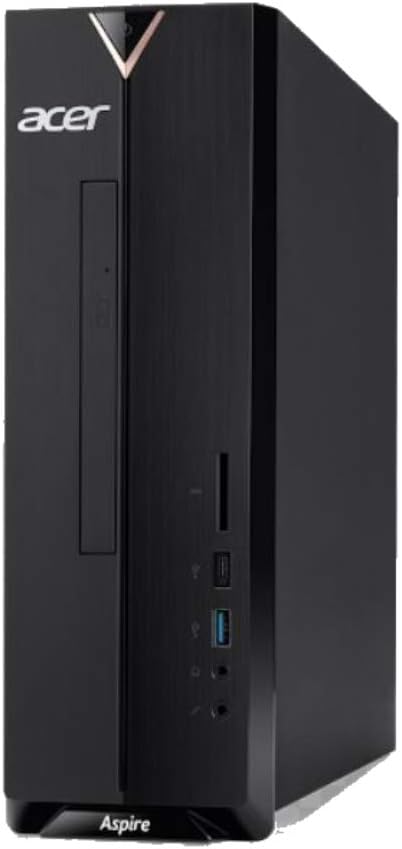
Εικόνα 2: Δεξιά πλευρά view of the Acer Aspire XC-886 desktop PC, illustrating the compact tower form factor and side panel design.
2. Ενεργοποίηση
Press the power button located on the top front of the desktop to turn on the system. The power indicator light will illuminate.
3. Initial Operating System Setup
Κατά την πρώτη εκκίνηση, θα σας καθοδηγήσει στη διαδικασία εγκατάστασης των Windows 10 Home. Ακολουθήστε τις οδηγίες στην οθόνη για να διαμορφώσετε τη γλώσσα, την περιοχή, τις ρυθμίσεις δικτύου και τον λογαριασμό χρήστη.
Οδηγίες Λειτουργίας
This section covers basic operation of your desktop PC.
Ενεργοποίηση/απενεργοποίηση και επανεκκίνηση
- Για ενεργοποίηση: Πατήστε το κουμπί λειτουργίας στον μπροστινό πίνακα.
- Για να κλείσετε: Κάντε κλικ στο κουμπί Έναρξη στα Windows και, στη συνέχεια, επιλέξτε Παροχή ενέργειας > Τερματισμός λειτουργίας.
- Για να επανεκκινήσεις: Κάντε κλικ στο κουμπί Έναρξη στα Windows και, στη συνέχεια, επιλέξτε Παροχή ενέργειας > Επανεκκίνηση.
- Για να κοιμηθείτε: Κάντε κλικ στο κουμπί Έναρξη στα Windows και, στη συνέχεια, επιλέξτε Παροχή ενέργειας > Αναστολή λειτουργίας.
Using the DVD Writer
The integrated DVD writer allows you to read and write CDs and DVDs. Press the eject button on the drive to open the tray, place your disc, and gently push the tray back in.
Σύνδεση στο Διαδίκτυο
- Ενσύρματη σύνδεση: Connect an Ethernet cable from your router or modem to the LAN port on the rear of the desktop.
- Ασύρματη σύνδεση: Windows 10 will automatically detect available Wi-Fi networks. Click the network icon in the taskbar, select your desired network, and enter the password if prompted.
Using USB Ports and Card Reader
Connect USB devices such as flash drives, external hard drives, or printers to any available USB port. The integrated card reader on the front panel supports various memory card formats for easy data transfer.
Συντήρηση
Proper maintenance helps ensure the longevity and optimal performance of your desktop PC.
- Διατηρήστε το καθαρό: Regularly clean the exterior of the desktop with a soft, dry cloth. Ensure ventilation openings are free from dust and obstructions to prevent overheating.
- Ενημερώσεις λογισμικού: Keep your Windows operating system and drivers updated. Windows Update can be accessed via Settings > Update & Security.
- Προστασία από ιούς: Utilize the included McAfee Internet Security to protect your system from malware and viruses. Ensure its definitions are regularly updated.
- Δημιουργία αντιγράφων ασφαλείας δεδομένων: Δημιουργείτε τακτικά αντίγραφα ασφαλείας των σημαντικών δεδομένων σας σε εξωτερικό δίσκο ή σε χώρο αποθήκευσης στο cloud για να αποτρέψετε την απώλεια δεδομένων.
- Περιβαλλοντικές Συνθήκες: Operate the desktop in a well-ventilated area, away from direct sunlight, heat sources, and excessive moisture.
Αντιμετώπιση προβλημάτων
If you encounter issues with your desktop, try these basic troubleshooting steps.
- Χωρίς ισχύ:
- Ensure the power cord is securely connected to both the desktop and the power outlet.
- Βεβαιωθείτε ότι η πρίζα λειτουργεί συνδέοντας μια άλλη συσκευή.
- Χωρίς εμφάνιση:
- Check that the monitor is powered on and its video cable is securely connected to the desktop.
- Βεβαιωθείτε ότι έχει επιλεγεί η σωστή πηγή εισόδου στην οθόνη σας.
- Το πληκτρολόγιο/το ποντίκι δεν ανταποκρίνεται:
- For wireless devices, check battery levels and ensure the wireless receiver is properly inserted into a USB port.
- Δοκιμάστε να συνδέσετε τον δέκτη σε διαφορετική θύρα USB.
- Δεν υπάρχει σύνδεση στο διαδίκτυο:
- Για ενσύρματες συνδέσεις, ελέγξτε το καλώδιο Ethernet και την κατάσταση του δρομολογητή/μόντεμ.
- For wireless connections, ensure Wi-Fi is enabled in Windows and you are connected to the correct network with the correct password.
- Restart your router/modem and the desktop.
- Επιβράδυνση συστήματος:
- Κλείστε τις περιττές εφαρμογές.
- Εκτελέστε μια πλήρη σάρωση συστήματος με το λογισμικό προστασίας από ιούς που χρησιμοποιείτε.
- Ελέγξτε και εγκαταστήστε τυχόν εκκρεμείς ενημερώσεις των Windows.
If these steps do not resolve your issue, please refer to the Acer support webιστότοπο ή επικοινωνήστε με την εξυπηρέτηση πελατών.
Προδιαγραφές
Detailed technical specifications for the Acer Aspire XC-886 desktop PC.
| Χαρακτηριστικό | Λεπτομέρεια |
|---|---|
| Αριθμός μοντέλου | i594MR81TS73 |
| Επεξεργαστής | 9th Gen Intel Core i5-9400 (up to 4.1GHz, 9MB cache) |
| Λειτουργικό σύστημα | Windows 10 Home (64-bit) |
| ΕΜΒΟΛΟ | 8 GB DDR4 RAM |
| Αποθήκευση | 1TB PCIe NVMe SSD |
| Γραφικά | NVIDIA GeForce GT 730, 2GB GDDR3 RAM |
| Μονάδα οπτικού δίσκου | DVD Writer |
| Ασύρματη Συνδεσιμότητα | Integrated AC Wireless LAN (802.11ac), Bluetooth |
| Front/Side I/O Ports |
|
| Πίσω θύρες I/O |
|
| Form Factor | Πύργος |
| Διαστάσεις (Πακέτο) | 49.8 x 40.8 x 17.4 εκ |
| Βάρος (Πακέτο) | 5.9 κιλά |
| Τομtage | 220 Volt |
Εγγύηση και υποστήριξη
Your Acer Aspire XC-886 desktop PC comes with a 1-year On-site Local Singapore WarrantyΑυτή η εγγύηση καλύπτει κατασκευαστικά ελαττώματα και βλάβες υλικού υπό κανονικές συνθήκες χρήσης.
For technical support, warranty claims, or service inquiries, please visit the official Acer support website or contact Acer customer service in Singapore. Keep your proof of purchase for warranty validation.
Υποστήριξη Acer Webτοποθεσία: https://www.acer.com/sg-en/support


