Εισαγωγή
Thank you for choosing the Tracer Roadster 4 in 1 Steering Wheel. This manual provides detailed instructions for setting up, operating, maintaining, and troubleshooting your new racing wheel. Please read this manual thoroughly before use to ensure optimal performance and longevity of your device.
The Tracer Roadster 4 in 1 Steering Wheel is designed for an immersive gaming experience, compatible with various platforms including PlayStation 4 and Windows PC. It features a responsive steering wheel, integrated shifter, and a pedal set for realistic control.
Περιεχόμενα συσκευασίας
- Tracer Roadster 4 in 1 Steering Wheel
- Σετ πεντάλ
- Εγχειρίδιο χρήστη (αυτό το έγγραφο)
Οδηγός εγκατάστασης
Connecting to PlayStation 4 (PS4)
- Connect the steering wheel's USB cable to an available USB port on your PS4 console.
- Power on your PS4 console. The red LED on the steering wheel will illuminate, indicating power.
- Connect the steering wheel to your PS4 controller using a microUSB cable (not included). This step is crucial for authentication.
- Πατήστε το ΣΠΙΤΙ button on the steering wheel. The green LED will illuminate, indicating successful connection and readiness for use.
Σύνδεση με υπολογιστή (Windows)
- Connect the steering wheel's USB cable to an available USB port on your Windows PC.
- The system should automatically detect and install the necessary drivers. If not, please refer to the manufacturer's webιστότοπος για λήψη προγραμμάτων οδήγησης.
- Once drivers are installed, the steering wheel will be ready for use with compatible PC racing games.

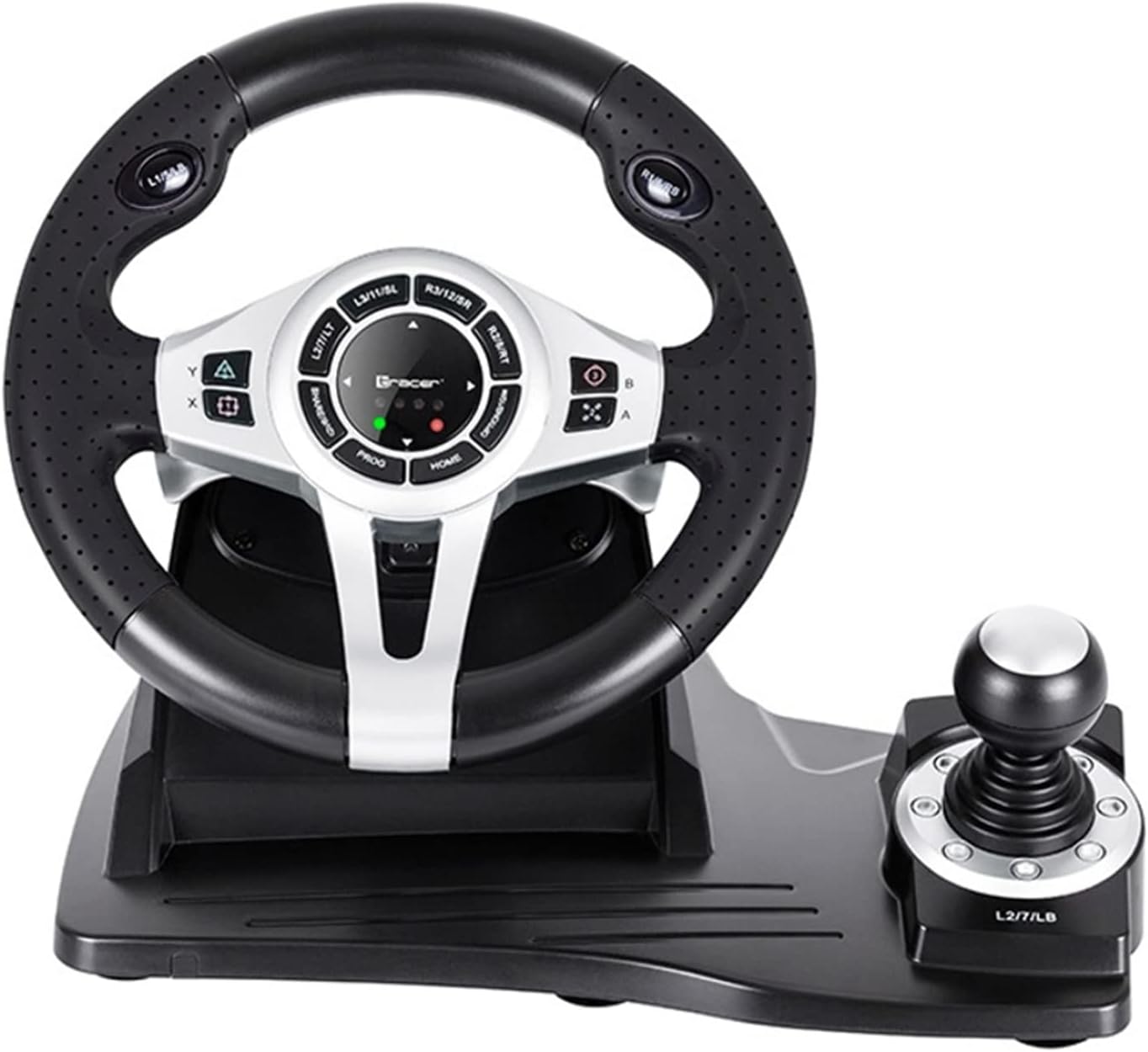
Figure 1: The Tracer Roadster 4 in 1 Steering Wheel, including the main wheel unit, integrated shifter, and separate pedal set. This image shows the complete setup ready for connection.
Οδηγίες Λειτουργίας
Χειριστήρια τιμονιού
The steering wheel features a full range of motion for precise control in racing games. It includes various buttons and a D-pad for in-game navigation and actions, mimicking a standard game controller layout.
- Κατευθυντικό pad (D-Pad): For menu navigation and specific in-game controls.
- Action Buttons (X, Circle, Square, Triangle / A, B, X, Y): Standard gaming action buttons.
- Κουμπιά L1/R1, L2/R2: Shoulder buttons, often used for shifting gears or other actions.
- Κουμπί HOME: PS4 system menu access.
- Κουμπί PROG: For programming specific functions (refer to game-specific instructions).
- Touchpad: Integrated touchpad for additional control options, especially on PS4.
Σχήμα 2: Λεπτομερής view of the central control panel on the steering wheel, showing the various buttons, D-pad, and indicator lights. The integrated shifter is visible to the right.
Σετ πεντάλ
The separate pedal set includes an accelerator and brake pedal for realistic driving simulation. Ensure the pedal set is placed on a stable surface to prevent slipping during intense gameplay.

Figure 3: The standalone pedal unit, featuring both accelerator and brake pedals. The textured base provides grip to prevent movement during use.
Συντήρηση και Φροντίδα
- Καθάρισμα: Use a soft, dry cloth to clean the surface of the steering wheel and pedals. For stubborn dirt, a slightly damp Μπορείτε να χρησιμοποιήσετε πανί, αλλά βεβαιωθείτε ότι δεν εισέρχεται υγρασία στα εσωτερικά εξαρτήματα.
- Αποθήκευση: Όταν δεν χρησιμοποιείται, αποθηκεύστε τη συσκευή σε δροσερό, ξηρό μέρος μακριά από το άμεσο ηλιακό φως και ακραίες θερμοκρασίες.
- Αποφύγετε τα υγρά: Μην εκθέτετε τη συσκευή σε νερό ή άλλα υγρά.
- Χειριστείτε με προσοχή: Αποφύγετε την πτώση ή την έκθεση της συσκευής σε ισχυρές κρούσεις.
Αντιμετώπιση προβλημάτων
| Πρόβλημα | Πιθανή αιτία | Διάλυμα |
|---|---|---|
| Steering wheel not recognized by PS4. | Incorrect connection or authentication issue. | Ensure the steering wheel's USB cable is securely connected to the PS4. Verify the microUSB cable connection between the steering wheel and the PS4 controller. Press the ΣΠΙΤΙ κουμπί στο τιμόνι. |
| No response from steering wheel on PC. | Drivers not installed or USB port issue. | Try a different USB port. Check Device Manager for driver status. Reinstall drivers if necessary from the manufacturer's webτοποθεσία. |
| Οι ενδεικτικές λυχνίες LED δεν ανάβουν. | Κανένα πρόβλημα τροφοδοσίας ή σύνδεσης. | Ensure the USB cable is firmly connected to the console/PC. Check if the console/PC is powered on. |
| Τα πεντάλ δεν ανταποκρίνονται. | Loose connection to the steering wheel. | Verify that the pedal unit's cable is securely plugged into the steering wheel base. |
Προδιαγραφές
| Χαρακτηριστικό | Λεπτομέρεια |
|---|---|
| Μάρκα | Ιχνηλάτης |
| Όνομα μοντέλου | Roadster 4 in 1 |
| Αριθμός μοντέλου | TRAJOY46524 |
| Τεχνολογία Συνδεσιμότητας | USB |
| Συμβατές Συσκευές | PlayStation 4, Windows PC |
| Τύπος ελεγκτή | Τιμόνι |
| Χρώμα | Μαύρος |
| Ειδικό χαρακτηριστικό | Touchpad |
| Αριθμός κουμπιών | 8 (excluding D-pad and shifter controls) |
| Βάρος αντικειμένου | 2 κιλά |
| Διαστάσεις προϊόντος (Μ x Π x Υ) | 2.8 x 24.6 x 16.5 εκ |
Εγγύηση και υποστήριξη
For warranty information and technical support, please refer to the official Tracer webιστότοπο ή επικοινωνήστε με τον αντιπρόσωπό σας. Κρατήστε την απόδειξη αγοράς για τυχόν αξιώσεις εγγύησης.
Για περαιτέρω βοήθεια, μπορείτε να επισκεφθείτε την σελίδα προϊόντος στο Amazon.com.be.


