1. Εισαγωγή
This manual provides detailed instructions for the setup, operation, and maintenance of your Tera Wireless Barcode Scanner, Model 8541733886. Please read this manual thoroughly before using the device to ensure proper functionality and to prevent damage.
The Tera Wireless Barcode Scanner offers versatile connectivity and efficient scanning capabilities for various barcode types, both printed and digital.
2. Το προϊόν τελείωσεview
2.1 Εξαρτήματα
Το πακέτο περιλαμβάνει συνήθως:
- Tera Wireless Barcode Scanner
- Hands-Free Stand
- Ασύρματο USB Dongle 2.4 GHz
- Καλώδιο φόρτισης/δεδομένων USB
- Εγχειρίδιο οδηγιών (αυτό το έγγραφο)

Image: Tera Wireless Barcode Scanner, showing the scanner unit, flexible stand, 2.4GHz USB dongle, and USB cable.
2.2 Βασικά χαρακτηριστικά
- 3 τρόποι σύνδεσης: Supports Bluetooth, 2.4GHz wireless, and USB 2.0 wired connections.
- Ευρεία συμβατότητα: Works with POS systems, iOS, Android, Windows, Mac OS, and Linux. Supports Bluetooth HID, SPP, and BLE protocols.
- Γρήγορη και ακριβής σάρωση: Equipped with an ARM32Bit Cortex CPU and a Japan-manufactured scanner head, achieving decoding speeds up to 500 scans per second.
- Dual Upload Modes:
- Λειτουργία άμεσης μεταφόρτωσης: Barcodes are transmitted to your device immediately upon scanning.
- Λειτουργία αποθήκευσης εκτός σύνδεσης: Stores up to 50,000 barcodes internally when out of range, allowing for later upload.
- Multi-Language Barcode Support: Capable of scanning barcodes in English, Spanish, German, French, Italian, and Japanese. Ensure your keyboard language matches the selected language for correct input.
- Versatile Barcode Symbologies:
- 1D: UPC-A, UPC-E, EAN-8, EAN-13, Code 128, Code 39, Code 93, Code 11, Interleaved 2 of 5, Matrix 2 of 5, Standard 2 of 5, Coda bar, MSI Plessey, RSS, etc.
- 2D: QR Code, Data Matrix, PDF417, Aztec code, Maxicode, etc.
- Αντοχή: Designed to withstand impacts from drops of up to 1.5 meters (5 feet) onto concrete.
- Μεγάλη διάρκεια ζωής μπαταρίας: Built-in 2200mAh battery supports approximately 57,000 scans on a full charge, with up to 15 days of standby time.
3. Ρύθμιση
3.1 Φόρτιση του σαρωτή
Before first use, fully charge the scanner. Connect the USB charging cable to the scanner's charging port and to a USB power source (e.g., computer USB port, USB wall adapter). The indicator light will show charging status.

Image: Illustration showing the scanner's 2200mAh battery capacity and its ability to withstand a 1.5-meter drop.
3.2 Τρόποι σύνδεσης
Ο σαρωτής υποστηρίζει τρεις μεθόδους σύνδεσης:

Image: Visual representation of the three connection modes: Bluetooth, 2.4G Wireless via USB dongle, and USB Wired connection.
3.2.1 USB Wired Mode (Plug & Play)
- Συνδέστε τον σαρωτή απευθείας στον υπολογιστή σας χρησιμοποιώντας το παρεχόμενο καλώδιο USB.
- The computer will typically recognize the device automatically without requiring driver installation.
- Ο σαρωτής είναι έτοιμος για χρήση.

Image: The scanner connected to a laptop, illustrating its plug-and-play functionality and compatibility with various operating systems including Windows, Mac OS, Linux, and Android.
3.2.2 Ασύρματη λειτουργία 2.4GHz
- Insert the 2.4GHz USB dongle into an available USB port on your computer or device.
- Ενεργοποιήστε τον σαρωτή γραμμωτού κώδικα. Θα πρέπει να συζευχθεί αυτόματα με το dongle.
- A successful connection is usually indicated by a specific sound or light on the scanner.
3.2.3 Λειτουργία Bluetooth
- Ensure your device (smartphone, tablet, computer) has Bluetooth enabled.
- Put the scanner into Bluetooth pairing mode (refer to the scanner's quick start guide for specific instructions, usually by scanning a special barcode).
- On your device, search for available Bluetooth devices and select "Tera Barcode Scanner" (or similar name).
- Επιβεβαιώστε τη σύζευξη εάν σας ζητηθεί.
Σημείωμα: Wireless range varies. Indoors with obstacles, Bluetooth range is approximately 33ft, and 2.4GHz wireless is approximately 98ft. Outdoors in barrier-free environments, Bluetooth range is approximately 65ft, and 2.4GHz wireless is approximately 328ft.
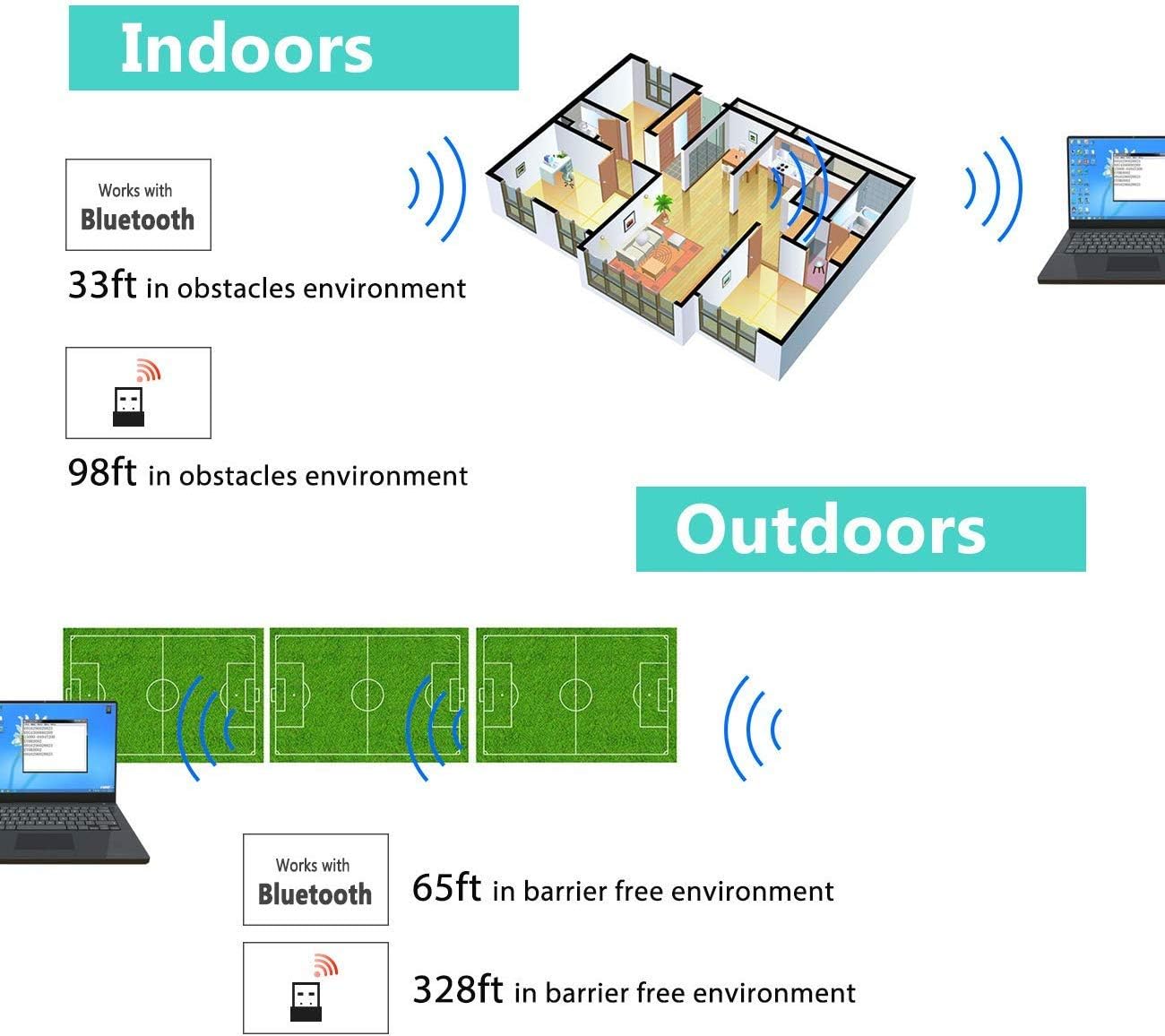
Image: Diagram illustrating the effective wireless range of the scanner in both indoor (with obstacles) and outdoor (barrier-free) environments for Bluetooth and 2.4GHz connections.
4. Οδηγίες λειτουργίας
4.1 Σάρωση γραμμωτών κωδίκων
The scanner can read both 1D and 2D barcodes, including QR codes, from printed materials and digital screens.
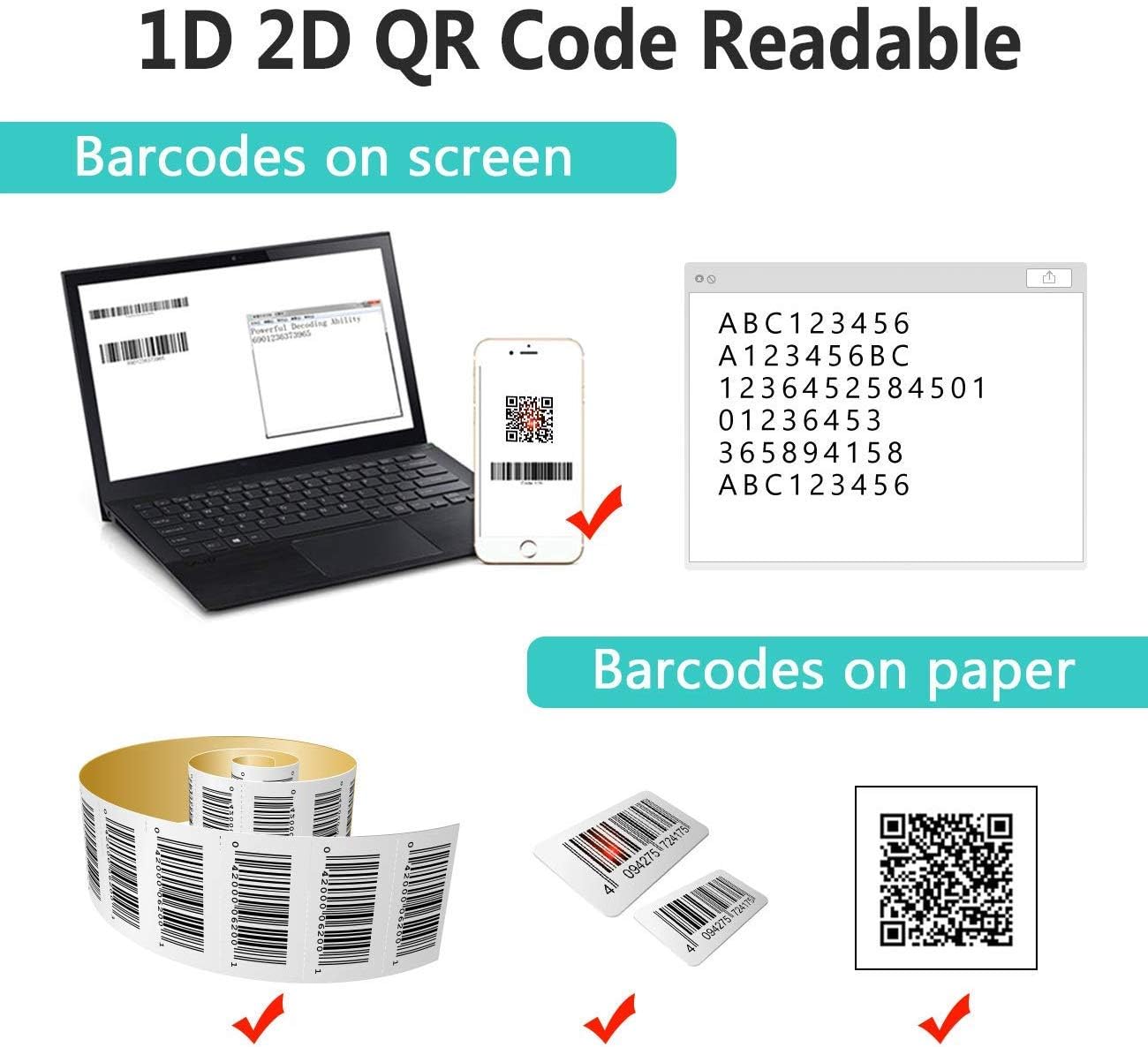
Image: The scanner demonstrating its ability to read 1D and 2D barcodes from both digital screens (laptop, smartphone) and physical printed labels.
Για να σαρώσετε έναν γραμμωτό κώδικα:
- Point the scanner's window at the barcode.
- Press the trigger button (or allow the sensor to activate in automatic modes).
- A successful scan is indicated by a beep and/or a green light.
4.2 Λειτουργίες σάρωσης
Ο σαρωτής υποστηρίζει τρεις κύριες λειτουργίες σάρωσης:

Image: The barcode scanner mounted on its stand, highlighting its 360-degree rotation capability and the three available scanning modes: Key Trigger Mode, Sensor Activated Mode, and Continuous Scan Mode.
- Λειτουργία ενεργοποίησης κλειδιού: Scan by manually pressing the trigger button for each barcode.
- Sensor Activated Mode: The scanner automatically activates when a barcode is detected in its field of view.
- Λειτουργία συνεχούς σάρωσης: The scanner continuously emits a scan beam, reading any barcode that passes through it.
Refer to the quick start guide or programming barcodes for instructions on how to switch between these modes.
4.3 Λειτουργίες μεταφόρτωσης δεδομένων
The scanner offers two methods for uploading scanned data:
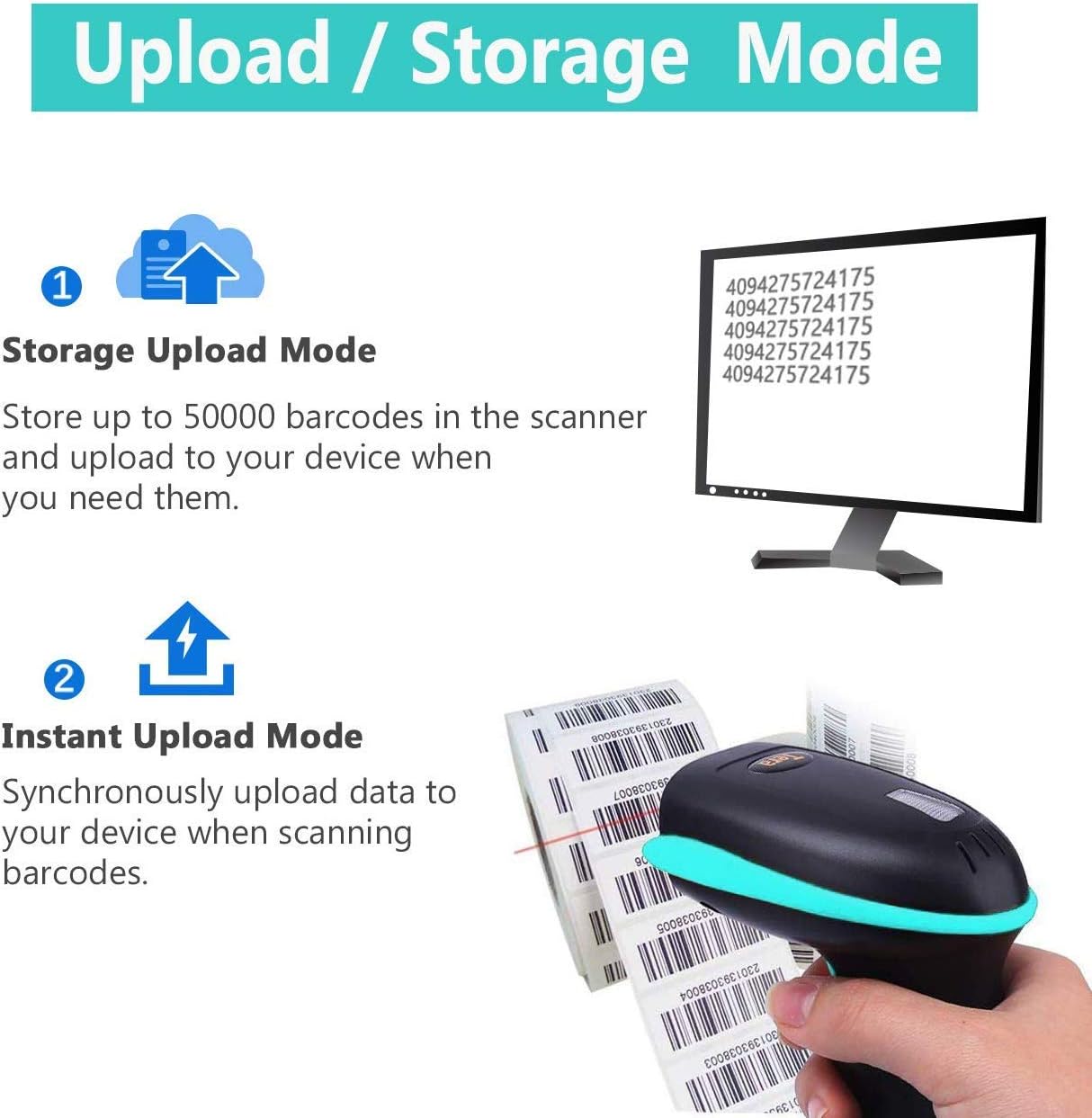
Image: Illustration of the two data upload modes: Storage Upload Mode, where barcodes are stored internally and uploaded later, and Instant Upload Mode, where data is transmitted immediately.
- Λειτουργία άμεσης μεταφόρτωσης: Barcodes are sent to your connected device immediately after scanning. This is suitable for real-time data entry.
- Λειτουργία αποθήκευσης εκτός σύνδεσης: If the scanner is out of range or not connected, it will store scanned barcodes internally. Up to 50,000 barcodes can be stored. Once reconnected, you can upload the stored data to your device.
To switch between upload modes, scan the appropriate programming barcode found in the quick start guide.
5. Συντήρηση
5.1 Καθαρισμός
- Χρησιμοποιήστε ένα μαλακό, καθαρό πανί ελαφρώςampened with water or a mild cleaning solution to wipe the scanner's exterior.
- Do not use abrasive cleaners, solvents, or excessive liquid, as these can damage the device.
- Keep the scanning window clean and free of dust or smudges to ensure optimal reading performance.
5.2 Φροντίδα μπαταρίας
- Φορτίζετε τον σαρωτή τακτικά, ειδικά εάν πρόκειται να αποθηκευτεί για μεγάλο χρονικό διάστημα.
- Αποφύγετε την συχνή πλήρη αποφόρτιση της μπαταρίας, καθώς αυτό μπορεί να μειώσει τη διάρκεια ζωής της.
- Αποθηκεύστε τον σαρωτή σε δροσερό και ξηρό μέρος όταν δεν τον χρησιμοποιείτε.
5.3 Αποθήκευση
When not in use, store the scanner in a safe place to prevent physical damage. The included stand can be used for convenient storage and hands-free operation.
6. Αντιμετώπιση Προβλημάτων
| Πρόβλημα | Πιθανή αιτία | Διάλυμα |
|---|---|---|
| Ο σαρωτής δεν ενεργοποιείται. | Χαμηλή μπαταρία. | Φορτίστε τον σαρωτή για τουλάχιστον 2-3 ώρες. |
| Ο σαρωτής δεν διαβάζει γραμμωτούς κώδικες. |
|
|
| No data transmitted to device. |
|
|
| Scanner beeps continuously or behaves erratically. | Configuration error or internal issue. | Perform a factory reset (refer to the quick start guide for the reset barcode). If the issue persists, contact support. |
7. Προδιαγραφές
- Αριθμός μοντέλου: 8541733886
- Διαστάσεις προϊόντος: 6.1 x 2.55 x 3.54 ίντσες
- Βάρος αντικειμένου: 1.05 λίρες
- Μπαταρία: 1 μπαταρία ιόντων λιθίου (2200mAh)
- Συνδεσιμότητα: Bluetooth, 2.4GHz Wireless, USB 2.0 Wired
- Συμβατές συσκευές: Desktop, Laptop, Smartphone (POS, iOS, Android, Windows, Mac OS, Linux)
- Πηγή ενέργειας: Ηλεκτρικό με καλώδιο (για φόρτιση)
- Κατασκευαστής: Tera
- Πρώτο διαθέσιμο: 7 Μαΐου 2019
8. Εγγύηση και υποστήριξη
8.1 Πληροφορίες εγγύησης
For specific warranty details, please refer to the warranty card included with your product or visit the official Tera webτοποθεσία. Κρατήστε την απόδειξη αγοράς σας ως απόδειξη αγοράς για αξιώσεις εγγύησης.
8.2 Υποστήριξη πελατών
If you encounter any issues not covered in this manual or require further assistance, please contact Tera customer support. Contact information can typically be found on the product packaging, the official Tera webστον ιστότοπο ή μέσω του λιανοπωλητή σας.
Όταν επικοινωνείτε με την υποστήριξη, παρακαλούμε να έχετε πρόχειρα τον αριθμό μοντέλου του προϊόντος σας (8541733886) και τα στοιχεία αγοράς.


Image: Illustrations representing customer service and technical support teams available to assist users.


