1. Εισαγωγή
This manual provides essential instructions for the installation, operation, and maintenance of your FSP iFP600 Uninterruptible Power Supply (UPS). Please read this manual thoroughly before installing or operating the unit to ensure proper function and safety. The FSP iFP600 is designed to provide reliable power backup and surge protection for your electronic devices.

Εικόνα 1.1: Εμπρός view of the FSP iFP600 UPS, showcasing its compact design and integrated LCD display.
2. Οδηγίες ασφαλείας
Please adhere to these important safety guidelines during installation, operation, and maintenance of the UPS:
- Μην ανοίγετε το UPS casinζ. Δεν υπάρχουν εξαρτήματα που μπορούν να επισκευαστούν από τον χρήστη στο εσωτερικό. Ανατρέξτε σε εξειδικευμένο προσωπικό σέρβις για όλες τις εργασίες σέρβις.
- Do not connect appliances that could overload the UPS, such as laser printers, vacuum cleaners, or heaters.
- Βεβαιωθείτε ότι το UPS είναι συνδεδεμένο σε γειωμένη πρίζα εναλλασσόμενου ρεύματος.
- Avoid placing the UPS in direct sunlight, near heat sources, or in environments with excessive dust, humidity, or corrosive substances.
- Position the UPS in a well-ventilated area to prevent overheating.
- In case of fire, use a dry chemical extinguisher. Water can be hazardous.
- Η μπαταρία στο εσωτερικό του UPS δεν αντικαθίσταται από τον χρήστη. Η αντικατάσταση της μπαταρίας πρέπει να πραγματοποιείται μόνο από εξειδικευμένο προσωπικό.
3. Το προϊόν τελείωσεview
The FSP iFP600 UPS provides reliable power protection for your critical electronics. It features a compact design and an intuitive LCD display for monitoring status.
3.1 Περιεχόμενα συσκευασίας
Μόλις ανοίξετε τη συσκευασία, βεβαιωθείτε ότι όλα τα εξαρτήματα υπάρχουν και δεν έχουν υποστεί ζημιά:
- FSP iFP600 UPS Unit
- Εγχειρίδιο χρήστη (αυτό το έγγραφο)
- Καλώδιο ρεύματος
- Καλώδιο επικοινωνίας USB
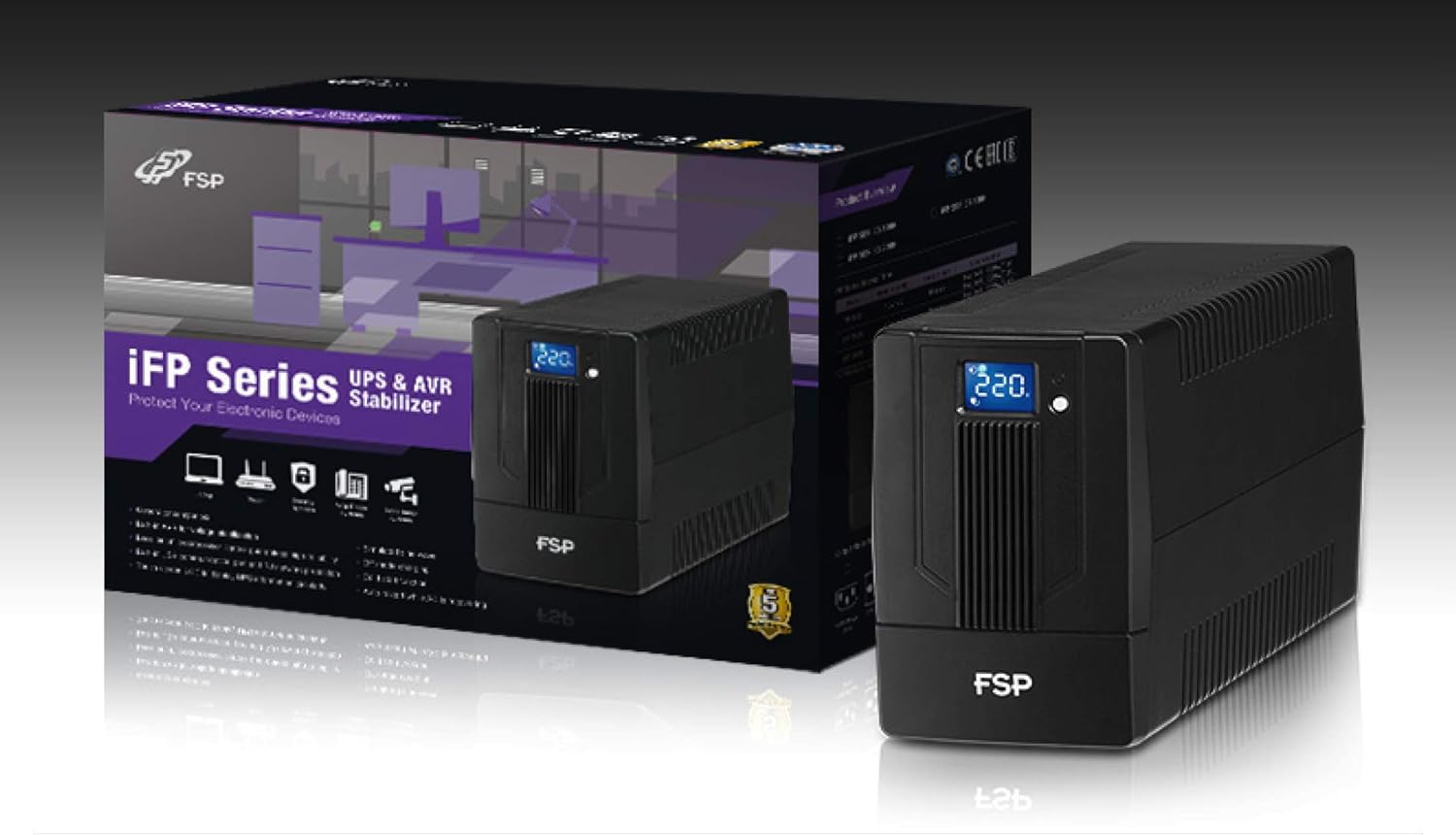
Image 3.1: The FSP iFP600 UPS shown alongside its retail packaging, illustrating the product's presentation.
3.2 Στοιχεία πίσω πάνελ
Familiarize yourself with the connections on the rear panel of the UPS:

Εικόνα 3.2: Λεπτομερής view of the FSP iFP600 UPS rear panel, highlighting connection points.
- Καταστήματα: Two SCHUKO type outlets for connecting protected equipment.
- Είσοδος AC: Connects the UPS to the main utility power.
- Fuse/Breaker: Overcurrent protection for the UPS.
- Επικοινωνία USB: Port for connecting to a computer for monitoring and management.
- Combo RJ11/RJ45 Surge Protection: Provides surge protection for telephone/network lines.
4. Ρύθμιση και εγκατάσταση
Follow these steps to set up your FSP iFP600 UPS:
- Αποσυσκευασία: Αφαιρέστε προσεκτικά το UPS από τη συσκευασία του. Ελέγξτε για τυχόν ζημιές κατά τη μεταφορά.
- Τοποθέτηση: Place the UPS on a flat, stable surface in a clean, cool, and well-ventilated area. Ensure adequate clearance around the unit for airflow.
- Αρχική φόρτιση: Connect the UPS to a standard grounded AC outlet using the provided power cord. Allow the unit to charge for at least 4-6 hours before initial use to ensure optimal battery performance. The UPS will charge whether it is turned on or off.
- Εξοπλισμός σύνδεσης: Plug your computer, monitor, and other critical electronic devices into the UPS outlets (A). Do not connect surge suppressors or power strips to the UPS outlets.
- Επικοινωνία USB (Προαιρετική): Connect the USB cable from the UPS USB port (D) to your computer's USB port to enable power management software features (software not included, typically downloaded from manufacturer's webιστοσελίδα).
- RJ11/RJ45 Protection (Optional): For surge protection of your telephone or network line, connect the incoming line to the 'IN' port of the Combo RJ11/RJ45 (E) and connect the 'OUT' port to your device.
5. Οδηγίες λειτουργίας
5.1 Ενεργοποίηση/Απενεργοποίηση
- Για ενεργοποίηση: Πατήστε παρατεταμένα το κουμπί λειτουργίας στην μπροστινή πλευρά για περίπου 2 δευτερόλεπτα μέχρι να ακούσετε ένα ηχητικό σήμα και να ανάψει η οθόνη LCD.
- Για απενεργοποίηση: Press and hold the power button for approximately 2 seconds until you hear a beep and the LCD display turns off.
5.2 Πληροφορίες οθόνης LCD
The FSP iFP600 features an LCD display that provides real-time status information. The display is touch-sensitive for navigating information.

Image 5.1: The LCD display of the FSP iFP600 UPS, indicating voltage output and its touch-screen functionality.
Η οθόνη LCD συνήθως εμφανίζει:
- Είσοδος Voltage
- Έξοδος Τόμοςtage
- Επίπεδο φόρτισης μπαταρίας
- Επίπεδο Φορτίου
- Operating Mode (e.g., AC mode, Battery mode)
- Warning/Fault Indicators
5.3 Battery Mode Operation
When the utility power fails or fluctuates outside acceptable limits, the UPS will automatically switch to battery mode. During battery mode, the UPS will provide power to connected equipment from its internal battery. An audible alarm will sound to indicate battery operation.
6. Συντήρηση
Proper maintenance ensures the longevity and reliability of your UPS.
- Καθάρισμα: Χρησιμοποιήστε ένα μαλακό, στεγνό πανί για να καθαρίσετε το εξωτερικό του UPS. Μην χρησιμοποιείτε υγρά καθαριστικά ή αεροζόλ.
- Φροντίδα μπαταρίας: To maximize battery life, ensure the UPS is connected to AC power and fully charged. If the UPS is stored for an extended period, recharge it every three months to prevent battery degradation.
- Αντικατάσταση μπαταρίας: The internal battery (12V / 7Ah x1) is not user-serviceable. Battery replacement should only be performed by FSP-certified service personnel or a qualified technician. Incorrect battery replacement can pose a risk of explosion or injury.
- Αποθήκευση: Store the UPS in a cool, dry place with adequate ventilation. Ensure the battery is fully charged before storage.
7. Αντιμετώπιση Προβλημάτων
Refer to the following table for common issues and their solutions. If the problem persists, contact FSP support.
| Σύμπτωμα | Ηχητικός συναγερμός | Πιθανή αιτία | Διάλυμα |
|---|---|---|---|
| UPS operating on battery power | Μπιπ κάθε 10 δευτερόλεπτα | Utility power failure or fluctuation | Save work and shut down equipment if power outage is prolonged. UPS will return to AC mode when power is restored. |
| Προειδοποίηση χαμηλής μπαταρίας | Ηχεί κάθε δευτερόλεπτο | Η φόρτιση της μπαταρίας είναι εξαιρετικά χαμηλή | Immediately save work and shut down connected equipment. |
| Κατάσταση υπερφόρτωσης | Ηχεί κάθε 0.5 δευτερόλεπτο | Ο συνδεδεμένος εξοπλισμός υπερβαίνει τη χωρητικότητα του UPS | Disconnect non-essential equipment until the alarm stops. Ensure total load is within UPS capacity. |
| Σφάλμα UPS | Συνεχώς μπιπ | Εσωτερικό σφάλμα ή δυσλειτουργία | Turn off the UPS and disconnect it from the AC outlet. Contact FSP technical support. |
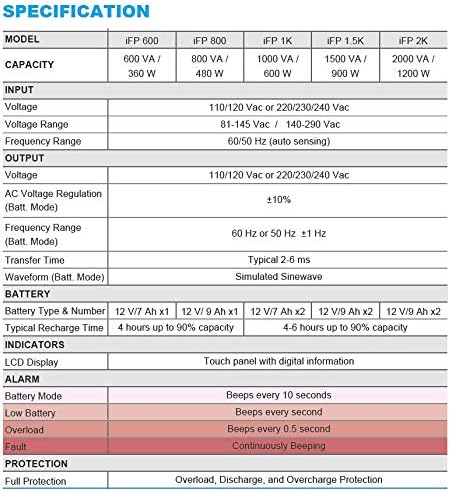
Image 7.1: Excerpt from the FSP iFP series specification table, detailing alarm indicators and their meanings.
8. Προδιαγραφές
Detailed technical specifications for the FSP iFP600 UPS:
| Χαρακτηριστικό | Προσδιορισμός |
|---|---|
| Μοντέλο | iFP 600 |
| Ικανότητα | 600 VA / 360 W |
| Είσοδος Voltage | 110/120 Vac or 220/230/240 Vac |
| Είσοδος Voltagε Εύρος | 81-145 Vac / 140-290 Vac |
| Εύρος συχνότητας εισόδου | 60/50 Hz (αυτόματη ανίχνευση) |
| Έξοδος Τόμοςtage | 110/120 Vac or 220/230/240 Vac |
| AC Voltage Κανονισμός (Λειτουργία Batt.) | ±10% |
| Output Frequency Range (Batt. Mode) | 60 Hz or 50 Hz ±1 Hz |
| Χρόνος Μεταφοράς | Τυπικό 2-6 ms |
| Κυματομορφή (Λειτουργία Batt.) | Προσομοίωση Sinwave |
| Τύπος & αριθμός μπαταρίας | 12V / 7Ah x1 |
| Τυπικός χρόνος επαναφόρτισης | 4 ώρες έως 90% χωρητικότητα |
| δείκτες | LCD Display (Touch panel with digital information) |
| Προστασία | Overload, Discharge, and Overcharge Protection |
| Βάρος αντικειμένου | 9.24 λίβρες (4.2 κιλά) |
| Διαστάσεις προϊόντος (ΜxΠxΥ) | 11.81 x 3.98 x 5.59 ίντσες |
| Χρώμα | Μαύρος |
| Υλικό | Μέταλλο |
9. Εγγύηση και υποστήριξη
FSP products are designed for reliability and performance. For warranty information, please refer to the warranty card included with your product or visit the official FSP website. For technical support, troubleshooting assistance, or service inquiries, please contact FSP customer service through their official channels.
Μπορείτε να βρείτε περισσότερες πληροφορίες και πόρους υποστήριξης στο FSP Store on Amazon.


