Εισαγωγή
This manual provides essential information for the safe and efficient operation of your Pioneer VSX-834 7.2-Channel AV Receiver. Please read these instructions thoroughly before use and retain them for future reference.
Πληροφορίες Ασφάλειας
ΠΡΟΕΙΔΟΠΟΙΗΣΗ: Αυτό το προϊόν μπορεί να σας εκθέσει σε χημικές ουσίες συμπεριλαμβανομένου του Μόλυβδου, ο οποίος είναι γνωστό στην Πολιτεία της Καλιφόρνια ότι προκαλεί καρκίνο και γενετικές ανωμαλίες ή άλλη αναπαραγωγική βλάβη. Για περισσότερες πληροφορίες μεταβείτε στο www.P65Warnings.ca.gov.
- Μην εκθέτετε τη συσκευή σε βροχή ή υγρασία.
- Μην φράζετε τα ανοίγματα εξαερισμού. Εγκαταστήστε σύμφωνα με τις οδηγίες του κατασκευαστή.
- Μην τοποθετείτε κοντά σε πηγές θερμότητας, όπως καλοριφέρ, θερμαντικά σώματα, σόμπες ή άλλες συσκευές (συμπεριλαμβανομένης ampσβηστήρες) που παράγουν θερμότητα.
- Χρησιμοποιείτε μόνο προσαρτήματα/αξεσουάρ που καθορίζονται από τον κατασκευαστή.
- Αναφέρετε όλα τα σέρβις σε εξειδικευμένο προσωπικό σέρβις.
Προϊόν Πάνωview
The Pioneer VSX-834 is a 7.2-channel AV receiver designed to deliver an immersive home theater experience. It supports the latest audio and video formats, offering versatile connectivity and advanced sound calibration features.
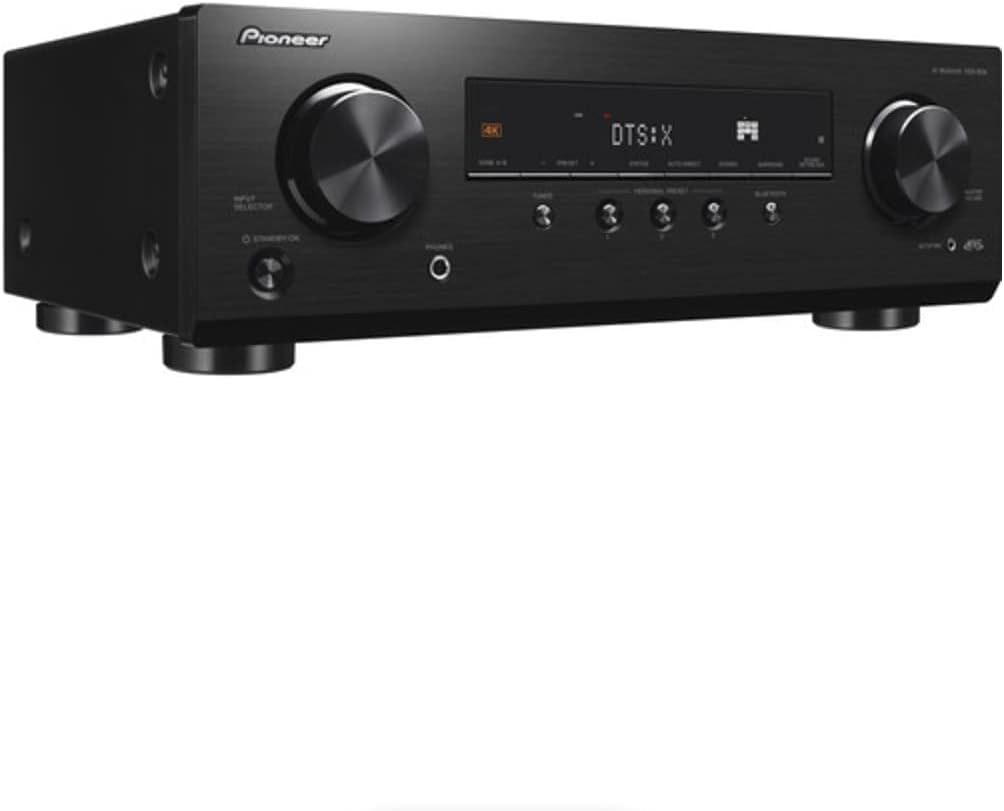
Εικόνα 1: Εμπρός view of the Pioneer VSX-834 AV Receiver.
Βασικά Χαρακτηριστικά
- 4K Video Support: Supports pass-through for HDR10, HLG (Hybrid Log-Gamma), and Dolby Vision signals. All HDMI terminals support 4K (60p/4:4:4/24-bit), wide color gamut (BT.2020), and HDCP 2.2.
- Immersive Audio: Compatible with Dolby Atmos and DTS:X audio formats, including Dolby Atmos Height Virtualizer and DTS Virtual:X for virtual surround effects without physical height or surround speakers.
- MCACC (Multi-Channel Acoustic Calibration System): Pioneer's proprietary system automatically compensates for differences in speaker size, level, and distance, and equalizes response for optimal acoustic environment.
- Zone B Audio Output: Expand main zone sound by connecting wireless headphones, allowing music playback in another room.
- Ενσωματωμένο Bluetooth: Stream audio wirelessly from compatible devices (Ver. 4.2 + LE) with A2DP/AVRCP profiles and SBC/AAC codecs.
- Προσωπική προεπιλογή: Save up to three preferred settings (volume, listening mode) for quick recall via the front panel button or remote control.
Ρύθμιση
1. Αποσυσκευασία
Carefully remove the AV Receiver and all accessories from the packaging. The box should contain the AC Receiver, remote control, setup microphone, and FM/AM antennas.
2. Συνδέσεις
Βεβαιωθείτε ότι ο δέκτης είναι απενεργοποιημένος και αποσυνδεδεμένος από την πρίζα πριν κάνετε οποιεσδήποτε συνδέσεις.

Figure 2: Rear panel connections for the Pioneer VSX-834 AV Receiver.
- Συνδέσεις HDMI: Connect your source devices (Blu-ray player, game console, streaming device) to the HDMI IN ports. Connect your TV or projector to the HDMI OUT port.
- Συνδέσεις ηχείων: Connect your speakers to the corresponding terminals on the rear panel. Pay attention to polarity (+/-) for each speaker. The receiver supports 5.1ch or 7.1/5.1.2ch configurations.
- Συνδέσεις κεραίας: Connect the supplied FM and AM antennas for radio reception.
- Εξουσία: Once all connections are made, plug the power cord into an AC outlet.
3. Initial Configuration (MCACC)
Use the supplied setup microphone and the MCACC system to automatically calibrate your speakers for optimal sound performance in your listening environment. Follow the on-screen instructions displayed on your connected TV.
Οδηγίες Λειτουργίας
1. Βασική Λειτουργία
- Ενεργοποίηση/Απενεργοποίηση: Πατήστε το STANDBY/ON κουμπί στον μπροστινό πίνακα ή στο τηλεχειριστήριο.
- Επιλογή εισαγωγής: Χρησιμοποιήστε το ΕΠΙΛΟΓΕΑΣ ΕΙΣΟΔΟΥ knob on the front panel or the input buttons on the remote control to choose your desired source (e.g., BD/DVD, GAME, CBL/SAT).
- Έλεγχος έντασης ήχου: Ρυθμίστε το ΜΕΓΑΛΟΣ ΟΓΚΟΣ κουμπί στον μπροστινό πίνακα ή στο ΤΟΜΟΣ +/- κουμπιά στο τηλεχειριστήριο.
2. Προηγμένες δυνατότητες
- Ροή Bluetooth: Πατήστε το BLUETOOTH button on the front panel to activate Bluetooth mode. Pair your device with the receiver to stream audio.
- Personal Presets: To save current settings, press and hold the PERSONAL PRESET button for three seconds. To recall, press the button briefly. Up to three presets can be stored.
- Ήχος Ζώνης Β: Connect wireless headphones to the Zone B audio output terminals to enjoy audio from the main zone in a separate location.
Συντήρηση
- Καθάρισμα: Σκουπίστε τη μονάδα με ένα μαλακό, στεγνό πανί. Μην χρησιμοποιείτε λειαντικά καθαριστικά ή διαλύτες.
- Αερισμός: Ensure adequate ventilation around the receiver to prevent overheating. Do not block any vents.
- Καλώδιο ρεύματος: Ελέγχετε τακτικά το καλώδιο τροφοδοσίας για τυχόν ζημιές.
Αντιμετώπιση προβλημάτων
- Χωρίς ισχύ: Ελέγξτε αν το καλώδιο τροφοδοσίας είναι καλά συνδεδεμένο και αν η πρίζα λειτουργεί.
- Χωρίς ήχο: Verify speaker connections, input selection, and volume level. Ensure the mute function is not active.
- Χωρίς βίντεο: Check HDMI cable connections between the source, receiver, and TV. Confirm correct input selection on both the receiver and TV.
- Ζητήματα σύνδεσης Bluetooth: Ensure the receiver is in Bluetooth mode and your device is in pairing mode. Check for interference from other wireless devices.
For more detailed troubleshooting, refer to the comprehensive online manual available on the Pioneer support webτοποθεσία.
Προδιαγραφές
| Διαστάσεις προϊόντος | 17.1 x 12.6 x 6.8 ίντσες |
| Βάρος αντικειμένου | 19 λίρες |
| Αριθμός μοντέλου | VSX834 |
| Τεχνολογία Συνδεσιμότητας | Bluetooth |
| Συνολικές θύρες HDMI | 5 |
| Κωδικοποίηση ήχου | DTS |
| Λειτουργία εξόδου ήχου | Περιβάλλω |
| Διαμόρφωση καναλιού ήχου surround | 7.2 Κανάλι |
| Κατασκευαστής | Πρωτοπόρος |
Εγγύηση και υποστήριξη
For warranty information and customer support, please visit the official Pioneer website or contact your local dealer. Keep your purchase receipt as proof of purchase for warranty claims.
Online resources and additional support can be found at: Υποστήριξη Pioneer


