Εισαγωγή
The Sharp Atomic Clock provides precise timekeeping and temperature monitoring for your home or office. Featuring a large, easy-to-read display, this clock automatically synchronizes with the atomic time signal (WWVB) broadcast from Fort Collins, Colorado, ensuring accuracy without manual adjustments. It also includes a wireless outdoor sensor to display both indoor and outdoor temperatures.
Χαρακτηριστικά προϊόντος
- Atomic Time Accuracy: Automatically synchronizes with the WWVB atomic time signal for precise timekeeping.
- Jumbo 3" Easy-to-Read Numbers: Large digital display for clear visibility of time, date, and temperature.
- Indoor/Outdoor Temperature Display: Monitors both indoor ambient temperature and outdoor temperature via a wireless sensor.
- Ασύρματος εξωτερικός αισθητήρας: Transmits outdoor temperature data to the main unit.
- Τροφοδοτείται από μπαταρία: Operates on batteries for flexible placement (batteries not included).
- Αυτόματη ρύθμιση θερινής ώρας (DST): Automatically adjusts for daylight saving time changes.
- Επιλέξιμες ζώνες ώρας: Allows selection of various US time zones.
- Μορφή 12/24 ωρών: Option to display time in either 12-hour or 24-hour format.
- Celsius/Fahrenheit Display: Εναλλαγή μεταξύ μονάδων θερμοκρασίας Κελσίου και Φαρενάιτ.
Περιεχόμενα συσκευασίας
Βεβαιωθείτε ότι όλα τα στοιχεία είναι παρόντα πριν προχωρήσετε στη ρύθμιση.
- Sharp Atomic Clock Main Unit
- Ασύρματος εξωτερικός αισθητήρας
- Εγχειρίδιο οδηγιών
Note: Batteries are not included. The main unit requires 2 AA batteries, and the outdoor sensor requires 2 AA batteries.
Ρύθμιση
1. Τοποθέτηση μπαταρίας
- Ανοίξτε τη θήκη των μπαταριών στο πίσω μέρος της κύριας μονάδας ρολογιού.
- Insert 2 AA batteries, observing the correct polarity (+ and -).
- Κλείστε το κάλυμμα της θήκης μπαταριών.
- Open the battery compartment on the wireless outdoor sensor.
- Insert 2 AA batteries into the outdoor sensor, observing the correct polarity.
- Close the outdoor sensor's battery compartment cover.
2. Initial Synchronization and Settings
After battery installation, the clock will attempt to receive the WWVB atomic time signal and connect to the outdoor sensor. This process may take several minutes or up to 24 hours depending on your location and environmental interference.
- Ζώνη ώρας: Press the "TIME ZONE" button (often labeled "UP TIME ZONE") on the back of the clock to cycle through available time zones (PST, MST, CST, EST). Select your desired time zone.
- Μορφή 12/24 ωρών: Press the "12/24" button to switch between 12-hour and 24-hour display.
- Κελσίου/Φαρενάιτ: Press the "°C/°F" button to toggle between Celsius and Fahrenheit temperature display.
- Outdoor Sensor Pairing: If the outdoor temperature does not appear, press the "CHANNEL" button on the main unit to search for the sensor signal. Ensure the outdoor sensor is within range and not obstructed.
For optimal signal reception, place the clock away from large metal objects, electronic devices, and areas with heavy concrete or brick walls. The outdoor sensor should be placed in a shaded, dry location, protected from direct sunlight and precipitation, for accurate readings.
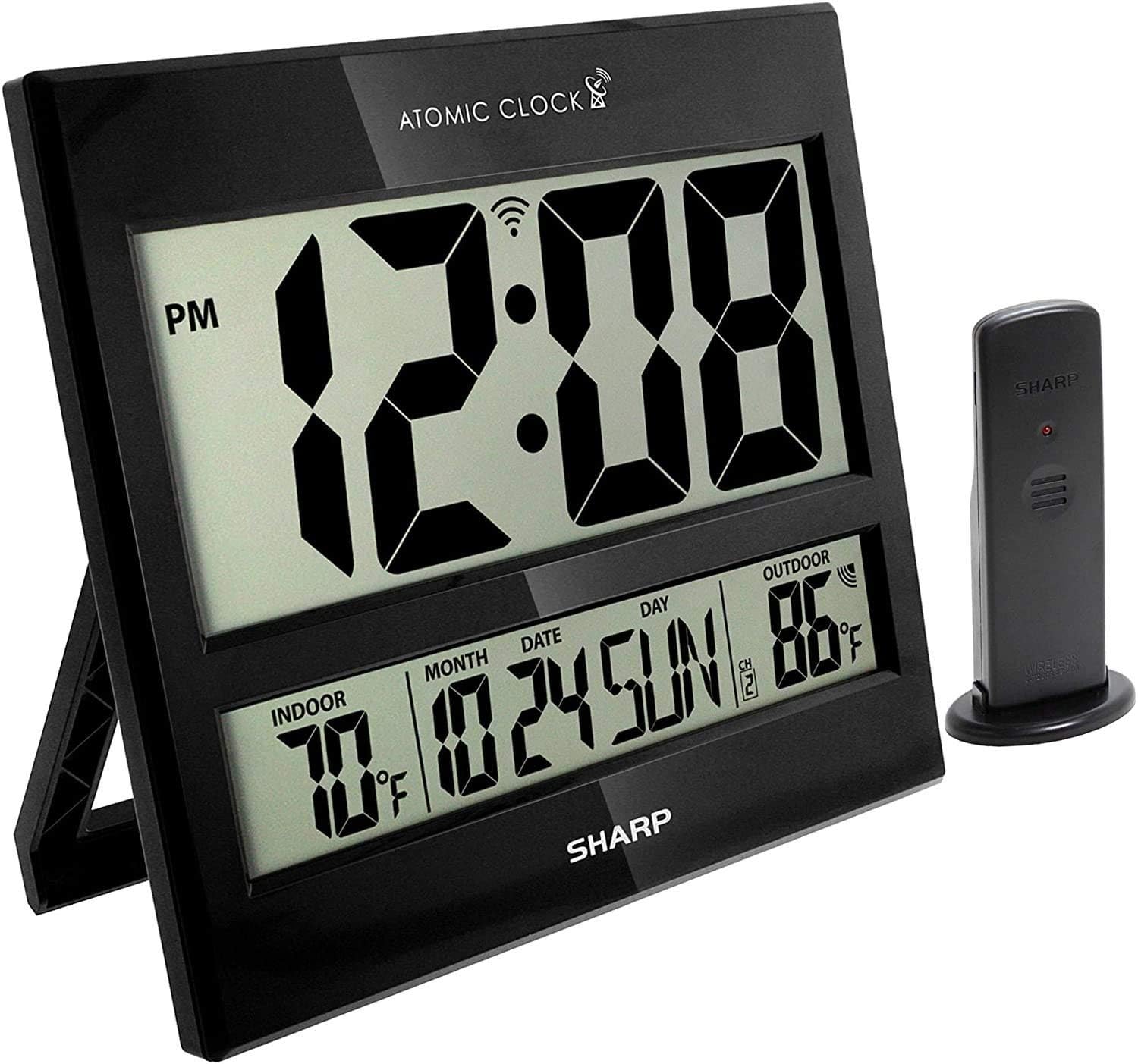
Image: The Sharp Atomic Clock main unit displaying time, indoor temperature, date, and outdoor temperature, alongside its wireless outdoor sensor.
Λειτουργία
Εμφάνιση πληροφοριών
The clock's large LCD screen displays the following information:
- Φορά: Current time in selected 12-hour or 24-hour format.
- Δείκτης PM: Displays "PM" for afternoon hours in 12-hour format.
- Δείκτης Ατομικού Σήματος: Shows the status of the WWVB atomic time signal reception.
- Εσωτερική θερμοκρασία: Current temperature measured by the main unit.
- Month/Date/Day: Current calendar information.
- Εξωτερική θερμοκρασία: Current temperature measured by the wireless outdoor sensor.
- Κανάλι εξωτερικού αισθητήρα: Indicates the channel the outdoor sensor is transmitting on.
- Ένδειξη χαμηλής μπαταρίας: An icon will appear when batteries are low and need replacement.
Button Functions (Rear Panel)
| Κουμπί | Λειτουργία |
|---|---|
| ΗΜΕΡΟΛΟΓΙΟ | Press and hold for 2 seconds to manually set calendar (Year, Month, Date, Language). Use UP/DOWN buttons to change values. |
| ΦΟΡΑ | Press and hold for 2 seconds to manually set time (DST ON/OFF, Hour, Minute). Use UP/DOWN buttons to change values. |
| 12/24 | Switches between 12-hour and 24-hour time display. |
| ΚΑΝΑΛΙ | Press to switch between outdoor sensor channels (1, 2, 3). Press and hold for 2 seconds to pair with the outdoor sensor. |
| ° C / ° F | Εναλλαγή μεταξύ εμφάνισης θερμοκρασίας Κελσίου και Φαρενάιτ. |
| ΚΥΜΑ | Initiates a manual search for the WWVB atomic time signal. |
| ΕΠΑΝΑΦΟΡΑ | Resets the clock to factory default settings. Requires a pointed object (e.g., paperclip). |
| UP / TIME ZONE | Increases values during manual setting. Press to cycle through time zones. |
| ΚΑΤΩ | Decreases values during manual setting. |
Συντήρηση
- Αντικατάσταση μπαταρίας: Replace batteries in both the main unit and outdoor sensor when the low battery indicator appears on the display. Always replace all batteries at the same time with new ones.
- Καθάρισμα: Clean the clock and sensor with a soft, dry cloth. Do not use abrasive cleaners or solvents.
- Τοποθέτηση αισθητήρα εξωτερικού χώρου: Periodically check the outdoor sensor's location to ensure it remains protected from extreme weather conditions, direct sunlight, and moisture.
Αντιμετώπιση προβλημάτων
- Clock not syncing with atomic time:
- Ensure the clock is placed away from electronic interference (TVs, computers, microwaves).
- Try placing the clock near a window facing Fort Collins, Colorado (if applicable to your region).
- Press the "WAVE" button to initiate a manual signal search.
- Υπολογίστε έως και 24 ώρες για τον αρχικό συγχρονισμό.
- Outdoor temperature not displaying or incorrect:
- Check batteries in the outdoor sensor.
- Ensure the outdoor sensor is within the effective transmission range (typically up to 100 feet, line of sight).
- Press the "CHANNEL" button on the main unit to re-establish connection.
- Verify the outdoor sensor is placed in a location protected from direct sunlight and rain, which can affect readings.
- Η οθόνη είναι αμυδρή ή κενή:
- Replace all batteries in the main unit with fresh ones.
- Βεβαιωθείτε ότι οι μπαταρίες έχουν τοποθετηθεί με τη σωστή πολικότητα.
- Λάθος ώρα ή ημερομηνία:
- Βεβαιωθείτε ότι έχει επιλεγεί η σωστή ζώνη ώρας.
- Check if Daylight Saving Time (DST) setting is correct for your region.
- If atomic signal is not received, manually set the time and date using the "TIME" and "CALENDAR" buttons.
Προδιαγραφές
| Χαρακτηριστικό | Λεπτομέρεια |
|---|---|
| Μάρκα | Αιχμηρός |
| Αριθμός μοντέλου | 8541848315 |
| UPC | 049353998732 |
| Χρώμα | ΓΥΑΛΙΣΤΕΡΟ μαυρο |
| Τύπος οθόνης | Ψηφιακή οθόνη LCD |
| Ειδικό χαρακτηριστικό | Atomic Time Synchronization (WWVB), Indoor/Outdoor Temperature |
| Διαστάσεις προϊόντος | 13"W x 1.5"H (Main Unit) |
| Πηγή ισχύος | Τροφοδοτείται από μπαταρία |
| Αριθμός Απαιτούμενων Μπαταριών | Main Unit: 2 AA; Outdoor Sensor: 2 AA |
| Υλικό | Πλαστική ύλη |
| Τύπος τοποθέτησης | Wall Mount / Tabletop Stand |
| Εσωτερική/Εξωτερική χρήση | Indoor (Main Unit), Outdoor (Sensor) |
Εγγύηση και υποστήριξη
Sharp products are manufactured to high-quality standards. For warranty information, technical support, or service inquiries, please refer to the contact information provided with your product packaging or visit the official Sharp webτοποθεσία. Κρατήστε την απόδειξη αγοράς σας ως απόδειξη αγοράς για αξιώσεις εγγύησης.


