Εισαγωγή
The Xfinity HD 720p Wireless Indoor/Outdoor Home Security Camera allows you to monitor your home environment with live video accessible from anywhere. Designed for both indoor and outdoor use, this camera provides essential security features to keep you informed.
Τι υπάρχει στο κουτί
- Xfinity HD 720p Wireless Security Camera (Model: SCHC2AEW)
- Μετασχηματιστής ρεύματος
- Καλώδιο USB
- Εξαρτήματα στερέωσης (βίδες και αγκύρια)

Image: Xfinity Home Security Camera and accessories neatly packaged in its box.
Οδηγός εγκατάστασης
- Σύνδεση ρεύματος: Connect the camera to the power adapter using the provided USB cable, then plug the adapter into a standard electrical outlet.
- Λήψη εφαρμογής: Download the official Xfinity Home app from your smartphone's app store (iOS App Store or Android Google Play).
- Σύζευξη συσκευής: Open the Xfinity Home app and follow the on-screen instructions to add a new device. You will typically need to scan a QR code on the camera or manually enter its details to pair it with your home Wi-Fi network. Ensure your Wi-Fi network is 2.4 GHz for compatibility.

Image: The Xfinity Home Security Camera placed on a surface, ready for setup.
Οδηγίες Λειτουργίας
Ζω View and Basic Controls
Once paired, access the live video feed through the Xfinity Home app. The app provides controls for:
- Ζωντανή ροή: View φαγητό σε πραγματικό χρόνοtage από την κάμερά σας.
- Εγγραφή: Manually record video clips.
- Στιγμιότυπο οθόνης: Λήψη στατικών εικόνων από τη ζωντανή ροή.
- Αμφίδρομος ήχος: Speak through the camera's speaker and hear audio from its microphone.
Νυχτερινή όραση
The camera features night vision capabilities for clear monitoring in low-light conditions. This feature automatically activates when ambient light is insufficient, providing a black-and-white image. Some models may offer color night vision depending on ambient light and settings.
Ανίχνευση κίνησης και ειδοποιήσεις
Configure motion detection settings within the Xfinity Home app to receive alerts on your smartphone when activity is detected. You can customize sensitivity levels and notification preferences.
Επιλογές αποθήκευσης
The camera supports local storage via a MicroSD card (not included). Insert a compatible MicroSD card into the designated slot to store recorded video clips directly on the device. Cloud storage options may also be available through your Xfinity Home service subscription.
Εγκατάσταση και τοποθέτηση
The Xfinity Home Security Camera can be placed on a flat surface or mounted to a wall. Use the included mounting hardware for secure wall installation. Ensure the camera is positioned to cover the desired monitoring area.
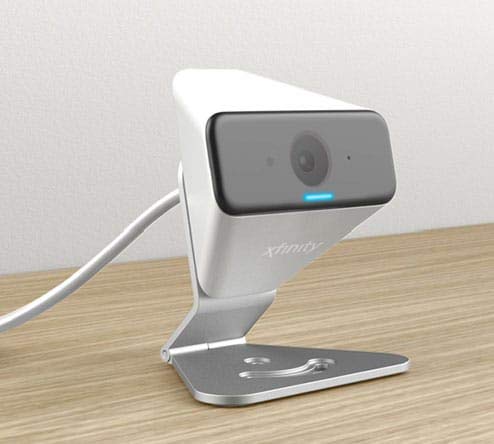
Image: The Xfinity Home Security Camera positioned on a desk, demonstrating its compact design.
Προδιαγραφές προϊόντος
| Χαρακτηριστικό | Λεπτομέρεια |
|---|---|
| Αριθμός μοντέλου | SCHC2AEW |
| Ανάλυση λήψης βίντεο | 720p |
| Τεχνολογία Συνδεσιμότητας | Ασύρματο (Wi-Fi) |
| Πρωτόκολλο συνδεσιμότητας | Wi-Fi (2.4 GHz compatible) |
| Εσωτερική/Εξωτερική χρήση | Εσωτερική, Εξωτερική |
| Ειδικά Χαρακτηριστικά | Αισθητήρας κίνησης, Νυχτερινή όραση |
| Πηγή ισχύος | DC (12 Volts, 1 Watt) |
| Διαστάσεις (Μ x Π x Υ) | 3 x 3 x 2 ίντσες |
| Βάρος αντικειμένου | 1.57 λίρες |
| Διεθνής αξιολόγηση προστασίας | IP65 |
Αντιμετώπιση προβλημάτων
- Χωρίς ισχύ: Βεβαιωθείτε ότι ο προσαρμογέας ρεύματος είναι συνδεδεμένος με ασφάλεια τόσο στην κάμερα όσο και σε μια λειτουργική πρίζα.
- Ζητήματα συνδεσιμότητας: Verify your Wi-Fi network is 2.4 GHz. Restart your router and the camera. Ensure the camera is within range of your Wi-Fi signal.
- Η εφαρμογή δεν ανταποκρίνεται: Close and reopen the Xfinity Home app. If the issue persists, try reinstalling the app.
- Κακή ποιότητα βίντεο: Ελέγξτε την ισχύ του σήματος Wi-Fi. Βεβαιωθείτε ότι ο φακός της κάμερας είναι καθαρός και απαλλαγμένος από εμπόδια.
Εγγύηση και υποστήριξη πελατών
For warranty information, please refer to the documentation included with your purchase or visit the official Xfinity support website. For technical assistance or customer service, please contact Xfinity customer support directly.


