1. Εισαγωγή
This manual provides comprehensive instructions for the safe and effective operation of your HIDIZS DH1000 Portable Hi-Res DAC/Headphone Amplifier. The DH1000 is designed to enhance your audio experience with its dual balanced amplifier architecture, supporting a wide range of Hi-Res audio formats and driving various headphone impedances. Please read this manual thoroughly before initial use and retain it for future reference.

Image: Three HIDIZS DH1000 units in grey and black, highlighting the compact and premium build quality of the portable ampπιο ζωντανή.
2. Περιεχόμενα συσκευασίας
Βεβαιωθείτε ότι όλα τα στοιχεία υπάρχουν στη συσκευασία:
- HIDIZS DH1000 Portable Hi-Res DAC/Headphone AmpΜονάδα σβηστήρα
- Καλώδιο φόρτισης/δεδομένων USB
- Εγχειρίδιο χρήστη (αυτό το έγγραφο)
3. Το προϊόν τελείωσεview
Familiarize yourself with the various components and ports of your DH1000 unit:
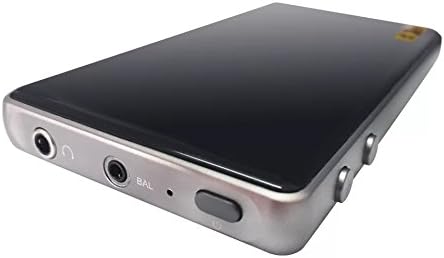
Εικόνα: Μια λεπτομερής view of the HIDIZS DH1000's input/output panel, featuring the 3.5mm unbalanced headphone jack, 2.5mm balanced headphone jack, and the power/control button.
Βασικά συστατικά:
- 2.5mm Balanced Headphone Jack: For connecting headphones with a 2.5mm balanced plug.
- 3.5mm Unbalanced Headphone Jack: For connecting headphones with a standard 3.5mm unbalanced plug.
- Κουμπί λειτουργίας: Used to power the device on/off and potentially for other control functions.
- Θύρα USB-C: For charging the device and connecting to audio source devices (e.g., smartphone, PC).
- Έλεγχοι έντασης ήχου: (Location may vary, typically on the side) For adjusting audio output volume.
4. Ρύθμιση
4.1 Φόρτιση της συσκευής
The DH1000 is equipped with an internal rechargeable battery. Before first use, it is recommended to fully charge the device.
- Connect one end of the provided USB cable to the USB-C port on the DH1000.
- Connect the other end of the USB cable to a compatible USB power adapter (e.g., smartphone charger, computer USB port).
- The charging indicator (if present) will illuminate or change color to indicate charging status. Once fully charged, the indicator may turn off or change color again.
4.2 Σύνδεση σε πηγή ήχου
The DH1000 can be connected to various audio source devices such as smartphones, tablets, computers (PC/Mac), and digital audio players (DAPs).

Image: The HIDIZS DH1000 amplifier connected to a smartphone, demonstrating its portable use case for enhanced audio playback.
- Ensure the DH1000 is sufficiently charged.
- Using a compatible USB cable (often the same one used for charging), connect the DH1000's USB-C port to the USB port of your audio source device.
- Your audio source device may automatically recognize the DH1000 as an external audio device. If not, you may need to select it manually in your device's audio settings.
4.3 Σύνδεση ακουστικών
Connect your headphones to the appropriate jack on the DH1000.
- For standard headphones, use the 3.5mm Unbalanced Headphone Jack.
- For headphones with a 2.5mm balanced cable, use the Ισορροπημένη υποδοχή ακουστικών 2.5 mm for optimal performance and stereo separation.
5. Οδηγίες λειτουργίας
5.1 Ενεργοποίηση/Απενεργοποίηση
To power on the DH1000, press and hold the Power Button until the indicator light illuminates. To power off, press and hold the Power Button again until the indicator light turns off.
5.2 Ρύθμιση έντασης ήχου
Adjust the audio output volume using the dedicated volume controls on the DH1000. Start with a low volume level and gradually increase it to a comfortable listening level to prevent hearing damage.
5.3 Αναπαραγωγή ήχου
Once connected and powered on, the DH1000 will process the audio signal from your source device. Ensure your audio source is playing Hi-Res audio files for optimal performance. The DH1000 supports a wide array of high-resolution audio formats, including:
- FLAC
- ΠΙΘΗΚΟΣ
- WAV
- ALAC (Apple Lossless Audio Codec)
- DSF
- DSDIFF
- PCM up to 24-Bit/192kHz
- Native DSD64/128
The DH1000 is capable of driving headphones with impedance ranging from 8 to 600Ω, providing ample power for a variety of headphone types.
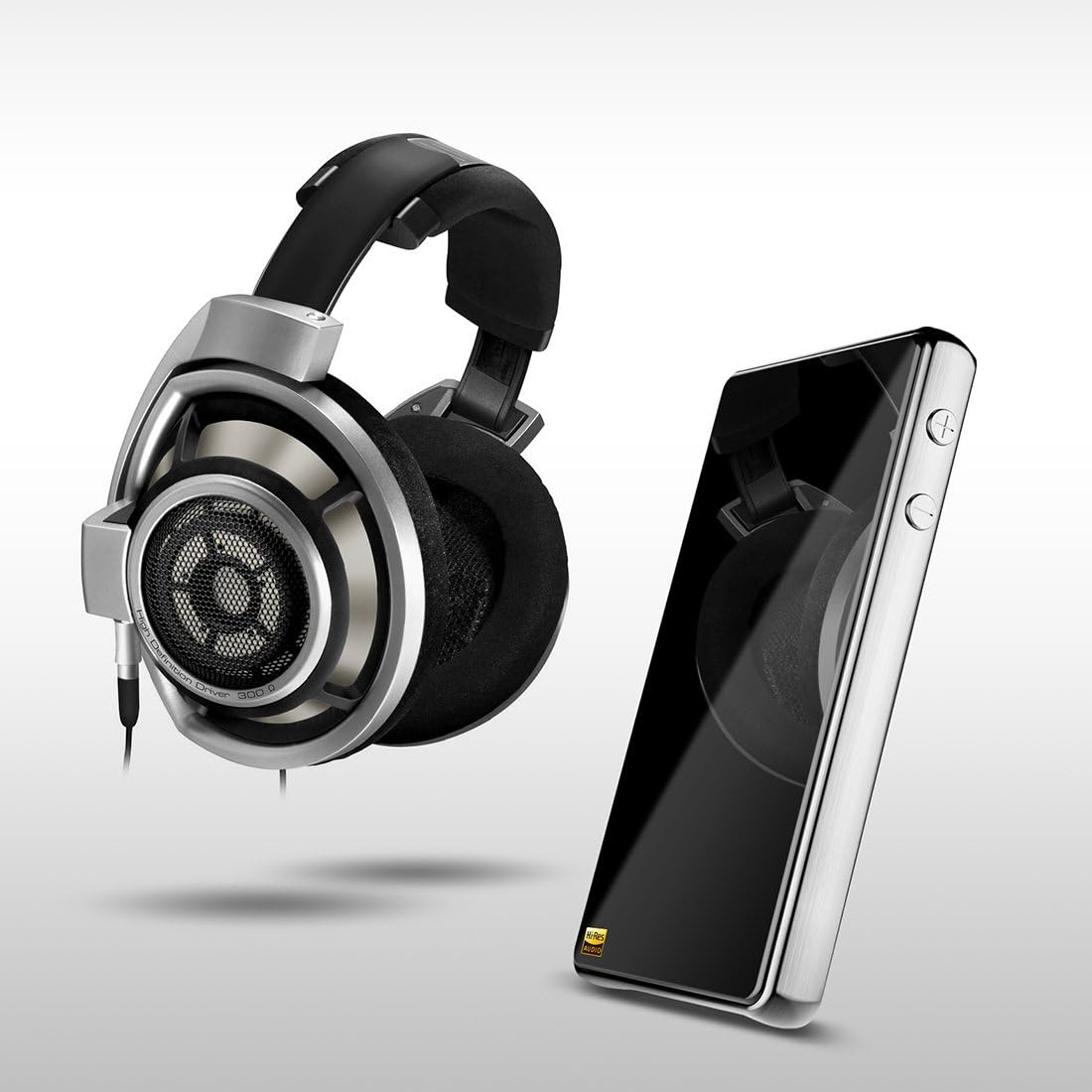
Image: The HIDIZS DH1000 positioned alongside a pair of high-end over-ear headphones, illustrating its role in a premium audio setup.
6. Συντήρηση
To ensure the longevity and optimal performance of your HIDIZS DH1000, please follow these maintenance guidelines:
- Καθάρισμα: Use a soft, dry, lint-free cloth to clean the exterior of the device. Avoid using abrasive cleaners, solvents, or strong chemicals, as they may damage the finish.
- Αποθήκευση: Όταν δεν χρησιμοποιείτε τη συσκευή για μεγάλα χρονικά διαστήματα, αποθηκεύστε τη σε δροσερό και ξηρό μέρος, μακριά από το άμεσο ηλιακό φως και τις ακραίες θερμοκρασίες.
- Χειριζόμενος: Handle the device with care. Avoid dropping it or subjecting it to strong impacts, which can damage internal components.
- Υγρασία: Keep the device away from water and other liquids. Do not operate it in humid environments.
- Αποσυναρμολόγηση: Do not attempt to disassemble, modify, or repair the device yourself. This will void the warranty and may cause damage or injury. Contact authorized service personnel for any repairs.
7. Αντιμετώπιση Προβλημάτων
If you encounter issues with your DH1000, refer to the following common problems and solutions:
| Πρόβλημα | Πιθανή αιτία | Διάλυμα |
|---|---|---|
| Η συσκευή δεν ανάβει. | Χαμηλή μπαταρία. | Φορτίστε τη συσκευή πλήρως χρησιμοποιώντας το παρεχόμενο καλώδιο USB. |
| Δεν υπάρχει έξοδος ήχου. | Incorrect connection; Volume too low; Source device not playing. | Ensure all cables are securely connected. Increase volume on both DH1000 and source device. Verify audio playback on the source device. |
| Poor sound quality (distortion, static). | Damaged cable; Incorrect audio settings; Low-quality audio file. | Try a different USB or headphone cable. Check audio settings on your source device. Use high-quality audio files. |
| Η συσκευή δεν αναγνωρίζεται από τον υπολογιστή. | Driver issue; Faulty USB port/cable. | Try a different USB port or cable. Restart your computer. Check Hidizs website for any necessary drivers. |
If the problem persists after trying these solutions, please contact Hidizs customer support for further assistance.
8. Προδιαγραφές
Detailed technical specifications for the HIDIZS DH1000:
| Χαρακτηριστικό | Προσδιορισμός |
|---|---|
| Όνομα μοντέλου | HIDIZS DH1000 |
| Αριθμός μοντέλου | DH100GR01 |
| Διαστάσεις (Μ x Π x Υ) | 12 x 6.7 x 1.5 εκ |
| Βάρος αντικειμένου | 185.97 γρ. (6.56 ουγγιά) |
| Υλικό | Αλουμίνιο |
| Τεχνολογία Συνδεσιμότητας | Ενσύρματο (USB) |
| Υποδοχές ακουστικών | 2.5 mm Balanced Jack, 3.5 mm Unbalanced Jack |
| Απόκριση συχνότητας | 0Hz ~ 50 KHz |
| Στερεοφωνικός διαχωρισμός | 120dB |
| Αναλογία σήματος προς θόρυβο (SNR) | 122 dB |
| Supported Headphone Impedance | 8 έως 600Ω |
| Υποστηριζόμενες μορφές ήχου | FLAC, APE, WAV, ALAC, APPLE LOSSLESS, DSF, DSDIFF, PCM 24-Bit/192kHz, native DSD64/128 |
| Πηγή ισχύος | Battery (1 Lithium Ion battery required) |
| Ειδικά Χαρακτηριστικά | Lightweight, Dual Balanced Ampπιο ζωντανή |
| Αρμονία | iPhone, Android Phones, iPad, PC, MAC, most DAPs |
9. Εγγύηση και υποστήριξη
Warranty information for the HIDIZS DH1000 is typically provided at the point of purchase or on the official Hidizs website. Please refer to your purchase documentation or visit the Hidizs official webιστότοπος για λεπτομερείς όρους εγγύησης και στοιχεία επικοινωνίας υποστήριξης.
For technical support, troubleshooting beyond this manual, or service inquiries, please contact Hidizs customer service through their official channels.


