1. Εισαγωγή
This manual provides essential information for the safe and efficient operation of your InFocus IN112XV Presentation Projector. The IN112XV is designed for business presentations and educational use, offering a long lamp life, high brightness, and clear image quality.
- Εκτεταμένο Λamp Ζωή: Enjoy over 15,000 hours of viewing.
- Υψηλή φωτεινότητα: 3800 lumens for clear images in various lighting conditions.
- Αναλογία αντίθεσης: 26000:1 for distinct whites and blacks.
- Εύκαμπτος Viewing: Projects images from 28 inches to 300 inches diagonally.
- Συνδεσιμότητα: Features HDMI input and SVGA (800 x 600) resolution.
2. Περιεχόμενα συσκευασίας
Βεβαιωθείτε ότι όλα τα είδη που αναφέρονται παρακάτω περιλαμβάνονται στη συσκευασία σας:
- InFocus IN112XV Projector
- Καλώδιο ρεύματος
- Τηλεχειριστήριο
- Καλώδιο VGA
- Τεκμηρίωση (αυτό το εγχειρίδιο και άλλοι οδηγοί)
3. Το προϊόν τελείωσεview
Familiarize yourself with the components and controls of your InFocus IN112XV projector.
3.1 Μπροστά View
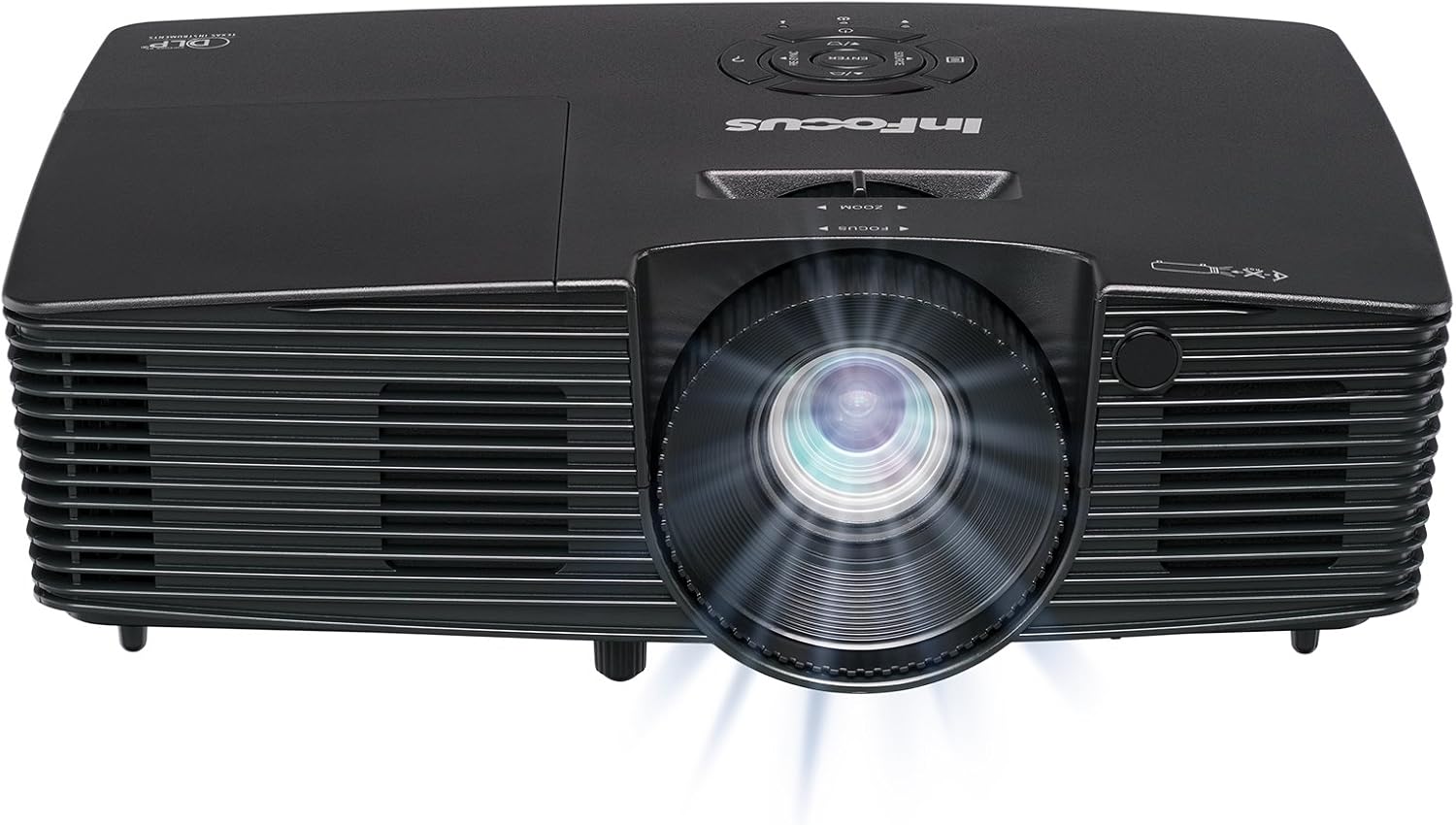
Εικόνα 3.1: Εμπρός view of the InFocus IN112XV projector. This image highlights the main projection lens and the front ventilation grilles.
3.2 Κορυφή View και Πίνακας Ελέγχου

Εικόνα 3.2: Κορυφή view of the InFocus IN112XV projector. The control panel is visible on the right, featuring buttons for power, source selection, menu navigation, keystone adjustment, and volume. The focus and zoom adjustment rings are located around the lens.
The control panel on the top of the projector allows for basic operation without the remote. Key buttons include:
- Εξουσία: Ενεργοποιεί ή απενεργοποιεί τον προβολέα.
- Πηγή: Εναλλάσσει τις διαθέσιμες πηγές εισόδου.
- Μενού: Πρόσβαση στο μενού εμφάνισης στην οθόνη (OSD).
- Εισάγω: Επιβεβαιώνει τις επιλογές στο μενού OSD.
- Πληκτρα ΒΕΛΟΥΣ: Navigate menu options and adjust settings.
- Re-Sync: Synchronizes the image.
3.3 Πίσω View και Θύρες Σύνδεσης

Εικόνα 3.3: Οπισθεν view of the InFocus IN112XV projector. This image displays the available connection ports, including Video In, S-Video In, Computer In (VGA), HDMI, and the power input.
The rear panel provides various ports for connecting external devices:
- Βίντεο σε: For composite video sources.
- S-Video In: For S-Video sources.
- Computer In (VGA): For connecting to computers via VGA cable.
- HDMI: For digital video and audio sources.
- Υπηρεσία: Για σκοπούς σέρβις και συντήρησης.
- Είσοδος ισχύος: Connects the power cord to an electrical outlet.
3.4 Τηλεχειριστήριο

Εικόνα 3.4: Remote control for the InFocus IN112XV projector. The remote provides full control over the projector's functions, including power, source selection, menu navigation, keystone correction, and volume.
The remote control offers convenient access to all projector functions. Ensure batteries are correctly installed.
4. Ρύθμιση
4.1 Τοποθέτηση
Position the projector on a stable, flat surface or mount it securely. Ensure there is adequate space around the projector for ventilation.
4.2 Σύνδεση ρεύματος
- Συνδέστε το καλώδιο τροφοδοσίας στην θύρα εισόδου τροφοδοσίας του προβολέα.
- Συνδέστε το άλλο άκρο του καλωδίου ρεύματος σε μια γειωμένη πρίζα.
4.3 Σύνδεση πηγών εισόδου
The projector supports various input sources. Choose the appropriate cable for your device:
- HDMI: Connect an HDMI cable from your source device (e.g., laptop, media player) to the projector's HDMI port.
- VGA (Είσοδος Υπολογιστή): Connect a VGA cable from your computer to the projector's Computer In port. This is a plug-and-play connection.
- Video In / S-Video In: Use composite video or S-Video cables for older video sources.
- Κινητές συσκευές: To connect an iPad or smartphone, a LightCast Key (sold separately) is required.
5. Οδηγίες λειτουργίας
5.1 Ενεργοποίηση/Απενεργοποίηση
- Για ενεργοποίηση: Πατήστε το Εξουσία button on the projector's control panel or the remote control. The power indicator light will change.
- Για απενεργοποίηση: Πατήστε το Εξουσία button again. A confirmation message may appear. Press again to confirm shutdown. Allow the projector to cool down before unplugging.
5.2 Επιλογή πηγής εισόδου
After connecting your source device, select the correct input:
- Πατήστε το Πηγή button on the projector's control panel or the remote control to cycle through available inputs (HDMI, VGA, Video, S-Video).
- Alternatively, use the dedicated input buttons (HDMI, VGA, Video) on the remote control.
5.3 Ρύθμιση εστίασης και ζουμ
For a clear and appropriately sized image, adjust the lens rings:

Εικόνα 5.1: Manual Focus Adjustment. This image illustrates the effect of adjusting the focus ring, transforming a blurry projection into a clear and sharp image.
- Εστία: Περιστρέψτε το Εστία ring on the projector lens until the image appears sharp and clear.
- Ανίπταμαι διαγωνίως: Περιστρέψτε το Ανίπταμαι διαγωνίως ring on the projector lens to adjust the size of the projected image.
5.4 Διόρθωση Keystone
If the projected image appears trapezoidal (wider at the top or bottom), use keystone correction to square it:
- Πατήστε το Keystone+ or Keystone- buttons on the remote control to adjust the image geometry.
5.5 Πλοήγηση μενού
Access the On-Screen Display (OSD) menu for advanced settings:
- Πατήστε το Μενού button on the remote or control panel.
- Use the arrow keys to navigate through menu options.
- Τύπος Εισάγω to select an option or confirm a setting.
- Τύπος Μενού ξανά για έξοδο από το μενού OSD.
6. Συντήρηση
6.1 Lamp Ζωή
Ο προβολέας lamp has an estimated life of over 15,000 hours. When the lamp reaches the end of its life, the projector may display a warning message or the image brightness may significantly decrease. Refer to the full service manual for lamp replacement procedures if necessary.
6.2 Καθαρισμός
- Projector Casing: Use a soft, dry cloth to wipe the exterior of the projector. Do not use abrasive cleaners or solvents.
- Φακός: Gently clean the lens with a lens cleaning cloth and specialized lens cleaning solution. Avoid touching the lens surface with your fingers.
- Ανοίγματα εξαερισμού: Periodically check and clean the ventilation openings to ensure proper airflow and prevent overheating. Use a soft brush or compressed air to remove dust.
7. Αντιμετώπιση Προβλημάτων
Αυτή η ενότητα εξετάζει συνηθισμένα προβλήματα που ενδέχεται να αντιμετωπίσετε με τον προβολέα σας.
| Πρόβλημα | Πιθανή αιτία | Διάλυμα |
|---|---|---|
| Δεν εμφανίζεται εικόνα |
|
|
| Η εικόνα είναι θολή |
|
|
| Η εικόνα είναι τραπεζοειδής |
|
|
| Projector runs hot or smells of burning plastic |
|
|
| Χωρίς ήχο |
|
|
Σημαντική Σημείωση: This projector is not recommended for high-definition movie viewing. While it can accept a 1080p input signal, it projects at its native SVGA (800 x 600) resolution.
8. Προδιαγραφές
| Χαρακτηριστικό | Λεπτομέρεια |
|---|---|
| Αριθμός μοντέλου | IN112XV |
| Τεχνολογία εμφάνισης | DLP |
| Εγγενής ανάλυση | SVGA (800 x 600) |
| Λάμψη | 3800 Lumens |
| Αναλογία αντίθεσης | 26000:1 |
| Lamp Ζωή | Έως 15,000 ώρες |
| Συνδεσιμότητα | HDMI, VGA (Computer In), Video In, S-Video In |
| Ειδικό χαρακτηριστικό | 3D-έτοιμο |
| Προτεινόμενες χρήσεις | Επιχειρήσεις, Εκπαίδευση |
| Διαστάσεις προϊόντος | 8.8 x 12.4 x 4 ίντσες |
| Βάρος αντικειμένου | 5.5 λίρες |
9. Εγγύηση και υποστήριξη
9.1 Πληροφορίες εγγύησης
The InFocus IN112XV projector is backed by a 2 χρόνια εγγύησηΑυτή η εγγύηση καλύπτει ελαττώματα υλικών και κατασκευής υπό κανονική χρήση. Παρακαλούμε φυλάξτε την απόδειξη αγοράς για τυχόν αξιώσεις εγγύησης.
9.2 Υποστήριξη πελατών
For technical assistance, troubleshooting beyond this manual, or warranty service, please contact InFocus customer support. Contact information can typically be found on the official InFocus webστον ιστότοπο ή στην τεκμηρίωση που συνοδεύει το προϊόν σας.


