Εισαγωγή
The Pioneer Elite VSX-LX302 is an advanced audio/video component receiver designed to deliver immersive sound and high-quality video experiences. It supports DTS:X and Dolby Atmos for multi-dimensional audio, enhanced by Reflex Optimizer for Atmos-enabled speakers. The receiver is compatible with Ultra HD video, HDR10, and Dolby Vision, supporting 4K/60p/4:4:4/24-bit content. Connectivity features include FireConnect, Chromecast built-in, and DTS Play-Fi for multi-room audio streaming. It offers a phono input and six HDMI inputs, providing versatile options for various home entertainment setups.
Βασικά Χαρακτηριστικά
- Έξοδος ισχύος: 200 W/Ch. (6 ohms, 1 kHz, THD 10 %, 1Ch Driven) / 100 W/Ch. (8 ohms, 20 Hz-20 kHz, THD 0.08 %, 2Ch Driven, FTC)
- Μορφές ήχου: Multi-dimensional sound processing with Dolby Atmos & DTS:X.
- Συμβατότητα βίντεο: Ultra HD pass-through with HDCP 2.2, Dolby Vision compatible with HDR10 and BT.2020 support (4K/60p/4:4:4/24-bit).
- Διαμέτρηση: MCACC Auto Room Tuning and synchronized sound with Phase Control.
- Speaker Support: Supports 4 Ohm speakers.
- Wireless & Multi-room Audio: Features FireConnect, Chromecast built-in, and DTS Play-Fi Technologies.
Ρύθμιση
Αποσυσκευασία και Περιεχόμενα
Αφαιρέστε προσεκτικά όλα τα εξαρτήματα από τη συσκευασία. Βεβαιωθείτε ότι υπάρχουν τα ακόλουθα:
- Δέκτης Pioneer Elite VSX-LX302
- Τηλεχειριστήριο
- Μπαταρίες AAA (2)
- Μικρόφωνο βαθμονόμησης δωματίου
- Εγχειρίδιο οδηγιών (αυτό το έγγραφο)
- Κεραία FM
- AM Antenna
Connecting Your Receiver
Πριν κάνετε οποιεσδήποτε συνδέσεις, βεβαιωθείτε ότι ο δέκτης είναι απενεργοποιημένος και αποσυνδεδεμένος από την πρίζα.
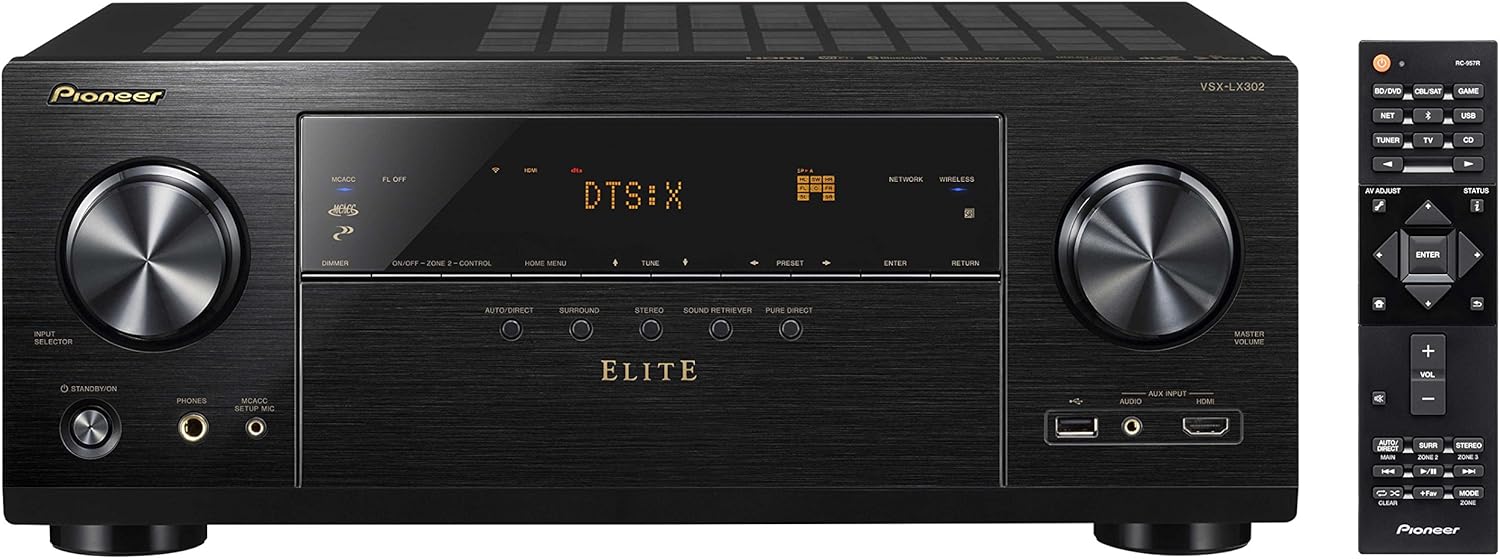
Εικόνα 1: Εμπρός view of the Pioneer Elite VSX-LX302 receiver, showing input selector, display, and volume controls.

Εικόνα 2: Πίσω view of the Pioneer Elite VSX-LX302 receiver, detailing various audio and video input/output ports.
Συνδέσεις ηχείων
Connect your speakers to the corresponding terminals on the rear panel (Figure 2). The VSX-LX302 supports a 7.2 channel configuration. Ensure correct polarity (+ to + and - to -) for optimal sound quality. This receiver supports 4 Ohm speakers.
Συνδέσεις HDMI
Connect your video sources (e.g., Blu-ray player, gaming console, streaming device) to the HDMI IN ports on the rear panel. Connect your TV or projector to the HDMI OUT (ARC) port. The receiver features 6 HDMI inputs and 2 HDMI outputs, all supporting HDCP 2.2, Dolby Vision, HDR10, and BT.2020.
Συνδέσεις ήχου
Utilize the various audio inputs for other devices. A dedicated PHONO input is available for turntables. Digital audio inputs (optical and coaxial) are also provided.
Σύνδεση δικτύου
Connect the receiver to your home network via an Ethernet cable to the NETWORK port or use the built-in Wi-Fi for wireless connectivity. This enables features like Chromecast built-in, DTS Play-Fi, and internet radio.
Automatic Room Calibration (MCACC)
Use the included Room Calibration Microphone and the MCACC (Multi-Channel Acoustic Calibration System) feature to automatically optimize the sound settings for your specific listening environment. Follow the on-screen instructions displayed on your TV.
Οδηγίες Λειτουργίας
Ενεργοποίηση/Απενεργοποίηση
Press the POWER button on the front panel or the remote control to turn the receiver on or off.
Επιλογή εισόδου
Use the INPUT SELECTOR knob on the front panel or the corresponding buttons on the remote control to switch between connected audio/video sources (e.g., BD/DVD, GAME, SAT/CATV, CD).
Έλεγχος έντασης ήχου
Adjust the volume using the MASTER VOLUME knob on the front panel or the VOLUME +/- buttons on the remote control.
Λειτουργίες ήχου
Select various sound modes (e.g., Auto Direct, Surround, Stereo, Pure Direct) to optimize audio playback for different content types. The receiver supports Dolby Atmos and DTS:X for immersive surround sound.
Χαρακτηριστικά δικτύου
Access streaming services, internet radio, and multi-room audio functionalities (FireConnect, Chromecast built-in, DTS Play-Fi) through the receiver's network connection. Control these features using the Pioneer Remote App on your smartphone or tablet.
Συντήρηση
To ensure optimal performance and longevity of your Pioneer Elite VSX-LX302 receiver, follow these maintenance guidelines:
- Καθάρισμα: Σκουπίζετε τακτικά το εξωτερικό με ένα μαλακό, στεγνό πανί. Αποφύγετε τη χρήση λειαντικών καθαριστικών ή διαλυτών.
- Αερισμός: Βεβαιωθείτε ότι υπάρχει επαρκής αερισμός γύρω από τον δέκτη. Μην φράζετε τα ανοίγματα εξαερισμού. Αφήστε επαρκή χώρο (τουλάχιστον 6 εκατοστά) πάνω και γύρω από τη μονάδα για σωστή ροή αέρα.
- Αφαίρεση σκόνης: Χρησιμοποιείτε περιοδικά μια μαλακή βούρτσα ή μια ηλεκτρική σκούπα με εξάρτημα βούρτσας για να αφαιρείτε τη σκόνη από τις γρίλιες εξαερισμού.
- Καλώδιο ρεύματος: Inspect the power cord for any damage. If damaged, discontinue use and contact qualified service personnel.
- Περιβαλλοντικές Συνθήκες: Αποφύγετε την έκθεση του δέκτη σε ακραίες θερμοκρασίες, υγρασία, άμεσο ηλιακό φως ή υπερβολική σκόνη.
Αντιμετώπιση προβλημάτων
If you encounter issues with your receiver, refer to the following common troubleshooting steps:
- Χωρίς ισχύ: Ensure the power cord is securely plugged into the receiver and a working wall outlet. Check if the power outlet is active.
- Χωρίς ήχο: Verify that the correct input source is selected. Check all speaker connections for proper polarity and secure fit. Ensure the volume is not muted or set too low. Confirm that the speakers are enabled in the receiver's settings.
- Χωρίς βίντεο: Confirm that the correct HDMI input is selected. Check HDMI cable connections between the source, receiver, and TV/projector. Ensure the TV/projector is set to the correct HDMI input.
- Προβλήματα συνδεσιμότητας δικτύου: Check your router and internet connection. Ensure the receiver is within range of your Wi-Fi network or the Ethernet cable is securely connected. Try restarting the receiver and your network equipment.
- Το τηλεχειριστήριο δεν λειτουργεί: Check and replace the batteries in the remote control. Ensure there are no obstructions between the remote and the receiver's IR sensor.
- Παραμορφωμένος ήχος: Check speaker impedance compatibility. Ensure speaker wires are not frayed or shorting. Reduce the volume if distortion occurs at high levels.
For more detailed troubleshooting, consult the full instruction manual or visit the Pioneer support webτοποθεσία.
Προδιαγραφές
| Διαστάσεις προϊόντος | 14.6 x 17.1 x 6.8 ίντσες |
| Βάρος αντικειμένου | 22 λίρες |
| Αριθμός μοντέλου είδους | VSX-LX302 |
| Μάρκα | ΠΡΩΤΟΠΟΡΟΣ |
| Τεχνολογία Συνδεσιμότητας | HDMI |
| Τύπος ελεγκτή | Android |
| Ειδικό χαρακτηριστικό | Multiroom |
| Συμβατές Συσκευές | Ομιλητής |
| Συνολικές θύρες HDMI | 9 (6 Είσοδοι, 2 Έξοδος) |
| Τύπος σύνδεσης | HDMI |
| Κωδικοποίηση ήχου | DTS |
| Λειτουργία εξόδου ήχου | Περιβάλλω |
| Διαμόρφωση καναλιού ήχου surround | 7.2 |
| Ημερομηνία πρώτης διαθεσιμότητας | 12 Μαΐου 2017 |
Εγγύηση και υποστήριξη
Για λεπτομερείς πληροφορίες εγγύησης, ανατρέξτε στην κάρτα εγγύησης που συνοδεύει το προϊόν σας ή επισκεφθείτε την επίσημη ιστοσελίδα της Pioneer. website. For technical support, product registration, or service inquiries, please visit the Pioneer support section on their official webιστότοπο ή επικοινωνήστε απευθείας με την εξυπηρέτηση πελατών τους.


