Εισαγωγή
This manual provides detailed instructions for the setup, operation, and maintenance of your Hyperkin Knight Premium Controller. Designed for use with PlayStation 3 (PS3), PC, and Mac systems, this controller offers a versatile gaming experience with its ergonomic design and responsive controls. Please read this manual thoroughly before using the product to ensure optimal performance and longevity.
Χαρακτηριστικά προϊόντος
- Διπλά αναλογικά χειριστήρια: Two wide-spectrum analog joysticks for precise control.
- Pressure-Sensitive D-Pad: An eight-way directional pad with pressure sensitivity.
- Pressure-Sensitive Buttons: Four shoulder buttons and four face buttons with pressure sensitivity for nuanced input.
- Αναγκαστική ανατροφοδότηση: Integrated force feedback for immersive gaming experiences.
- Κουμπί αφετηρίας: Dedicated button for system menu access.
- Μακρύ καλώδιο: A 6-foot (1.8 meter) cable for flexible positioning.
- Συμβατότητα πολλαπλών πλατφορμών: Compatible with all PS3 models, as well as PC and Mac via USB.
Περιεχόμενα συσκευασίας
- Hyperkin Knight Premium Controller (White)
- Integrated USB Cable (6 ft.)
Οδηγίες εγκατάστασης
Connecting to PlayStation 3 (PS3)
- Ensure your PS3 console is powered off or in standby mode.
- Locate an available USB port on your PS3 console.
- Plug the USB connector of the Hyperkin Knight Controller into the USB port on your PS3.
- Power on your PS3 console. The controller should be automatically recognized and assigned a player number.
- If the controller does not respond, try a different USB port or restart the console.
Σύνδεση σε PC/Mac
- Locate an available USB port on your PC or Mac computer.
- Plug the USB connector of the Hyperkin Knight Controller into the USB port.
- Your operating system (Windows, macOS) should automatically detect and install the necessary drivers. This process may take a few moments.
- Once installed, the controller will be ready for use with compatible games and applications. You may need to configure controller settings within individual games or system preferences.
- Σημείωμα: Functionality may vary depending on the operating system and specific game titles.
Οδηγίες Λειτουργίας
The Hyperkin Knight Premium Controller features a standard layout for intuitive gameplay.
Διάταξη ελεγκτή

Εικόνα: Κορυφή view of the Hyperkin Knight Premium Controller, showing the D-pad, analog sticks, face buttons, and central buttons.
- D-Pad (Κατευθυντικό Pad): Located on the left, used for directional input.
- Αριστερός αναλογικός μοχλός: Below the D-Pad, for precise movement and camera control.
- Δεξιός αναλογικός μοχλός: On the right side, typically for camera control or aiming.
- Κουμπιά με όψη (Τρίγωνο, Κύκλος, Σταυρός, Τετράγωνο): On the right, used for actions within games.
- Κουμπιά ώμου (L1, L2, R1, R2): Located on the top edge of the controller, used for various in-game functions.
- Κουμπί ΕΠΙΛΟΓΗ: Typically used for menu access or specific game functions.
- Κουμπί εκκίνησης: Typically used for pausing games or confirming selections.
- Κουμπί HOME: Central button to access the PS3 XMB (CrossMediaBar) or system menus on PC/Mac.
Αναγκαστική ανατροφοδότηση
The controller features force feedback (rumble) functionality, which provides tactile sensations during gameplay, enhancing immersion. This feature is automatically enabled when supported by the game and system. If you wish to disable it, check your game's or system's controller settings.
Συντήρηση
- Καθάρισμα: Χρησιμοποιήστε ένα μαλακό, στεγνό πανί για να σκουπίσετε το χειριστήριο. Για επίμονη βρωμιά, σκουπίστε ελαφρά.ampΞεπλύνετε το πανί με νερό. Αποφύγετε τη χρήση σκληρών χημικών ουσιών ή λειαντικών καθαριστικών.
- Αποθήκευση: Αποθηκεύστε το χειριστήριο σε δροσερό και ξηρό μέρος, μακριά από το άμεσο ηλιακό φως και τις ακραίες θερμοκρασίες. Αποφύγετε το πολύ σφιχτό τύλιγμα του καλωδίου για να αποφύγετε τυχόν ζημιά.
- Φροντίδα καλωδίων: Do not pull the controller by its cable. Always grasp the USB connector when plugging or unplugging.
Αντιμετώπιση προβλημάτων
Ο ελεγκτής δεν ανταποκρίνεται
- Ελέγξτε τη σύνδεση: Ensure the USB cable is securely plugged into both the controller and the console/computer.
- Δοκιμάστε διαφορετική θύρα USB: Connect the controller to another USB port on your system.
- Επανεκκίνηση συστήματος: Power cycle your PS3, PC, or Mac.
- Driver Check (PC/Mac): On PC, check Device Manager to see if the controller is recognized and if there are any driver issues. On Mac, check System Information > USB.
Incorrect Button Mapping or Limited Functionality
- Ρυθμίσεις παιχνιδιού: Many games allow for custom controller mapping. Check the in-game settings for controller configuration.
- System Settings (PC/Mac): For PC, some games or emulators may require specific controller configurations or third-party software. For Mac, check System Preferences > Game Controllers (if available) or specific application settings.
- Συμβατότητα PS3: While compatible with all PS3 models, some older games or specific PS3 system software versions might have unique controller handling. Ensure your PS3 system software is up to date.
Force Feedback Not Working
- Υποστήριξη παιχνιδιού: Verify that the game you are playing supports force feedback.
- Ρυθμίσεις εντός παιχνιδιού: Check the game's options menu to ensure force feedback (rumble) is enabled.
- Ρυθμίσεις συστήματος: On PC, ensure rumble is enabled in your controller settings.
Προδιαγραφές
| Αριθμός μοντέλου | M07213-WH |
| Αρμονία | PlayStation 3, PC, Mac (via USB) |
| Μήκος καλωδίου | 6 πόδια (περίπου 1.8 μέτρα) |
| Τύπος εισόδου | Pressure-sensitive buttons and D-pad, dual analog joysticks |
| Ανατροφοδότηση | Force Feedback (Rumble) |
| Διαστάσεις | 2.99 x 7.99 x 7.01 ίντσες (περίπου 7.6 x 20.3 x 17.8 εκ.) |
| Βάρος | 12.5 ουγγιές (περίπου 354 γραμμάρια) |
| Κατασκευαστής | Hyperkin Inc |
Εγγύηση και υποστήριξη
For warranty information and technical support, please refer to the official Hyperkin webστον ιστότοπο ή επικοινωνήστε απευθείας με την εξυπηρέτηση πελατών. Κρατήστε την απόδειξη αγοράς σας ως απόδειξη αγοράς για τυχόν αξιώσεις εγγύησης.
Κατασκευαστής: Hyperkin Inc
Webτοποθεσία: www.hyperkin.com (Παρακαλούμε επισκεφθείτε την επίσημη website for the most current support information.)
Προϊόν Πάνωview εικόνες
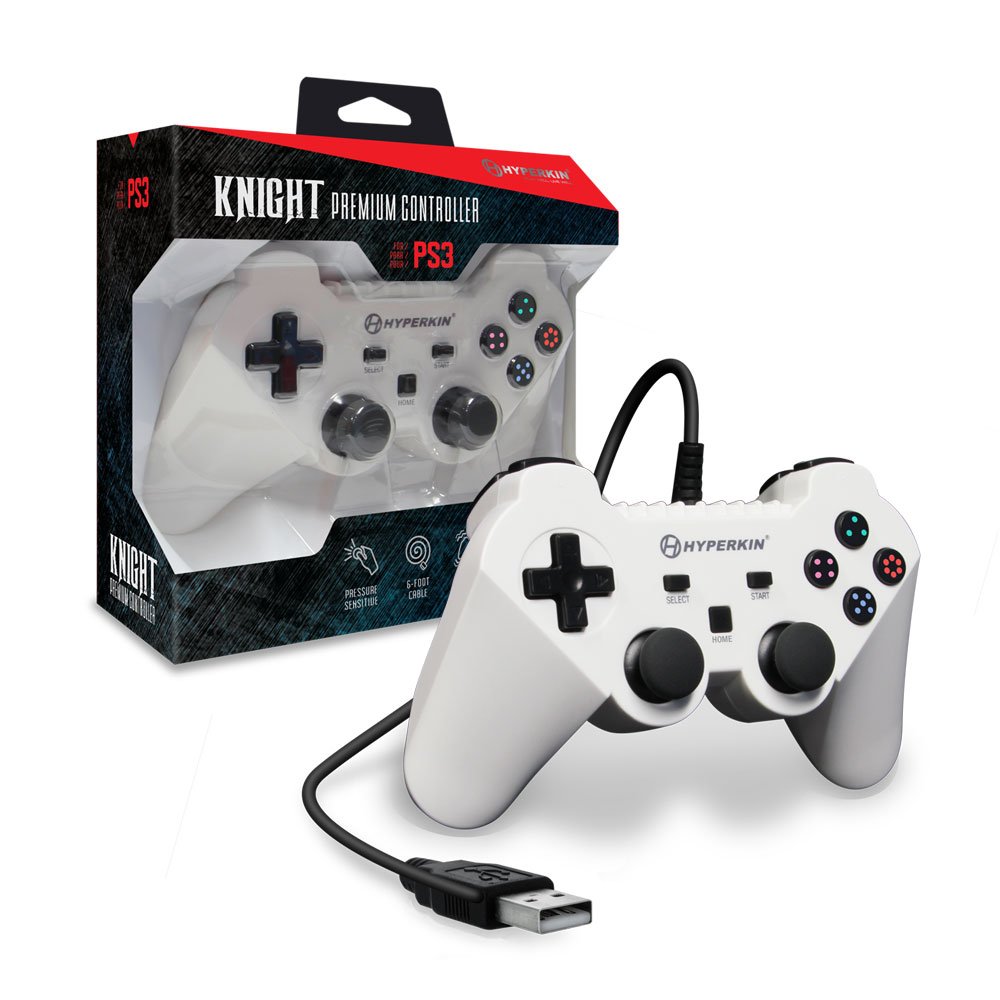
Image: The Hyperkin Knight Premium Controller displayed alongside its retail packaging, highlighting the product's design and branding.

Εικόνα: Κοντινό πλάνο view of the Hyperkin Knight Premium Controller's retail box, showcasinβασικά χαρακτηριστικά και στοιχεία σχεδιασμού g.

Εικόνα: Μια γωνιακή view of the Hyperkin Knight Premium Controller, emphasizing its ergonomic shape and button placement.