1. Εισαγωγή
The ECHOGEAR Universal Streaming Device Mount is designed to securely attach media streaming devices and small AV accessories to the back of flat screen TVs, keeping them out of sight. This mount offers a universal design compatible with various devices and TV setups, supporting items up to 3 pounds.
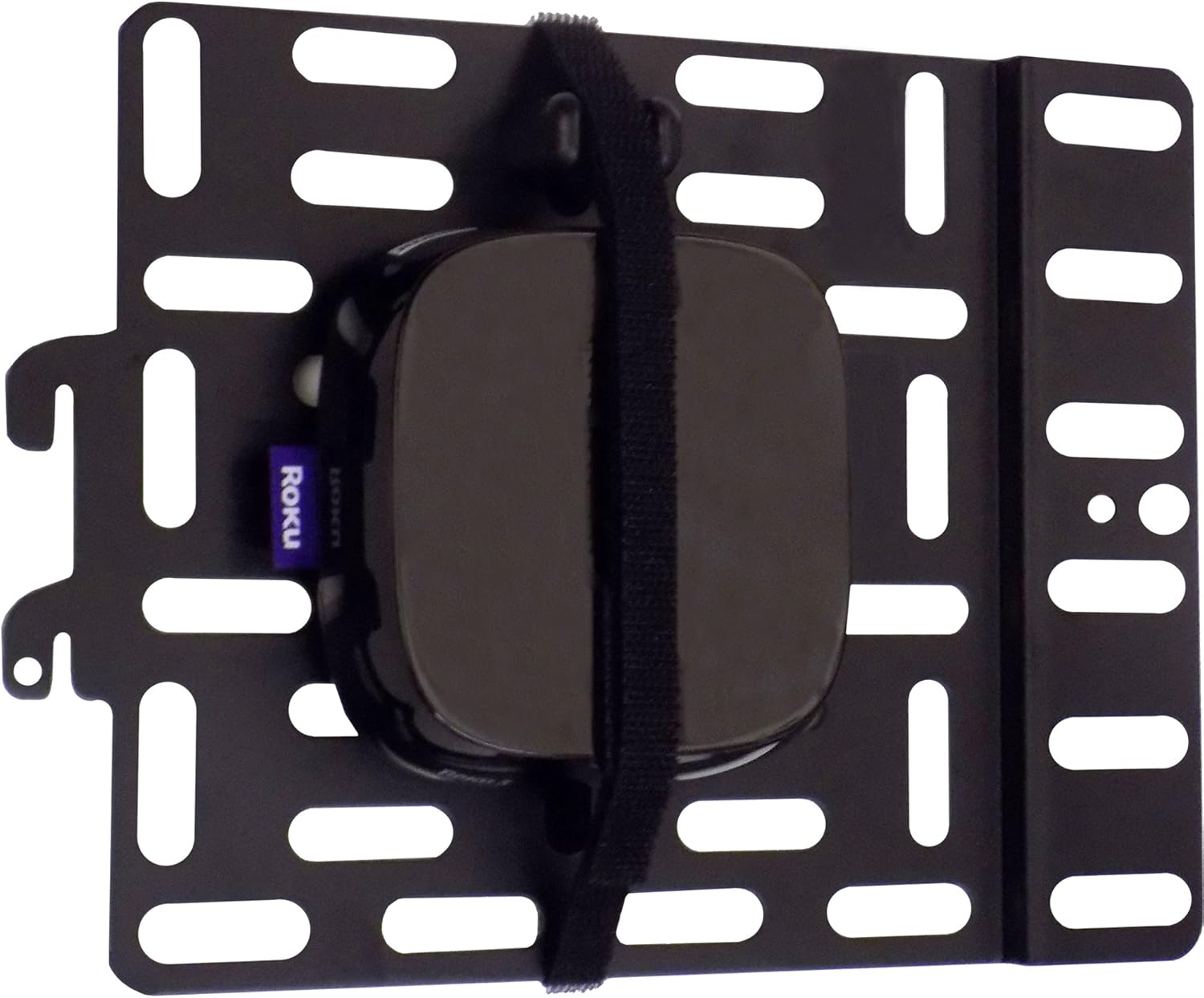
Figure 1.1: The ECHOGEAR Universal Streaming Device Mount with a Roku device secured.

Figure 1.2: Illustration showing a media device visible in front of a TV (left) and hidden behind the TV using the mount (right).
2. Περιεχόμενα συσκευασίας
Βεβαιωθείτε ότι όλα τα εξαρτήματα υπάρχουν στη συσκευασία πριν ξεκινήσετε την εγκατάσταση:
- Universal Streaming Device Mount Plate
- Hook and Loop Straps (2)
- Various Philips head screws (M4, M6, M8)
- Ροδέλα και αποστάτες
- Εγχειρίδιο οδηγιών

Figure 2.1: Contents of the ECHOGEAR Universal Streaming Device Mount package.
3. Προδιαγραφές
| Χαρακτηριστικό | Λεπτομέρεια |
|---|---|
| Αριθμός μοντέλου | LYSB01M4NQ0SC-ELECTRNCS |
| Υλικό | Κραματοποιημένος χάλυβας |
| Χρώμα | Μαύρος |
| Τύπος τοποθέτησης | Wall Mount (via TV VESA holes) |
| Μέγιστη χωρητικότητα βάρους | 3 λίβρες (1.36 κιλά) |
| Βάρος αντικειμένου | 1.2 λίβρες (0.54 κιλά) |
| Διαστάσεις συσκευασίας | 9 x 6.8 x 1.5 ίντσες (22.86 x 17.27 x 3.81 cm) |

Figure 3.1: Mount dimensions and weight capacity.
4. Συμβατές συσκευές
The ECHOGEAR Universal Streaming Device Mount is designed to be compatible with a wide range of streaming media devices and small accessories, including but not limited to:
- Roku (Roku 2, Roku 3, Roku 4, Roku Express, Roku Express+, Roku Premiere, Roku Premiere+, Roku Ultra)
- Apple TV (1st, 2nd, 3rd, and 4th Generation, 4K models)
- Amazon Fire TV
- TiVo Mini
- Slingbox
- Other small AV devices up to 3 lbs

Εικόνα 4.1: Πρamples of compatible streaming devices.
5. Ρύθμιση και εγκατάσταση
The mount can be attached directly to the back of your TV using an existing VESA hole or integrated with an existing TV wall mount.
5.1. Βήματα εγκατάστασης
- Attach Panel to TV or TV Mount: Select an appropriate VESA screw hole on the back of your television. Use the provided screws, washers, and spacers to securely attach the mount panel. Ensure the panel is stable. If attaching to an existing TV mount, the panel slides between the TV and the mount at one of the VESA points.
- Attach Streaming Device to Panel: Place your streaming device onto the mount panel. Use the included hook and loop straps to firmly secure the device to the panel. Ensure the device is centered and the straps are tightened to prevent movement.

Figure 5.1: Basic installation steps.

Figure 5.2: Mount attachment options: to a TV wall mount (left) or directly to the TV (right).
5.2. Διαχείριση καλωδίων
Once the device is secured, route all necessary cables (power, HDMI, etc.) neatly. The open design of the mount allows for various cable routing options to maintain a clean appearance behind the TV.

Figure 5.3: The mount discreetly positioned behind a wall-mounted television.
6. Οδηγίες λειτουργίας
The ECHOGEAR Universal Streaming Device Mount is a passive accessory. Once installed and your device is secured, no further operation is required from the mount itself. Ensure your streaming device is properly connected to your TV and power source as per its own manufacturer's instructions.
7. Συντήρηση
To ensure continued secure performance of your ECHOGEAR mount:
- Τακτικοί έλεγχοι: Periodically inspect the mount and the secured device to ensure all screws remain tight and the hook and loop straps are still firmly holding the device.
- Καθάρισμα: If necessary, gently wipe the mount with a dry, soft cloth to remove dust. Avoid using abrasive cleaners or solvents.
- Όριο βάρους: Do not exceed the maximum weight capacity of 3 lbs. Overloading can compromise the mount's integrity and lead to damage.
8. Αντιμετώπιση Προβλημάτων
8.1. Device Not Secure
- Ensure the hook and loop straps are threaded correctly and pulled tight around the device.
- Verify that the device's weight does not exceed the 3 lbs capacity.
- Check that the mount plate itself is securely fastened to the TV or TV mount.
8.2. Mount Does Not Fit TV VESA Hole
- The mount is designed to attach to a single VESA screw hole. Ensure you are using the correct screw size (M4, M6, or M8) and appropriate washers/spacers for your TV.
- If using with a wall-mounted TV, ensure the mount does not interfere with the existing wall mount's stability. If the TV appears skewed, consider adding washers of equivalent thickness to the other VESA mounting points to even out the spacing.
8.3. Cables Are Not Tidy
- Utilize cable ties or clips (not included) to bundle and route cables along the mount or behind the TV for a cleaner appearance.
9. Εγγύηση και υποστήριξη
For specific warranty information regarding your ECHOGEAR Universal Streaming Device Mount, please refer to the warranty card included in your product packaging or visit the official ECHOGEAR webτοποθεσία.
ECHOGEAR provides US-based customer service available 7 days a week to assist with any questions or support needs. Contact information can typically be found on the product packaging or the ECHOGEAR official webτοποθεσία.


