1. Εισαγωγή
This manual provides comprehensive instructions for the installation, operation, and maintenance of your Lorex LNR1141TC4 4-Channel 1TB Network Video Recorder (NVR) system with four 1080p HD cameras. This system is designed to provide high-definition surveillance for your property, offering real-time recording and remote access capabilities.
Please read this manual thoroughly before setting up and operating your system to ensure proper functionality and to maximize its features.
2. Περιεχόμενα συσκευασίας
Verify that all components listed below are included in your package. If any items are missing or damaged, please contact Lorex support.
- 1 x NVR with Pre-Installed 1TB HDD
- 1 x καλώδιο HDMI
- 1 x Μετασχηματιστής ρεύματος για NVR
- 1 x ποντίκι USB
- 1 x Καλώδιο Ethernet
- Quick Start Οδηγοί
- 4 x IP Bullet Cameras (1080p HD)
- 4 x Mounting Kits for Cameras
- 4 x 60ft (18m) Cat5e Ethernet Cables
3. Το σύστημα τελείωσεview
The Lorex LNR1141TC4 system consists of a Network Video Recorder (NVR) and four 1080p HD IP cameras. The NVR manages video recording, storage, and network connectivity, while the cameras capture high-definition video footage.
3.1 NVR and Camera Components

Εικόνα 3.1: Lorex LNR1141TC4 NVR system with four 1080p HD bullet cameras. This image displays the main components of the surveillance system, including the central NVR unit and the four included bullet-style IP cameras.
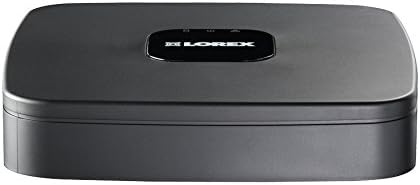
Εικόνα 3.2: Κορυφή view of the Lorex LNR1141TC4 NVR. The NVR unit features a sleek black design with the Lorex logo prominently displayed on the top surface.

Εικόνα 3.3: Rear panel of the Lorex LNR1141TC4 NVR. This view shows the various input and output ports, including HDMI, VGA, USB, Ethernet, and the four Power over Ethernet (PoE) ports for camera connections.

Εικόνα 3.4: Close-up of a Lorex 1080p HD bullet camera lens. This image highlights the camera's lens, infrared LEDs for night vision, and light sensor.
4. Ρύθμιση
Follow these steps to set up your Lorex LNR1141TC4 NVR system.
4.1 Σύνδεση του NVR
- Σύνδεση οθόνης: Connect the NVR to a monitor using the supplied HDMI cable or a VGA cable (not included).
- Συνδέστε το ποντίκι: Plug the USB mouse into one of the USB ports on the NVR's rear panel.
- Σύνδεση δικτύου (Προαιρετική αλλά συνιστάται): Connect the NVR to your router using the supplied Ethernet cable for remote access and system updates.
- Ενεργοποίηση: Συνδέστε τον προσαρμογέα ρεύματος του NVR στο NVR και στη συνέχεια σε μια πρίζα. Το NVR θα ενεργοποιηθεί αυτόματα.
4.2 Σύνδεση των καμερών
The Lorex LNR1141TC4 NVR features Power over Ethernet (PoE) ports, simplifying camera installation.
- Τοποθέτηση καμερών: Securely mount each camera in your desired location using the provided mounting kits. Ensure the camera's field of view covers the area you wish to monitor.
- Συνδέστε καλώδια Ethernet: Connect one end of the supplied 60ft Cat5e Ethernet cable to the camera's Ethernet port and the other end to one of the PoE ports on the NVR's rear panel. The NVR will automatically detect and power the cameras.
- Προσαρμογή γωνίας κάμερας: Once connected, adjust each camera's angle to optimize surveillance coverage.
5. Λειτουργία
This section covers the basic operation of your Lorex NVR system.
5.1 Οδηγός αρχικής εγκατάστασης
Upon first power-up, the NVR will guide you through an initial setup wizard to configure basic settings such as language, date/time, network settings, and password creation. Follow the on-screen prompts.
5.2 Εγγραφή
- Συνεχής ηχογράφηση: The NVR is configured for continuous recording by default, utilizing the pre-installed 1TB hard drive.
- Προγραμματισμένη εγγραφή: You can customize recording schedules for each camera through the NVR's menu. This allows you to set specific times for recording.
- Εγγραφή κίνησης: Configure motion detection zones and sensitivity to trigger recording only when movement is detected. This helps conserve storage space.
- High Definition 1080p: The system records in 1080p resolution at 30/25 frames per second (fps) per channel, ensuring clear and detailed footage.
5.3 Αναπαραγωγή
Πρόσβαση σε καταγεγραμμένο footage through the NVR's playback menu. You can search by date, time, and event type (e.g., motion detection). The system supports selectable area digital zoom during live view and playback for detailed examination.
5.4 Remote Access (FLIR Cloud)
The FLIR Cloud connectivity solution enables remote viewing of your surveillance system.
- Λήψη εφαρμογής: Download the free Lorex FLIR Cloud app on your iOS or Android smartphone or tablet.
- Σάρωση κωδικού QR: Use the app to scan the QR code located on your NVR or in the quick start guide.
- Συνδέω: Follow the app's instructions to connect to your NVR. This allows you to view live feeds, playback recordings, and receive push notifications for motion events and instant email alerts with snapshot attachments from anywhere with an internet connection.
6. Συντήρηση
Η τακτική συντήρηση διασφαλίζει τη μακροζωία και τη βέλτιστη απόδοση του συστήματος παρακολούθησης.
- Καθάρισμα: Καθαρίζετε περιοδικά τους φακούς της κάμερας με ένα μαλακό,amp cloth to remove dust and smudges. Ensure the NVR's ventilation openings are clear of obstructions.
- Κατάσταση σκληρού δίσκου: The NVR's hard drive is crucial for recording. Monitor its health through the NVR's system settings. Consider backing up important footagε τακτικά.
- Ενημερώσεις υλικολογισμικού: Ελέγξτε το Lorex website for any available firmware updates for your NVR to ensure you have the latest features and security enhancements.
7. Αντιμετώπιση Προβλημάτων
This section addresses common issues you might encounter with your Lorex LNR1141TC4 system.
- Δεν υπάρχει έξοδος βίντεο στην οθόνη:
- Βεβαιωθείτε ότι το καλώδιο HDMI/VGA είναι συνδεδεμένο σταθερά τόσο στο NVR όσο και στην οθόνη.
- Βεβαιωθείτε ότι η οθόνη έχει ρυθμιστεί στη σωστή πηγή εισόδου.
- Try a different HDMI/VGA cable or monitor.
- Κάμερες που δεν εμφανίζονται:
- Check that the Ethernet cables are securely connected to both the cameras and the NVR's PoE ports.
- Βεβαιωθείτε ότι το NVR είναι ενεργοποιημένο.
- If a camera is still not detected, try connecting it to a different PoE port on the NVR.
- A power cycle of the NVR (unplug and replug) can sometimes resolve camera detection issues.
- Η απομακρυσμένη πρόσβαση δεν λειτουργεί:
- Verify the NVR is connected to your router and has internet access.
- Βεβαιωθείτε ότι το smartphone/tablet σας διαθέτει σταθερή σύνδεση στο διαδίκτυο.
- Double-check the QR code scan and account login details in the FLIR Cloud app.
- Προβλήματα ηχογράφησης:
- Ελέγξτε την κατάσταση του σκληρού δίσκου στις ρυθμίσεις συστήματος του NVR.
- Βεβαιωθείτε ότι τα προγράμματα ηχογράφησης έχουν διαμορφωθεί σωστά.
- Verify that motion detection settings are appropriate if using motion-triggered recording.
8. Προδιαγραφές
| Χαρακτηριστικό | Λεπτομέρεια |
|---|---|
| Αριθμός μοντέλου | LNR1141TC4 |
| Ανάλυση λήψης βίντεο | 1080p HD |
| Αριθμός καναλιών | 4 |
| Χωρητικότητα αποθήκευσης μνήμης | 1 TB (Προεγκατεστημένος σκληρός δίσκος) |
| Τεχνολογία Συνδεσιμότητας | Wired (Ethernet, PoE for cameras) |
| Ειδικό χαρακτηριστικό | Motion Sensor, Remote Access (FLIR Cloud) |
| Ρυθμός καρέ | 30/25 fps per channel |
| Λειτουργία εγγραφής | Continuous, Scheduled, Motion |
| Πηγή ισχύος | Ενσύρματο Ηλεκτρικό |
| Διαστάσεις NVR (Μ x Π x Υ) | 8.1 x 8.1 x 1.8 ίντσες (20.6 x 20.6 x 4.6 cm) |
| NVR Item Weight | 1.1 λίβρες (0.5 κιλά) |
| Συμβατές Συσκευές | Κάμερες, Προσωπικοί Υπολογιστές, Smartphones, Tablets |
9. Εγγύηση και υποστήριξη
For warranty information and technical support, please refer to the documentation included with your product or visit the official Lorex website. Lorex provides resources and customer service to assist with any questions or issues you may encounter.
Διαδικτυακοί πόροι: www.lorex.com/support


