Εισαγωγή
This manual provides comprehensive instructions for the Baseus SUWY-01 Aluminum Desktop Stand. Designed for smartphones and tablets ranging from 3 to 10.5 inches, this stand offers a stable and adjustable platform for an enhanced viewing experience. Please read this manual thoroughly before use to ensure proper setup and operation.

Image: The Baseus SUWY-01 Aluminum Desktop Stand in black, shown from the front.
Ρύθμιση
The Baseus SUWY-01 Desktop Stand is designed for immediate use with minimal assembly required. Follow these steps to set up your stand:
- Αποσυσκευάστε τη βάση: Carefully remove the stand from its packaging.
- Τοποθέτηση: Place the stand on a flat, stable surface such as a desk or table. Ensure the surface is clean and free of obstructions.
- Διαχείριση καλωδίων: Utilize the integrated cross-shaped cable organizer located on the stand's pole to keep charging cables tidy and prevent clutter.
- Base Storage: The base of the stand features a shallow recess, which can serve as a mini container for small items like earbuds, USB drives, or keys.
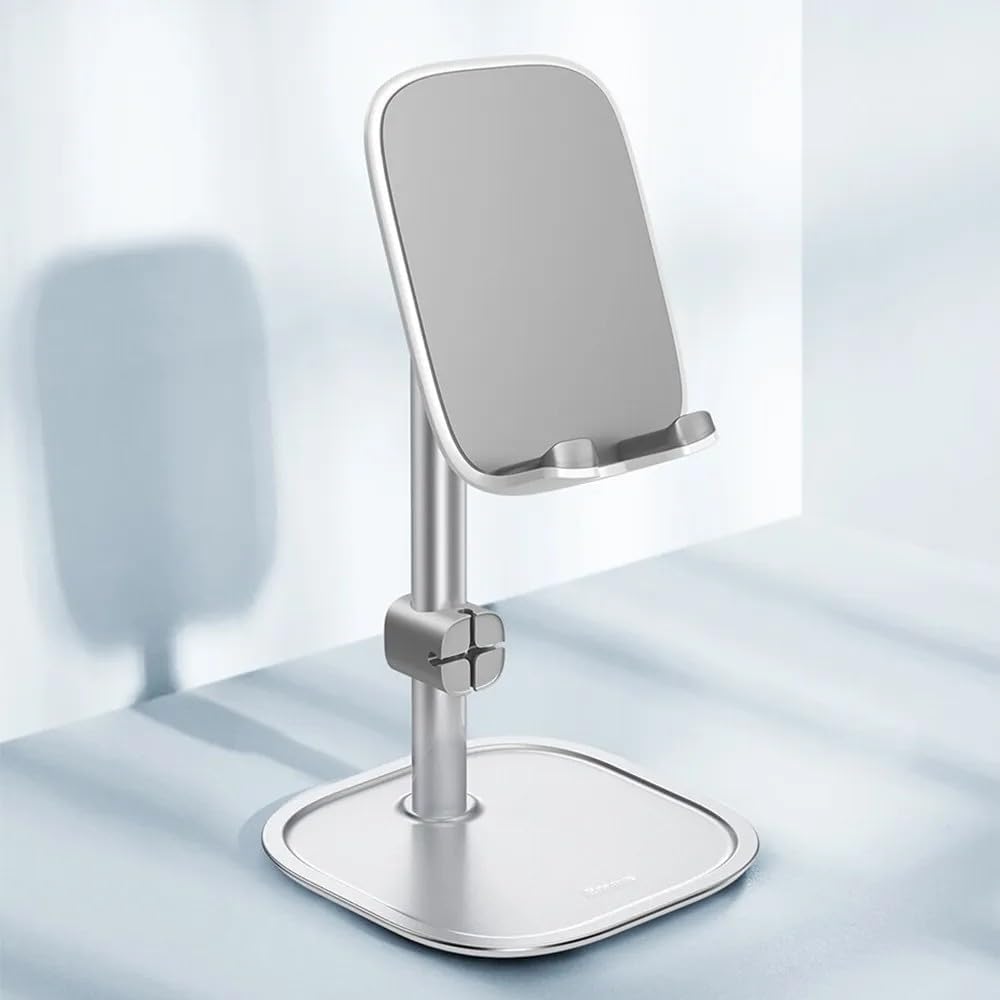
Image: The Baseus SUWY-01 Aluminum Desktop Stand in silver, showcasing its stable base and adjustable arm.
Οδηγίες Λειτουργίας
The Baseus SUWY-01 stand offers flexibility for various viewing needs. Follow these guidelines for optimal operation:
- Placing Your Device: Gently place your smartphone or tablet onto the cradle of the stand. Ensure the device is centered and securely resting against the anti-slip silicone pads. The stand supports devices with screen sizes from 3 to 10.5 inches.
- Ρύθμιση του Viewγωνία: The stand features a 35-degree adjustable angle. Hold the base firmly and carefully tilt the device cradle up or down to achieve your desired viewing angle. This adjustment helps maintain proper posture and reduces strain.

Εικόνα: Πλευρά view of the black Baseus SUWY-01 stand, illustrating its adjustable angle mechanism.
- Maintaining Proper Distance: When using the stand, position your device at an appropriate distance from your eyes to prevent eye strain and promote good posture.

Image: A person using the Baseus stand with a smartphone, demonstrating the recommended viewing distance for ergonomic comfort.
- Φόρτιση κατά τη χρήση: The design allows for charging cables to be connected to your device while it is on the stand. Use the cable organizer to keep the charging cable neat.

Image: A silver Baseus stand supporting a smartphone, with a charging cable neatly routed through the integrated cable management feature.
- Ευέλικτη χρήση: The stand is suitable for various activities such as watching videos, video calls, reading, or browsing, both in portrait and landscape orientations.

Image: Two Baseus stands, one holding a tablet and another holding a smartphone, illustrating the stand's versatility for different device types and orientations.
- Using the Mini Container: The recessed area in the base can be used to store small accessories, helping to keep your workspace organized.

Εικόνα: Κοντινό πλάνο view of the Baseus stand's base, highlighting the mini container feature with earbuds and a phone ring holder placed inside.
Συντήρηση
To ensure the longevity and appearance of your Baseus SUWY-01 Desktop Stand, follow these simple maintenance guidelines:
- Καθάρισμα: Σκουπίζετε τακτικά τη βάση με ένα μαλακό, στεγνό ή ελαφρώςamp cloth. Avoid using abrasive cleaners, solvents, or harsh chemicals, as these can damage the aluminum finish and silicone pads.
- Αποθήκευση: When not in use, store the stand in a clean, dry environment.
- Επιθεώρηση: Periodically check the stand for any loose parts or damage. If any issues are found, discontinue use and contact customer support.
Αντιμετώπιση προβλημάτων
If you encounter any issues with your Baseus SUWY-01 Desktop Stand, refer to the following common troubleshooting tips:
- Η βάση είναι ασταθής:
- Ensure the stand is placed on a completely flat and stable surface.
- Verify that the device placed on the stand is within the recommended size and weight limits (3 to 10.5 inches).
- Difficulty adjusting the angle:
- Apply gentle, firm pressure when adjusting the angle. The mechanism is designed to be stiff enough to hold the device securely.
- Ensure no foreign objects are obstructing the hinge mechanism.
- Device slipping from the cradle:
- Check that the silicone anti-slip pads on the cradle are clean and intact. Clean them with a damp ύφασμα εάν χρειάζεται.
- Ensure your device is properly seated in the cradle and not excessively heavy for the stand's design.
If the problem persists, please contact Baseus customer support for further assistance.
Προδιαγραφές
| Χαρακτηριστικό | Λεπτομέρεια |
|---|---|
| Αριθμός μοντέλου | SUWY-01 |
| Υλικό | Κράμα αλουμινίου, σιλικόνη |
| Διαστάσεις (L x H) | 101.34 mm x 190.99 mm |
| Βάρος | Περίπου 10 γραμμάρια |
| Ρυθμιζόμενη γωνία | Έως 35 βαθμούς |
| Συμβατές Συσκευές | Smartphones and Tablets (3 to 10.5 inches) |
| Ειδικά Χαρακτηριστικά | Anti-slip design, Cable Organizer, Mini Storage Container in Base |

Image: Technical diagram illustrating the dimensions of the Baseus SUWY-01 Desktop Stand.
Εγγύηση και υποστήριξη
For warranty information, please refer to the documentation included with your purchase or visit the official Baseus website. If you require technical support or have questions not covered in this manual, please contact Baseus customer service through their official channels.
Κατασκευαστής: BASEUS


