Εισαγωγή
The DigiTech TRIO is an innovative electric guitar multi-effect pedal designed to be your personal band. It listens to your guitar playing and automatically generates accompanying bass and drum parts. This manual provides comprehensive instructions for setting up, operating, and maintaining your TRIO pedal, ensuring you get the most out of its unique features.
Βασικά Χαρακτηριστικά
- Seven Music Genres and Twelve Song Styles Per Genre to Choose From
- The TRIO can learn up to three different song parts that can be recalled on-the-fly
- Adjustable Tempo & Alternate Half Time/Double Time Variants Bass & Drum Level Controls
- Hands-Free Control Using a DigiTech FS3X Footswitch (optional)
- Amp & Mixer Outputs Headphone Output w/Level Control Power Supply Included
Οδηγός εγκατάστασης
Follow these steps to set up your DigiTech TRIO pedal:
- Connect the included 9V DC power supply to the ΕΞΟΥΣΙΑ input on the pedal and plug it into a power outlet.
- Συνδέστε την ηλεκτρική σας κιθάρα στο ΚΙΘΑΡΑ ΜΕΣΑ υποδοχή χρησιμοποιώντας ένα τυπικό καλώδιο οργάνου 1/4 ίντσας.
- Συνδέστε το AMP ΕΞΩ Τζακ στην κιθάρα σου amplifier's input using another 1/4-inch instrument cable.
- For connecting to a mixer or PA system, use the ΜΙΚΡΟ ΕΞΩ γρύλος.
- Για ιδιωτική πρακτική, συνδέστε ακουστικά στο ΑΚΟΥΣΤΙΚΟ ΕΞΩ γρύλος.
- Optionally, connect a DigiTech FS3X Footswitch to the ΕΛΕΓΧΟΣ ΣΕ jack for extended hands-free control.
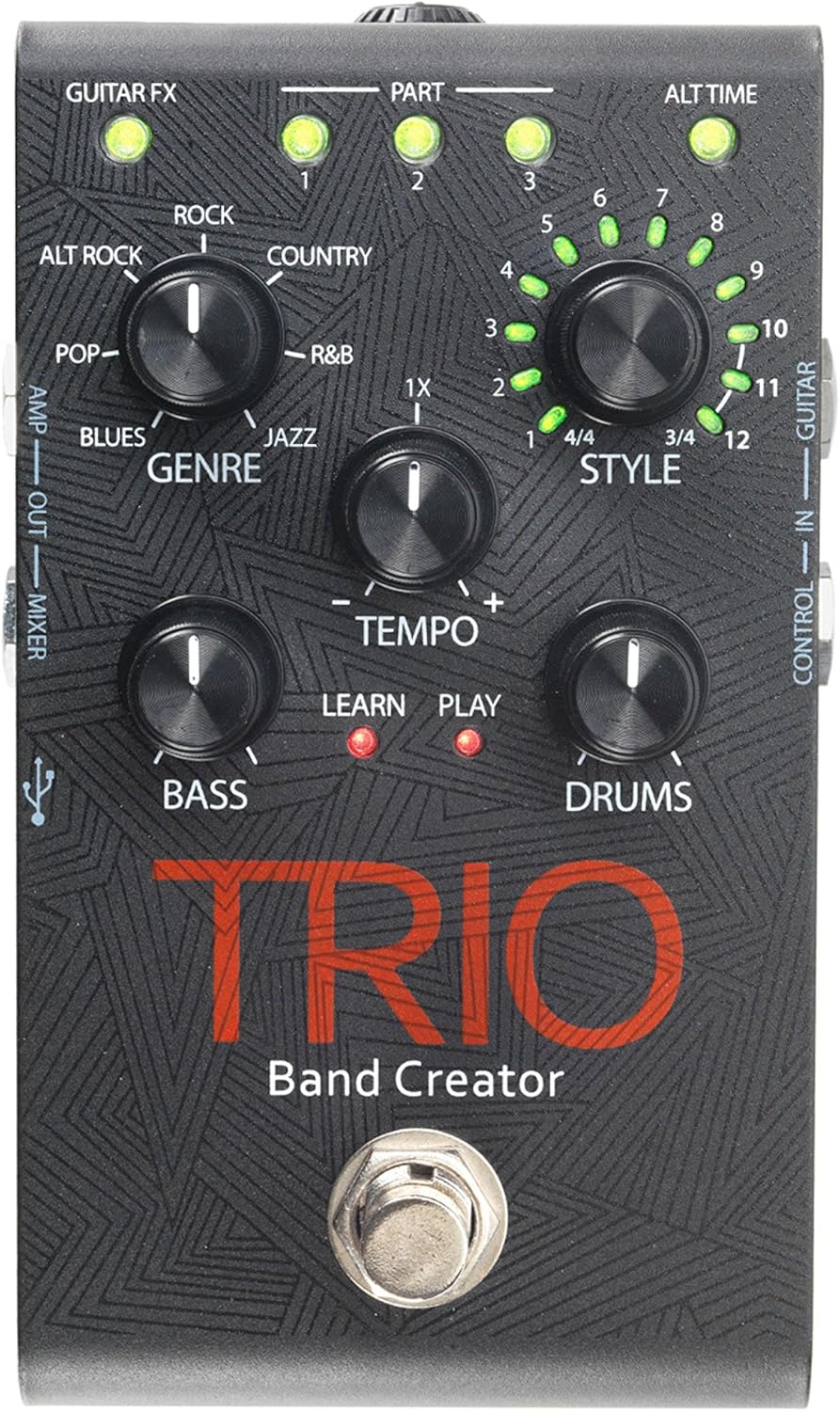
Εικόνα 1: Κορυφή view of the DigiTech TRIO pedal, showing the main controls and footswitch.
Οδηγίες Λειτουργίας
Basic Operation: Teaching the TRIO a Song
- Πατήστε το ΖΩΝΗ footswitch once to enter 'Listen' mode. The ΜΑΘΑΙΝΩ Η λυχνία LED θα ανάψει.
- Play your desired chord progression and rhythm clearly. The TRIO will analyze your playing.
- Πατήστε το ΖΩΝΗ footswitch again to stop 'Listen' mode. The ΠΑΙΧΝΙΔΙ LED will illuminate, and the TRIO will immediately begin playing generated bass and drum parts.
- You can now play along with your virtual band.
Genre and Style Selection
- Χρησιμοποιήστε το ΕΙΔΟΣ knob to select from Blues, Pop, Alternative Rock, Rock, Country, R&B, and Jazz. The genre affects the overall feel of the generated bass and drum parts.
- Χρησιμοποιήστε το ΣΤΥΛ knob to choose from twelve different song styles available for each genre. This allows for further customization of the rhythm and feel.
- Ο ALT TIME button allows you to switch between 3/4 and 4/4 time signatures.
Looping and Song Parts
- The TRIO can learn up to 3 different song parts. To record a new part, select an empty ΜΕΡΟΣ slot (1, 2, or 3) using the corresponding buttons.
- Follow the 'Basic Operation' steps to teach the TRIO the new song part.
- During playback, you can switch between learned song parts on-the-fly by pressing the corresponding ΜΕΡΟΣ κουμπί.
- Ο ΒΡΟΧΟΣ footswitch allows you to record and playback your own guitar loops. Press once to start recording, press again to stop recording and start playback, and press and hold to clear the loop.
Adjusting Levels and Tempo
- Ο ΡΥΘΜΟΣ knob adjusts the playback speed of the band and loops.
- Ο Μπάσο knob controls the volume level of the generated bass line.
- Ο ΤΥΜΠΑΝΑ knob controls the volume level of the generated drum track.
- Ο ΒΡΟΧΟΣ knob controls the volume level of your recorded guitar loop.

Σχήμα 2: Γωνιακό view of the DigiTech TRIO pedal, highlighting the control knobs and input/output jacks.
Χειριστήρια και Συνδέσεις
The DigiTech TRIO pedal features a user-friendly layout with clearly labeled controls and versatile connection options:
Χειριστήρια μπροστινού πίνακα:
- GUITAR FX: Activates built-in guitar effects tailored to the selected genre.
- PART 1, 2, 3: Buttons to select and recall different learned song parts.
- ALT TIME: Toggles between 3/4 and 4/4 time signatures.
- TEMPO Knob: Adjusts the overall playback speed.
- Κουμπί ΕΙΔΟΥΣ: Selects the musical genre (Blues, Pop, Alt Rock, Rock, Country, R&B, Jazz).
- ΣΤΥΛ Κουμπί: Selects one of twelve styles within the chosen genre.
- LOOP Knob: Controls the volume of your recorded guitar loop.
- Πόμολο BASS: Ελέγχει την ένταση της παραγόμενης γραμμής μπάσων.
- DRUMS Knob: Ελέγχει την ένταση του δημιουργημένου κομματιού τυμπάνου.
- Ποδοδιακόπτης LOOPER: Records/plays/clears guitar loops.
- Ποδοδιακόπτης BAND: Enters 'Listen' mode to learn chords/rhythm, or starts/stops band playback.
Side and Rear Panel Connections:
- ΚΙΘΑΡΑ ΣΕ: 1/4-inch input for your electric guitar.
- AMP ΕΞΩ: 1/4-inch output to your guitar ampπιο ζωντανή.
- MIXER OUT: 1/4-inch output for connecting to a mixer or PA system.
- ΑΚΟΥΣΤΙΚΟ ΕΞΩ: 1/8-inch stereo output for headphones.
- ΕΛΕΓΧΟΣ ΣΕ: 1/4-inch input for optional DigiTech FS3X Footswitch.
- ΕΞΟΥΣΙΑ: 9V DC input for the included power supply.
- USB: Mini-USB port for firmware updates.

Εικόνα 3: Πίσω view of the DigiTech TRIO pedal, showing the power input and headphone jack.
Προδιαγραφές
| Χαρακτηριστικό | Λεπτομέρεια |
|---|---|
| Βάρος αντικειμένου | 10.6 ουγκιές (0.3 κιλά) |
| Διαστάσεις προϊόντος | 4.63 x 3.19 x 2.13 ίντσες (11.76 x 8.10 x 5.41 cm) |
| Αριθμός μοντέλου είδους | TRIO |
| Μπαταρίες | 1 9V battery required (for internal use, not primary power) |
| Διασύνδεση υλικού | Ήχος 1/4 ιντσών |
| Μορφή σήματος | Αναλογικό |
| Πηγή ισχύος | Corded Electric (9V DC adapter included) |
| Τομtage | 9 Volt |
| Ampοργή | 300 εκατamps |
Συντήρηση
- Διατηρήστε το πεντάλ καθαρό σκουπίζοντάς το με ένα μαλακό, στεγνό πανί. Αποφύγετε τη χρήση λειαντικών καθαριστικών ή διαλυτών.
- Αποθηκεύστε το πεντάλ σε δροσερό και ξηρό μέρος, μακριά από το άμεσο ηλιακό φως και τις ακραίες θερμοκρασίες.
- Βεβαιωθείτε ότι όλα τα καλώδια είναι συνδεδεμένα με ασφάλεια για να αποτρέψετε απώλεια ή ζημιά σήματος.
- Αποφύγετε να ρίξετε το πεντάλ ή να το υποβάλετε σε ισχυρές κρούσεις.
Αντιμετώπιση προβλημάτων
- Χωρίς ήχο: Ελέγξτε όλες τις συνδέσεις καλωδίων (κιθάρα, amp, power). Ensure the pedal is powered on and the volume knobs are not set to zero.
- Κακή ποιότητα ήχου: Βεβαιωθείτε ότι το όργανό σας και amplifier are functioning correctly. Check for damaged cables.
- Band Not Generating Correctly: Ensure you are playing clear, distinct chords during the 'Listen' phase. Try different genres and styles to see if a different setting better interprets your playing.
- Ο ποδοδιακόπτης δεν ανταποκρίνεται: Disconnect and reconnect the power supply. If using an optional FS3X footswitch, ensure it is properly connected.
Εγγύηση και υποστήριξη
Για πληροφορίες σχετικά με την εγγύηση και την τεχνική υποστήριξη, ανατρέξτε στην επίσημη ιστοσελίδα της DigiTech. webή επικοινωνήστε με την εξυπηρέτηση πελατών τους. Κρατήστε την απόδειξη αγοράς για τυχόν αξιώσεις εγγύησης.


