Εισαγωγή
The Logitech UE Boom is a 360-degree wireless Bluetooth speaker designed for portable audio. It features a durable, go-anywhere shape and is equipped with a water and stain resistant acoustic skin. This speaker allows for wireless music playback, phone calls, and can be paired with another UE Boom for stereo sound.

Εικόνα: Μπροστά view of the Logitech UE Boom Wireless Bluetooth Speaker in Northern Light color.
Βασικά Χαρακτηριστικά
- Ήχος 360 μοιρών: Delivers immersive audio in all directions.
- Φορητό σχέδιο: Versatile, cylindrical shape for easy transport.
- Water and Stain Resistant: Features a colorful acoustic skin with plasma coating for durability against water and stains.
- Ασύρματη συνδεσιμότητα: Connects via Bluetooth from up to 50 feet away. Easy pairing via NFC for compatible devices.
- Double Up Feature: Wirelessly connect two UE BOOM speakers in stereo using the UE BOOM app for enhanced sound.
- Μεγάλη διάρκεια ζωής μπαταρίας: Rechargeable battery provides up to 15 hours of playback.
- Μεγάφωνο: Integrated crystal-clear speakerphone for calls.
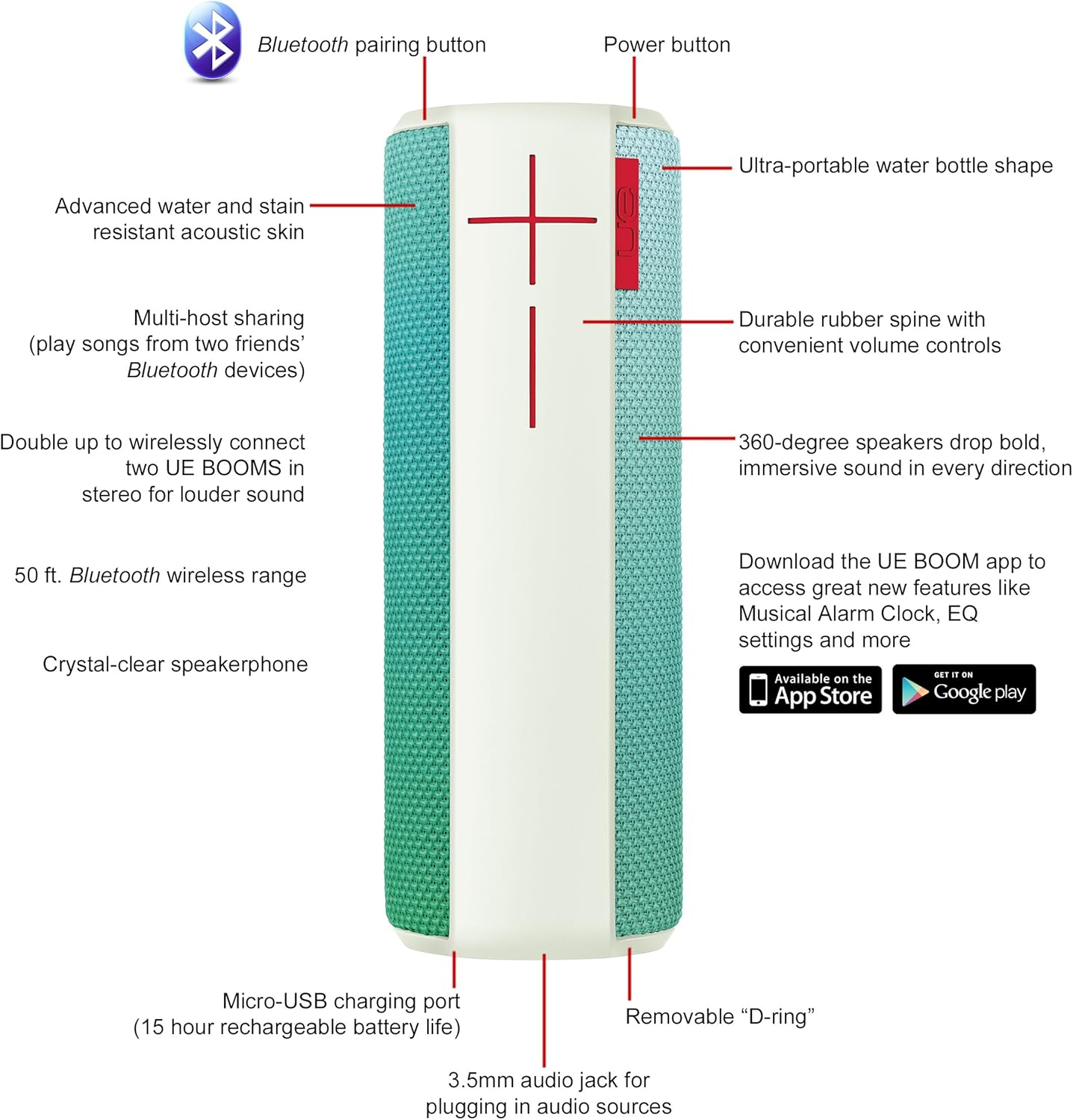
Image: Diagram highlighting key features and controls of the UE Boom speaker, including Bluetooth pairing button, power button, volume controls, micro-USB charging port, and 3.5mm audio jack.
Ρύθμιση
Φόρτιση του ηχείου
Before initial use, fully charge your UE Boom speaker. Connect the provided micro-USB cable to the charging port located at the bottom of the speaker and plug the other end into a USB power source. The speaker's battery provides approximately 15 hours of playback on a full charge.
Σύνδεση μέσω Bluetooth
- Power on your UE Boom speaker by pressing the power button.
- Press and hold the Bluetooth pairing button (usually indicated by a Bluetooth icon) until you hear an audible tone and the LED indicator flashes rapidly.
- On your mobile device (smartphone or tablet), navigate to the Bluetooth settings.
- Select "UE Boom" from the list of available devices to pair.
- Once paired, you will hear a confirmation tone from the speaker.
Για συσκευές με δυνατότητα NFC, απλώς αγγίξτε τη συσκευή σας στην περιοχή NFC του ηχείου για γρήγορη σύζευξη.
Οδηγίες Λειτουργίας
Βασικοί έλεγχοι
- Κουμπί λειτουργίας: Located on the top of the speaker to turn it on or off.
- Έλεγχοι έντασης ήχου: Large '+' and '-' buttons on the side of the speaker adjust the volume.
- Κουμπί Bluetooth: Ενεργοποιεί τη λειτουργία σύζευξης Bluetooth.
Using the UE BOOM App
Download the official UE BOOM app from your device's app store (available on App Store and Google Play) to unlock additional features:
- Musical Alarm Clock: Wake up to your favorite music.
- Απομακρυσμένη ενεργοποίηση: Turn your speaker on/off from your device.
- Ρυθμίσεις EQ: Προσαρμόστε το sound profile κατά την προτίμησή σας.
- Double Up: Connect two UE BOOM speakers for a stereo sound experience.
Λειτουργικότητα ηχείου
When connected to a smartphone, the UE Boom can be used as a speakerphone. Incoming calls will be routed through the speaker, allowing for hands-free communication.
Συντήρηση
The UE Boom speaker features a water and stain resistant acoustic skin. To clean, gently wipe the speaker with a damp cloth. Avoid using harsh chemicals or abrasive cleaners. Ensure all ports are dry before charging or connecting other devices.
Αντιμετώπιση προβλημάτων
- Χωρίς ισχύ: Ensure the speaker is charged. Connect it to a power source using the micro-USB cable.
- Δεν είναι δυνατή η σύζευξη μέσω Bluetooth:
- Βεβαιωθείτε ότι το ηχείο βρίσκεται σε λειτουργία σύζευξης (αναβοσβήνει η λυχνία LED).
- Ελέγξτε ότι το Bluetooth είναι ενεργοποιημένο στη συσκευή σας.
- Move your device closer to the speaker (within 50 feet).
- Δοκιμάστε να καταργήσετε τη σύζευξη και να επανασυνδέσετε τη συσκευή.
- Χαμηλή ένταση ή παραμορφωμένος ήχος:
- Ρυθμίστε την ένταση τόσο στο ηχείο όσο και στη συνδεδεμένη συσκευή σας.
- Βεβαιωθείτε ότι το ηχείο είναι πλήρως φορτισμένο.
- Check for any obstructions around the speaker.
- Η εφαρμογή δεν συνδέεται: Ensure the speaker is powered on and connected via Bluetooth to your device. Update the app to the latest version.
Προδιαγραφές προϊόντος
| Όνομα μοντέλου | Logitech UE Boom Wireless Bluetooth Speaker |
| Αριθμός μοντέλου | 980-001023 |
| Μάρκα | Logitech |
| Χρώμα | Northern Light |
| Τύπος ηχείου | Υπαίθριος |
| Τεχνολογία Συνδεσιμότητας | Bluetooth, Ασύρματο |
| Wireless Σειρά | Έως 50 πόδια (15.24 μέτρα) |
| Πηγή ισχύος | Τροφοδοτείται από μπαταρία (περιλαμβάνεται 1 μπαταρία ιόντων λιθίου) |
| Μέση διάρκεια ζωής μπαταρίας | 15 Ώρες |
| Επίπεδο αντοχής στο νερό | Αδιάβροχος |
| Βάρος αντικειμένου | 2.2 λίρες |
| Διαστάσεις προϊόντος (ΜxΠxΥ) | 2.6 x 2.6 x 7.1 ίντσες |
| Υλικό | Πλαστική ύλη |
| UPC | 097855112125 |
Επίσημο βίντεο προϊόντος
Βίντεο: Ένα overview of the Logitech UE Boom speaker's features, including 360-degree sound, water resistance, wireless connectivity, and the ability to pair two speakers for louder sound. This video demonstrates the speaker's durability and portability in various environments.
Εγγύηση και υποστήριξη
The Logitech UE Boom Wireless Bluetooth Speaker comes with a Limited Warranty. For specific warranty details, please refer to the documentation included with your product or visit the official Logitech webτοποθεσία.
For technical support or customer service, you may contact Logitech at: 646-454-3200.


