1. Εισαγωγή
The Bogen 1126-BG-UTI1 is a single-zone paging controller designed to integrate a paging system with a telephone system. It provides a reliable interface for making announcements over a public address system from a telephone. This manual provides detailed instructions for the proper installation, operation, and maintenance of your Bogen paging controller.
2. Σημαντικές πληροφορίες για την ασφάλεια
Διαβάστε και κατανοήστε όλες τις οδηγίες ασφαλείας πριν από τη λειτουργία αυτής της συσκευής. Φυλάξτε αυτό το εγχειρίδιο για μελλοντική αναφορά.
- Πηγή ενέργειας: Συνδέστε τη μονάδα μόνο στην καθορισμένη παροχή ρεύματος.tage.
- Υγρασία: Μην εκθέτετε τη μονάδα σε βροχή ή υγρασία.
- Αερισμός: Βεβαιωθείτε για τον κατάλληλο αερισμό. Μην φράζετε τα ανοίγματα εξαερισμού.
- Εξυπηρέτηση: Αναθέστε όλες τις εργασίες σέρβις σε εξειδικευμένο προσωπικό σέρβις. Μην επιχειρήσετε να κάνετε μόνοι σας σέρβις σε αυτό το προϊόν.
- Καθάρισμα: Καθαρίστε μόνο με στεγνό πανί.
3. Περιεχόμενα συσκευασίας
Βεβαιωθείτε ότι όλα τα στοιχεία υπάρχουν στη συσκευασία:
- Bogen 1126-BG-UTI1 Single Zone Paging Controller Unit
- Μετασχηματιστής ρεύματος
- Εγχειρίδιο χρήστη (αυτό το έγγραφο)
- Εξαρτήματα τοποθέτησης (εάν υπάρχουν)
4. Το προϊόν τελείωσεview
The Bogen 1126-BG-UTI1 features various ports and indicators for seamless integration and operation. Familiarize yourself with the unit's components before installation.
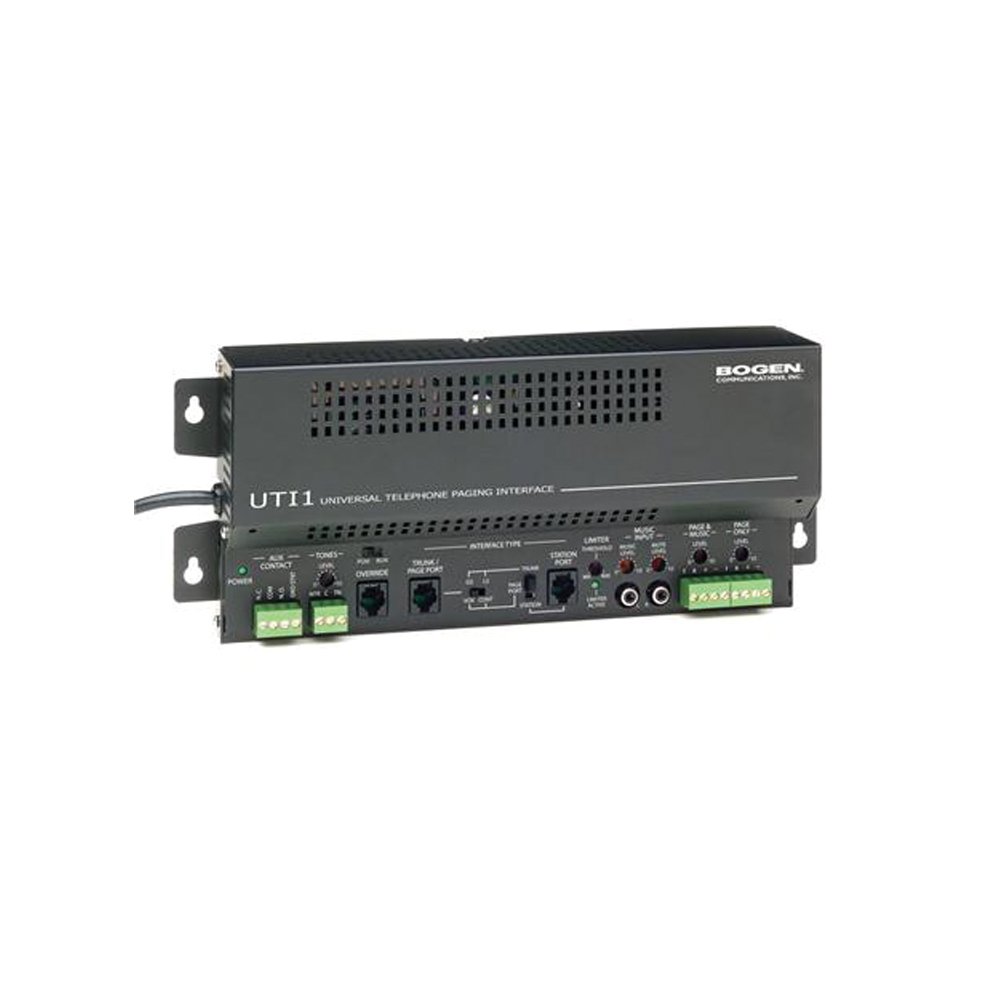
Εικόνα 1: Εμπρός view of the Bogen Single Zone Paging Controller. This image displays the main unit, highlighting its compact design and essential connection points for audio input and output, as well as power. The various ports and indicators are visible, crucial for understanding the device's functionality and connectivity.
4.1 Πρόσοψη
- LED ισχύος: Υποδεικνύει την κατάσταση ισχύος.
- Έλεγχος επιπέδου εισόδου: Adjusts the audio input sensitivity.
- Έλεγχος επιπέδου εξόδου: Ρυθμίζει την ένταση του ήχου εξόδου.
4.2 Πίσω πίνακας
- Telephone Line Input: RJ-11 jack for connecting to the telephone system.
- Έξοδος ήχου: RCA or screw terminal connections for connecting to an ampπιο ζωντανή.
- Είσοδος ισχύος: Jack for connecting the power adapter.
- MOH Output: Music On Hold output (if applicable).
5. Ρύθμιση και εγκατάσταση
Follow these steps to properly install your paging controller:
- Βάση: Choose a suitable location for the controller, away from excessive heat or moisture. Secure the unit using appropriate mounting hardware if desired.
- Connect to Telephone System: Connect an RJ-11 cable from your telephone system's paging port or a suitable analog extension to the "Telephone Line Input" on the controller. Consult your telephone system's manual for specific paging port details.
- Σύνδεση σε Ampπιο ζωντανός: Connect the "Audio Output" of the paging controller to an available input on your paging amplifier. Ensure correct polarity if using screw terminals.
- Σύνδεση τροφοδοσίας: Plug the provided power adapter into the "Power Input" jack on the controller, then plug the adapter into a standard electrical outlet. The Power LED should illuminate.
- Initial Level Adjustment: Start with the Input Level and Output Level controls set to their minimum positions.
6. Οδηγίες λειτουργίας
Once installed, the Bogen 1126-BG-UTI1 is ready for operation.
6.1 Making a Page
- From a telephone connected to the system, dial the designated paging access code or extension.
- Wait for the confirmation tone or voice prompt from the paging controller.
- Speak clearly into the telephone handset to make your announcement.
- Hang up the telephone when finished.
6.2 Ρύθμιση επιπέδων ήχου
- Επίπεδο εισαγωγής: Slowly increase the "Input Level Control" until the paging audio is clear and distortion-free. If the audio is too loud or distorted, decrease this level.
- Επίπεδο εξόδου: Adjust the "Output Level Control" to achieve the desired volume through the paging speakers. This should be done in conjunction with the ampρυθμιστής έντασης του σωστήρα.
7. Συντήρηση
The Bogen 1126-BG-UTI1 is designed for reliable operation with minimal maintenance.
- Καθάρισμα: Periodically wipe the unit with a soft, dry cloth. Do not use liquid cleaners or aerosols.
- Αερισμός: Ensure that ventilation openings remain clear of dust and debris.
- Συνδέσεις: Ελέγχετε περιστασιακά όλες τις συνδέσεις καλωδίων για να βεβαιωθείτε ότι είναι ασφαλείς.
8. Αντιμετώπιση Προβλημάτων
Εάν αντιμετωπίσετε προβλήματα, ανατρέξτε στον ακόλουθο οδηγό αντιμετώπισης προβλημάτων:
| Πρόβλημα | Πιθανή αιτία | Διάλυμα |
|---|---|---|
| Δεν υπάρχει ενδεικτική λυχνία λειτουργίας. | Power adapter not connected or faulty; no power at outlet. | Check power adapter connection. Verify outlet has power. Test with another adapter if available. |
| No paging audio. | Incorrect telephone system connection; amplifier off or muted; audio levels too low. | Verify telephone line and audio output connections. Ensure amplifier is on and not muted. Adjust Input and Output Level controls. |
| Paging audio is distorted. | Input or output levels set too high. | Reduce Input Level and/or Output Level controls. |
| Cannot access paging from telephone. | Incorrect paging access code; telephone system not configured correctly. | Confirm the correct paging access code with your telephone system administrator. Verify telephone system programming. |
If the problem persists after attempting these solutions, contact Bogen technical support.
9. Προδιαγραφές
| Χαρακτηριστικό | Λεπτομέρεια |
|---|---|
| Αριθμός μοντέλου | 1126-BG-UTI1 |
| Μάρκα | Bogen |
| Διαστάσεις συσκευασίας | 15 x 9 x 7 ίντσες |
| Βάρος αντικειμένου | 6.7 λίρες |
| ASIN | B00P1AOL2C |
| Κατασκευαστής | Bogen |
| Paging Zones | Ενιαία ζώνη |
| Αρμονία | Telephone systems with analog paging port or extension |
10. Εγγύηση και υποστήριξη
Bogen products are designed for durability and performance. For specific warranty information, please refer to the warranty card included with your product or visit the official Bogen website. Technical support is available to assist with any questions or issues you may encounter.
- Διαδικτυακή υποστήριξη: Επίσκεψη www.bogen.com/support for FAQs, documentation, and contact information.
- Στοιχεία επικοινωνίας: Refer to the Bogen website for current telephone numbers and email addresses for technical assistance.


