1. Εισαγωγή
This manual provides essential information for the safe and effective operation of the Rigol DG5352 Function/Arbitrary Waveform Generator. The DG5352 is a high-performance, 2-channel device capable of generating various waveforms with a maximum frequency of 350 MHz and a sampling rate of 1 GSa/s. Please read this manual thoroughly before using the instrument to ensure proper functionality and to prevent damage.
2. Πληροφορίες Ασφάλειας
Τηρήστε τις ακόλουθες προφυλάξεις ασφαλείας για να αποτρέψετε τραυματισμούς και να αποφύγετε ζημιές στο όργανο ή σε οποιαδήποτε συνδεδεμένα προϊόντα.
- Πηγή ενέργειας: Connect the instrument to a power source that provides the specified voltagε φάσμα.
- Γείωση: Βεβαιωθείτε ότι το όργανο είναι σωστά γειωμένο για να αποφύγετε ηλεκτροπληξία.
- Αερισμός: Do not block ventilation openings. Ensure adequate airflow around the instrument.
- Περιβάλλο: Operate the instrument in a dry, well-ventilated area, away from direct sunlight, high temperatures, and excessive dust.
- Καθάρισμα: Αποσυνδέστε την παροχή ρεύματος πριν από τον καθαρισμό. Χρησιμοποιήστε ένα μαλακό,amp πανί· αποφύγετε τα λειαντικά καθαριστικά ή τους διαλύτες.
- Εξυπηρέτηση: Αναθέστε όλες τις εργασίες σέρβις σε εξειδικευμένο προσωπικό σέρβις. Μην επιχειρήσετε να επισκευάσετε μόνοι σας το όργανο.
3. Το προϊόν τελείωσεview
The Rigol DG5352 is a versatile function/arbitrary waveform generator designed for a wide range of applications in electronics testing and development. It features two independent output channels, allowing for simultaneous generation of different waveforms or synchronized signals.
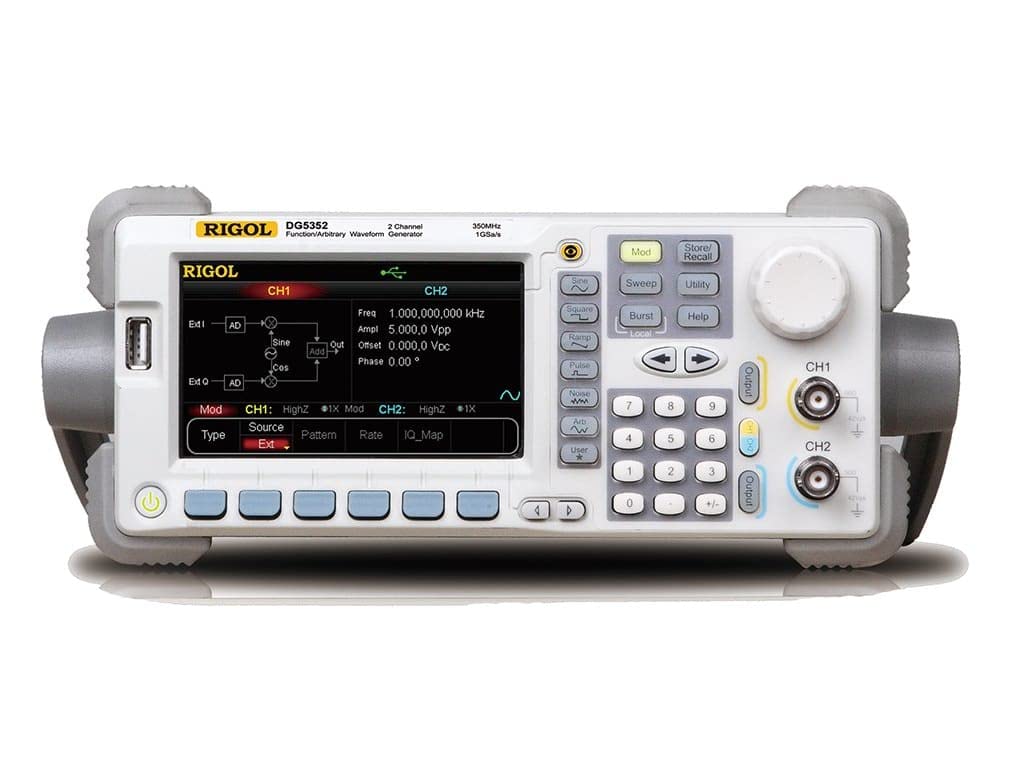
Figure 3.1: Front Panel of the Rigol DG5352. This image displays the front panel of the Rigol DG5352, highlighting its main display, control buttons, rotary knob, and output connectors for Channel 1 (CH1) and Channel 2 (CH2). The display shows current settings for frequency, amplitude, offset, and phase, along with waveform type and modulation options.
Βασικά Χαρακτηριστικά:
- Κανάλια: 2 independent output channels.
- Εύρος συχνότητας: Up to 350 MHz.
- SampΠοσοστό ling: 1 GSa/s.
- Τύποι κυματομορφών: Sine, Square, Ramp, Pulse, Noise, Arbitrary, and more.
- Modulation Functions: AM, FM, PM, FSK, ASK, PSK, PWM, Sweep, Burst.
- Διεπαφή χρήστη: Intuitive front panel with a clear display, dedicated function buttons, and a rotary knob for precise adjustments.
4. Ρύθμιση
- Αποσυσκευασία: Carefully remove the DG5352 from its packaging. Verify that all accessories listed in the packing list are present.
- Σύνδεση ρεύματος: Connect the provided power cord to the AC input on the rear panel of the instrument, then plug the other end into a grounded AC power outlet.
- Ενεργοποίηση: Press the power button located on the front panel to turn on the instrument. The display will illuminate, and the system will perform a self-test.
- Συνδέσεις εξόδου: Connect your test leads or cables to the desired output channels (CH1 or CH2) on the front panel. Ensure proper impedance matching for your application.
- USB/LAN Connection (Optional): For remote control or data transfer, connect a USB cable to the USB host/device port or an Ethernet cable to the LAN port on the rear panel.
5. Οδηγίες λειτουργίας
This section outlines basic operation procedures for generating standard waveforms.
5.1. Generating a Standard Waveform (e.g., Sine Wave)
- Επιλέξτε Κανάλι: Πατήστε το CH1 or CH2 button on the front panel to select the desired output channel. The active channel will be highlighted on the display.
- Select Waveform Type: Πατήστε το Ημίτονο button (or other waveform buttons like Πλατεία, Ramp, Σφυγμός) located on the left side of the control panel. The display will show the default sine wave parameters.
- Ρύθμιση συχνότητας: Use the numeric keypad to enter the desired frequency value, then press the corresponding unit button (e.g., MHz, kHz). Alternatively, use the rotary knob to adjust the frequency.
- Σειρά Amplitude: Πατήστε το Ampl softkey on the display. Use the numeric keypad and unit buttons (e.g., Vpp) or the rotary knob to set the peak-to-peak amplitude.
- Set Offset: Πατήστε το Οφσετ softkey. Use the numeric keypad and unit buttons (e.g., Vdc) or the rotary knob to set the DC offset voltage.
- Ενεργοποίηση εξόδου: Πατήστε το Παραγωγή button for the selected channel (CH1 or CH2) to enable the waveform output. The button will illuminate when active.
5.2. Modulation Functions
The DG5352 supports various modulation types. To access these, press the Mod button on the front panel. Follow the on-screen prompts and use the softkeys and rotary knob to configure the desired modulation parameters (e.g., AM, FM, PM).
5.3. Storing and Recalling Settings
To save current instrument settings, press the Αποθήκευση/Ανάκληση button. Select a memory location using the softkeys and rotary knob, then confirm to save. To recall settings, press Αποθήκευση/Ανάκληση again, select the desired memory location, and confirm.
6. Συντήρηση
- Καθάρισμα: Regularly clean the exterior of the instrument with a soft, dry cloth. For stubborn dirt, use a cloth lightly dampολοκληρώθηκε με νερό. Μην χρησιμοποιείτε σκληρά χημικά ή διαλύτες.
- Αερισμός: Ensure that the ventilation openings on the instrument remain clear of dust and obstructions to prevent overheating.
- Αποθήκευση: When not in use for extended periods, store the DG5352 in a clean, dry environment within its specified operating temperature range.
- Διαμέτρηση: Periodic calibration by qualified personnel is recommended to maintain measurement accuracy. Refer to Rigol's official support for calibration services.
7. Αντιμετώπιση Προβλημάτων
| Πρόβλημα | Πιθανή αιτία | Διάλυμα |
|---|---|---|
| Το όργανο δεν ενεργοποιείται. | Power cord not connected; power outlet faulty; internal fuse blown. | Check power cord connection; test power outlet; contact service for fuse replacement. |
| No output signal. | Output channel not enabled; incorrect waveform parameters; faulty cable. | Πατήστε το Παραγωγή button for the channel; verify frequency/amplitude settings; check/replace cables. |
| Η οθόνη εμφανίζει μήνυμα σφάλματος. | System error; invalid input. | Refer to the on-screen message for specific instructions; restart the instrument; contact support if persistent. |
8. Προδιαγραφές
The following are key specifications for the Rigol DG5352 Function/Arbitrary Waveform Generator.
- Αριθμός μοντέλου: DG5352
- Κατασκευαστής: Rigol
- Κανάλια: 2
- Μέγιστη συχνότητα: 350 MHz
- SampΠοσοστό ling: 1 GSa/s
- ASIN: B00EPECMLC
- Πρώτο διαθέσιμο: 3 Σεπτεμβρίου 2014
9. Εγγύηση και υποστήριξη
Rigol products typically come with a standard manufacturer's warranty. For detailed warranty terms, technical support, or service inquiries, please refer to the official Rigol website or contact your local Rigol distributor. Keep your purchase receipt as proof of purchase for warranty claims.


