Εισαγωγή
This manual provides essential information for setting up, operating, and maintaining your Microsoft Xbox 360 E 250GB Console. Please read this guide thoroughly before using your console to ensure proper function and longevity.
Περιεχόμενα συσκευασίας
Βεβαιωθείτε ότι το πακέτο σας περιέχει τα ακόλουθα στοιχεία:
- Xbox 360 E 250GB Console
- Xbox 360 Wireless Controller (Black)
- Τροφοδοτικό και καλώδιο ρεύματος
- Καλώδιο HDMI
- AA Batteries for Wireless Controller
Κονσόλα Πάνωview
Familiarize yourself with the various ports and buttons on your Xbox 360 E console.

Image: Microsoft Xbox 360 E 250GB Console. This image displays the front and side view of the Xbox 360 E console, showing its compact design and disc drive slot.
Μπροστινό Πάνελ
- Κουμπί λειτουργίας: Turns the console on or off.
- Disc Drive: Insert game discs or DVDs.
- Θύρες USB: Connect accessories like USB drives or wired controllers.
- Controller Connect Button: Used to wirelessly sync controllers.
Πίσω πίνακας
- Θύρα ισχύος: Συνδέστε το τροφοδοτικό.
- Θύρα HDMI: Connect to a TV or monitor for high-definition video and audio.
- Θύρα AV: For older composite or component cables (not included with all models).
- Θύρα Ethernet: Συνδεθείτε σε ενσύρματο δίκτυο.
- Θύρες USB: Additional ports for accessories.
Wireless Controller Overview
The Xbox 360 Wireless Controller allows for intuitive gameplay. Familiarize yourself with its buttons and functions.
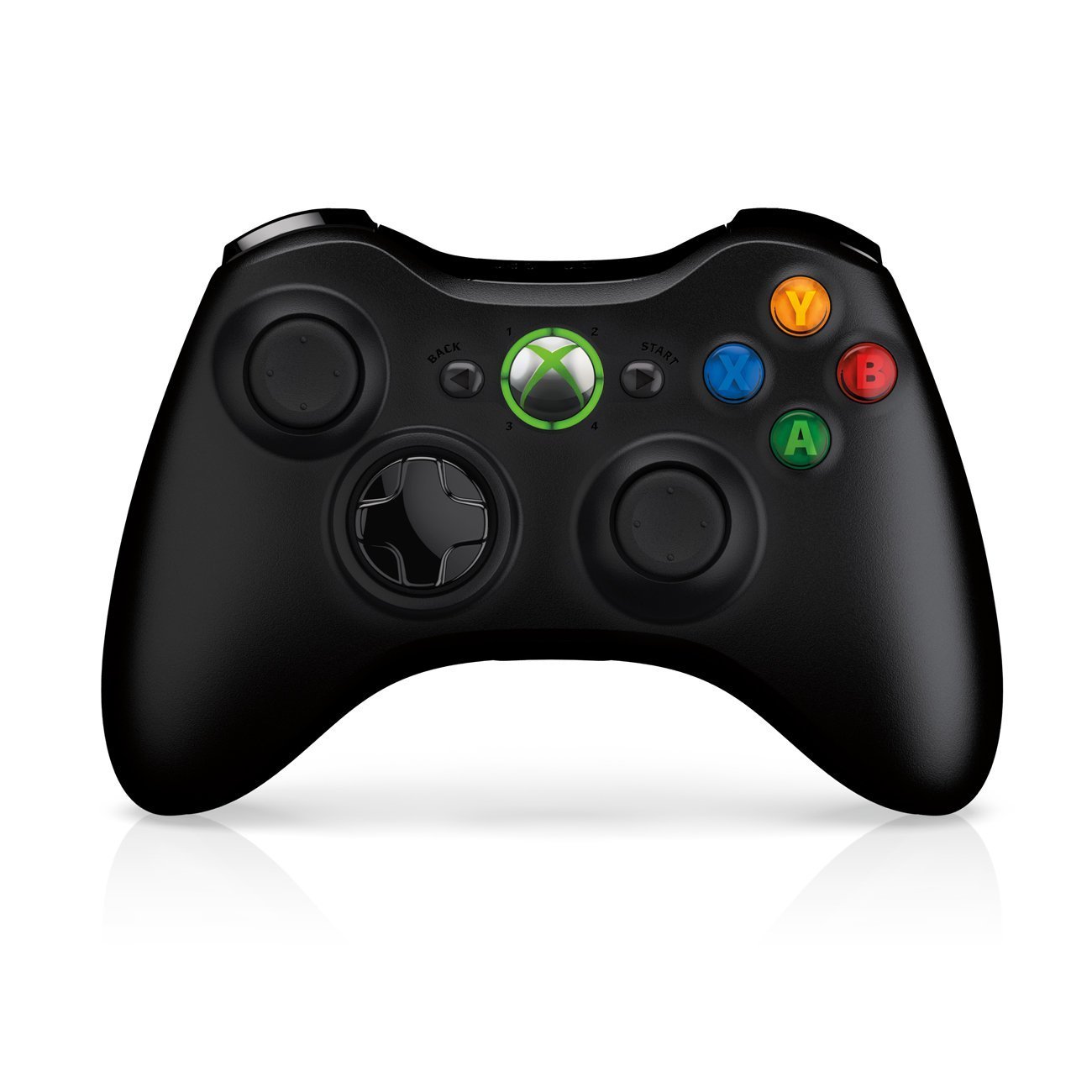
Image: Xbox 360 Wireless Controller. This image displays the front view of the black wireless controller, highlighting the D-pad, analog sticks, face buttons (A, B, X, Y), Guide button, Start button, and Back button.
Κουμπιά και λειτουργίες ελεγκτή
- Αριστεροί/Δεξιοί Αναλογικοί Μοχλόι: Για κίνηση και έλεγχο κάμερας.
- D-Pad (Κατευθυντικό Pad): For menu navigation and specific game controls.
- Κουμπιά A, B, X, Y: Primary action buttons, color-coded (Green A, Red B, Blue X, Yellow Y).
- Κουμπί έναρξης: Pauses games or opens in-game menus.
- Κουμπί Πίσω: Returns to previous screens or opens specific game functions.
- Guide Button (Xbox Logo): Powers on the console, accesses the Xbox Guide, or turns off the controller.
- Left/Right Bumpers (LB, RB): Κουμπιά ώμου για διάφορες ενέργειες εντός παιχνιδιού.
- Left/Right Triggers (LT, RT): Analog triggers for precise control, often used for acceleration/braking or firing weapons.
Εγκατάσταση μπαταρίας
The wireless controller requires two AA batteries. To install:
- Press the tab on the top of the battery pack and pull down to remove it.
- Τοποθετήστε δύο μπαταρίες AA, φροντίζοντας για τη σωστή πολικότητα (+/-).
- Slide the battery pack back into the controller until it clicks into place.
Οδηγός εγκατάστασης
1. Σύνδεση της Κονσόλας
- Σύνδεση ρεύματος: Connect the power cord to the power supply, then connect the power supply to the console's power port. Plug the power cord into a wall outlet.
- Σύνδεση βίντεο/ήχου: Connect one end of the HDMI cable to the HDMI port on the back of your Xbox 360 E console. Connect the other end to an available HDMI input on your TV or monitor.
- Σύνδεση στο Διαδίκτυο (Προαιρετικό): For wired internet, connect an Ethernet cable from your router/modem to the Ethernet port on the console. For wireless, the console has built-in Wi-Fi.
2. Σύνδεση του ασύρματου χειριστηρίου
- Ensure batteries are installed in the controller.
- Turn on the console by pressing the Power button on the console or the Guide button on the controller.
- Press and release the Connect button on the console (small button near the USB ports on the front).
- Within 20 seconds, press and release the Connect button on the controller (small button on the top edge, between the bumpers).
- The lights around the Guide button on the controller and the console will flash and then glow steadily, indicating a successful connection.
3. Initial Power On and System Settings
After connecting, turn on your console. Follow the on-screen prompts to:
- Επιλέξτε τη γλώσσα και την περιοχή σας.
- Adjust display settings (resolution, aspect ratio).
- Set up your internet connection (wired or wireless).
- Create or sign in to an Xbox Live profile.
Λειτουργία της κονσόλας σας
Παιχνίδια και πολυμέσα
- Turn on your console and TV.
- Open the disc tray by pressing the eject button on the console.
- Place a game disc or DVD/Blu-ray disc into the tray, label side up.
- Close the disc tray. The console should automatically start the game or media. If not, select it from the dashboard.
- Digital games can be launched directly from the Xbox Dashboard.
Connecting to Xbox Live
Xbox Live allows you to play online, download games and content, and access streaming services. Ensure your console is connected to the internet.
- From the Xbox Dashboard, navigate to the "Social" or "Settings" tab.
- Select "Join Xbox Live" or "Network Settings" to configure your connection and create/manage your profile.
- A 1-month Xbox LIVE Gold trial may be included with your console.
Ρυθμίσεις συστήματος
Access system settings to customize your console experience:
- Οθόνη & Ήχος: Adjust resolution, audio output, and screen format.
- Αποθήκευση: Manage your 250GB hard drive, view free space, and delete content.
- Ρυθμίσεις δικτύου: Configure wired or wireless internet connections.
- Family Settings: Set parental controls for content and online access.
Συντήρηση
Καθαρισμός της κονσόλας σας
- Always power off and unplug the console before cleaning.
- Χρησιμοποιήστε ένα μαλακό, στεγνό πανί που δεν αφήνει χνούδι για να σκουπίσετε το εξωτερικό της κονσόλας και του χειριστηρίου.
- Μην χρησιμοποιείτε υγρά καθαριστικά, αεροζόλ ή λειαντικά υλικά.
- Keep ventilation openings clear of dust and obstructions to ensure proper airflow.
Αποθήκευση και Τοποθέτηση
- Place the console on a stable, flat surface.
- Ensure adequate ventilation around the console. Do not place it in an enclosed cabinet or on soft surfaces that can block vents.
- Avoid exposing the console to direct sunlight, excessive heat, or extreme cold.
Αντιμετώπιση προβλημάτων
If you encounter issues with your Xbox 360 E console, refer to the following common solutions:
No Power / Console Not Turning On
- Ensure the power cord is securely connected to the console, power supply, and wall outlet.
- Check the power supply unit (PSU) indicator light. If it's off or red, try a different outlet or contact support.
- Δοκιμάστε μια διαφορετική πρίζα.
Δεν υπάρχει έξοδος βίντεο ή ήχου
- Verify the HDMI cable is securely connected to both the console and your TV/monitor.
- Βεβαιωθείτε ότι η τηλεόραση/οθόνη σας έχει ρυθμιστεί στη σωστή πηγή εισόδου HDMI.
- Δοκιμάστε ένα διαφορετικό καλώδιο HDMI ή μια διαφορετική θύρα HDMI στην τηλεόρασή σας.
- Ελέγξτε τις ρυθμίσεις έντασης ήχου και σίγασης της τηλεόρασής σας.
Σφάλματα ανάγνωσης δίσκου
- Βεβαιωθείτε ότι ο δίσκος είναι καθαρός και χωρίς γρατσουνιές ή λεκέδες. Σκουπίστε απαλά με ένα μαλακό πανί από το κέντρο προς τα έξω.
- Try a different game or movie disc to determine if the issue is with the disc or the console.
- Ensure the console is placed on a stable, flat surface and not being moved during disc operation.
Wireless Controller Not Connecting
- Βεβαιωθείτε ότι ο ελεγκτής διαθέτει καινούργιες μπαταρίες.
- Resync the controller by pressing the Connect buttons on both the console and controller as described in the "Setup Guide".
- Βεβαιωθείτε ότι δεν υπάρχουν ισχυρές ασύρματες παρεμβολές σε κοντινή απόσταση.
For further assistance, please refer to the official Microsoft Xbox support webτοποθεσία.
Προδιαγραφές
| Χαρακτηριστικό | Λεπτομέρεια |
|---|---|
| Αριθμός μοντέλου | M9V-00001 |
| Αποθήκευση | 250 GB Hard Drive |
| Ασύρματη Συνδεσιμότητα | Ενσωματωμένο Wi-Fi |
| Ελεγκτής | 1 Black Wireless Controller |
| Κωδικός Περιφέρειας | NTSC |
| Διαστάσεις προϊόντος | 12 x 6 x 24 ίντσες |
| Βάρος αντικειμένου | 10.32 λίρες |
| Απαιτούνται μπαταρίες | 2 AA batteries for controller |
| Ημερομηνία κυκλοφορίας | 1 Ιουνίου 2013 |
Πληροφορίες εγγύησης
For detailed warranty information regarding your Microsoft Xbox 360 E 250GB Console, please refer to the warranty card included with your product or visit the official Microsoft Xbox support webιστότοπος. Οι όροι και οι προϋποθέσεις της εγγύησης ενδέχεται να διαφέρουν ανάλογα με την περιοχή και την ημερομηνία αγοράς.
Υποστήριξη
If you require technical assistance, have questions about your console, or need to report an issue, please contact Microsoft Xbox Support:
- Διαδικτυακή υποστήριξη: Επισκεφθείτε τον επίσημο Υποστήριξη Xbox webτοποθεσία για συχνές ερωτήσεις, οδηγούς αντιμετώπισης προβλημάτων και επιλογές επικοινωνίας.
- Τηλεφωνική υποστήριξη: Refer to your product packaging or the Xbox Support webΙστότοπος για περιφερειακούς αριθμούς τηλεφώνου.


