1. Εισαγωγή
This manual provides detailed instructions for the setup, operation, and maintenance of your Vibe Axcess 5-in-1 Universal Remote. Please read this manual thoroughly before using the remote control to ensure proper functionality and to maximize your user experience. This remote is designed to control up to five different audio/video devices.
2. Το προϊόν τελείωσεview
The Vibe Axcess 5-in-1 Universal Remote is designed to consolidate control of multiple home entertainment devices into a single unit. It features dedicated buttons for various functions and device types.
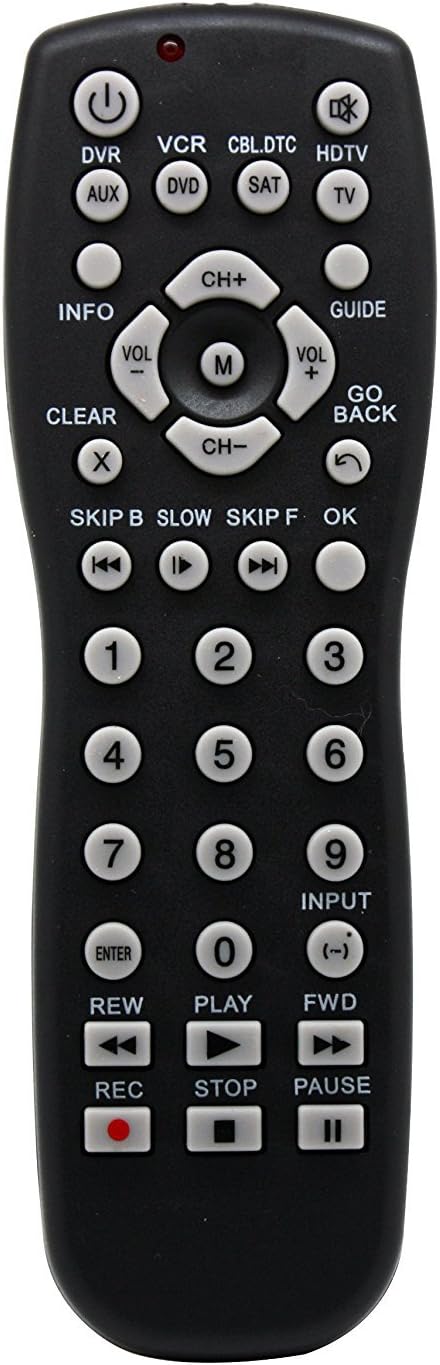
Εικόνα 1: Εμπρός view of the Vibe Axcess 5-in-1 Universal Remote. This image displays the remote's layout, including device selection buttons (DVR, VCR, CBL.DTC, HDTV, AUX, DVD, SAT, TV), navigation pad, number keys, and media control buttons (REW, PLAY, FWD, REC, STOP, PAUSE).

Εικόνα 2: Packaging of the Vibe Axcess 5-in-1 Universal Remote. The packaging highlights the remote's 5-in-1 capability and compatibility with various device types such as DVD/VCR, HDTV, DVD, AUX, and CBL/SAT/CABLE.
3. Ρύθμιση
3.1 Τοποθέτηση μπαταρίας
- Εντοπίστε το κάλυμμα της θήκης μπαταριών στο πίσω μέρος του τηλεχειριστηρίου.
- Σύρετε το κάλυμμα προς τα κάτω ή πιέστε το μάνταλο και σηκώστε το για να ανοίξει.
- Τοποθετήστε δύο (2) μπαταρίες AAA, διασφαλίζοντας ότι οι θετικοί (+) και αρνητικοί (-) ακροδέκτες ταιριάζουν με τα διαγράμματα στο εσωτερικό της θήκης.
- Επανατοποθετήστε το κάλυμμα της θήκης των μπαταριών, σύροντάς το στη θέση του μέχρι να ασφαλίσει.
Σημείωμα: Always use fresh batteries and replace both batteries at the same time. Do not mix old and new batteries or different types of batteries.
3.2 Προγραμματισμός του τηλεχειριστηρίου
To control your devices, the universal remote must be programmed with the correct codes for each device. There are typically two methods for programming:
3.2.1 Άμεση εισαγωγή κωδικού
This method involves entering a specific code from a code list (usually provided with the remote or available online) for your device's brand.
- Ενεργοποιήστε τη συσκευή που θέλετε να ελέγξετε (π.χ. τηλεόραση, συσκευή αναπαραγωγής DVD).
- Press and hold the desired device button on the remote (e.g., TV, DVD) for approximately 3 seconds until the indicator light (usually red) illuminates and stays on.
- While the indicator light is on, enter the 3-digit or 4-digit code for your device's brand using the number keys.
- If the code is valid, the indicator light will turn off. If the light flashes and remains on, the code was invalid; re-enter the code.
- Δοκιμάστε το τηλεχειριστήριο πατώντας το ΕΞΟΥΣΙΑ button. If the device turns off, the code is correct. If not, try the next code listed for your brand.
3.2.2 Αυτόματη αναζήτηση κώδικα
If you cannot find a code or direct code entry fails, use the auto code search method.
- Ενεργοποιήστε τη συσκευή που θέλετε να ελέγξετε.
- Πατήστε παρατεταμένα το κουμπί της επιθυμητής συσκευής (π.χ. TV) for approximately 3 seconds until the indicator light illuminates and stays on.
- Ενώ κρατάτε πατημένο το κουμπί της συσκευής, πατήστε το ΕΞΟΥΣΙΑ button once. The indicator light will start flashing, indicating it is searching for a code.
- Point the remote at the device and wait for the device to turn off. This may take several minutes as the remote cycles through codes.
- Μόλις απενεργοποιηθεί η συσκευή, πατήστε αμέσως το κουμπί ΕΙΣΑΓΩ για να αποθηκεύσετε τον κωδικό. Η ενδεικτική λυχνία θα σβήσει.
- Test the remote's functions. If some functions do not work, repeat the auto search process to find a more compatible code.
4. Οδηγίες λειτουργίας
Once programmed, operating your Vibe Axcess 5-in-1 Universal Remote is straightforward.
- Επιλέξτε συσκευή: Πατήστε το αντίστοιχο κουμπί της συσκευής (π.χ. TV, DVD, CBL.DTC) for the device you wish to control. The indicator light will briefly illuminate to confirm selection.
- Ενεργοποίηση/Απενεργοποίηση: Πατήστε το ΕΞΟΥΣΙΑ κουμπί για να ενεργοποιήσετε ή να απενεργοποιήσετε την επιλεγμένη συσκευή.
- Έλεγχος έντασης ήχου: Χρησιμοποιήστε το VOL+ και ΤΟΛ- κουμπιά για να ρυθμίσετε την ένταση.
- Έλεγχος καναλιού: Χρησιμοποιήστε το CH+ και CH- κουμπιά για αλλαγή καναλιών.
- Αριθμητικά κλειδιά: Use the number keys (0-9) to directly enter channel numbers or other numerical inputs.
- Πλοήγηση: Use the directional pad (up, down, left, right) and OK κουμπί για πλοήγηση στο μενού.
- Στοιχεία ελέγχου πολυμέσων: Χρήση ΠΑΙΧΝΙΔΙ, ΠΑΥΣΗ, ΣΤΑΣΗ, REW, FWD, και REC for controlling media playback on compatible devices.
5. Συντήρηση
5.1 Καθαρισμός
To clean your remote, gently wipe it with a soft, dry cloth. Do not use abrasive cleaners, solvents, or harsh chemicals, as these can damage the remote's finish or internal components.
5.2 Αντικατάσταση μπαταρίας
When the remote's performance degrades or the indicator light fails to illuminate, it is time to replace the batteries. Follow the battery installation steps in Section 3.1. Dispose of used batteries responsibly according to local regulations.
6. Αντιμετώπιση Προβλημάτων
- Το τηλεχειριστήριο δεν λειτουργεί:
- Ελέγξτε αν οι μπαταρίες έχουν τοποθετηθεί σωστά και δεν έχουν εξαντληθεί. Αντικαταστήστε τις, εάν είναι απαραίτητο.
- Βεβαιωθείτε ότι έχετε επιλέξει το σωστό κουμπί συσκευής (π.χ. TV για την τηλεόρασή σας).
- Verify that the remote is programmed with the correct code for your device. Re-program if unsure.
- Βεβαιωθείτε ότι δεν υπάρχουν εμπόδια μεταξύ του τηλεχειριστηρίου και του αισθητήρα υπερύθρων της συσκευής.
- Ορισμένες λειτουργίες δεν λειτουργούν:
- Some universal remote codes may not support all original remote functions. Try another code for your device brand using the programming steps.
- Ensure the device you are trying to control supports the specific function (e.g., not all TVs have a dedicated 'INFO' button function).
- Η ενδεικτική λυχνία δεν ανάβει:
- Ελέγξτε και αντικαταστήστε τις μπαταρίες.
- Εάν το πρόβλημα επιμένει μετά την αντικατάσταση της μπαταρίας, το τηλεχειριστήριο ενδέχεται να είναι ελαττωματικό.
7. Προδιαγραφές
- Μοντέλο: OT795-KO
- Μάρκα: Vibe
- Διαστάσεις προϊόντος: 10.7 x 4 x 0.8 ίντσες
- Βάρος αντικειμένου: 4 ουγγιές
- Μπαταρίες: Απαιτούνται 2 μπαταρίες AAA (δεν περιλαμβάνονται)
- Μέγιστος αριθμός υποστηριζόμενων συσκευών: 5
- Τεχνολογία συνδεσιμότητας: Υπέρυθρες
- Ειδικό χαρακτηριστικό: Παγκόσμιος
8. Εγγύηση και υποστήριξη
For information regarding warranty coverage or technical support, please refer to the documentation included with your purchase or contact the retailer where the product was acquired. Specific warranty terms may vary.