1. Σημαντικές οδηγίες ασφαλείας
Please read these instructions carefully before operating the unit and retain them for future reference. Following these guidelines will ensure safe and proper use of your GPX R602B radio.
- Νερό και υγρασία: Do not use this apparatus near water. Avoid exposure to rain or moisture.
- Πηγές θερμότητας: Μην τοποθετείτε κοντά σε πηγές θερμότητας, όπως καλοριφέρ, θερμαντικά σώματα, σόμπες ή άλλες συσκευές (συμπεριλαμβανομένης ampσβηστήρες) που παράγουν θερμότητα.
- Αερισμός: Βεβαιωθείτε για τον κατάλληλο αερισμό. Μην φράζετε κανένα άνοιγμα αερισμού.
- Πηγές ενέργειας: Operate only from the type of power source indicated on the marking label.
- Καθάρισμα: Καθαρίστε μόνο με στεγνό πανί.
- Συνημμένα: Χρησιμοποιείτε μόνο προσαρτήματα/αξεσουάρ που καθορίζονται από τον κατασκευαστή.
- Εξυπηρέτηση: Αναφέρετε όλα τα σέρβις σε εξειδικευμένο προσωπικό σέρβις. Απαιτείται σέρβις όταν η συσκευή έχει καταστραφεί με οποιονδήποτε τρόπο, όπως το καλώδιο τροφοδοσίας ή το φις έχει υποστεί ζημιά, έχει χυθεί υγρό ή έχουν πέσει αντικείμενα μέσα στη συσκευή, η συσκευή έχει εκτεθεί σε βροχή ή υγρασία, δεν λειτουργεί κανονικά , ή έχει απορριφθεί.
Ασφάλεια μπαταρίας
- Μην αναμιγνύετε παλιές και νέες μπαταρίες.
- Μην αναμιγνύετε αλκαλικές, τυπικές (άνθρακα-ψευδαργύρου) ή επαναφορτιζόμενες (νικελίου-καδμίου) μπαταρίες.
- Insert batteries correctly, observing the + and - polarities.
- Αφαιρέστε αμέσως τις εξαντλημένες μπαταρίες.
- Απορρίψτε τις μπαταρίες σωστά. Μην αποτεφρώνετε.
2. Χαρακτηριστικά
The GPX R602B Portable AM/FM Radio offers a range of features designed for convenience and versatility:
- Portable AM/FM radio with a built-in handle for easy transport.
- Integrated speakers with analog volume control and durable metal grills.
- Digital clock with user-friendly setting buttons.
- Operates using the built-in AC power cable.
- Can also be powered by 3 C batteries (sold separately) for portable use.
- 3.5mm audio line input jack for connecting external audio devices.
- Telescopic antenna for improved FM reception.
- Stereo headphone jack for private listening.

Figure 2.1: Key features and connection points of the GPX R602B radio.
3. Περιεχόμενα συσκευασίας
Upon unpacking your GPX R602B radio, please ensure all the following items are present:
- GPX R602B Portable AM/FM Radio Unit
- Εγχειρίδιο κατόχου
- Built-in AC Power Adapter
4. Έλεγχοι και δείκτες
Familiarize yourself with the controls and indicators on your radio for optimal operation.
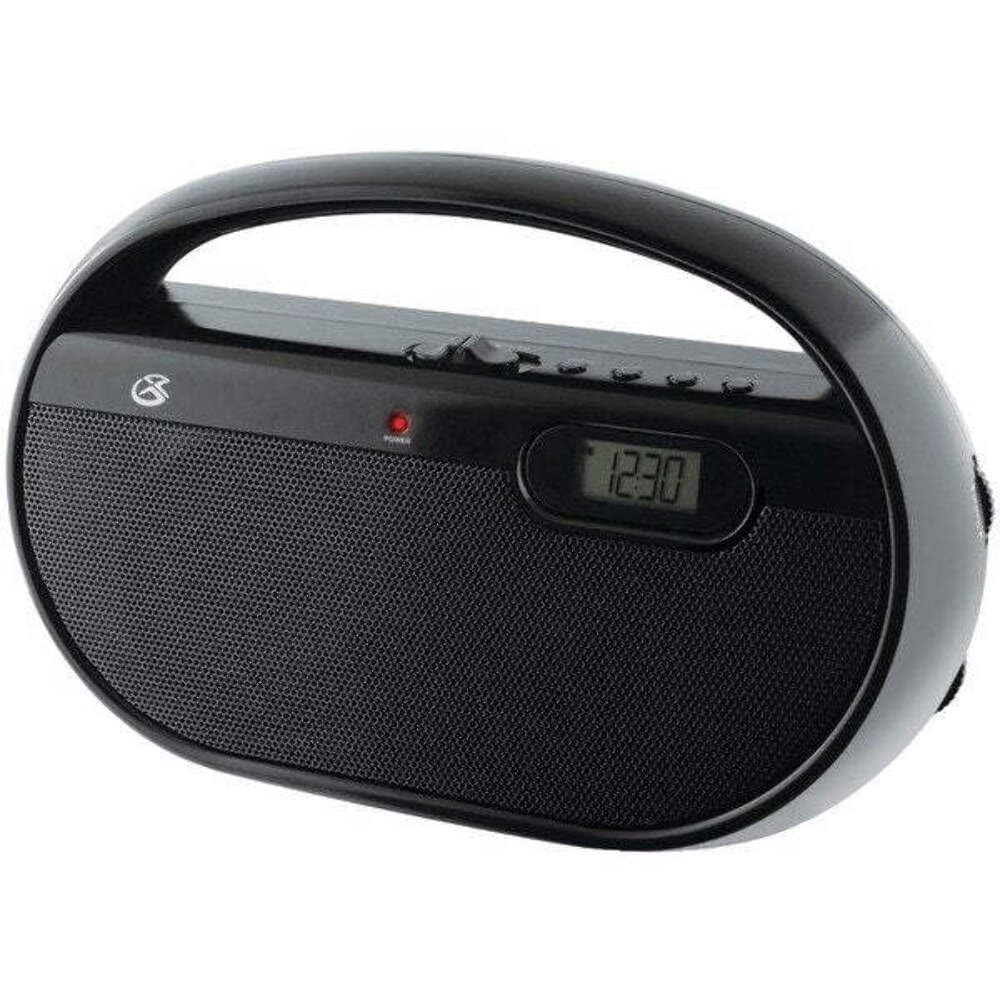
Εικόνα 4.1: Εμπρός view of the GPX R602B radio.
Control Layout (Refer to Figure 4.1)
- Κουμπί τροφοδοσίας/έντασης: Rotates to turn the unit ON/OFF and adjust the volume level.
- Κουμπί συντονισμού: Rotates to select AM or FM radio stations.
- Band Selector Switch: Slides to select between AM and FM radio bands.
- Ψηφιακή οθόνη: Shows the current time or radio frequency.
- Set Time Button: Used in conjunction with H/M buttons to set the clock.
- H/M Buttons: Used to adjust hours and minutes when setting the clock.
- Display Time Button: Briefly shows the time when the radio is playing.
- Aux In Jack (3.5mm): Συνδέστε εξωτερικές συσκευές ήχου.
- Υποδοχή ακουστικών (3.5 mm): Συνδέστε ακουστικά για ιδιωτική ακρόαση.
- Telescopic FM Antenna: Extend and adjust for optimal FM reception.
5. Τροφοδοσία της μονάδας
The GPX R602B radio can be powered by either AC power or batteries.
Λειτουργία εναλλασσόμενου ρεύματος
- Locate the built-in AC power cord. This cord is typically stored in the battery compartment when not in use.
- Plug the AC power cord into a standard wall outlet (120V AC, 60Hz).
- Η μονάδα είναι τώρα έτοιμη για λειτουργία.
Λειτουργία με μπαταρία
For portable use, the radio requires 3 'C' size batteries (not included).
- Ανοίξτε το κάλυμμα της θήκης μπαταριών που βρίσκεται στο πίσω μέρος της μονάδας.
- Insert 3 'C' size batteries, ensuring the correct polarity (+ and -) as indicated inside the compartment.
- Κλείστε καλά το κάλυμμα της θήκης μπαταριών.
- The unit is now ready for battery-powered operation.

Figure 5.1: Power options for the GPX R602B radio.
6. Ρύθμιση και βασική λειτουργία
Αρχική ρύθμιση
- Σύνδεση ρεύματος: Connect the radio to AC power or insert batteries as described in Section 5.
- Ρύθμιση κεραίας: For FM reception, extend the telescopic antenna fully. For AM reception, the unit has a built-in antenna, so no external adjustment is needed. Position the unit for best AM reception.
Λειτουργία του Ραδιοφώνου
- Ανάβω: Rotate the Power/Volume knob clockwise until it clicks and the unit powers on.
- Επιλέξτε ζώνη: Slide the Band Selector switch to either AM or FM.
- Συντονισμός σταθμού: Rotate the Tuning knob to find your desired radio station. The frequency will be displayed on the digital screen.
- Προσαρμογή έντασης ήχου: Rotate the Power/Volume knob to adjust the sound level.
- Κλείνω: Rotate the Power/Volume knob counter-clockwise until it clicks and the unit powers off.
Using the Line Input (Aux In)
You can connect external audio devices, such as smartphones or MP3 players, to play audio through the radio's speakers.
- Connect a 3.5mm audio cable (not included) from the headphone jack or line-out jack of your external device to the Aux In jack on the radio.
- Turn on the radio and your external device.
- Adjust the volume on both the radio and your external device for optimal sound.

Figure 6.1: Devices compatible with the Aux In feature.
Χρήση ακουστικών
For private listening, plug standard 3.5mm headphones (not included) into the Headphone Jack. The internal speakers will automatically mute.
Ρύθμιση του ψηφιακού ρολογιού
The digital clock can be set when the radio is turned off.
- Ensure the radio is turned OFF using the Power/Volume knob.
- Πατήστε παρατεταμένα και τα δύο Ρύθμιση ώρας κουμπί και το H/M κουμπί ταυτόχρονα.
- Ενώ κρατάτε το Ρύθμιση ώρας button, repeatedly press the H/M button to adjust the hour and then the minutes.
- Απελευθερώστε το Ρύθμιση ώρας button once the desired time is set.
- Να view the time while the radio is playing, press the Χρόνος εμφάνισης button. The time will appear briefly on the digital display.
7. Συντήρηση
Proper care and maintenance will ensure the longevity of your GPX R602B radio.
- Καθάρισμα: Σκουπίστε το εξωτερικό της μονάδας με ένα μαλακό, στεγνό πανί. Μην χρησιμοποιείτε λειαντικά καθαριστικά, κεριά ή διαλύτες.
- Αντικατάσταση μπαταρίας: If using batteries, replace all three 'C' batteries when the unit's performance diminishes. Always replace with new batteries of the same type.
- Αποθήκευση: If storing the unit for an extended period, remove the batteries to prevent leakage and corrosion.
8. Αντιμετώπιση Προβλημάτων
If you encounter issues with your GPX R602B radio, refer to the following common problems and solutions:
| Πρόβλημα | Πιθανή αιτία | Διάλυμα |
|---|---|---|
| Καμία δύναμη | AC cord not plugged in; Batteries exhausted or incorrectly inserted. | Ensure AC cord is securely plugged into a live outlet. Replace batteries with new ones, checking polarity. |
| Κακή ραδιοφωνική λήψη | Antenna not extended (FM); Unit poorly positioned (AM); Weak signal. | Extend and adjust the telescopic FM antenna. For AM, rotate the unit for better reception. Try moving the radio to a different location. |
| Δεν υπάρχει ήχος από τα ηχεία | Volume too low; Headphones connected. | Increase the volume using the Power/Volume knob. Disconnect headphones if not desired. |
| Clock not setting correctly | Λανθασμένη σειρά κουμπιών. | Ensure the radio is OFF. Press and hold both 'Set Time' and 'H/M' buttons simultaneously, then repeatedly press 'H/M' to adjust. Release 'Set Time' when done. |
| Ο ήχος είναι παραμορφωμένος ή ασαφής | Volume too high; Poor reception; External device volume too high. | Lower the volume. Adjust antenna or unit position for better reception. If using Aux In, adjust volume on the external device. |
9. Προδιαγραφές
Detailed technical specifications for the GPX R602B Portable AM/FM Radio:
- Αριθμός μοντέλου: R602B
- Διαστάσεις προϊόντος (Μ x Π x Υ): 9.62 x 3.74 x 6.3 ίντσες (24.43 x 9.50 x 16.00 cm)
- Βάρος αντικειμένου: 1.76 λίβρες (0.80 κιλά)
- Πηγή ενέργειας: AC 120V, 60Hz or 3 x 'C' size batteries (not included)
- Τεχνολογία δέκτη: AM/FM
- Υποστηριζόμενες μπάντες ραδιοφώνου: 2-Band (AM/FM)
- Τεχνολογία συνδεσιμότητας: Radio, 3.5mm Aux In
- Ειδικά χαρακτηριστικά: Built-In AM Antenna, Built-In Clock, Portable, Telescopic FM Antenna, 3.5mm Headphone Jack
- Χρώμα: Μαύρος
- Κατασκευαστής: Digital Products International, Inc.
- Ημερομηνία πρώτης διαθεσιμότητας: 5 Ιουνίου 2012
10. Εγγύηση και υποστήριξη
For warranty information and customer support regarding your GPX R602B radio, please refer to the warranty card included with your purchase or visit the official GPX webτοποθεσία. Κρατήστε την απόδειξη αγοράς σας ως απόδειξη αγοράς για τυχόν αξιώσεις εγγύησης.
If you require technical assistance or have questions not covered in this manual, please contact GPX customer service directly. Contact details are typically available on the manufacturer's webτοποθεσία ή στη συσκευασία του προϊόντος.


