1. Το προϊόν τελείωσεview
The Mitel MiVoice 5304 IP Phone is a compact and cost-effective entry-level display phone designed for various environments such as hotel rooms, university dorms, classrooms, and retail spaces. It provides essential communication features and integrates seamlessly with Mitel IP-based communication platforms.
This phone supports both MiNet and SIP protocols, offering flexibility in deployment. It features a backlit display, two lines with LED indication, and programmable keys for enhanced functionality.
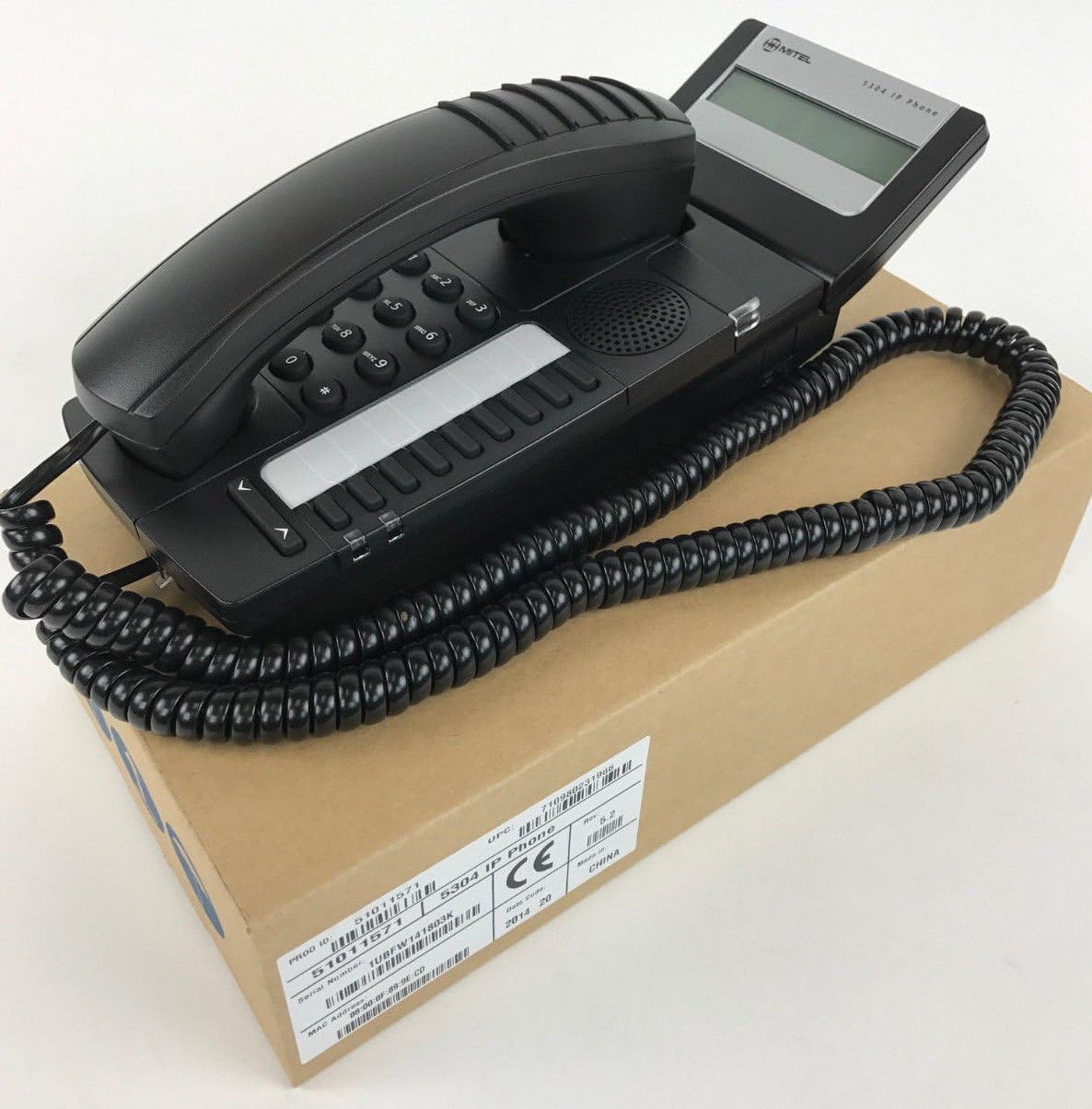
Figure 1: Mitel MiVoice 5304 IP Phone. This image shows the black IP phone with its coiled handset cord, resting on a brown cardboard box. The phone features a numeric keypad, several function buttons, and a small display screen.
2. Βασικά Χαρακτηριστικά
- Επίδειξη: Two x 20 character backlit display with auto-dimming.
- Γραμμές: Two lines with LED indication (one prime line, one programmable key).
- Προγραμματιζόμενα κλειδιά: Eight programmable keys for speed dials, feature access codes, paging, conferencing, voicemail access, etc.
- Σελίδα: Paging and page receive capability, including direct page and group page support.
- Υποστήριξη διπλής λειτουργίας: Compatible with both MiNet and SIP protocols.
- Οπτικοί δείκτες: Incoming call visual indication and message waiting indication.
- Στοιχεία ελέγχου ήχου: Adjustable volume and ringing controls.
- Βάση: Wall-mountable (optional accessory may be required).
- Τροφοδοσία: Multiple powering options, including 802.3af compliant Power over Ethernet (PoE).
- Προσιτότητα: ADA-compliant (HAC handset).
- Συμπαγής σχεδιασμός: Small footprint (approximately 26.5 cm x 10 cm or 10.5 x 4 inches).
- Ενεργειακή απόδοση: Designed for power conservation to reduce overall energy consumption.
3. Ρύθμιση και εγκατάσταση
3.1 Περιεχόμενα συσκευασίας
Πριν ξεκινήσετε, βεβαιωθείτε ότι υπάρχουν όλα τα εξαρτήματα:
- Mitel MiVoice 5304 IP Phone unit
- Ακουστικό
- Σπειροειδές καλώδιο ακουστικού
- Καλώδιο Ethernet
- (Optional) Power adapter if PoE is not used
3.2 Σύνδεση του τηλεφώνου
- Συνδέστε το ακουστικό: Συνδέστε το ένα άκρο του σπειροειδούς καλωδίου του ακουστικού στο ακουστικό και το άλλο άκρο στην υποδοχή ακουστικού στη βάση του τηλεφώνου.
- Σύνδεση στο Δίκτυο: Connect one end of the Ethernet cable to the LAN port on the back of the phone and the other end to an active network port (e.g., a wall jack or network switch). If using Power over Ethernet (PoE), the phone will power on automatically.
- Σύνδεση τροφοδοσίας (αν δεν χρησιμοποιείτε PoE): If your network does not provide PoE, connect an optional Mitel-approved power adapter to the power port on the phone and then to a standard electrical outlet.
- Αρχική εκκίνηση: The phone will power on and begin its boot-up sequence. This may take a few moments as it obtains an IP address and registers with your communication system.
3.3 Τοποθέτηση σε τοίχο (Προαιρετικό)
The Mitel 5304 IP Phone can be wall-mounted. An optional wall-mount kit (sold separately) may be required. Follow the instructions provided with the wall-mount kit for proper installation.
4. Οδηγίες λειτουργίας
4.1 Πραγματοποίηση και απάντηση κλήσεων
- Για να πραγματοποιήσετε μια κλήση:
- Σηκώστε το ακουστικό ή πατήστε το Ομιλητής κουμπί.
- Καλέστε τον επιθυμητό αριθμό χρησιμοποιώντας το πληκτρολόγιο.
- Πατήστε το Καντράν or Στέλνω button (if available) or wait for the call to connect automatically.
- Για να απαντήσετε σε μια κλήση:
- Σηκώστε το ακουστικό ή πατήστε το κουμπί γραμμής που αναβοσβήνει ή το Ομιλητής κουμπί.
- Για να τερματίσετε μια κλήση:
- Αντικαταστήστε το ακουστικό ή πατήστε το Τερματισμός κλήσης or Ομιλητής κουμπί.
4.2 Using Programmable Keys
The Mitel 5304 features eight programmable keys. Their functions are typically configured by your system administrator and can include:
- Speed Dial numbers
- Access to specific features (e.g., Call Forward, Do Not Disturb)
- Paging functions
- Voicemail access
- Συνδιάσκεψη
To use a programmable key, simply press the button corresponding to the desired function.
4.3 Ρύθμιση έντασης ήχου
Use the volume control buttons (usually located below the keypad or on the side of the phone) to adjust the handset, speakerphone, or ringer volume. Press the + κουμπί για αύξηση της έντασης ήχου και - κουμπί για μείωση της έντασης.
4.4 Message Waiting Indication
A flashing LED indicator on the phone signifies that you have new voicemail messages. To retrieve messages, press the dedicated Μήνυμα button (if configured) or dial your voicemail access code.
5. Συντήρηση και Φροντίδα
- Καθάρισμα: Χρησιμοποιήστε ένα απαλό, ελαφρώς damp cloth to clean the phone's surface. Do not use abrasive cleaners, solvents, or strong chemicals, as these can damage the finish.
- Σκόνη: Regularly dust the phone, especially around the keypad and display, to prevent accumulation that could affect performance.
- Περιβάλλο: Keep the phone away from excessive heat, direct sunlight, and moisture. Ensure proper ventilation if placed in an enclosed space.
- Καλώδια: Βεβαιωθείτε ότι όλα τα καλώδια είναι συνδεδεμένα με ασφάλεια και δεν έχουν πιαστεί ή καταστραφεί.
6. Αντιμετώπιση Προβλημάτων
| Πρόβλημα | Πιθανή αιτία | Διάλυμα |
|---|---|---|
| Το τηλέφωνο δεν ενεργοποιείται. | No power from Ethernet (PoE) or power adapter not connected/faulty. |
|
| No dial tone or cannot make calls. | Network connectivity issue, phone not registered, or system configuration problem. |
|
| Η οθόνη είναι κενή ή μη αναγνώσιμη. | Power issue or display fault. |
|
| Δεν μπορώ να ακούσω τον καλούντα ή ο καλών δεν μπορεί να με ακούσει. | Volume settings, handset/speaker issue, or network audio problem. |
|
7. Προδιαγραφές
| Ιδιότης | Λεπτομέρεια |
|---|---|
| Αριθμός μοντέλου | 51011571 |
| Διαστάσεις προϊόντος (Μ x Π x Υ) | 10 x 10 x 6 ίντσες (25.4 x 25.4 x 15.24 cm) |
| Βάρος αντικειμένου | 1.9 λίβρες (0.86 κιλά) |
| Χρώμα | Μαύρος |
| Τύπος τηλεφώνου | Ενσύρματο τηλέφωνο IP |
| Πηγή ισχύος | Corded Electric (PoE 802.3af compliant or optional power adapter) |
| Τύπος Dialer | Μονό Πληκτρολόγιο |
| Επίδειξη | Two x 20 character backlit display |
| Υποστήριξη γραμμής | 2 Lines with LED indication |
| Υποστηριζόμενα πρωτόκολλα | MiNet, SIP |
| Συμβατές Συσκευές | VoIP services, IP-based communication systems, Mitel 3300, Mitel SX-200 IP Communications Platforms |
| Δυνατότητα τηλεδιάσκεψης | 2-way |
8. Εγγύηση και υποστήριξη
For information regarding product warranty, please refer to the warranty card included with your purchase or visit the official Mitel website. For technical support, service, or further inquiries, please contact your Mitel authorized dealer or system administrator.
You can also find additional resources and contact information on the official Mitel webτοποθεσία: www.mitel.com


