1. Εισαγωγή
The Grandstream GXP2100 is an enterprise-grade IP phone designed for business communication. It features support for four lines, a backlit graphical LCD, and various programmable keys to enhance user experience. This manual provides detailed instructions for the installation, configuration, and operation of your GXP2100 IP phone.
2. Περιεχόμενα συσκευασίας
Upon unpacking your Grandstream GXP2100, verify that all items are present and in good condition. The standard package typically includes:
- Grandstream GXP2100 IP Phone Unit
- Ακουστικό με σπειροειδές καλώδιο
- Τηλεφωνική βάση
- Καλώδιο Ethernet
- Μετασχηματιστής ρεύματος
- Quick Installation Guide (this manual provides more detail)
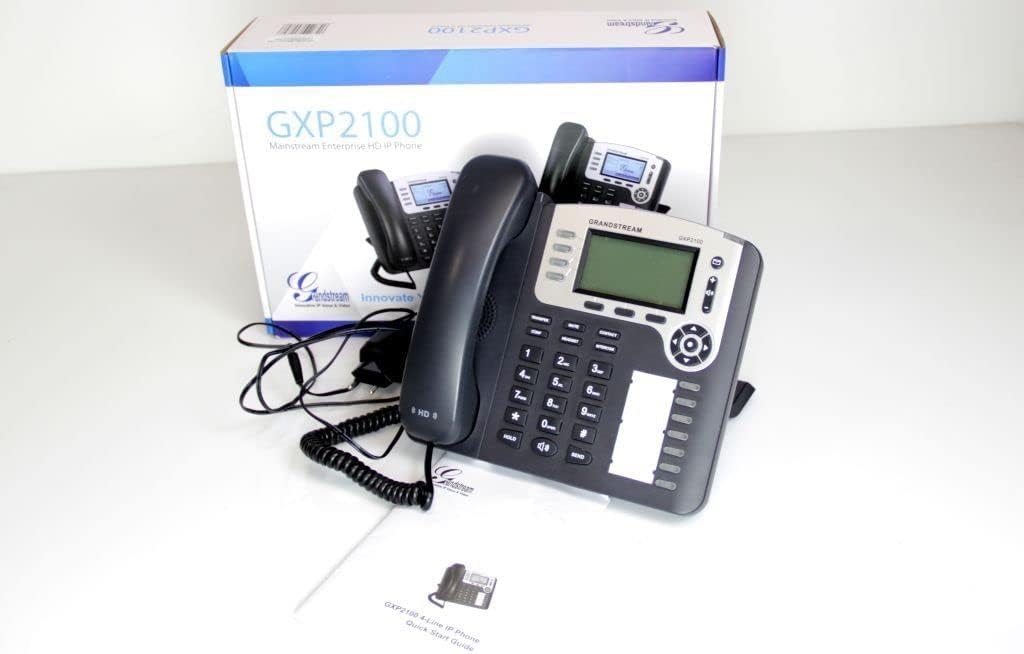
Image 2.1: Grandstream GXP2100 IP Phone unit, handset, coiled cord, power adapter, Ethernet cable, and quick start guide, displayed with its retail packaging.
3. Χαρακτηριστικά προϊόντος
The GXP2100 IP phone offers a range of features designed for efficient business communication:
- Πλήκτρα γραμμής: 4 dual-color line keys supporting up to 4 SIP accounts.
- Soft Keys: 3 XML programmable context-sensitive soft keys for dynamic functions.
- BLF Extension Keys: 7 dual-color BLF (Busy Lamp Field) extension keys, supporting up to 11 call appearances.
- Conference Calling: Up to 5-way conference capability.
- Ποιότητα ήχου: HD wideband audio and a superb full-duplex hands-free speakerphone with advanced acoustic echo cancellation.
- Συνδεσιμότητα δικτύου: Dual network ports with integrated Power over Ethernet (PoE).
- Τηλεφωνικό κατάλογο: Automated phone book synchronization with directory servers using XML.
- Εφαρμογές: Integrated real-time web applications (e.g., weather, stock, currency, RSS news).
- Ασφάλεια: Advanced security protection for privacy.
- Ανάπτυξη: Supports automated provisioning for easy deployment.

Εικόνα 3.1: Εμπρός view of the Grandstream GXP2100 IP Phone, highlighting the display, keypad, and function buttons.
4. Ρύθμιση
4.1 Φυσική σύνδεση
Follow these steps to connect your GXP2100 IP phone:
- Συνδέστε το ακουστικό: Plug the coiled cord into the handset port on the side of the phone and into the handset.
- Σύνδεση των ακουστικών (Προαιρετικά): If using a headset, plug it into the dedicated headset port.
- Σύνδεση στο Δίκτυο:
- If using PoE: Connect one end of the Ethernet cable to the LAN port on the phone and the other end to a PoE-enabled switch or hub.
- If not using PoE: Connect one end of the Ethernet cable to the LAN port on the phone and the other end to your network switch/router. Then, connect the power adapter to the phone's power jack and to an electrical outlet.
- Σύνδεση με υπολογιστή (Προαιρετικό): If you wish to connect a computer through the phone, connect an Ethernet cable from the PC port on the phone to your computer's Ethernet port.

Εικόνα 4.1: Πλάγια όψη view of the Grandstream GXP2100 IP Phone, showing the various connection ports for handset, headset, LAN, and PC.
4.2 Αρχική διαμόρφωση
After physical connection, the phone will attempt to obtain an IP address via DHCP. You can access the phone's web configuration interface for detailed setup:
- Λήψη διεύθυνσης IP: Πατήστε το Μενού button on the phone, navigate to Κατάσταση, τότε Κατάσταση Δικτύου για να βρείτε τη διεύθυνση IP του τηλεφώνου.
- Πρόσβαση Web Διεπαφή: Ανοίξτε α web browser on a computer connected to the same network and enter the phone's IP address in the address bar.
- Σύνδεση: Enter the administrator username and password (default values are typically 'admin' for both, refer to your network administrator or Grandstream documentation for specific defaults).
- Configure SIP Accounts: Πλοηγηθείτε στο Λογαριασμοί section to configure your SIP account details provided by your VoIP service provider. This includes SIP Server, SIP User ID, Authenticate ID, and Password.
- Save and Apply: After making changes, save and apply the configuration. The phone may reboot.
5. Οδηγίες λειτουργίας
5.1 Βασικές Συναρτήσεις Κλήσης
- Πραγματοποίηση κλήσης:
- Σηκώστε το ακουστικό, πατήστε το Ομιλητής κουμπί ή πατήστε ένα διαθέσιμο Γραμμή κλειδί.
- Καλέστε τον επιθυμητό αριθμό.
- Πατήστε το ΣΤΕΛΝΩ button or wait a few seconds for automatic dialing.
- Απάντηση σε κλήση:
- Σηκώστε το ακουστικό.
- Πατήστε το που αναβοσβήνει Γραμμή κλειδί.
- Πατήστε το Ομιλητής κουμπί.
- Τερματισμός κλήσης: Κλείστε το ακουστικό ή πατήστε το Ομιλητής κουμπί εάν χρησιμοποιείτε ανοιχτή ακρόαση.
5.2 Advanced Call Functions
- Αμπάρι: Κατά τη διάρκεια μιας ενεργής κλήσης, πατήστε το ΑΜΠΑΡΙ button. The line key will flash. To resume, press the flashing Γραμμή κλειδί.
- ΜΕΤΑΦΟΡΑ:
- Κατά τη διάρκεια μιας ενεργής κλήσης, πατήστε το ΜΕΤΑΦΟΡΑ προγραμματιζόμενο πλήκτρο. Η ενεργή κλήση θα τεθεί σε αναμονή.
- Καλέστε τον αριθμό στον οποίο θέλετε να μεταφέρετε την κλήση.
- Πατήστε το ΜΕΤΑΦΟΡΑ soft key again to complete the transfer (blind transfer) or wait for the party to answer and announce the call before pressing ΜΕΤΑΦΟΡΑ (μετάθεση μεταφοράς).
- Διάσκεψη:
- Κατά τη διάρκεια μιας ενεργής κλήσης, πατήστε το ΣΥΝΔ προγραμματιζόμενο πλήκτρο. Η ενεργή κλήση θα τεθεί σε αναμονή.
- Καλέστε τον αριθμό του επόμενου συμμετέχοντα και πατήστε ΣΤΕΛΝΩ.
- Μόλις απαντήσει ο δεύτερος, πατήστε το ΣΥΝΔ soft key again to establish the conference call. Repeat for additional participants (up to 5-way).
- Βουβός: Πατήστε το ΒΟΥΒΟΣ για σίγαση του μικροφώνου σας κατά τη διάρκεια μιας κλήσης. Πατήστε ξανά για να απενεργοποιήσετε τη σίγαση.
- Μεγάφωνο: Πατήστε το Ομιλητής κουμπί για ενεργοποίηση ή απενεργοποίηση της λειτουργίας ανοιχτής ακρόασης.
- BLF Keys: The BLF (Busy Lamp Field) keys can be programmed to monitor the status of other extensions. A green light indicates idle, red indicates busy, and flashing red indicates ringing. Pressing a BLF key can initiate a call to that extension or pick up a ringing call.
- Soft Keys: The three soft keys below the LCD display change their function based on the phone's current state (e.g., during a call, idle, or in a menu). Their current function is displayed on the LCD directly above them.
6. Συντήρηση
- Καθάρισμα: Use a soft, dry cloth to clean the phone's surface. Avoid abrasive cleaners or solvents.
- Ενημερώσεις υλικολογισμικού: Grandstream periodically releases firmware updates to improve performance and add features. Firmware updates are typically performed via the phone's web interface. Consult your network administrator or Grandstream's official support resources for the latest firmware and update procedures. Manual firmware updates often require downloading files from the manufacturer and hosting them on a local web υπηρέτης.
- Περιβαλλοντικές Συνθήκες: Λειτουργήστε το τηλέφωνο εντός των συνιστώμενων εύρων θερμοκρασίας και υγρασίας για να εξασφαλίσετε βέλτιστη απόδοση και μακροζωία.
7. Αντιμετώπιση Προβλημάτων
This section addresses common issues you might encounter with your GXP2100 IP phone.
| Πρόβλημα | Πιθανή αιτία | Διάλυμα |
|---|---|---|
| Το τηλέφωνο δεν ενεργοποιείται. | No power from adapter or PoE switch. |
|
| Δεν ακούγεται τόνος κλήσης / Δεν είναι δυνατή η πραγματοποίηση ή η λήψη κλήσεων. | Network connectivity issue, SIP account not registered, incorrect configuration. |
|
| One-way audio (you can hear, but the other party cannot, or vice-versa). | Network firewall/NAT issues, incorrect audio codec settings. |
|
| Phone frequently loses registration. | Unstable network connection, SIP server issues, incorrect registration expiration. |
|
8. Προδιαγραφές
Key technical specifications for the Grandstream GXP2100 IP Business Phone:
| Ιδιότης | Αξία |
|---|---|
| Αριθμός μοντέλου | GXP2100 |
| Μάρκα | Grandstream |
| Διαστάσεις προϊόντος (Μ x Π x Υ) | 8.7 x 8.3 x 3.6 ίντσες |
| Βάρος αντικειμένου | 2.4 λίρες |
| Χρώμα | Γκρί |
| Τύπος τηλεφώνου | Κορδόνι |
| Πηγή ισχύος | Ηλεκτρικό καλώδιο (με δυνατότητα PoE) |
| Τύπος Dialer | Μονό Πληκτρολόγιο |
| Τύπος συστήματος απάντησης | Ψηφιακό |
| Δυνατότητα τηλεδιάσκεψης | 5-way |
| Λειτουργία πολλαπλών γραμμών | Multi-Line Operation (4 lines) |
| ASIN | B004PAS3SM |
| Ημερομηνία πρώτης διαθεσιμότητας | 9 Φεβρουαρίου 2011 |
9. Εγγύηση και υποστήριξη
For warranty information, technical support, or further assistance with your Grandstream GXP2100 IP Phone, please refer to the official Grandstream website or contact your product vendor. Keep your purchase receipt and product serial number handy when seeking support.
Επίσημο Grandstream Webτοποθεσία: www.grandstream.com


