1. Εισαγωγή
This manual provides essential instructions for the safe and effective replacement of the APC APCRBC124 battery cartridge in compatible APC Uninterruptible Power Supply (UPS) units. The APCRBC124 is a Valve Regulated Lead Acid (VRLA) battery designed to restore your APC UPS to its original performance specifications. Please read all instructions carefully before proceeding with installation or maintenance.
2. Πληροφορίες Ασφάλειας
- Use only genuine APC replacement batteries to ensure optimal performance and warranty support for your APC UPS.
- The battery is a sealed, non-spillable lead-acid battery.
- Do not dispose of the battery in fire; it may explode.
- Μην ανοίγετε ή ακρωτηριάζετε την μπαταρία. Ο ηλεκτρολύτης που απελευθερώνεται είναι επιβλαβής για το δέρμα και τα μάτια. Μπορεί να είναι τοξικό.
- Refer to the labels on the battery cartridge for additional safety warnings and handling instructions.
3. Περιεχόμενα συσκευασίας
The APC APCRBC124 package typically includes:
- One (1) Battery Pack with New Batteries Installed
- Reusable Packaging for Recycling Return
4. Αρμονία
The APCRBC124 battery cartridge is compatible with the following APC UPS models:
- BR1500G
- BX1500M
- BR1300G
- SMC1000-2U
- SMC1000-2UC
- BR1500GI
- BX1500G
And select other compatible models.
5. Εγκατάσταση
The APCRBC124 is designed for hot-swappable installation in many compatible UPS models, meaning the battery can be replaced without powering down connected equipment. However, for safety and proper procedure, it is recommended to power off the UPS if possible.
Βήματα εγκατάστασης:
- Prepare the UPS: If your UPS supports hot-swapping, you may not need to power it down. However, for safety, it is recommended to turn off the UPS and disconnect it from the main power supply.
- Εντοπίστε τη θήκη μπαταριών: The battery compartment is typically located on the front or side of the UPS.
- Αφαιρέστε το κάλυμμα της μπαταρίας: Gently slide or pop open the battery compartment cover.
- Disconnect and Remove the Old Battery: Pull the old battery cartridge out using the integrated pull tabs. Ensure the connectors disconnect smoothly.
- Τοποθετήστε τη νέα μπαταρία: Orient the new APCRBC124 battery cartridge as indicated by the "INSERT THIS WAY" label. Slide it firmly into the compartment until the connectors engage.
- Ασφαλίστε το κάλυμμα της μπαταρίας: Επανατοποθετήστε το κάλυμμα της θήκης των μπαταριών, φροντίζοντας να ασφαλίσει στη θέση του με ένα κλικ.
- Power On the UPS: Reconnect the UPS to the main power supply and turn it on.
- Perform Self-Test and Recalibration: After installation, allow the new battery to charge for at least 16-24 hours. Then, perform a self-test and update the battery replacement date using the UPS's display or the PowerChute software. This recalibrates the UPS for accurate runtime estimations.

Εικόνα 1: Εμπρός view of the APC APCRBC124 Battery Replacement.

Εικόνα 2: Πλευρά view of the APC APCRBC124 Battery Replacement, showing the 'TO CONNECT BATTERY' label and pull tabs.
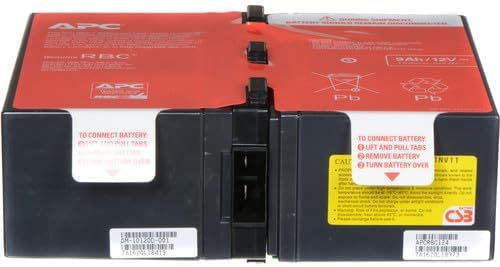
Εικόνα 3: Πίσω view of the APC APCRBC124 Battery Replacement.
Video 1: Official APC video demonstrating the battery replacement process for various APC UPS models. This video provides a general overview of how to replace an APC UPS battery.
Video 2: Official APC video highlighting the benefits of genuine APC UPS Replacement Batteries, including safety and performance.
6. Λειτουργία
After installing the new battery, your UPS should resume normal operation. The UPS will automatically begin charging the new battery. For accurate monitoring and management of your UPS and its new battery, it is highly recommended to use APC's PowerChute software.
PowerChute Software: Αυτό το λογισμικό σάς επιτρέπει να:
- Monitor UPS status and battery charge.
- Perform self-tests.
- Update the battery replacement date to ensure accurate runtime calculations. This step is crucial for the UPS to correctly recognize the new battery's capacity and provide reliable runtime estimates.
Refer to your specific UPS model's user manual for detailed instructions on using PowerChute software and performing battery recalibration.
7. Συντήρηση
To maximize the lifespan and performance of your APC UPS and its battery, consider the following:
- Regular Self-Tests: Periodically perform self-tests as recommended by your UPS model's manual or PowerChute software.
- Περιβαλλοντικές Συνθήκες: Operate the UPS within recommended temperature and humidity ranges.
- Διάρκεια ζωής μπαταρίας: Genuine APC batteries typically have a lifespan of 3-5 years, depending on usage and environmental factors.
- Ανακύκλωση: When replacing your old battery, utilize APC's authorized recycling program. This program includes free return to a recycling center using the packaging from your new battery. Visit the APC website for detailed instructions on the "RBC Recycling Program".

Figure 4: APC offers environmentally sound recycling programs for old battery cartridges.
8. Αντιμετώπιση Προβλημάτων
If you encounter issues after replacing the battery, consider the following common scenarios:
- "X" on Battery Icon or Bad Battery Light: This often indicates the UPS has not yet recognized the new battery or requires recalibration. Ensure the battery is fully charged (allow 16-24 hours) and then perform a self-test. If using PowerChute software, update the battery replacement date.
- Low Estimated Run Time: After replacing the battery, the UPS might initially display a low run time. This is normal until the battery has fully charged and the UPS has been recalibrated. Perform a self-test and update the battery replacement date in PowerChute software to resolve this.
- Το UPS δεν ενεργοποιείται: Double-check all connections, including the battery cartridge insertion. Ensure the UPS is plugged into a working power outlet.
If problems persist, consult the full user manual for your specific APC UPS model or contact APC customer support.
9. Προδιαγραφές
| Χαρακτηριστικό | Προσδιορισμός |
|---|---|
| Διαστάσεις προϊόντος | 8.86 x 7.24 x 3.78 ίντσες |
| Βάρος αντικειμένου | 1.54 λίρες |
| Αριθμός μοντέλου είδους | APCRBC124 |
| Απαιτούνται μπαταρίες | Απαιτείται 1 μπαταρία 12V |
| Σύνθεση κυψέλης μπαταρίας | Σφραγισμένο Οξύ Μολύβδου |
| Χωρητικότητα μπαταρίας | 9 Amp Ώρες |
10. Εγγύηση και υποστήριξη
Genuine APC Replacement Battery Cartridges (RBCs) are backed by a Εγγύηση κατασκευαστή 2 έτους. Αυτή η εγγύηση καλύπτει ελαττώματα στα υλικά και την κατασκευή υπό κανονική χρήση.
For warranty claims, technical support, or further assistance, please visit the official APC by Schneider Electric website or contact their customer service directly. Ensure you have your proof of purchase and the battery's serial number available.


