Εισαγωγή
The Casio SA-76 44-Key Mini Personal Keyboard is designed for beginners, offering an intuitive and engaging musical experience. Its compact size and user-friendly interface make it suitable for young musicians and those new to keyboard playing. This manual provides essential information for setting up, operating, and maintaining your SA-76 keyboard.
The keyboard features an easy-to-read LCD display that shows important data such as tone, rhythm, song number, metronome, tempo, and the note being played. With dedicated buttons for Piano and Organ sounds, switching between instrument voices is quick and simple. The 44 mini keys and 5 percussion pads are designed for comfortable play, especially for smaller hands, making it an excellent introduction to the world of keyboard music.
Βασικά Χαρακτηριστικά
- 44 mini-sized keys for comfortable play.
- 5 percussion pads for rhythmic exploration.
- 100 built-in tones to explore various instrument sounds.
- 50 rhythm patterns to accompany your playing.
- Simple tone selection with dedicated PIANO and ORGAN buttons.
- Melody on/off lesson function for practice.
- Easy-to-read LCD display for clear information.
- Built-in speakers with 1.6 Watts output.
- Headphones jack (3.5mm) for private practice.
- Portable design, can be powered by batteries (6 AA, not included) or an optional AC adapter.
Ρύθμιση
1. Τροφοδοσία της μονάδας
The Casio SA-76 can be powered by either an optional AC adapter or batteries.
- Προσαρμογέας AC (Προαιρετικός): Connect a compatible 9V DC AC adapter (not included) to the DC 9V jack on the rear panel of the keyboard. Plug the adapter into a standard wall outlet.
- Μπαταρίες: The keyboard requires 6 AA-size batteries (not included).
2. Τοποθέτηση μπαταρίας
- Ensure the keyboard is turned off.
- Locate the battery compartment cover on the bottom of the keyboard.
- Σύρετε το κάλυμμα για να το ανοίξετε.
- Insert 6 AA-size batteries, ensuring correct polarity (+/-) as indicated inside the compartment.
- Επανατοποθετήστε το κάλυμμα της θήκης μπαταριών με ασφάλεια.
3. Attaching the Music Stand
The included music stand can be inserted into the slots on the top panel of the keyboard to hold sheet music or a tablet.
Οδηγίες Λειτουργίας
1. Ενεργοποίηση/Απενεργοποίηση
- Για να ενεργοποιήσετε το πληκτρολόγιο, πατήστε παρατεταμένα το ΕΞΟΥΣΙΑ button until the LCD display lights up.
- To turn off the keyboard, press and hold the ΕΞΟΥΣΙΑ ξανά το κουμπί μέχρι να σβήσει η οθόνη.
2. Ρύθμιση έντασης ήχου
Χρησιμοποιήστε το ΤΟΜΟΣ + και ΕΝΤΟΜΟΣ - buttons located next to the power button to increase or decrease the overall sound volume.
3. Επιλογή τόνων
The SA-76 offers 100 different tones. You can select them using the dedicated buttons or the rotary dial.
- Πατήστε το ΠΙΑΝΟ or ΟΡΓΑΝΟ button for quick access to these common sounds.
- To select other tones, rotate the ΤΟΝΟΣ dial to browse through the available options displayed on the LCD.
4. Playing Rhythms
The keyboard includes 50 rhythm patterns.
- Περιστρέψτε το ΡΥΘΜΟΣ dial to select a desired rhythm pattern.
- Πατήστε το ΕΝΑΡΞΗ/ΔΙΑΚΟΠΗ button to begin or end the rhythm playback.
- Ρυθμίστε το τέμπο χρησιμοποιώντας το TEMPO + και TEMPO - κουμπιά.
5. Playing Built-in Songs
The SA-76 features 10 built-in songs for listening or practicing with the melody on/off function.
- Περιστρέψτε το ΤΡΑΠΕΖΑ ΤΡΑΓΟΥΔΙΟΥ dial to select a song.
- Πατήστε το ΑΝΑΠΑΡΑΓΩΓΗ/ΠΑΥΣΗ button to start or pause the song.
- Χρησιμοποιήστε το MELODY ON/OFF button to mute or unmute the melody part of the song, allowing you to play along.
6. Sustain Function
Ενεργοποιήστε το ΥΠΟΣΤΗΡΙΖΩ function to make notes linger longer after the key is released, similar to a piano's sustain pedal.
- Πατήστε το ΥΠΟΣΤΗΡΙΖΩ button to toggle the effect on or off.
7. Percussion Pads
The 5 percussion pads allow you to add drum sounds to your performance. Simply press a pad to trigger a percussion sound.
8. Χρήση ακουστικών
For private practice, connect 3.5mm stereo headphones to the ΤΗΛΕΦΩΝΑ/ΕΞΟΔΟΣ jack on the rear panel. This will mute the built-in speakers.
Προϊόν Πάνωview
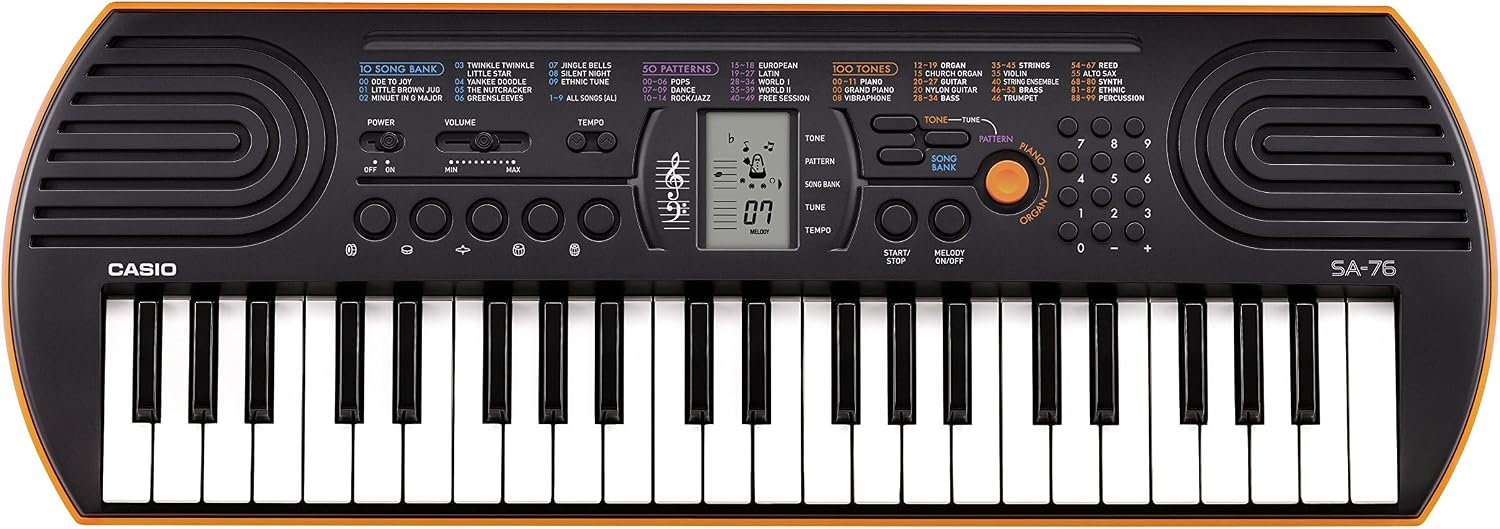
Figure 1: Casio SA-76 44-Key Mini Personal Keyboard. This image shows the overall design of the orange Casio SA-76 keyboard with its 44 mini keys and control panel.

Figure 2: Close-up of the control panel. This image provides a detailed view of the LCD display, tone/rhythm/song dials, volume buttons, and other function buttons on the Casio SA-76.

Figure 3: Diagram highlighting key features. This image illustrates various components of the Casio SA-76, including the 44 mini keys, drum pads, built-in speakers, and easy-to-use controls.

Figure 4: Casio SA-76 product dimensions. This image shows the physical measurements of the keyboard: 23.8 inches (W) x 8.3 inches (D) x 2.24 inches (H).
Συντήρηση
- Καθάρισμα: Wipe the keyboard with a soft, dry cloth. Avoid using abrasive cleaners, waxes, or solvents, as these can damage the finish.
- Αποθήκευση: Store the keyboard in a cool, dry place away from direct sunlight, extreme temperatures, and high humidity. If storing for an extended period, remove the batteries to prevent leakage.
- Χειριζόμενος: Αποφύγετε την πτώση του πληκτρολογίου ή την έκθεσή του σε ισχυρά χτυπήματα. Μην τοποθετείτε βαριά αντικείμενα πάνω του.
Αντιμετώπιση προβλημάτων
| Πρόβλημα | Πιθανή αιτία | Διάλυμα |
|---|---|---|
| Καμία δύναμη | Batteries are dead or incorrectly installed; AC adapter not connected or faulty. | Replace batteries or check polarity. Ensure AC adapter is securely connected and functional. |
| Κανένας ήχος | Volume is too low; headphones are connected; speakers are muted. | Increase volume. Disconnect headphones. Check if any mute function is active. |
| Τα κλειδιά δεν ανταποκρίνονται | Keyboard may be in a specific mode (e.g., lesson mode with melody off) or requires a reset. | Check current mode settings. Turn the keyboard off and on again to reset. |
Προδιαγραφές
| Χαρακτηριστικό | Λεπτομέρεια |
|---|---|
| Αριθμός κλειδιών | 44 mini-sized keys |
| Ήχοι | 100 |
| Ρυθμοί | 50 |
| Τραγούδια | 10 |
| Επιθέματα κρουστών | 5 |
| Ηχεία | 2 x 1.2 W (Amp Output: 1.6 Watts) |
| Υποδοχή ακουστικών | Μίνι στερεοφωνική υποδοχή 3.5 mm |
| Πηγή ισχύος | 6 AA batteries or optional AC adapter (DC 9V) |
| Διαστάσεις (Π x Β x Υ) | 23.8" x 8.3" x 2.24" (60.45 εκ. x 21.08 εκ. x 5.69 εκ.) |
| Βάρος αντικειμένου | 3.08 λίβρες (1.4 κιλά) |
Εγγύηση και υποστήριξη
For warranty information or technical support, please refer to the documentation included with your product or visit the official Casio webτοποθεσία. Κρατήστε την απόδειξη αγοράς σας ως απόδειξη αγοράς για τυχόν αξιώσεις εγγύησης.


