1. Εισαγωγή
This manual provides essential information for the safe and efficient use of your Nokia 8800 Unlocked Cell Phone. Please read this guide carefully before operating the device to ensure proper functionality and to understand its features.

Image: The Nokia 8800 phone in a partially slid-open position, revealing the keypad and screen.
2. Ρύθμιση
2.1 Εγκατάσταση της κάρτας SIM και της μπαταρίας
- Remove the back cover of the phone by sliding it downwards or pressing the release button, if present.
- Insert your SIM card into the designated slot with the gold contacts facing down and the cut corner aligned correctly.
- Place the battery into the battery compartment, ensuring the contacts align with those on the phone.
- Επανατοποθετήστε το πίσω κάλυμμα μέχρι να ασφαλίσει στη θέση του με ένα κλικ.

Image: The Nokia 8800 phone with its back cover removed, revealing the internal battery compartment and SIM card slot. A separate back cover is shown next to it.
2.2 Φόρτιση της μπαταρίας
Before first use, fully charge the phone's battery. Connect the charger to the phone's charging port and plug it into a power outlet. The battery indicator on the screen will show the charging status.

Image: The Nokia 8800 phone placed upright in a dedicated charging dock.
2.3 Ενεργοποίηση/Απενεργοποίηση
To power on, press and hold the power key (usually the red end call key) until the Nokia logo appears. To power off, press and hold the same key until the 'Power off' option appears, then select it.
3. Οδηγίες λειτουργίας
3.1 Πραγματοποίηση και λήψη κλήσεων
- Πραγματοποίηση κλήσης: Enter the phone number using the keypad and press the green call key.
- Απάντηση σε κλήση: Press the green call key when the phone rings.
- Τερματισμός κλήσης: Press the red end call key.
3.2 Αποστολή μηνυμάτων
Navigate to the 'Messages' menu. Select 'Create new message' or 'New SMS/MMS'. Enter your text, add multimedia content if sending an MMS, and then enter the recipient's number or select from contacts before sending.
3.3 Χρήση της Κάμερας
Access the camera from the main menu. Frame your shot using the display and press the dedicated camera key or the center navigation key to capture an image. The integrated SVGA camera supports still images and improved video recording quality (QCIF).
3.4 Internet Browsing
The Nokia 8800 features an integrated xHTML browser that connects over TCP/IP. Access the browser from the main menu to navigate web pages. Data transfer is supported via EDGE/E-GPRS (Class 8) and GPRS (Class 8).

Image: The Nokia 8800 phone with its screen displaying 'Telekom.de', indicating network or service provider information.
4. Χαρακτηριστικά
The Nokia 8800 is designed with a focus on premium materials and functionality:
- Επίδειξη: High-resolution TFT display with 256K colors and 208 x 208 pixel resolution.
- Απεικόνιση: Integrated SVGA camera (0.5 megapixels) with improved video recording quality (QCIF).
- Μηνύματα: Supports text, audio, image, and video clips (MMS up to 300 KB). Email support for SMTP, POP3, and IMAP4 protocols. Predictive text input for major languages.
- Μνήμη: 64MB internal NAND flash memory.
- Συνδεσιμότητα: Bluetooth (Stereo, Plug & Play connector, SIM Access Profile), EDGE/E-GPRS, GPRS.
- Voice Features: Integrated handsfree speaker.
- Μέσα ενημέρωσης: 64 polyphonic MIDI, AAC, MP3 ringing tones. Video recording and streaming. Digital music player and FM Radio.
- Εφαρμογές: Java MIDP 2.0 for applications and games.
- Ειδικά χαρακτηριστικά: Exclusive 3D graphics and UI themes, Mobile Wallet 2.0 application, device-to-device synchronization.

Image: The Nokia 8800 phone in its closed, compact form, showcasing τον κομψό σχεδιασμό του.
5. Συντήρηση
5.1 Καθαρισμός της συσκευής
Use a soft, lint-free cloth to clean the phone's screen and body. Avoid using harsh chemicals or abrasive materials, as these can damage the finish and display.
5.2 Φροντίδα μπαταρίας
To prolong battery life, avoid exposing the phone to extreme temperatures. Do not leave the battery fully discharged for extended periods. Use only Nokia-approved chargers and batteries.
5.3 Γενικός Χειρισμός
Protect your phone from drops, impacts, and moisture. Keep it away from magnetic fields and direct sunlight.
6. Αντιμετώπιση Προβλημάτων
6.1 Κοινά ζητήματα και λύσεις
- Το τηλέφωνο δεν ενεργοποιείται: Ensure the battery is charged and correctly inserted. Try connecting the charger.
- Δεν υπάρχει σήμα δικτύου: Ελέγξτε αν η κάρτα SIM έχει τοποθετηθεί σωστά. Μετακινηθείτε σε μια περιοχή με καλύτερη κάλυψη δικτύου. Επικοινωνήστε με τον πάροχο υπηρεσιών σας εάν το πρόβλημα επιμένει.
- Η μπαταρία δεν φορτίζει: Verify the charger connection. Ensure the charger is functional. Check for any damage to the charging port.
- Η οθόνη δεν ανταποκρίνεται: Try restarting the phone. If the issue continues, contact support.
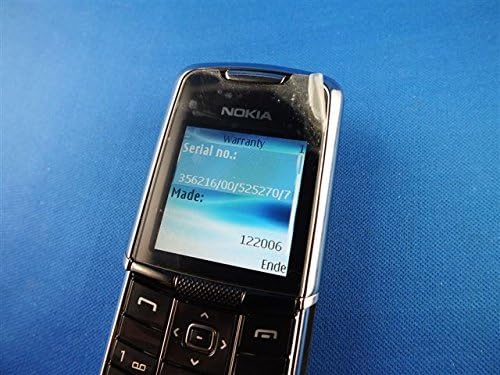
Image: The Nokia 8800 phone with its screen displaying 'Warranty' and 'Serial no.' information, useful for troubleshooting or support inquiries.
7. Προδιαγραφές
| Χαρακτηριστικό | Λεπτομέρεια |
|---|---|
| Όνομα μοντέλου | Nokia 8800 |
| Συχνότητα λειτουργίας | Tri-band GSM 900/1800/1900 |
| Διαστάσεις (Μ x Π x Υ) | 107 mm x 45 mm x 15.0 - 16.5 mm |
| Βάρος | 134 g (4.7 ουγκιές) |
| Επίδειξη | High-resolution TFT, 256K colors, 208 x 208 pixels, 2 inches |
| Κάμερα | SVGA (0.5 megapixels), QCIF video recording |
| Εσωτερική μνήμη | 64MB NAND flash |
| Λειτουργικό σύστημα | Java-based (proprietary) |
| Συνδεσιμότητα | Bluetooth, EDGE/E-GPRS Class 8, GPRS Class 8 |
| Πρόγραμμα περιήγησης | Integrated xHTML browser |
| Jack ήχου | Δεν υπάρχει υποδοχή ακουστικών |
| Form Factor | Ολισθητής |
| Χρώμα | Ασήμι |
| Ημερομηνία πρώτης διαθεσιμότητας | 13 Φεβρουαρίου 2007 |
8. Εγγύηση και υποστήριξη
For warranty information and customer support, please refer to the documentation provided at the time of purchase or visit the official Nokia webιστότοπο. Κρατήστε την απόδειξη αγοράς για τυχόν αξιώσεις εγγύησης.


