1. Εισαγωγή
This manual provides detailed instructions for the setup, operation, maintenance, and troubleshooting of your Logitech S200 Multimedia Speaker System. Please read this manual thoroughly before using the product to ensure proper functionality and to maximize your listening experience.
2. Το προϊόν τελείωσεview
The Logitech S200 is a 2.1 channel wired multimedia speaker system designed for use with personal computers and other compatible audio devices. It consists of a subwoofer for bass reproduction and two satellite speakers for mid-range and high-frequency audio.
Συστατικά:
- 1x Subwoofer unit
- 2x δορυφορικά ηχεία
- Wired remote control (integrated into one satellite speaker)
- Καλώδιο ήχου (βύσμα 3.5 mm)
- Καλώδιο τροφοδοσίας

Εικόνα 2.1: Εμπρός view of the Logitech S200 speaker system, showing the central subwoofer and two satellite speakers.
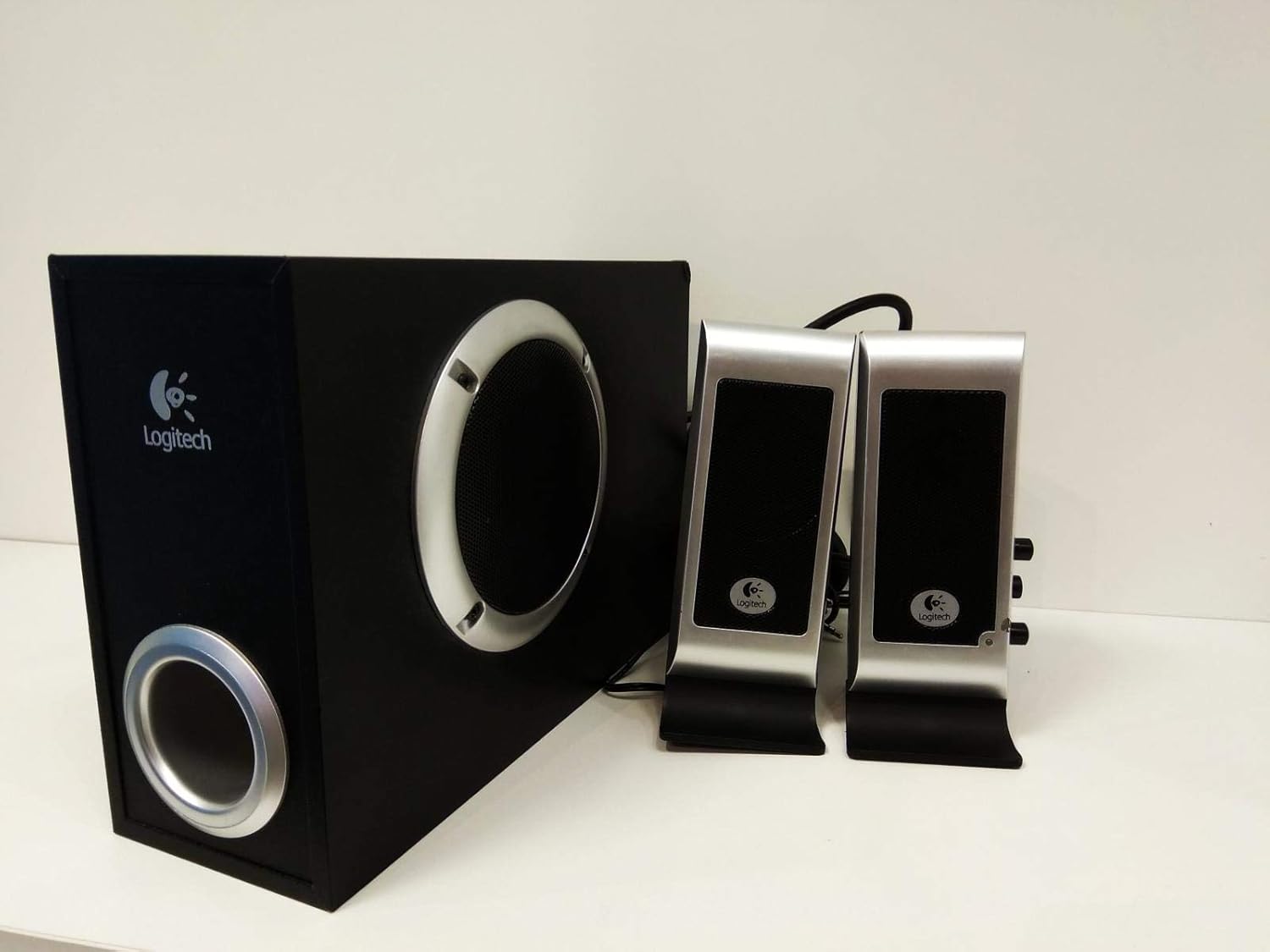
Εικόνα 2.2: Πλευρά view of the Logitech S200 subwoofer and front view of the satellite speakers, illustrating the compact design.
3. Οδηγίες εγκατάστασης
Follow these steps to correctly set up your Logitech S200 speaker system:
- Τοποθέτηση των ηχείων: Place the subwoofer on the floor, preferably under your desk or in a corner for optimal bass response. Position the two satellite speakers on either side of your monitor or listening area, ensuring they are equidistant from your listening position for balanced stereo sound.
- Connecting Satellite Speakers to Subwoofer: Συνδέστε τα καλώδια από τα δορυφορικά ηχεία στις αντίστοιχες θύρες στο πίσω μέρος του υπογούφερ. Βεβαιωθείτε για ασφαλή σύνδεση.
- Σύνδεση με πηγή ήχου: Plug the 3.5mm audio cable (usually green) from the subwoofer into the audio output jack (headphone or line-out) of your computer, laptop, smartphone, or other audio device.
- Ισχύς σύνδεσης: Plug the power cable from the subwoofer into a standard electrical outlet.
- Ενεργοποίηση: Turn on the speaker system using the power control located on one of the satellite speakers. A blue LED indicator will illuminate when the system is powered on.

Εικόνα 3.1: Οπισθεν view of the subwoofer and satellite speakers, showing the connection ports for power, audio input, and satellite speaker cables.
4. Οδηγίες λειτουργίας
4.1 Ενεργοποίηση/Απενεργοποίηση
The power switch is integrated with the volume control knob on one of the satellite speakers. Rotate the knob clockwise until you hear a click to turn the system on. Rotate counter-clockwise until you hear a click to turn it off.
4.2 Έλεγχος έντασης ήχου
Adjust the overall volume by rotating the large knob on the satellite speaker. Rotate clockwise to increase volume and counter-clockwise to decrease volume.
4.3 Έλεγχος μπάσων
The bass volume can be adjusted using a separate knob, typically located on the subwoofer unit or the same satellite speaker as the main volume control. Adjust to your preferred bass level.
4.4 Headphone and Microphone Jacks
One of the satellite speakers features a headphone output jack and a microphone input jack. These allow for convenient connection of headphones and a microphone without needing to access the computer's ports directly. Plugging in headphones will mute the speakers.
5. Συντήρηση
To ensure the longevity and optimal performance of your Logitech S200 speaker system, follow these maintenance guidelines:
- Καθάρισμα: Use a soft, dry cloth to clean the speaker surfaces. Avoid using abrasive cleaners, solvents, or strong detergents, as these can damage the finish.
- Αφαίρεση σκόνης: Regularly dust the speaker grilles and vents to prevent accumulation, which can affect sound quality and internal cooling.
- Τοποθέτηση: Keep the speakers away from direct sunlight, heat sources, and areas with high humidity. Ensure adequate ventilation around the subwoofer.
- Διαχείριση καλωδίων: Avoid kinking or sharply bending the cables. Ensure cables are not under heavy objects or in areas where they can be tripped over.
6. Αντιμετώπιση Προβλημάτων
Εάν αντιμετωπίσετε προβλήματα με το σύστημα ηχείων σας, ανατρέξτε στα ακόλουθα συνηθισμένα προβλήματα και λύσεις:
| Πρόβλημα | Πιθανή αιτία | Διάλυμα |
|---|---|---|
| Κανένας ήχος |
|
|
| Παραμορφωμένος ήχος |
|
|
| Χωρίς μπάσο |
|
|
| Power indicator (blue LED) is off |
|
|
7. Προδιαγραφές
| Χαρακτηριστικό | Λεπτομέρεια |
|---|---|
| Όνομα μοντέλου | S200 |
| Model Number Item | 970145-0914 |
| Μάρκα | Logitech |
| Τύπος ηχείου | Subwoofer (2.1 Multimedia Speaker System) |
| Τεχνολογία Συνδεσιμότητας | Ενσύρματο |
| Μέγιστη ισχύς εξόδου ηχείου | 5 Watt RMS |
| Wattagε (Σύνολο) | 17 Watt |
| Λειτουργία εξόδου ήχου | Στέρεο |
| Μέθοδος Ελέγχου | Remote Control (integrated) |
| Πηγή ισχύος | Ενσύρματο Ηλεκτρικό |
| Διαστάσεις προϊόντος | 400 x 215 x 142 εκ. (περίπου) |
| Βάρος αντικειμένου | 3.06 κιλά |
| Υλικό | Πλαστική ύλη |
| Τύπος τοποθέτησης | Επιτραπέζια βάση |
| Προτεινόμενες Εφαρμογές | Για υπολογιστές |
| Συμβατές Συσκευές | Φορητός υπολογιστής, Smartphone, Tablet, Τηλεόραση |
| Συμβατότητα λειτουργικού συστήματος | Linux, Mac OS, Microsoft Windows |
8. Εγγύηση και υποστήριξη
Logitech products are manufactured to high quality standards and are backed by a limited hardware warranty. For specific warranty terms and conditions applicable to your region, please refer to the warranty information included with your purchase or visit the official Logitech support webτοποθεσία.
Για περαιτέρω βοήθεια, τεχνική υποστήριξη ή για πρόσβαση σε πρόσθετους πόρους, επισκεφθείτε την επίσημη ιστοσελίδα υποστήριξης της Logitech. webτοποθεσία: www.logitech.com/support


