1. Το προϊόν τελείωσεview
The D-Link DES-1008D is an 8-port Fast Ethernet unmanaged desktop switch designed to expand network connectivity for small workgroups. This device allows for flexible connection of Ethernet and Fast Ethernet devices, automatically detecting network speed and negotiating between 10BASE-T and 100BASE-TX, as well as full and half-duplex modes. Its plug-and-play design ensures simple operation without complex configuration.

Figure 1: D-Link DES-1008D 8-Port Fast Ethernet Unmanaged Desktop Switch (Silver/Blue model).
Τα βασικά χαρακτηριστικά περιλαμβάνουν:
- 8 10/100 Mbps auto-sensing ports for flexible network integration.
- Unmanaged design for simple plug-and-play installation.
- Automatic MDI/MDIX crossover for all ports, eliminating the need for crossover cables.
- Fanless operation for silent performance.
2. Περιεχόμενα συσκευασίας
Βεβαιωθείτε ότι το πακέτο σας περιέχει τα ακόλουθα στοιχεία:
- Μη διαχειριζόμενος διακόπτης επιφάνειας εργασίας D-Link DES-1008D 8 θυρών γρήγορου Ethernet
- Μετασχηματιστής ρεύματος
- Quick Install Guide and Documentation
If any of the above items are missing or damaged, please contact your local D-Link reseller for assistance.
3. Οδηγίες εγκατάστασης
The DES-1008D switch is designed for easy installation. Follow these steps to set up your device:
- Τοποθέτηση: Place the switch on a flat, stable surface or mount it to a wall. Ensure adequate ventilation around the device.
- Σύνδεση τροφοδοσίας: Connect the provided power adapter to the power input port on the switch and then plug the adapter into a standard electrical outlet. The Power LED on the switch should illuminate.
- Σύνδεση συσκευών δικτύου: Connect your network devices (e.g., computers, printers, network-attached storage, routers) to any of the 8 Fast Ethernet ports on the switch using standard Ethernet cables. The Link/Act LED for each connected port should illuminate, indicating an active connection.
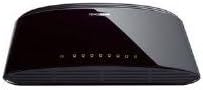
Εικόνα 2: Πίσω view of the D-Link DES-1008D (Black model) showing Ethernet ports and power input.
The switch will automatically detect the speed and duplex mode of the connected devices. No further configuration is required for basic operation.
4. Οδηγίες λειτουργίας
The D-Link DES-1008D is an unmanaged switch, meaning it operates automatically without user configuration. Once powered on and devices are connected, it functions as a central hub for your network traffic.
Ενδείξεις LED:
Ο διακόπτης διαθέτει ενδεικτικές λυχνίες LED για την παροχή πληροφοριών κατάστασης:
- LED ισχύος: Illuminates when the switch is receiving power.
- LED σύνδεσης/ενεργοποίησης (ανά θύρα):
- Συμπαγές πράσινο: Indicates a valid network connection at 100 Mbps.
- Συμπαγές Κεχριμπάρι: Indicates a valid network connection at 10 Mbps.
- Αναβοσβήνει: Indicates network activity (data transmission or reception) on that port.
- Μακριά από: Δεν υπάρχει συνδεδεμένη συσκευή ή η συνδεδεμένη συσκευή είναι απενεργοποιημένη.
Μεταφορά δεδομένων:
The switch facilitates data transfer between connected devices. Each port supports auto-negotiation for speed (10/100 Mbps) and duplex mode (full/half-duplex), ensuring optimal performance for each connection. In full-duplex mode, a workstation can achieve up to 200 Mbps data transfer rate.
5. Συντήρηση
To ensure optimal performance and longevity of your D-Link DES-1008D switch, consider the following maintenance guidelines:
- Περιβάλλο: Operate the switch within its specified temperature range (up to 40°C). Avoid placing it in direct sunlight or near heat sources.
- Αερισμός: Ensure that the ventilation openings on the switch are not blocked. Proper airflow is crucial for heat dissipation.
- Καθάρισμα: Διατηρείτε τον διακόπτη καθαρό και χωρίς σκόνη. Χρησιμοποιήστε ένα μαλακό, στεγνό πανί για τον καθαρισμό. Μην χρησιμοποιείτε υγρά καθαριστικά ή καθαριστικά σε μορφή αεροζόλ.
- Τροφοδοτικό: Use only the power adapter supplied with the device. Using an incorrect power adapter may damage the switch and void the warranty.
- Διαχείριση καλωδίων: Οργανώστε τα καλώδια δικτύου για να αποτρέψετε την καταπόνηση των θυρών και να διατηρήσετε μια τακτοποιημένη εγκατάσταση.
6. Αντιμετώπιση Προβλημάτων
If you encounter issues with your D-Link DES-1008D switch, refer to the following troubleshooting tips:
- Δεν υπάρχει LED τροφοδοσίας:
- Βεβαιωθείτε ότι ο προσαρμογέας ρεύματος είναι συνδεδεμένος με ασφάλεια στον διακόπτη και σε μια λειτουργική πρίζα.
- Βεβαιωθείτε ότι η ηλεκτρική πρίζα λειτουργεί συνδέοντας μια άλλη συσκευή.
- No Link/Act LED for a Connected Device:
- Ελέγξτε ότι το καλώδιο Ethernet είναι καλά συνδεδεμένο τόσο στη θύρα του διακόπτη όσο και στη συσκευή δικτύου.
- Βεβαιωθείτε ότι η συνδεδεμένη συσκευή δικτύου είναι ενεργοποιημένη και λειτουργεί σωστά.
- Δοκιμάστε ένα διαφορετικό καλώδιο Ethernet.
- Δοκιμάστε να συνδέσετε σε διαφορετική θύρα στο διακόπτη.
- Verify that the cable length does not exceed the maximum recommended length for Ethernet (100 meters).
- Αργή απόδοση δικτύου:
- Ensure all connected devices are operating at their optimal speed. The Link/Act LED color indicates the connection speed (Green for 100 Mbps, Amber for 10 Mbps).
- Check for excessive network traffic or bandwidth-intensive applications on your network.
- Verify that your network cables are not damaged.
- Διακοπτόμενη συνδεσιμότητα:
- Ελέγξτε για χαλαρές συνδέσεις καλωδίων.
- Ensure the switch is placed in an area with good ventilation to prevent overheating.
- Test with different cables and devices to isolate the issue.
If problems persist after following these steps, contact D-Link technical support for further assistance.
7. Προδιαγραφές
| Χαρακτηριστικό | Λεπτομέρεια |
|---|---|
| Αριθμός μοντέλου | DES-1008D |
| Αριθμός Λιμένων | 8 |
| Τύπος διεπαφής | RJ45 |
| Ρυθμός μεταφοράς δεδομένων | 10/100 Megabits Per Second (Mbps) |
| Ικανότητα μεταγωγής | 1.6 Gbps (χωρίς αποκλεισμό) |
| Πρότυπα | IEEE 802.3 10BASE-T Ethernet, IEEE 802.3u 100BASE-TX Fast Ethernet, IEEE 802.3x Flow Control |
| Αυτόματο MDI/MDIX | Υποστηρίζεται σε όλες τις θύρες |
| Είσοδος ισχύος | 230 Volts (AC) (via external power adapter) |
| Κατανάλωση ρεύματος | Low power consumption (fanless design) |
| Διαστάσεις (Μ x Π x Υ) | 6.5" x 4.41" x 1.42" (περίπου 165mm x 112mm x 36mm) |
| Βάρος αντικειμένου | 8.9 ουγγιές (252 γραμμάρια) |
| Υλικό θήκης | Πλαστική ύλη |
| Θερμοκρασία λειτουργίας | 0°C έως 40°C (32°F έως 104°F) |
| Θερμοκρασία αποθήκευσης | -10°C έως 70°C (14°F έως 158°F) |
| Υγρασία λειτουργίας | 10% έως 90% χωρίς συμπύκνωση |
| Πιστοποιήσεις | FCC Class B, CE Class B, VCCI Class B, C-Tick, RoHS |
8. Εγγύηση και υποστήριξη
The D-Link DES-1008D switch comes with a limited 2-year warranty. For specific terms and conditions, please refer to the warranty documentation included with your product or visit the official D-Link webτοποθεσία.
For technical support, product registration, or to download the latest firmware and documentation, please visit the D-Link support portal:
When contacting support, please have your product model number (DES-1008D) and serial number ready.


