
1. Εισαγωγή
This manual provides essential information for the safe and efficient use of your suevery Prebuilt Gaming PC. Please read these instructions carefully before operating the device and retain them for future reference. This gaming PC is designed for high-performance computing, suitable for gaming, business, and everyday use.

Εικόνα 1.1: Πάνωview of the suevery Prebuilt Gaming PC with internal RGB lighting.
2. Οδηγός εγκατάστασης
Follow these steps to set up your new suevery Prebuilt Gaming PC:
- Αποσυσκευασία: Carefully remove the PC from its packaging. Inspect for any visible damage.
- Τοποθέτηση: Τοποθετήστε τον υπολογιστή σε μια σταθερή, επίπεδη επιφάνεια με επαρκή αερισμό. Βεβαιωθείτε ότι δεν υπάρχουν φραγμένες οπές εξαερισμού.
- Σύνδεση περιφερειακών:
- Connect your monitor(s) to the graphics card's HDMI or DisplayPort outputs.
- Συνδέστε το πληκτρολόγιο και το ποντίκι σας στις διαθέσιμες θύρες USB.
- Συνδέστε ηχεία ή ακουστικά στις θύρες εξόδου ήχου.
- For wired internet, connect an Ethernet cable to the LAN port. For Wi-Fi, ensure antennas are attached if external.
- Σύνδεση ρεύματος: Connect the power cable to the PC's power supply unit and then to a grounded electrical outlet.
- Πρώτη εκκίνηση: Press the power button on the front of the PC. The system will initiate the boot process. Follow any on-screen instructions for initial operating system setup.
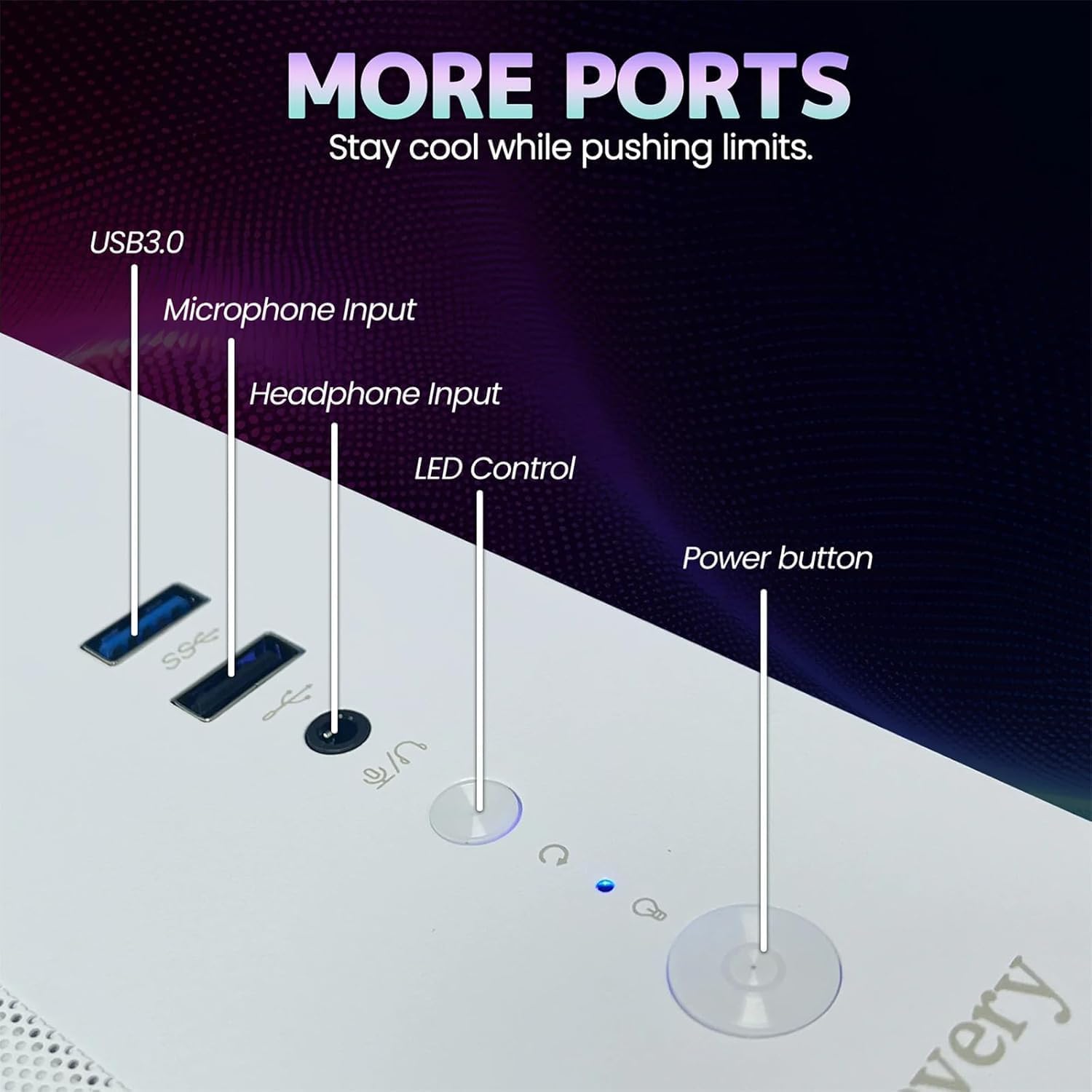
Image 2.1: Rear panel of the PC illustrating various connectivity ports including USB, HDMI, and audio jacks.
3. Οδηγίες λειτουργίας
Your suevery Prebuilt Gaming PC comes with a pre-installed operating system (DOS, requiring user installation of a full OS). Once your preferred operating system is installed and configured, you can begin using your PC.
- Ενεργοποίηση/Απενεργοποίηση: Press the power button to turn the PC on. To turn off, use the operating system's shutdown function. Avoid direct power-off unless necessary to prevent data loss.
- Έλεγχος φωτισμού RGB: The PC features customizable RGB lighting. Refer to the specific software or physical button (if available, as indicated in Image 2.1) for adjusting lighting modes and colors.
- Εγκατάσταση λογισμικού: Install necessary drivers for your graphics card and other components from the manufacturer's websites for optimal performance. Install your desired games and applications.
- Συνδεσιμότητα: Utilize the Wi-Fi 6 for high-speed wireless internet or the Ethernet port for a stable wired connection. The multiple USB ports allow for connecting various peripherals.
Video 3.1: An official video demonstrating the suevery Prebuilt Gaming PC Desktop Computer, showcasing τον σχεδιασμό και τα χαρακτηριστικά του.
4. Συντήρηση
Η τακτική συντήρηση διασφαλίζει τη μακροζωία και τη βέλτιστη απόδοση του υπολογιστή σας.
- Καθαρισμός σκόνης: Periodically clean dust from the internal components, especially fans and heatsinks, using compressed air. Ensure the PC is powered off and unplugged before cleaning.
- Ενημερώσεις λογισμικού: Keep your operating system, drivers, and antivirus software updated to ensure security and performance.
- Διαχείριση καλωδίων: Ensure internal and external cables are neatly organized to improve airflow and prevent accidental disconnections.
- Αερισμός: Always ensure the PC has clear space around its vents for proper airflow.

Εικόνα 4.1: Εσωτερικό view of the PC highlighting the cooling fans and component layout, emphasizing the importance of dust removal.
5. Αντιμετώπιση Προβλημάτων
Αυτή η ενότητα εξετάζει συνηθισμένα προβλήματα που ενδέχεται να αντιμετωπίσετε.
| Πρόβλημα | Πιθανή Λύση |
|---|---|
| Ο υπολογιστής δεν ενεργοποιείται. | Check power cable connections to the PC and wall outlet. Ensure the power supply switch on the back of the PC is in the 'On' position. Test the outlet with another device. |
| Δεν υπάρχει ένδειξη στην οθόνη. | Ensure the monitor is powered on and connected to the graphics card (not the motherboard's video output). Try a different cable or monitor. |
| Το σύστημα είναι αργό ή παγώνει. | Check for background applications consuming resources. Update drivers. Scan for malware. Ensure adequate ventilation to prevent overheating. |
| Προβλήματα σύνδεσης Wi-Fi. | Ensure Wi-Fi antennas are securely attached. Restart your router and PC. Update Wi-Fi drivers. |
| Ο φωτισμός RGB δεν λειτουργεί. | Check connections to the RGB controller. Use the dedicated RGB control button or software to adjust settings. |
6. Προδιαγραφές
Detailed technical specifications for your suevery Prebuilt Gaming PC.
| Χαρακτηριστικό | Λεπτομέρεια |
|---|---|
| Μάρκα | σουέβερι |
| Όνομα μοντέλου | SU-V9W2-V9W4 |
| Μοντέλο CPU | AMD Ryzen 5 (6 Cores, 3.6 GHz up to 4.1 GHz) |
| Μνήμη RAM | 16 GB DDR4 3200 MHz (Max 32 GB) |
| Αποθήκευση | 512 GB M.2 PCIe NVMe SSD |
| Συνεπεξεργαστής γραφικών | RX 560 4G GDDR5 (Dedicated) |
| Λειτουργικό σύστημα | DOS (User-installed OS required) |
| Συνδεσιμότητα | Wi-Fi 6 (802.11ax), USB (2x USB 3.0, 4x USB 2.0), HDMI |
| Κατανάλωση ρεύματος | 400 Watt |
| Διαστάσεις (Μ x Π x Υ) | 13.35 x 10.87 x 12.99 ίντσες |
| Χρώμα | Λευκό |

Image 6.1: Dimensional diagram of the suevery Prebuilt Gaming PC, indicating its compact size.
7. Εγγύηση και υποστήριξη
Your suevery Prebuilt Gaming PC comes with a Εγγύηση 1 ετών από την ημερομηνία αγοράς, καλύπτοντας κατασκευαστικά ελαττώματα.
For technical support, warranty claims, or further assistance, please contact suevery customer service through the retailer's platform or visit the official suevery website για στοιχεία επικοινωνίας.
Please have your product model number (Ryzen5-16G-512G-RX560 4G) and proof of purchase ready when contacting support.