
1. Εισαγωγή
This manual provides detailed instructions for the safe and efficient use of your Qubo X232 phone. Please read this manual thoroughly before operating the device and retain it for future reference.
2. Το προϊόν τελείωσεview
The Qubo X232 is a 4G mobile phone designed for ease of use, featuring a large 2.3-inch screen, loud audio, and a dedicated SOS emergency button. Its robust 1700mAh battery ensures extended usage, and the unlocked status provides compatibility with various Mexican carriers.
2.1. Περιεχόμενα συσκευασίας
- Qubo X232 Phone
- Μπαταρία 1700 mAh
- Καλώδιο φόρτισης USB Type-C
- Προσαρμογέας USB OTG
- Εγχειρίδιο χρήστη
3. Βασικά Χαρακτηριστικά
- Clear Display & Simple Operation: Features a 2.3-inch color screen for enhanced readability, large illuminated buttons with voice prompts, and a simplified user interface for straightforward navigation. Includes side buttons for keypad lock/unlock and volume control.
- Λειτουργία έκτακτης ανάγκης SOS: A dedicated SOS button allows for automatic dialing to up to 5 pre-set emergency contacts and simultaneous alert message sending.
- Loud Audio & Clear Calls: Equipped with a high-volume speaker for improved audibility in various environments. Supports 3.5mm headphones and Bluetooth accessories.
- Efficient 1700mAh Battery: Offers extended battery life, providing up to 14 days of standby time depending on usage. Features a reversible USB Type-C port for convenient charging.
- Unlocked & Wide Compatibility: Compatible with major Mexican carriers including Telcel, AT&T, Movistar, BAIT, CFE, and Altan. Supports 4G, 3G, and 2G networks, and accepts 5G SIM cards operating on 4G.
- Ενσωματωμένα εργαλεία: Includes FM radio (usable without headphones), camera, multimedia player, alarm, calendar, calculator, call recorder, SMS, and photo contacts.
- Συμπαγής & Εργονομικός Σχεδιασμός: Dimensions of 132.1 x 58.2 x 14.1 mm and a weight of approximately 110 grams ensure comfortable handling and portability.
4. Ρύθμιση
4.1. Εγκατάσταση της κάρτας SIM και της μπαταρίας
- Αφαιρέστε προσεκτικά το πίσω κάλυμμα του τηλεφώνου.
- Insert your Nano SIM card(s) into the designated slot(s). Ensure the gold contacts face downwards and the card is correctly oriented.
- If desired, insert a MicroSD card (up to 64GB) into its dedicated slot for expanded storage.
- Τοποθετήστε την μπαταρία 1700mAh στη θήκη της μπαταρίας, ευθυγραμμίζοντας τις επαφές.
- Επανατοποθετήστε το πίσω κάλυμμα μέχρι να ασφαλίσει στη θέση του με ένα κλικ.
4.2. Αρχική φόρτιση
Before first use, fully charge the phone battery. Connect the USB Type-C cable to the phone's charging port and the other end to a compatible USB power adapter. The charging indicator will show the battery status. A full charge typically takes a few hours.

The Qubo X232 features a 1700mAh battery for extended use, with convenient Type-C charging.
4.3. Ενεργοποίηση/Απενεργοποίηση
- Για ενεργοποίηση: Πατήστε παρατεταμένα το κουμπί Ενεργοποίησης/Τερματισμού Κλήσης (συνήθως κόκκινο) μέχρι να ανάψει η οθόνη.
- Για απενεργοποίηση: Πατήστε παρατεταμένα το κουμπί Ενεργοποίησης/Τερματισμού Κλήσης μέχρι να εμφανιστούν οι επιλογές απενεργοποίησης και, στη συνέχεια, επιλέξτε «Απενεργοποίηση».
5. Οδηγίες λειτουργίας
5.1. Βασική πλοήγηση
Use the directional keys (up, down, left, right) to navigate through menus. The 'OK' button (center) confirms selections, and the 'Back' button (often the right soft key) returns to the previous screen.

The Qubo X232 features a user-friendly, multi-language menu with voice prompts for keys, enhancing ease of use.
5.2. Πραγματοποίηση και λήψη κλήσεων
- To Dial: Εισαγάγετε τον αριθμό τηλεφώνου χρησιμοποιώντας το πληκτρολόγιο και πατήστε το Πράσινο κουμπί κλήσης.
- Απαντώ: Όταν χτυπήσει το τηλέφωνο, πατήστε το Πράσινο κουμπί κλήσης.
- Για να τερματίσετε την κλήση: Πατήστε το κόκκινο κουμπί τερματισμού κλήσης.
- Ταχείας κλήσης: Assign frequently called numbers to specific keys for quick dialing. Refer to the 'Phone Settings' menu for setup.
- Επαφές φωτογραφιών: Store contacts with associated photos for easy visual identification.
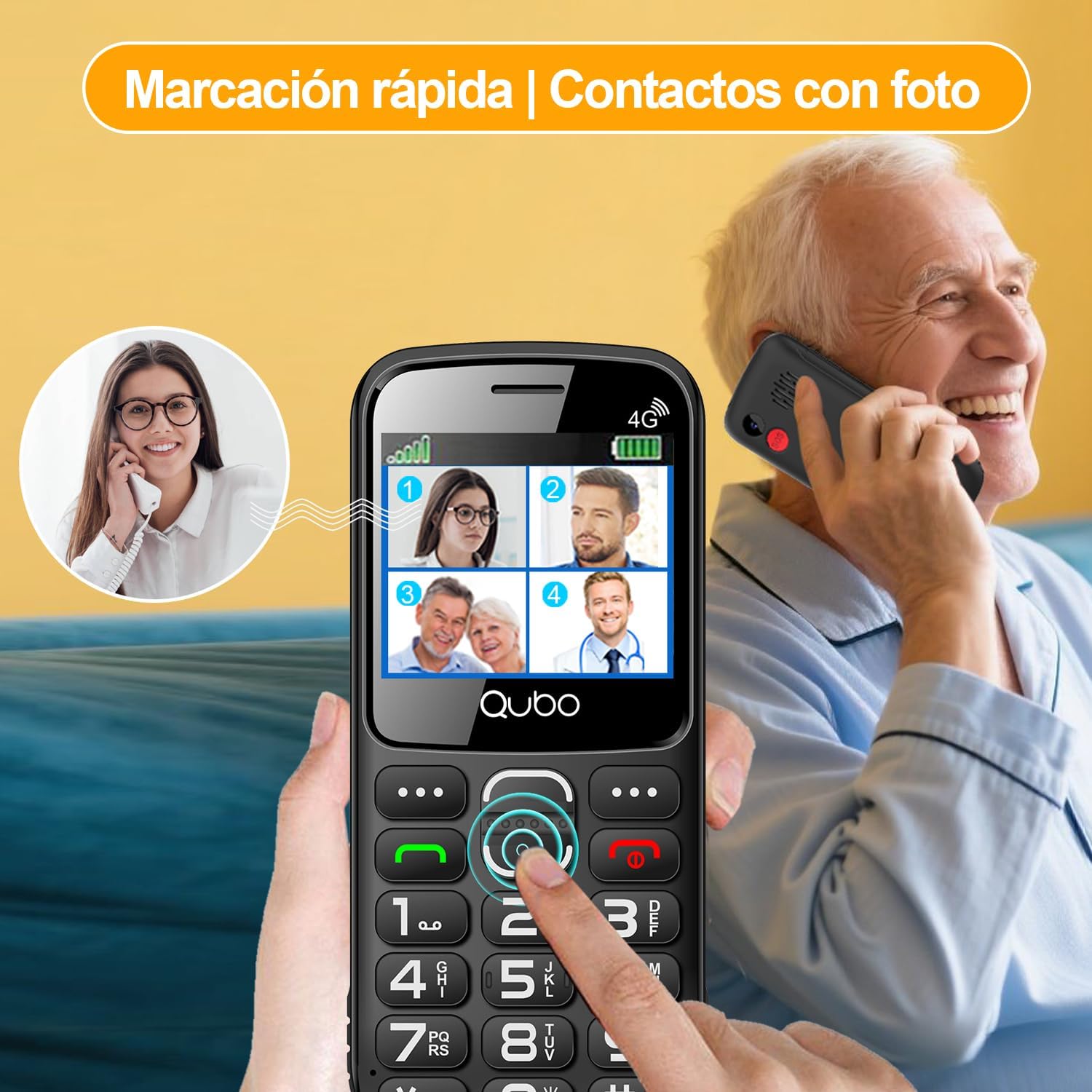
Quick dial and photo contacts on the Qubo X232 simplify calling for users, allowing them to recognize contacts visually.
5.3. Κουμπί έκτακτης ανάγκης SOS
The SOS button is located on the back of the phone. In an emergency:
- Press and hold the SOS button for a few seconds.
- The phone will automatically dial up to 5 pre-set emergency contacts in sequence until one answers.
- Simultaneously, an alert message will be sent to these contacts.
To set up SOS contacts: Navigate to Μενού > Ρυθμίσεις SOS and add/edit emergency numbers.
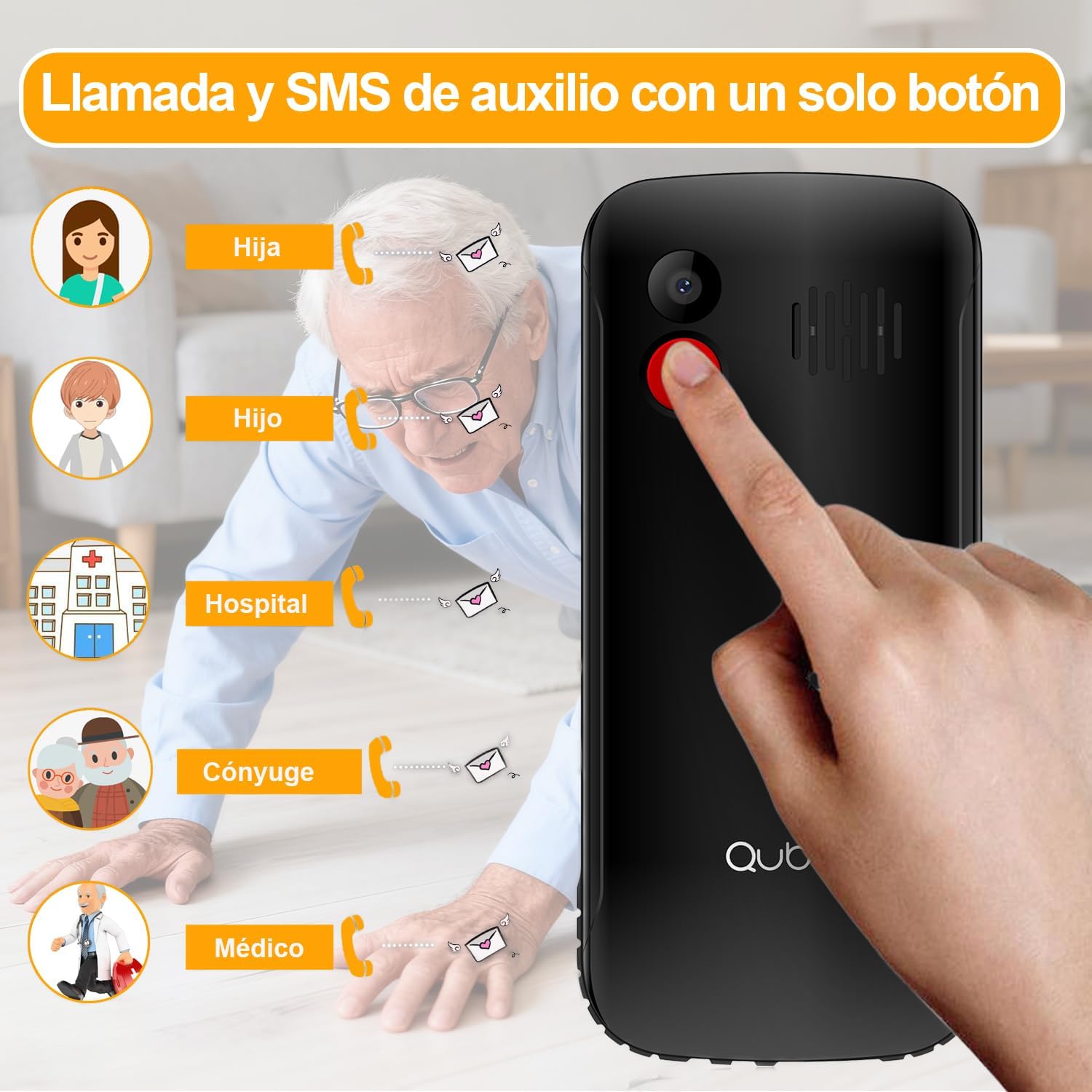
The dedicated SOS button on the Qubo X232 allows for quick emergency calls to up to five pre-selected contacts.
5.4. Μηνύματα (SMS)
To send or read text messages, navigate to Menu > Messages. The large screen and clear font facilitate easy reading and composing.
5.5. Φακός
The Qubo X232 includes a built-in LED flashlight. To activate/deactivate, use the dedicated side button or access it via the menu.

The Qubo X232 includes a bright built-in flashlight, easily accessible for use in low-light conditions.
5.6. Ραδιόφωνο FM
Access the FM Radio via the Μενού. The Qubo X232 allows listening to FM radio without requiring headphones.

Enjoy FM radio on the Qubo X232, which can be used without the need for headphones.
5.7. Other Applications
The phone includes various useful applications:
- Κάμερα: For taking basic photos.
- Συσκευή αναπαραγωγής πολυμέσων: For playing audio and video files είναι αποθηκευμένα στη συσκευή ή στην κάρτα MicroSD.
- Τρομάζω: Ορίστε πολλαπλά ξυπνητήρια.
- Ημερολόγιο: Παρακολουθήστε ημερομηνίες και γεγονότα.
- Αριθμομηχανή: Εκτελέστε βασική αριθμητική.
- Call Recorder: Record phone conversations (check local laws regarding consent).
- Πρόγραμμα περιήγησης: Basic internet access.

The Qubo X232 offers essential applications such as messaging, FM radio, a camera, and a calculator, along with Bluetooth connectivity.
5.8. Ρυθμίσεις γλώσσας
The phone supports multiple languages including Spanish, English, and Portuguese. To change the language, navigate to Menu > Settings > Phone Settings > Languages.
6. Συντήρηση
- Καθάρισμα: Use a soft, dry cloth to clean the phone. Avoid liquid cleaners.
- Φροντίδα μπαταρίας: To prolong battery life, avoid extreme temperatures and do not leave the phone fully discharged for extended periods.
- Αποθήκευση: Αποθηκεύστε το τηλέφωνο σε δροσερό και ξηρό μέρος όταν δεν το χρησιμοποιείτε.
7. Αντιμετώπιση Προβλημάτων
| Πρόβλημα | Πιθανή αιτία | Διάλυμα |
|---|---|---|
| Το τηλέφωνο δεν ανάβει | Η μπαταρία είναι αποφορτισμένη ή δεν έχει τοποθετηθεί σωστά. | Φορτίστε την μπαταρία για τουλάχιστον 30 λεπτά. Βεβαιωθείτε ότι η μπαταρία έχει τοποθετηθεί σωστά. |
| Δεν υπάρχει σήμα δικτύου | Out of network coverage, SIM card not inserted correctly, or network settings issue. | Move to an area with better coverage. Reinsert the SIM card. Check network settings in the menu. |
| Δεν είναι δυνατή η πραγματοποίηση/λήψη κλήσεων | No network signal, insufficient balance (prepaid), or call barring activated. | Check network signal. Ensure sufficient balance. Deactivate call barring if active. |
| Το κουμπί SOS δεν λειτουργεί | Δεν έχουν ρυθμιστεί επαφές έκτακτης ανάγκης ή οι αριθμοί είναι λανθασμένοι. | Επαληθεύστε τις ρυθμίσεις SOS και βεβαιωθείτε ότι οι επαφές έκτακτης ανάγκης έχουν αποθηκευτεί σωστά. |
| Η μπαταρία αδειάζει γρήγορα | Heavy usage, poor network signal, or background applications. | Reduce usage. Turn off features like Bluetooth when not needed. Charge regularly. |
8. Προδιαγραφές
| Χαρακτηριστικό | Λεπτομέρεια |
|---|---|
| Μάρκα | Qubo |
| Μοντέλο | X232 |
| Λειτουργικό σύστημα | Nucleus OS |
| ΕΜΒΟΛΟ | 48 MB |
| Εσωτερική αποθήκευση | 1 GB |
| Επεκτάσιμος χώρος αποθήκευσης | MicroSD έως 64 GB |
| Μέγεθος οθόνης | 2.31 ίντσες |
| Ψήφισμα | 320 x 240 pixel |
| Τύπος οθόνης | AMOLED |
| Κινητή τεχνολογία | 4G (compatible with 5G SIM on 4G network) |
| Υποδοχές καρτών SIM | Διπλή SIM |
| Μέγεθος κάρτας SIM | Νανο |
| Χωρητικότητα μπαταρίας | 1700 mAh |
| Χρόνος Ομιλίας | Έως 6 ώρες |
| Χρόνος αναμονής | Έως 14 Ημέρες |
| Θύρα φόρτισης | USB Type-C |
| Jack ήχου | 3.5 χλστ |
| Διαστάσεις (Μ x Π x Υ) | 132.1 x 58.2 x 14.1 mm |
| Βάρος | Περίπου 110 γραμμάρια |
| Προέλευση | Κίνα |
9. Επίσημα βίντεο προϊόντων
9.1. HXEIR 4G Phone Features Overview
Video demonstrating the features of a 4G phone for seniors, including large buttons, SOS function, flashlight, and a simplified user interface.
9.2. artfone 4G Basic Mobile Phone for Seniors
Υπερview video of a basic 4G mobile phone for seniors, showcasing features like large buttons, SOS emergency call, charging dock, and built-in flashlight.
9.3. artfone C1+ 4G Mobile Phone for Seniors
Demonstration of the artfone C1+ 4G mobile phone for seniors, highlighting its large buttons, SOS function, charging cradle, and voice dialing capabilities.
10. Εγγύηση και υποστήριξη
10.1. Πληροφορίες εγγύησης
Your Qubo X232 phone comes with a 30-day product warranty from the date of purchase. This warranty covers manufacturing defects. Please retain your proof of purchase for warranty claims.
10.2. Υποστήριξη πελατών
For technical assistance, troubleshooting, or warranty inquiries, please contact your retailer or the Qubo customer support line. Refer to the packaging or official Qubo webιστοσελίδα για στοιχεία επικοινωνίας.