1. Εισαγωγή
Thank you for choosing the Generic 50000mAh Solar Power Bank. This high-capacity portable charger is designed to keep your electronic devices powered on the go, featuring solar charging capabilities, multiple output ports, and a digital display for convenience. Please read this manual carefully to ensure proper use and optimal performance of your device.
2. Το προϊόν τελείωσεview
2.1 Βασικά χαρακτηριστικά
- Impressive 50000mAh Capacity: Provides multiple recharges for mobile devices.
- Ενσωματωμένο ηλιακό πάνελ: Offers alternative charging for emergency situations or outdoor use.
- Ευέλικτη φόρτιση: Equipped with 4 USB outputs (3 standard USB, 1 fast charging USB) and a USB Type-C output.
- Advanced Fast Charging: Supports 22.5W fast charging for efficient and rapid device power-up.
- Ψηφιακή οθόνη: Integrated LCD screen accurately shows the remaining battery level.
- Πολλαπλές επιλογές εισαγωγής: Compatible with Lightning, Micro USB, and USB Type-C inputs for recharging the power bank.
- Πρακτικός σχεδιασμός: Portable white structure with a convenient carrying handle, ideal for travel, work, and outdoor activities.
2.2 Εξαρτήματα
Familiarize yourself with the different parts of your power bank:
- Ψηφιακή οθόνη: Εμφανίζει το ποσοστό της μπαταρίαςtage.
- Ηλιακό πάνελ: Located on the front for solar charging.
- Θύρες εξόδου USB (x4): Για φόρτιση εξωτερικών συσκευών.
- USB Type-C Output Port: Για φόρτιση εξωτερικών συσκευών.
- Input Ports (Lightning, Micro USB, USB Type-C): Για την επαναφόρτιση του power bank.
- Κουμπί λειτουργίας: To activate the display or turn on/off the device.
- Λαβή μεταφοράς: Για εύκολη μεταφορά.
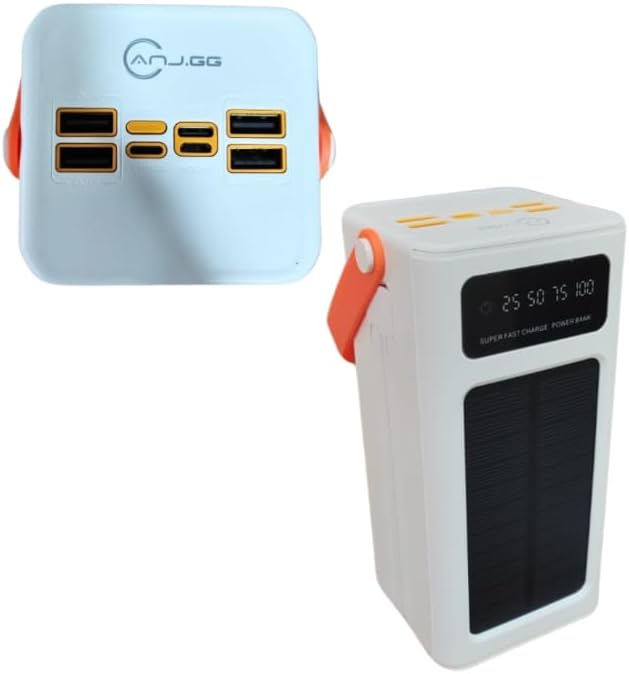
Εικόνα 2.2.1: Κορυφή view of the power bank, highlighting the four USB output ports and various input ports.

Εικόνα 2.2.2: Μπροστινή πλευρά view of the power bank, showing the digital display, solar panel, and carrying handle.
3. Ρύθμιση
3.1 Αρχική φόρτιση του Power Bank
Before first use, fully charge the power bank using a wall adapter. This ensures the internal battery is properly conditioned.
- Connect a compatible charging cable (Micro USB, Lightning, or USB Type-C) to one of the power bank's input ports.
- Connect the other end of the cable to a USB wall adapter (not included) and plug it into a power outlet.
- The digital display will show the charging progress. Charge until the display reads 100%.
3.2 Φόρτιση ηλιακής ενέργειας
The integrated solar panel provides an alternative charging method, primarily for emergencies or maintaining charge. It is not intended as the primary charging source due to varying solar intensity and charging speed.
- Τοποθετήστε το power bank με το ηλιακό πάνελ στραμμένο προς το άμεσο ηλιακό φως.
- Ensure no obstructions block the solar panel.
- The solar charging indicator on the display will activate when charging via solar power.
4. Οδηγίες λειτουργίας
4.1 Φόρτιση εξωτερικών συσκευών
- Ensure the power bank is sufficiently charged. Check the digital display for the battery level.
- Connect your device's charging cable to one of the power bank's USB output ports or the USB Type-C output port.
- Συνδέστε το άλλο άκρο του καλωδίου στη συσκευή σας.
- The power bank should automatically begin charging your device. If not, press the power button once to activate.
- The digital display will show the power bank's remaining charge.
For optimal performance, use quality charging cables compatible with your devices.
4.2 Κατανόηση της ψηφιακής οθόνης
The digital display provides real-time information about the power bank's status:
- Μπαταρία Percentage: Shows the exact remaining charge (e.g., 25, 50, 75, 100).
- Ένδειξη φόρτισης: An icon or animation will appear when the power bank is being recharged.
- Ένδειξη ηλιακής φόρτισης: A specific icon (e.g., a sun) will light up when solar charging is active.
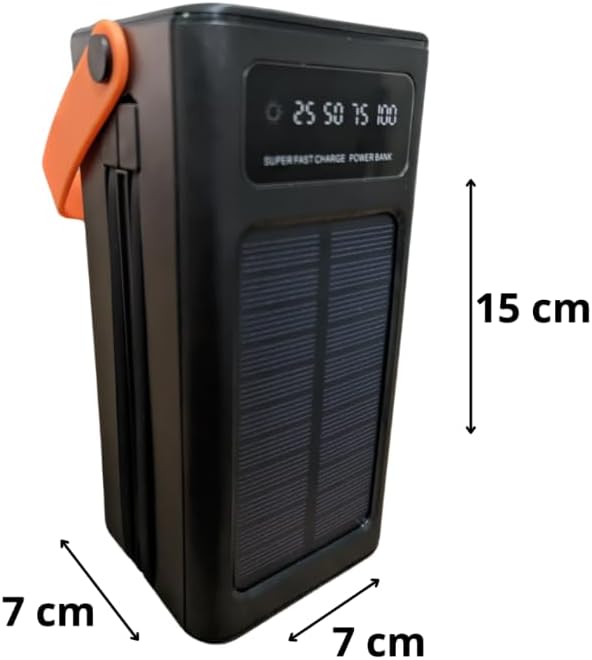
Image 4.2.1: Close-up of the digital display showing battery level indicators (25, 50, 75, 100).
5. Συντήρηση
- Τακτική επαναφόρτιση: To maintain battery health, fully recharge the power bank at least once every three months, even if not in use.
- Αποθήκευση: Αποθηκεύστε το power bank σε δροσερό και ξηρό μέρος, μακριά από το άμεσο ηλιακό φως και τις ακραίες θερμοκρασίες.
- Καθάρισμα: Use a soft, dry cloth to clean the exterior. Do not use harsh chemicals or abrasive materials.
- Αποφύγετε τις πτώσεις και τις επιπτώσεις: Protect the device from physical damage.
- Έκθεση στο νερό: Αυτή η συσκευή δεν είναι αδιάβροχη. Αποφύγετε την έκθεση σε νερό ή υψηλή υγρασία.
6. Αντιμετώπιση Προβλημάτων
- Η συσκευή δεν φορτίζει από το power bank:
- Ensure the power bank is charged (check digital display).
- Βεβαιωθείτε ότι το καλώδιο φόρτισης είναι συνδεδεμένο με ασφάλεια τόσο στο power bank όσο και στη συσκευή σας.
- Try a different USB port on the power bank.
- Δοκιμάστε ένα διαφορετικό καλώδιο φόρτισης.
- Πατήστε το κουμπί λειτουργίας στο power bank για να ενεργοποιήσετε την έξοδο.
- Το power bank δεν επαναφορτίζεται:
- Ensure the charging cable is securely connected to the power bank's input port and the wall adapter.
- Verify the wall adapter is working and plugged into a live outlet.
- Δοκιμάστε ένα διαφορετικό καλώδιο φόρτισης ή προσαρμογέα τοίχου.
- For solar charging, ensure the panel is in direct sunlight and unobstructed. Note that solar charging is slower than wall charging.
- Αργή φόρτιση:
- Βεβαιωθείτε ότι χρησιμοποιείτε καλώδιο συμβατό με γρήγορη φόρτιση και ότι η συσκευή σας υποστηρίζει γρήγορη φόρτιση.
- The 22.5W fast charging port provides higher output; ensure you are using this specific port if fast charging is desired.
- Close unnecessary applications on your device while charging.
7. Προδιαγραφές
| Μοντέλο | Ηλιακή τράπεζα ισχύος 50000 mAh |
| Ικανότητα | 50000 mAh |
| Θύρες εισόδου | Lightning, Micro USB, USB Type-C |
| Θύρες εξόδου | 4 x USB (3x 5V-2A, 1x 22.5W Smart Port), 1 x USB Type-C |
| Έξοδος USB Type-C | 5V-3A, 9V-2.22A, 12V-1.67A |
| Γρήγορη Φόρτιση | Έως 22.5W |
| Ειδικά Χαρακτηριστικά | Carrying Handle, Digital Display, Solar Panel |
| Πηγή ισχύος | Rechargeable Battery and Solar Power |
| Χρώμα | Λευκό |
| Βάρος προϊόντος | 450 γρ |
| Διαστάσεις συσκευασίας | 25 x 18 x 8 εκ |

Image 7.1: Dimensions of the power bank (note: image shows black version for clarity of dimensions).
8. Πληροφορίες εγγύησης
This product is covered by a standard manufacturer's warranty against defects in materials and workmanship. The warranty period typically begins from the date of purchase. Please retain your proof of purchase for any warranty claims. For specific warranty terms and conditions, refer to the documentation provided at the time of purchase or contact your retailer.
9. Υποστήριξη
If you encounter any issues or have questions regarding your Generic 50000mAh Solar Power Bank that are not addressed in this manual, please contact the retailer or the point of purchase for assistance. Provide your product model and a detailed description of the issue to facilitate support.