1. Εισαγωγή
The Generic ABM200 Video Baby Monitor is designed to provide reliable monitoring of your baby. It features a 4.3-inch HD display, night vision capabilities, two-way audio communication, and a secure wireless signal. This manual provides instructions for setting up, operating, and maintaining your baby monitor.

Figure 1.1: Generic ABM200 Video Baby Monitor System Overview
2. Περιεχόμενα συσκευασίας
Ελέγξτε τα περιεχόμενα της συσκευασίας για να βεβαιωθείτε ότι υπάρχουν όλα τα είδη:
- Camera Unit (Baby Unit)
- Monitor Unit (Parent Unit)
- Εγχειρίδιο χρήστη
- Power Adapters and Cables (for both camera and monitor)
3. Το προϊόν τελείωσεview
3.1 Μονάδα γονέα (Οθόνη)
The parent unit features a 4.3-inch HD display for clear video monitoring. It includes controls for menu navigation, volume, and two-way audio communication.

Figure 3.1: Parent Unit Front View
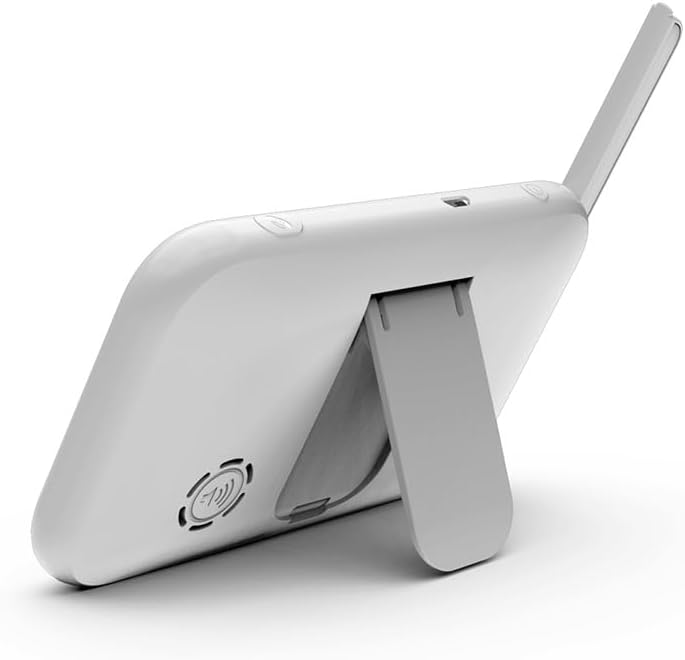
Figure 3.2: Parent Unit Back View με βάση στήριξης
3.2 Μονάδα μωρού (κάμερα)
The baby unit is equipped with a camera that offers pan, tilt, and zoom functions. It includes a night lamp, temperature sensor, and a slot for local recording via an SD card.
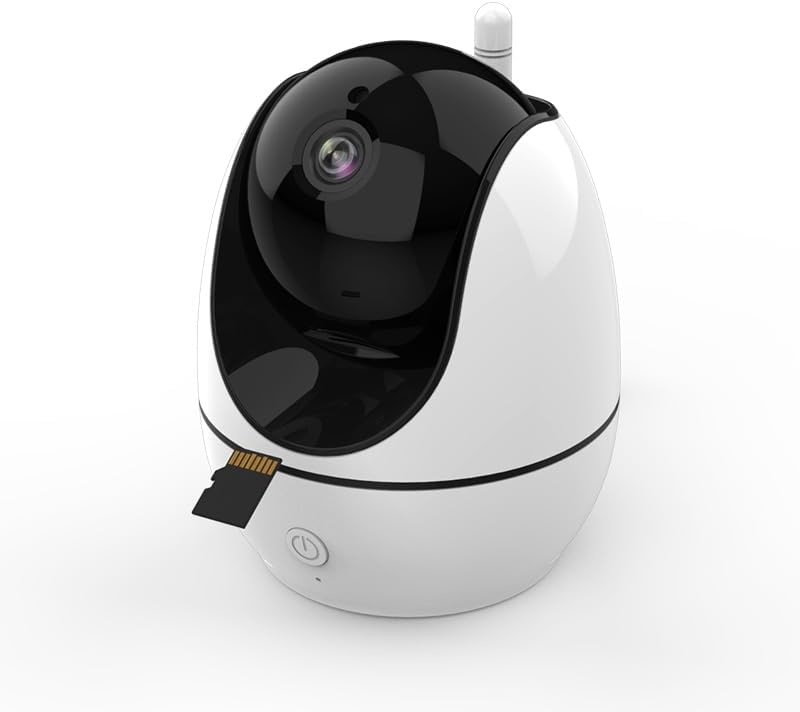
Figure 3.3: Baby Unit (Camera) with SD Card Slot
4. Οδηγίες εγκατάστασης
4.1 Ενεργοποίηση
- Connect the power adapter to the baby unit and plug it into an electrical outlet.
- Connect the power adapter to the parent unit and plug it into an electrical outlet.
- Press and hold the power button on the parent unit to turn it on.
4.2 Τοποθέτηση
- Τοποθετήστε τη μονάδα μωρού (κάμερα) σε σημείο που παρέχει καθαρή view of your baby, ensuring it is out of reach of the baby.
- Position the parent unit (monitor) in a convenient location where you can easily monitor your baby.
- Ensure both units are within the signal range (up to 400m in open areas) for optimal performance.
5. Οδηγίες λειτουργίας
5.1 Βασικοί έλεγχοι
- Κουμπί λειτουργίας: Πατήστε παρατεταμένα για να ενεργοποιήσετε/απενεργοποιήσετε τη μονάδα.
- Κουμπιά έντασης ήχου: Adjust the listening volume on the parent unit.
- Κουμπί μενού: Access the monitor's settings and features.
- Κουμπιά πλοήγησης: Use up/down/left/right to navigate menus and control camera pan/tilt.
- OK κουμπί: Επιβεβαιώστε τις επιλογές.
5.2 Αμφίδρομος ήχος
To speak to your baby, press and hold the talk button on the parent unit. Release the button to hear your baby.

Σχήμα 5.1: Αμφίδρομη επικοινωνία ήχου
5.3 Pan, Tilt, and Zoom Camera
Χρησιμοποιήστε τα κουμπιά πλοήγησης στη μονάδα γονέα για να ρυθμίσετε από απόσταση την κάμερα viewing angle. The camera supports 355° pan and 75° tilt. Digital zoom is also available through the menu.

Figure 5.2: Camera Pan, Tilt, and Zoom Functionality
5.4 Night Vision and Night Lamp
The camera automatically activates infrared night vision in low-light conditions, providing a clear black and white image. The integrated night lamp can be controlled from the parent unit to provide soft illumination.

Σχήμα 5.3: Νυχτερινή όραση σε λειτουργία
5.5 Παρακολούθηση θερμοκρασίας
The baby unit includes a temperature sensor that monitors the room temperature. This reading is displayed on the parent unit, and alerts can be set for high or low temperature thresholds.

Figure 5.4: Room Temperature Monitoring
5.6 Νανουρίσματα
The monitor includes 8 pre-programmed lullabies that can be played from the baby unit to soothe your child. Access and control lullaby playback through the parent unit's menu.
5.7 Built-in Recorder (Local Recording)
Insert a compatible SD card (not included) into the baby unit's slot to enable local video recording. Manage recording settings via the parent unit's menu.
5.8 Cry Detection and Sound Activation (VOX)
The monitor features cry detection and VOX (Voice Operated eXchange) functionality. When enabled, the parent unit's screen will activate or alert you when sounds above a set threshold are detected in the baby's room.
5.9 Υπενθύμιση τροφοδοσίας
Set feeding reminders through the parent unit's menu to help maintain a consistent feeding schedule for your baby.
6. Συντήρηση
- Καθάρισμα: Use a soft, dry cloth to clean the surfaces of both the parent and baby units. Do not use abrasive cleaners or solvents.
- Εξουσία: Always use the provided power adapters. Disconnect power during extended periods of non-use.
- Περιβάλλο: Keep units away from water, direct sunlight, and extreme temperatures.
7. Αντιμετώπιση Προβλημάτων
- Δεν υπάρχει εικόνα/ήχος: Ensure both units are powered on and within range. Check power connections.
- Αδύναμο σήμα: Move the parent unit closer to the baby unit. Avoid placing units near large metal objects or other electronic devices that may cause interference.
- Η οθόνη παγώνει: Try restarting both units by disconnecting and reconnecting their power.
- Temperature Reading Inaccurate: Ensure the baby unit is not placed in direct sunlight or near heat sources/vents.
8. Προδιαγραφές
| Αριθμός μοντέλου | ABM200 |
| Μέγεθος οθόνης | 4.3 ίντσες |
| Ανάλυση λήψης βίντεο | 720p |
| Τεχνολογία Συνδεσιμότητας | Wireless (Radio, FHSS protocol) |
| Εύρος σήματος | Έως 400 μέτρα (ανοιχτό πεδίο) |
| Μετατόπιση/Κλίση Κάμερας | 355° Παν, 75° Κλίση |
| Ειδικά Χαρακτηριστικά | 2 Way Audio, Cry Detection, HD Resolution, Local Recording, Motion Sensor, Night Vision, Night Lamp, Temperature Control, Lullabies |
| Εσωτερική/Εξωτερική χρήση | Εσωτερικός |
| Διαστάσεις προϊόντος | 16 x 10 x 11 εκ |
| Βάρος | 607.81 γρ |
9. Εγγύηση και υποστήριξη
9.1 Πληροφορίες εγγύησης
Αυτό το προϊόν συνοδεύεται από α 1 έτος τοπική εγγύηση against manufacturing defects. Please retain your proof of purchase for warranty claims.
9.2 Υποστήριξη πελατών
For technical assistance or warranty inquiries, please refer to the contact information provided with your purchase documentation or visit the manufacturer's official webτοποθεσία.


