
1. Το προϊόν τελείωσεview
The DUDAO U4A is an open-ear wireless earbud designed for the right ear, offering a blend of audio enjoyment and environmental awareness. Its ear-hook design ensures a secure and comfortable fit for various activities.
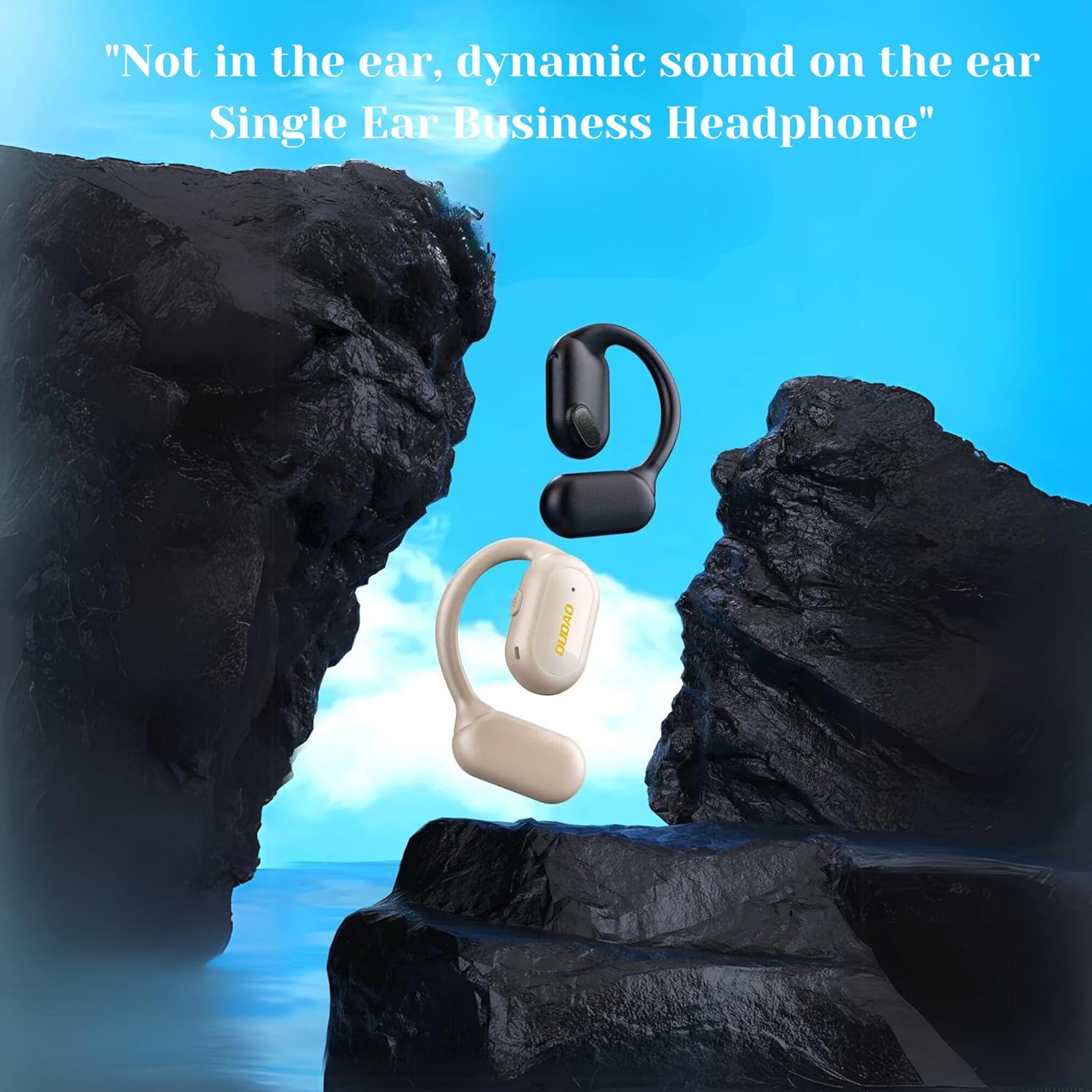
Image: The DUDAO U4A Open-Ear Wireless Earbud in black and almond colors, illustrating its design that rests on the ear rather than inside it.
This earbud features Bluetooth 5.3 technology for stable connectivity, a 13mm composite diaphragm driver for clear sound, and a long battery life suitable for extended use.
2. Περιεχόμενα συσκευασίας
Βεβαιωθείτε ότι όλα τα στοιχεία υπάρχουν στη συσκευασία:
- 1 x DUDAO U4A Single Earbud (Right Ear)
- 1 x Καλώδιο φόρτισης Type-C
- 1 x Εγχειρίδιο χρήστη (αυτό το έγγραφο)
3. Ρύθμιση
3.1 Αρχική φόρτιση
Before first use, fully charge the earbud for approximately one hour. Subsequent charges typically take about 30 minutes for up to 30 hours of playtime.
- Connect the provided Type-C charging cable to the charging port on the earbud.
- Συνδέστε το άλλο άκρο του καλωδίου σε μια συμβατή πηγή τροφοδοσίας USB (π.χ., θύρα USB υπολογιστή, προσαρμογέας USB τοίχου).
- The indicator light on the earbud will show charging status. Refer to the earbud's specific LED indicators for full charge notification.
3.2 Φορώντας τα ακουστικά
The DUDAO U4A is designed for the right ear only. Its ear-hook design provides a stable and comfortable fit.
- Gently place the earbud over your right ear, ensuring the ear-hook rests securely behind your ear.
- Adjust the earbud so the speaker portion is positioned near your ear canal, allowing sound to be heard clearly without blocking ambient noise.

Εικόνα: Κοντινό πλάνο view of the DUDAO U4A earbud correctly worn on the right ear, illustrating its open-ear and ear-hook design.
3.3 Σύζευξη Bluetooth
To connect the earbud to your device:
- Ενεργοποίηση: Press and hold the multi-function button on the earbud until the indicator light flashes, indicating it is in pairing mode.
- Ενεργοποίηση Bluetooth: Στο smartphone ή σε άλλη συσκευή με δυνατότητα Bluetooth, μεταβείτε στις ρυθμίσεις Bluetooth και βεβαιωθείτε ότι το Bluetooth είναι ενεργοποιημένο.
- Επιλέξτε συσκευή: In the list of available devices, locate and select "DUDAO U4A".
- Επιβεβαίωση σύνδεσης: Once connected, the earbud's indicator light will change (e.g., solid blue or off), and you may hear an audible confirmation.
- Εάν σας ζητηθεί κωδικός πρόσβασης, πληκτρολογήστε "0000".
4. Οδηγίες λειτουργίας
4.1 Ενεργοποίηση/Απενεργοποίηση
- Ενεργοποίηση: Πατήστε παρατεταμένα το κουμπί πολλαπλών λειτουργιών για περίπου 3 δευτερόλεπτα.
- Απενεργοποιώ: Πατήστε παρατεταμένα το κουμπί πολλαπλών λειτουργιών για περίπου 5 δευτερόλεπτα.
4.2 Αναπαραγωγή μουσικής
- Αναπαραγωγή/Παύση: Πατήστε μόνο ένα κουμπί πολλαπλών λειτουργιών.
- Επόμενο κομμάτι: Πατήστε δύο φορές το κουμπί πολλαπλών λειτουργιών.
- Προηγούμενο κομμάτι: Πατήστε τρεις φορές το κουμπί πολλαπλών λειτουργιών.
4.3 Διαχείριση κλήσεων
- Απάντηση/Τερματισμός κλήσης: Πατήστε μόνο ένα κουμπί πολλαπλών λειτουργιών.
- Απόρριψη κλήσης: Πατήστε και κρατήστε πατημένο το κουμπί πολλαπλών λειτουργιών για 2 δευτερόλεπτα.
- Επανάκληση τελευταίου αριθμού: Πατήστε δύο φορές το κουμπί πολλαπλών λειτουργιών όταν δεν βρίσκεστε σε κλήση.

Image: The DUDAO U4A earbud in use during an office call, highlighting its suitability for extended communication.

Image: The DUDAO U4A earbud being used by a driver, demonstrating its open-ear design for maintaining situational awareness during travel.
4.4 Βοηθός φωνής
The DUDAO U4A supports Google Assistant. To activate:
- Ενεργοποίηση Βοηθού φωνής: Πατήστε παρατεταμένα το κουμπί πολλαπλών λειτουργιών για 2 δευτερόλεπτα (όταν δεν βρίσκεστε σε κλήση).
5. Συντήρηση
5.1 Καθαρισμός
- Wipe the earbud regularly with a soft, dry, lint-free cloth.
- Μη χρησιμοποιείτε σκληρά χημικά, διαλύτες καθαρισμού ή ισχυρά απορρυπαντικά.
5.2 Αποθήκευση
- Φυλάξτε τα ακουστικά σε δροσερό, ξηρό μέρος, μακριά από το άμεσο ηλιακό φως και ακραίες θερμοκρασίες.
- Αποφύγετε την αποθήκευση σε περιβάλλοντα με σκόνη.
5.3 Ανθεκτικότητα στο νερό
The DUDAO U4A is water resistant. This means it can withstand splashes and sweat, making it suitable for sports and everyday use. However, it is not designed for submersion in water. Avoid exposing it to heavy rain or showering with it.
6. Αντιμετώπιση Προβλημάτων
6.1 Earbud Does Not Power On
- Ensure the earbud is fully charged. Connect it to the charging cable and allow it to charge for at least 30 minutes.
- Try pressing and holding the multi-function button for a longer duration (5-7 seconds) to ensure it's not just in pairing mode.
6.2 Δεν είναι δυνατή η σύζευξη με συσκευή
- Ensure the earbud is in pairing mode (indicator light flashing).
- Απενεργοποιήστε και στη συνέχεια ενεργοποιήστε ξανά το Bluetooth της συσκευής σας.
- Move the earbud closer to your device (within 10 meters).
- Forget "DUDAO U4A" from your device's Bluetooth list and attempt to pair again.
- Βεβαιωθείτε ότι δεν υπάρχουν άλλες συσκευές Bluetooth που να παρεμβαίνουν στη σύνδεση.
6.3 Δεν υπάρχει ήχος ή η ένταση είναι χαμηλή
- Ελέγξτε τα επίπεδα έντασης ήχου τόσο στα ακουστικά όσο και στη συνδεδεμένη συσκευή σας.
- Βεβαιωθείτε ότι τα ακουστικά είναι σωστά συνδεδεμένα στη συσκευή σας.
- Δοκιμάστε να αναπαράγετε ήχο από διαφορετική εφαρμογή ή πηγή.
6.4 Κακή ποιότητα κλήσης
- Ensure the earbud's microphone is not obstructed.
- Μετακινηθείτε σε μια περιοχή με λιγότερο θόρυβο υποβάθρου.
- Ελέγξτε την ισχύ του σήματος δικτύου της συσκευής σας.
7. Προδιαγραφές

Εικόνα: Λεπτομερής view of the 13mm speaker driver, responsible for the earbud's sound output.
| Χαρακτηριστικό | Λεπτομέρεια |
|---|---|
| Όνομα μοντέλου | U4A Open Ear Single Headset |
| Τεχνολογία Συνδεσιμότητας | Ασύρματο (Bluetooth) |
| Έκδοση Bluetooth | 5.3 |
| Εύρος Bluetooth | 10 μέτρα |
| Μέγεθος προγράμματος οδήγησης ήχου | 13 χιλιοστά |
| Διάρκεια ζωής μπαταρίας | Έως 30 ώρες |
| Χρόνος Φόρτισης | 30 Minutes (for 30 hours playtime) |
| Θύρα φόρτισης | Τύπος-C |
| Τύπος ελέγχου | Touch, Button, Google Assistant |
| Τοποθέτηση αυτιού | On Ear (Right Ear Only) |
| Form Factor | Open Ear, Earhook |
| Υλικό | Ακρυλονιτρίλιο βουταδιένιο στυρένιο (ABS) |
| Βάρος αντικειμένου | 20 γρ |
| Διαστάσεις προϊόντος | 5 x 3 x 0.79 εκ |
| Επίπεδο αντοχής στο νερό | Ανθεκτικό στο νερό (ανθεκτικό στον ιδρώτα) |
| Έλεγχος θορύβου | Partial Noise Isolation |
8. Εγγύηση και υποστήριξη
8.1 Πληροφορίες εγγύησης
This product comes with a standard manufacturer's warranty. For specific warranty terms and conditions, please refer to the warranty card included in your product packaging or contact DUDAO customer support.
Ενδέχεται να διατίθενται επιλογές επέκτασης εγγύησης από τρίτους παρόχους. Επικοινωνήστε με τον αντιπρόσωπό σας για λεπτομέρειες.
8.2 Υποστήριξη πελατών
For technical assistance, product inquiries, or warranty claims, please contact DUDAO customer support:
- E-mail: customercare@dudao.in
- Τηλέφωνο: +91 9310681651
- Διεύθυνση: DUDAO INDIA, 101 Mall Road, Kingsway Camp, Σταθμός Μετρό GTB Nagar, Πύλη Αρ. 1, ΝΕΟ ΔΕΛΧΙ, ΔΕΛΧΙ 110009
Please have your product model number (U4A) and purchase details ready when contacting support.